微信小程序实现左侧list滑动点击更换数据功能
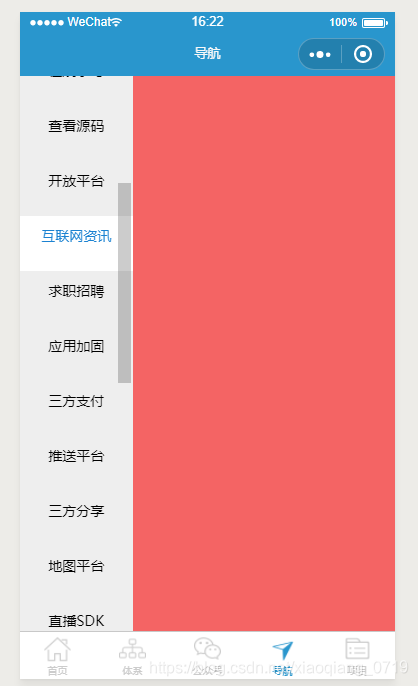
完成效果如上图
- 首先我们要在wxml中完成布局
左侧为一个可以上下滑动的list 宽度占屏幕的30%,右侧为显示相关数据的页面,宽度占屏幕的70%
{{item.name}} - js文件中定义三个数据-> 数据源courselist, 屏幕高度screenHeight , 当前选中项currentTab
在onLoad方法中执行数据请求接口获取数据赋值给courselist,同时获取屏幕的高度并将单位转化为rpx
重写点击choosetype方法将当前选中项赋值给currentTab则页面的选中效果就会发生改变
这里使用的是开放API获取数据 https://www.wanandroid.com/navi/json
 /*** 页面的初始数据*/data: {courselist: [],screenHeight: 0,currentTab: 0,},
/*** 生命周期函数--监听页面加载*/onLoad: function(options) {var that=thisvar tempHeight = 0wx.getSystemInfo({success: function(res) {// 获取可使用窗口宽度let clientHeight = res.windowHeight;// 获取可使用窗口高度let clientWidth = res.windowWidth;// 算出比例let ratio = 750 / clientWidth;// 算出高度(单位rpx)let height = clientHeight * ratio;// 设置高度tempHeight = height;},fail: function(res) {},complete: function(res) {},})that.setData({screenHeight: tempHeight})this.getCurseList();},
//获取左侧分类列表getCurseList: function() {var that = this;wx.request({url: app.globalData.baseUrl + '/navi/json',data: '',header: {},method: 'GET',dataType: 'json',responseType: 'text',success: function(res) {that.setData({courselist: res.data.data})console.log(res.data)},fail: function(res) {},complete: function(res) {},})},//点击左侧分类列表,切换选中项 更改数据choosetype: function(event) {console.log(event.currentTarget.id)this.setData({currentTab: event.currentTarget.id})}
这里要注意一下scroll-view的高度,我们是获取到屏幕的rpx高度 然后进行赋值操作 height:{{screenHeight}}rpx; 格式和单位要写正确
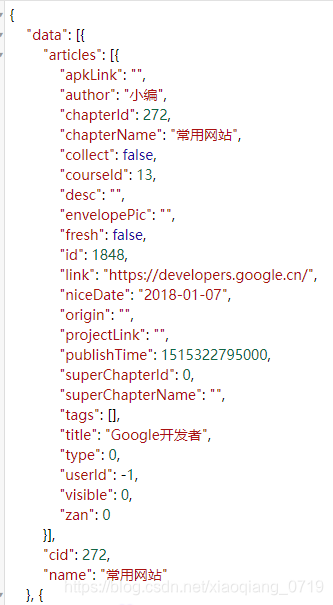
json数据格式: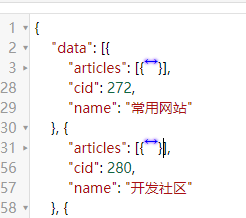
最终完成效果: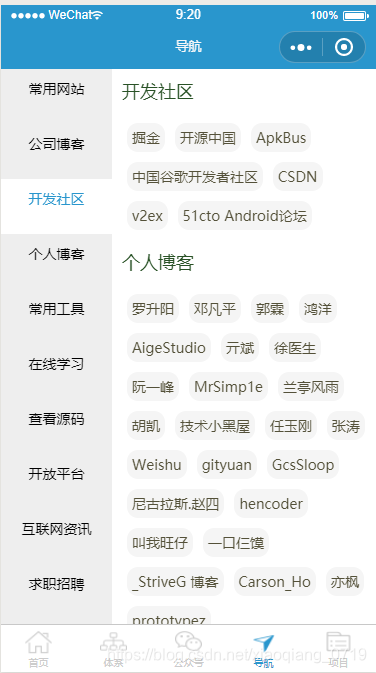
点击左侧 scroll-view数据列 右侧的数据表相对应的的item会滑动到顶部
这里主要使用了scroll-view的属性scroll-into-view来实现上述效果,使用方法在小程序文档中有介绍
这里我给右侧每一个item的标签view设置id属性为id=“data{{index}}”(例右侧第一个item的id为 data0)
然后左侧列表的点击事件传递当前是点击的哪个item并把当前的index传递到js文件,js中拿到index赋值给scroll-into-view的值toview为当前点击item的id(例 当前点击的是第一个item 则赋值 给toview的值为data0)
此时scroll-into-view的toview值为data0 ,则会去对应id为data0的item 并滑动到顶部,以上效果就完成了
下面是完成整体流程的代码,备注很详细,开放接口和数据源本文都有介绍可以自己动手实现一下
最终wxml:
{{item.name}} {{item.name}} {{itemName.title}} 最终js:
var app = getApp();
Page({/*** 页面的初始数据*/data: {courselist: [],screenHeight: 0,currentTab: 0,toview: ''},/*** 生命周期函数--监听页面加载*/onLoad: function(options) {var that = thisvar tempHeight = 0wx.getSystemInfo({success: function(res) {// 获取可使用窗口宽度let clientHeight = res.windowHeight;// 获取可使用窗口高度let clientWidth = res.windowWidth;// 算出比例let ratio = 750 / clientWidth;// 算出高度(单位rpx)let height = clientHeight * ratio;// 设置高度tempHeight = height;},fail: function(res) {},complete: function(res) {},})that.setData({screenHeight: tempHeight})this.getCurseList();},/*** 生命周期函数--监听页面初次渲染完成*/onReady: function() {},/*** 生命周期函数--监听页面显示*/onShow: function() {},/*** 生命周期函数--监听页面隐藏*/onHide: function() {},/*** 生命周期函数--监听页面卸载*/onUnload: function() {},/*** 页面相关事件处理函数--监听用户下拉动作*/onPullDownRefresh: function() {},/*** 页面上拉触底事件的处理函数*/onReachBottom: function() {},/*** 用户点击右上角分享*/onShareAppMessage: function() {},//获取左侧分类列表getCurseList: function() {var that = this;wx.request({url: app.globalData.baseUrl + '/navi/json',data: '',header: {},method: 'GET',dataType: 'json',responseType: 'text',success: function(res) {that.setData({courselist: res.data.data,rightCourseTitle: res.data.data.articles})console.log(res.data)},fail: function(res) {},complete: function(res) {},})},//点击左侧分类列表,切换选中项 更改数据choosetype: function(event) {console.log(event.currentTarget.id)this.setData({currentTab: event.currentTarget.id})this.setData({toview: "date" + event.currentTarget.id})}
})
最终wxss样式:
::-webkit-scrollbar {width: 0;height: 0;color: transparent;
}.course {display: flex;flex-direction: row;
}.leftView {width: 30%;height: 100%;display: flex;flex-direction: column;
}.rightView {margin-left: 10rpx;width: 70%;height: 1000rpx;display: flex;flex-direction: column;
}.coursetitleno {height: 70rpx;width: 100%;font-size: 14px;text-align: center;color: #2996cd;align-self: center;flex-grow: 1;background-color: #fff;padding: 10px;
}.coursetitlese {width: 100%;font-size: 14px;align-self: center;height: 70rpx;text-align: center;color: #000;flex-grow: 1;background-color: #eee;padding: 10px;
}.leftitem {display: flex;flex-direction: column;
}.toptyperow {width: auto;display: flex;flex-direction: column;align-items: center;justify-content: center;height: auto;background-color: #f5f5f5;padding-bottom: 2px;
}.rightItem {display: flex;flex-direction: column;
}.rightItemIn {display: flex;padding: 10rpx;flex-direction: row;flex-wrap: wrap;
}.itemName {margin-bottom: 10px;margin-top: 10px;margin-left: 10rpx;color: #295226;font-size: 18px;
}.itemNameIn {margin-left: 15rpx;color: #545139;font-size: 14px;padding: 10rpx;background: #f5f5f5;margin: 10rpx;border-radius: 22rpx;
}
本文来自互联网用户投稿,文章观点仅代表作者本人,不代表本站立场,不承担相关法律责任。如若转载,请注明出处。 如若内容造成侵权/违法违规/事实不符,请点击【内容举报】进行投诉反馈!