保安日记:JavaScript学习第十八篇之Javascrip函数进阶
函数进阶
定义方式
1.自定义函数 function fn() {};
2.函数表达式(匿名函数) var fun = function() {};
3.利用 new Function(‘参数1’,‘参数2’,‘函数体’);
----所有函数都是 Function 的实例(对象)
var fun = new Function('a','b','console.log(a + b)');
fun(1,2);
调用方式
1. 普通函数function fn() {console.log('人生的巅峰');}// fn();   fn.call()
2. 对象的方法var o = {sayHi: function() {console.log('人生的巅峰');}}o.sayHi();
3. 构造函数function Star() {};new Star();
4. 绑定事件函数btn.onclick = function() {};   // 点击了按钮就可以调用这个函数
5. 定时器函数setInterval(function() {}, 1000);  //这个函数是定时器自动1秒钟调用一次
6. 立即执行函数(function() {console.log('人生的巅峰');})();// 立即执行函数是自动调用
this指向
    <script>
函数的不同调用方式决定了this 的指向不同
1. 普通函数 this 指向windowfunction fn() {console.log('普通函数的this' + this);}window.fn();
2. 对象的方法 this指向的是对象 ovar o = {sayHi: function() {console.log('对象方法的this:' + this);}}o.sayHi();
3. 构造函数 this 指向 ldh 这个实例对象 原型对象里面的this 指向的也是 ldh这个实例对象function Star() {};Star.prototype.sing = function() {}var ldh = new Star();
4. 绑定事件函数 this 指向的是函数的调用者 btn这个按钮对象var btn = document.querySelector('button');btn.onclick = function() {console.log('绑定时间函数的this:' + this);};
5. 定时器函数 this 指向的也是windowwindow.setTimeout(function() {console.log('定时器的this:' + this);}, 1000);
6. 立即执行函数 this还是指向window(function() {console.log('立即执行函数的this' + this);})();</script>
改变函数内部this指向
-
call()
var o = {name: 'andy'}function fn(a, b) {console.log(this);console.log(a + b);};fn.call(o, 1, 2); call 第一个可以调用函数 第二个可以改变函数内的this 指向 call 的主要作用可以实现继承function Father(uname, age) {this.uname = uname;this.age = age;}function Son(uname, age) {Father.call(this, uname, age);}var son = new Son('刘德华', 18);console.log(son); -
apply()
fn.apply(thisArg,[argsArray])
thisArg----在fn函数运行时指定的this值
[argsArray]----传递的值,必须包含在数组里
返回值就是函数的返回值
var o = {name: 'andy'};function fn(arr) {console.log(this);console.log(arr); // 'pink'};fn.apply(o, ['pink']); 1. 也是调用函数 第二个可以改变函数内部的this指向 2. 但是他的参数必须是数组(伪数组)---'[]' 3. apply 的主要应用 比如说我们可以利用 apply 借助于数学内置对象求数组最大值 var arr = [1, 66, 3, 99, 4];var arr1 = ['red', 'pink'];var max = Math.max.apply(Math, arr);var min = Math.min.apply(Math, arr);console.log(max, min); -
bind()
fn.bind(thisArg,arg1,arg2...)
thisArg----在fn函数运行时指定的this值
arg1,arg2..----传递的其他参数
var o = {name: 'andy'};function fn(a, b) {console.log(this);console.log(a + b);};var f = fn.bind(o, 1, 2);f(); 1. 不会调用原来的函数 可以改变原来函数内部的this 指向 2. 返回的是原函数改变this之后产生的新函数 3. 如果有的函数我们不需要立即调用,但是又想改变这个函数内部的this指向此时用bind 4. 我们有一个按钮,当我们点击了之后,就禁用这个按钮,3秒钟之后开启这个按钮/*var btn1 = document.querySelector("button");btn1.onclick = function () {this.disabled = true; // 这个this 指向的是 btn 这个按钮// var that = this;setTimeout(function () {// that.disabled = false; // 定时器函数里面的this 指向的是windowthis.disabled = false; // 此时定时器函数里面的this 指向的是btn}.bind(this),3000); // 这个this 指向的是btn 这个对象};*/var btns = document.querySelectorAll('button');for (var i = 0; i < btns.length; i++) {btns[i].onclick = function() {this.disabled = true;setTimeout(function() {this.disabled = false;}.bind(this), 2000);}}总结
![[外链图片转存失败,源站可能有防盗链机制,建议将图片保存下来直接上传(img-Uqc4oIW5-1604125134341)(C:\Users\97169\AppData\Roaming\Typora\typora-user-images\image-20201031134826654.png)]](https://img-blog.csdnimg.cn/20201031142248897.png?x-oss-process=image/watermark,type_ZmFuZ3poZW5naGVpdGk,shadow_10,text_aHR0cHM6Ly9ibG9nLmNzZG4ubmV0L1podW9fRGU=,size_16,color_FFFFFF,t_70#pic_center)
严格模式—strict mode
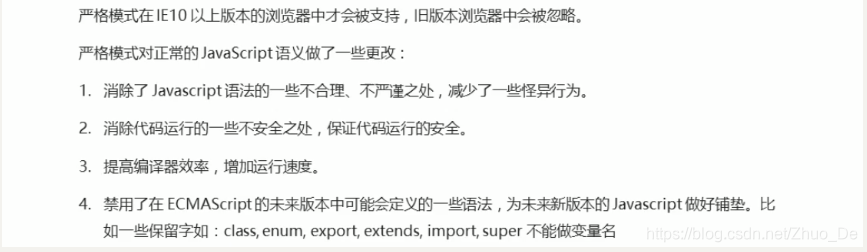
开启严格模式
- 为脚本开启严格模式
- 为函数开启严格模式
function() {'use strict';
}
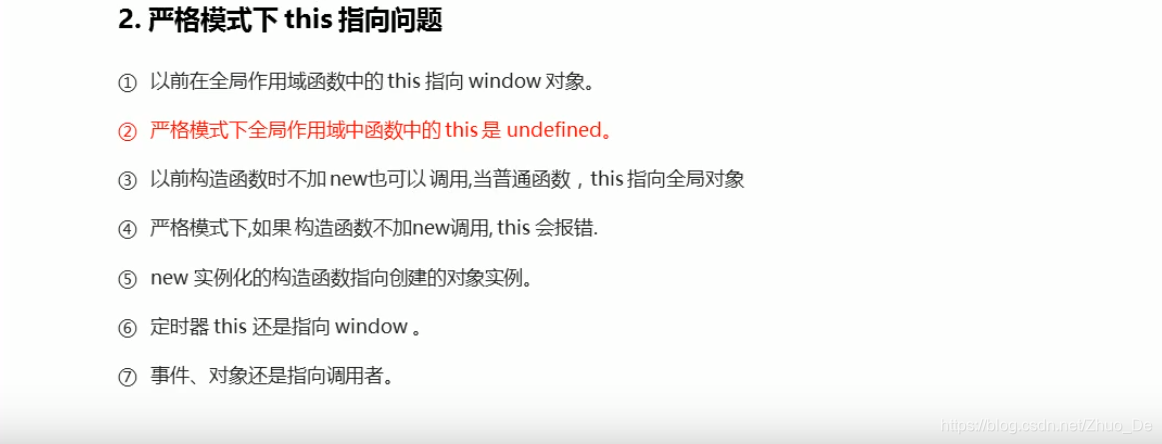
严格模式的变化


本文来自互联网用户投稿,文章观点仅代表作者本人,不代表本站立场,不承担相关法律责任。如若转载,请注明出处。 如若内容造成侵权/违法违规/事实不符,请点击【内容举报】进行投诉反馈!