Java程序猿搬砖笔记(二)
文章目录
- Java程序猿搬砖笔记(二)
Java程序猿搬砖笔记(二)
作为码农平时搜集一些小知识点个人认为是个不错的习惯,书上说
好记性不如烂笔头
我想即使是以前忽略或者新get的很简单的东西,自己动手记下来不管如何印象也会更深刻。
1、jQuery常用的选择器整理
$(“:first”);//匹配第一个元素
$(“:last”);//匹配最后一个元素
$(“:eq(index)”);//在匹配的集合中选择索引值为index的元素
$(“:gt(index)”);//在匹配的集合中选择索引值大于index的元素
$(“:even”);//选择索引值为偶数的元素,从0开始计数
$(“:odd”);//选择索引值为奇数的元素,从0开始计数
$(“parent>child”);//子选择器:选择所有指定"parent"元素中指定的"child"的直接子元素
$(“ancestor decendant”);//后代选择器:选择给定的祖先元素的所有后代元素,一个元素的后代可能是该元素的一个孩子,孙子,曾孙等
$(“prev +next”);//相邻兄弟选择器:选择所有紧接在"prev"元素后的"next"元素
$(“prev ~sibings”);//一般兄弟选择器:匹配"prev"元素之后的所有兄弟元素
2、MyBatis批量更新
sql列子:
UPDATE courseSET name = CASE id WHEN 1 THEN 'name1'WHEN 2 THEN 'name2'WHEN 3 THEN 'name3'END, title = CASE id WHEN 1 THEN 'New Title 1'WHEN 2 THEN 'New Title 2'WHEN 3 THEN 'New Title 3'END
WHERE id IN (1,2,3)
在做编辑订单功能(现在想想都是一场噩梦)时,折腾了这个操作,java代码如下:
int updateBatch(@Param("detailList")List<ThOrderDetail> detailList);
注:MyBatis默认会把所有集合封装为"list",如果要自定义参数名需要用@Param注解
MyBatis代码如下:
<update id="updateBatch" parameterType="java.util.List">update th_order_detail<trim prefix="set" suffixOverrides=","><trim prefix="unit_price =case" suffix="end,"><foreach collection="detailList" item="item" index="index"><if test="item.unitPrice !=null">when ord_detail_id=#{item.ordDetailId} then #{item.unitPrice}if><if test="item.unitPrice == null">when ord_detail_id=#{item.ordDetailId} then th_order_detail.unit_priceif>foreach>trim><trim prefix="negative_interval_percentage =case" suffix="end,"><foreach collection="detailList" item="item" index="index"><if test="item.negativeIntervalPercentage !=null">when ord_detail_id=#{item.ordDetailId} then #{item.negativeIntervalPercentage}if><if test="item.negativeIntervalPercentage == null">when ord_detail_id=#{item.ordDetailId} then th_order_detail.negative_interval_percentageif>foreach>trim><trim prefix="positive_interval_percentage =case" suffix="end,"><foreach collection="detailList" item="item" index="index"><if test="item.positiveIntervalPercentage !=null">when ord_detail_id=#{item.ordDetailId} then #{item.positiveIntervalPercentage}if><if test="item.positiveIntervalPercentage == null">when ord_detail_id=#{item.ordDetailId} then th_order_detail.positive_interval_percentageif>foreach>trim><trim prefix="negative_interval_quantity =case" suffix="end,"><foreach collection="detailList" item="item" index="index"><if test="item.negativeIntervalQuantity !=null">when ord_detail_id=#{item.ordDetailId} then #{item.negativeIntervalQuantity}if><if test="item.negativeIntervalQuantity == null">when ord_detail_id=#{item.ordDetailId} then th_order_detail.negative_interval_quantityif>foreach>trim><trim prefix="positive_interval_quantity =case" suffix="end,"><foreach collection="detailList" item="item" index="index"><if test="item.positiveIntervalQuantity !=null">when ord_detail_id=#{item.ordDetailId} then #{item.positiveIntervalQuantity}if><if test="item.positiveIntervalQuantity == null">when ord_detail_id=#{item.ordDetailId} then th_order_detail.positive_interval_quantityif>foreach>trim>trim>where ord_detail_id in<foreach collection="detailList" index="index" item="item" separator="," open="(" close=")">#{item.ordDetailId}foreach>update>
执行代码后,打印出的sql如下:
update th_order_detail
setunit_price = casewhen ord_detail_id = 252 then 25.55 when ord_detail_id = 253 then 35.55 end,order_price = casewhen ord_detail_id = 252 then 383.25 when ord_detail_id = 253 then 639.9 end,negative_interval_percentage = casewhen ord_detail_id = 252 then 11.11 when ord_detail_id = 253 then 13.33 end,positive_interval_percentage = casewhen ord_detail_id = 252 then 12.2 when ord_detail_id = 253 then 14.44 end,negative_interval_quantity = casewhen ord_detail_id = 252 then 13.3335 when ord_detail_id = 253 then 15.6006 end,positive_interval_quantity = casewhen ord_detail_id = 252 then 16.83 when ord_detail_id = 253 then 20.5992 end
where ord_detail_id in (252, 253) ;
参考链接
3、POI导出Excel
- 测试方法:
public static void main(String[] args) throws IOException {HSSFWorkbook workbook = new HSSFWorkbook();HSSFCellStyle style = workbook.createCellStyle();style.setAlignment(HSSFCellStyle.ALIGN_CENTER);style.setVerticalAlignment(HSSFCellStyle.VERTICAL_CENTER);HSSFSheet sheet = workbook.createSheet("sheet");HSSFRow row0 = sheet.createRow(0);HSSFCell cell_00 = row0.createCell(0);cell_00.setCellStyle(style);cell_00.setCellValue("日期");HSSFCell cell_01 = row0.createCell(1);cell_01.setCellStyle(style);cell_01.setCellValue("午别");HSSFRow row1 = sheet.createRow(1);HSSFCell cell_10 = row1.createCell(0);cell_10.setCellStyle(style);cell_10.setCellValue("20191103");HSSFCell cell_11 = row1.createCell(1);cell_11.setCellStyle(style);cell_11.setCellValue("上午");HSSFRow row2 = sheet.createRow(2);HSSFCell cell_21 = row2.createCell(1);cell_21.setCellStyle(style);cell_21.setCellValue("下午");// 合并日期占两行(4个参数,分别为起始行,结束行,起始列,结束列)// 行和列都是从0开始计数,且起始结束都会合并// 这里是合并excel中日期的两行为一行CellRangeAddress region = new CellRangeAddress(1, 2, 0, 0);sheet.addMergedRegion(region);File file = new File("E:\\demo.xls");FileOutputStream fout = new FileOutputStream(file);workbook.write(fout);fout.close();}
实现效果如下:
| 日期 | 午别 |
|---|---|
| 20191103 | 上午 |
| 下午 |
参考链接
- 项目中导出xcel例子:
客户给出的表格需要统计对上游付款总金额和对下游付款总金额(大于的为占用金额),然后根据这个占用金额去计算利息
有两个要求:1、第一行需要显示用款和付款 2、后面如果日期相同也要显示到同一行
这个用sql查询出来后还需要Java代码处理,总之这是今年做的最坑的需求之一(搞死开发者却不一定实用)。
后台打印出的sql如下:
#分组前sql
select * from((select p.amount as amount,ifnull(p.payment_date, p.add_time) as payment_date,p.contract_id as contract_id,c.type as type frompayment_bond p inner join contract c on p.contract_id = c.contract_id and p.state != 2 and c.type in (1, 2) and p.entrust_id = 116) unionall (select s.amount as amount,ifnull(s.payment_date, s.add_time) as payment_date,s.contract_id as contract_id,c.type as type fromsettlement_apply s inner join contract c on s.contract_id = c.contract_id and s.status in (0, 1, 3) and c.type in (1, 2) and s.entrust_id = 116)) b order by b.payment_date asc
分组前数据库返回结果:
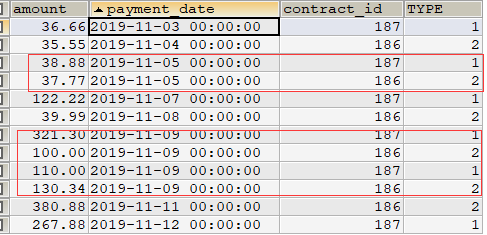
类型为1是采购合同,也就是对上游付款的信息,类型为2的是销售合同,也就是对下游收款的数据。可以看出同一类型同一天的数据还没有合并起来。所以还需要对这个查询结果再分组求和,sql如下:
#分组后sql
select sum(amount) as amount,payment_date,type
from(上面的sql) bb group by bb.payment_date,bb.type ;
分组后数据库返回结果:
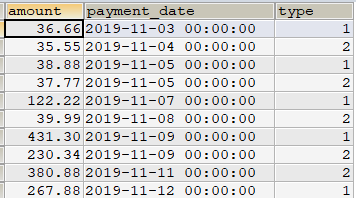
费了九牛二虎之力然而仅仅是开始,在java代码中还需要实现[1、第一行需要显示用款和付款 2、后面如果日期相同也要显示到同一行]这两个要求。大致思路是先定义一些全局的变量来记录上一条数据和第一条数据,找到第一条后再去看后面是不是有时间相同的,controller的核心代码如下:
if(!ObjectUtils.isNullObj(paymentBondViewVos)){//百分比NumberFormat numFormat = java.text.NumberFormat.getPercentInstance();numFormat.setMaximumIntegerDigits(3);numFormat.setMaximumFractionDigits(2);double payAmount = 0d;//支出金额double receiptAmout = 0d;//收入金额int type=0;//上一次合同类型(是否第一次)boolean alreadySet=false;//已找到第一条int lastType=0;//上一次合同类型(循环后)Date lastDate=null;//上一次日期double lastAmout=0.0;//上一次金额int size = paymentBondViewVos.size();for(int i = 0; i < size; i++){PaymentBondViewVo paymentBondViewVo = paymentBondViewVos.get(i);int typeTmp = paymentBondViewVo.getType();//当前合同类型if(i==0){type = typeTmp;row = sheet.createRow(4);if(typeTmp==1){row.createCell(0).setCellValue(sdf.format(paymentBondViewVo.getPaymentDate()));row.createCell(1).setCellValue(paymentBondViewVo.getAmount());payAmount = DoubleUtil.preciseAdd(payAmount, paymentBondViewVo.getAmount(), 2);}if(typeTmp==2){row.createCell(2).setCellValue(sdf.format(paymentBondViewVo.getPaymentDate()));row.createCell(3).setCellValue(paymentBondViewVo.getAmount());receiptAmout = DoubleUtil.preciseAdd(receiptAmout, paymentBondViewVo.getAmount(), 2);}}else{Date paymentDate = paymentBondViewVo.getPaymentDate();//占用天数int daysOfUse = 0;if(type!=typeTmp&&alreadySet==false){//第一条数据展示alreadySet=true;row = sheet.getRow(4);if(typeTmp==2){//采购商后付款daysOfUse = daysBetween(lastDate,paymentDate);}}else if(ObjectUtils.equals(sdf.format(lastDate),sdf.format(paymentDate))){//时间相同的合并到一列int lastRowNum = sheet.getLastRowNum();row = sheet.getRow(lastRowNum);//获取excel上一行的时间并计算占用天数daysOfUse = calculateDaysOfUse(sheet,lastRowNum-1,sdf,paymentDate);}else{//正常处理int lastRowNum = sheet.getLastRowNum();row = sheet.createRow(lastRowNum+1);//获取excel上一行的时间并计算占用天数daysOfUse = calculateDaysOfUse(sheet,lastRowNum,sdf,paymentDate);}if(typeTmp==1){row.createCell(0).setCellValue(sdf.format(paymentDate));row.createCell(1).setCellValue(paymentBondViewVo.getAmount());payAmount = DoubleUtil.preciseAdd(payAmount, paymentBondViewVo.getAmount(), 2);}if(typeTmp==2){row.createCell(2).setCellValue(sdf.format(paymentDate));row.createCell(3).setCellValue(paymentBondViewVo.getAmount());receiptAmout = DoubleUtil.preciseAdd(receiptAmout, paymentBondViewVo.getAmount(), 2);}//支出金额大于收入金额if(Double.compare(payAmount, receiptAmout)==1){double advancePayment = DoubleUtil.preciseSub(payAmount,receiptAmout, 2);//利息=占用金额*占用天数*年化/应付利息天数double tmp = DoubleUtil.preciseMul(DoubleUtil.preciseMul(advancePayment,Constant.ANNUALIZED),Double.valueOf(daysOfUse));double interestAmount = DoubleUtil.preciseDev(tmp,Double.valueOf(Constant.INTERESTDAYS));row.createCell(4).setCellValue(advancePayment);row.createCell(5).setCellValue(daysOfUse);row.createCell(7).setCellValue(interestAmount);}}row.createCell(6).setCellValue(numFormat.format(Constant.ANNUALIZED));//年化lastType=paymentBondViewVo.getType();//上一次合同类型(循环后)lastDate=paymentBondViewVo.getPaymentDate();//上一次日期lastAmout=paymentBondViewVo.getAmount();//上一次金额}
}
只贴出了封装数据代码 (省略查询委托 合同 设置表头 合并单元格以及循环设置单元格样式等代码)。这样以后就导出需要的表格了,效果图如下:

然而作死把浏览器设置为英文后出现文件名乱码了,如下所示:

需要在浏览器的header中对中文重新进行编码:
String codedFileName = java.net.URLEncoder.encode(fileName, "UTF-8");
这样一来,总算搞定了。。。
4、登录时返回之前的链接
在Spring中做如下配置:
<mvc:interceptor><mvc:mapping path="/mcmall/**"/><mvc:mapping path="/foodmall/**"/><bean class="com.itonghui.filter.RecordLoginInterceptor"/>
mvc:interceptor>
Java代码如下:
public class RecordLoginInterceptor extends HandlerInterceptorAdapter {private static final Logger LOGGER = LoggerFactory.getLogger(RecordLoginInterceptor.class);/*** 如果返回true 执行下一个拦截器,直到所有的拦截器都执行完毕 再执行被拦截的Controller 然后进入拦截器链*/@Overridepublic boolean preHandle(HttpServletRequest request, HttpServletResponse response, Object handler){SysUser user = (SysUser) SecurityUtils.getSubject().getPrincipal();String url = "";if ((request.getMethod().equalsIgnoreCase(WebContentGenerator.METHOD_POST) || ServerInfo.isAjaxs(request))) {return true;}else{url = request.getRequestURI();String queryString =request.getQueryString();if(StringUtils.isNotBlank(queryString)){url =url+"?"+queryString;}}if(!ObjectUtils.isNullObj(user)){//已登录return true;}HttpSession session = request.getSession();session.setAttribute(Constant.HISTORY_URL,url);return true;}
}
本文来自互联网用户投稿,文章观点仅代表作者本人,不代表本站立场,不承担相关法律责任。如若转载,请注明出处。 如若内容造成侵权/违法违规/事实不符,请点击【内容举报】进行投诉反馈!