tablayout实现添加图片与文字
现在项目使用Tablayout实现添加文字与图片一起,点击某项是,实现文字更换颜色,图片更换。
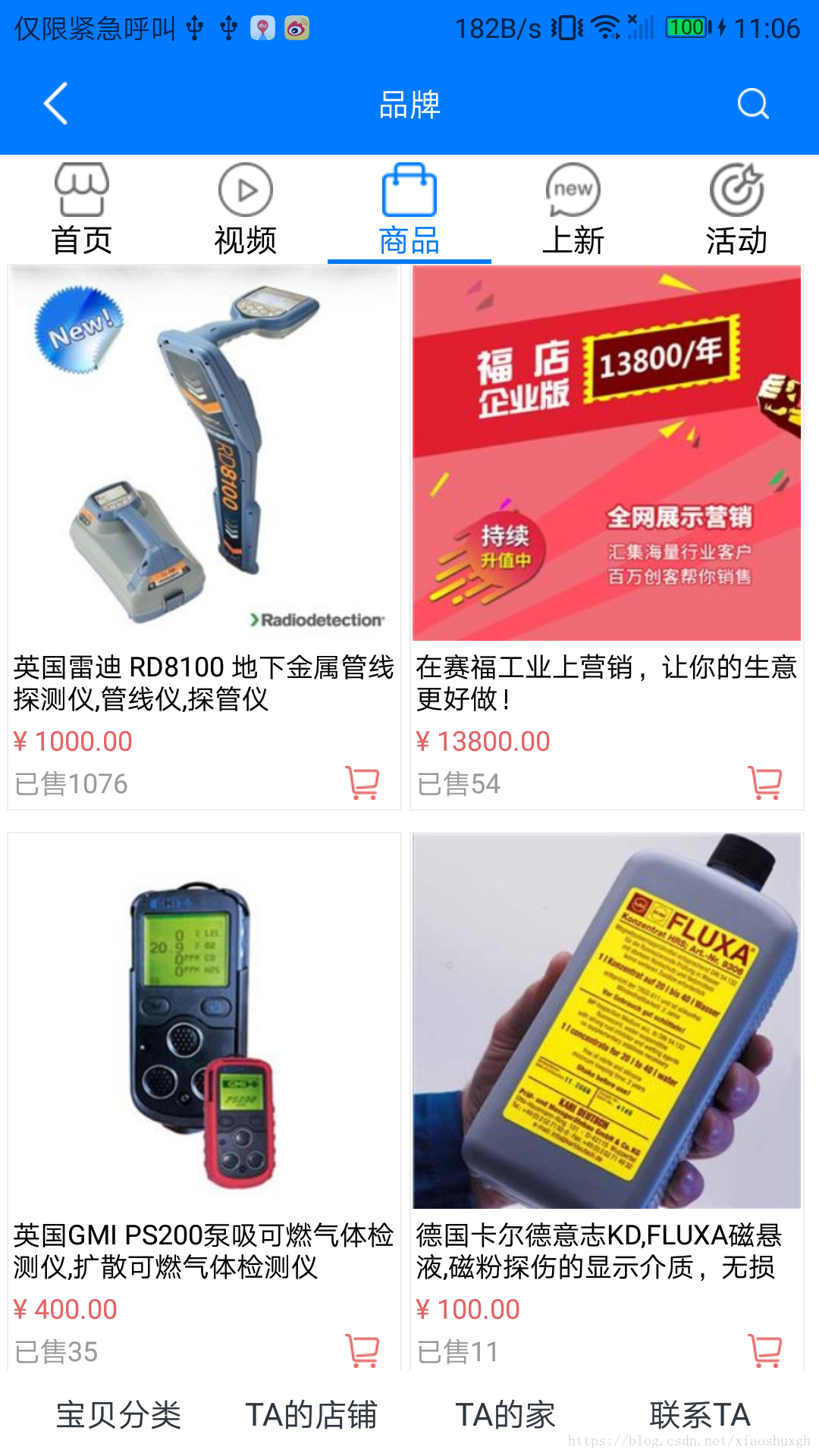
具体实现效果。
下面贴出具体实现代码:
布局文件 icon_view:
Fragment的适配器
public class PagerAdapter extends FragmentPagerAdapter {public PagerAdapter(FragmentManager fm) {super(fm);}@Overridepublic CharSequence getPageTitle(int position) {return str[position];}@Overridepublic Fragment getItem(int position) {Log.e("position", position + "");Fragment fragment = null;if (position == 2) {fragment = new CreatorShopFragment();Bundle bundle = new Bundle();bundle.putString("CatalogId", "0");bundle.putString("mAccountIdAdmin", hisShopBean.getData().getMemberInfo().get(0).getAccount_ID_admin() + "");//品牌店铺idbundle.putString("Member_ID", mUserId);//创客idfragment.setArguments(bundle);} else {fragment = new SafAccountFragment();Bundle bundle = new Bundle();bundle.putString("CatalogId", "0");bundle.putString("catalogName", str[position]);fragment.setArguments(bundle);}return fragment;}@Overridepublic int getCount() {return str.length;}public View getTabView(int position) {View v = LayoutInflater.from(MakerShopActivity.this).inflate(R.layout.icon_view, null);ImageView iv = v.findViewById(R.id.tabicon);TextView tv = v.findViewById(R.id.tabtext);iv.setBackgroundResource(ints[position]);tv.setText(str[position]);if (position == 0) {tv.setTextColor(v.getResources().getColor(R.color.saf_indus_blue));}return v;}}最后调用:
mPagerAdapter = new PagerAdapter(getSupportFragmentManager());
vpContent.setAdapter(mPagerAdapter);
tab.setupWithViewPager(vpContent);for (int i = 0; i < tab.getTabCount(); i++) {tab.getTabAt(i).setCustomView(mPagerAdapter.getTabView(i));
}tab.setOnTabSelectedListener(new TabLayout.OnTabSelectedListener() {@Overridepublic void onTabSelected(TabLayout.Tab tab) {switch (tab.getPosition()) {case 0:tab.getCustomView().findViewById(R.id.tabicon).setBackgroundResource(R.drawable.mallhomeblue);break;case 1:tab.getCustomView().findViewById(R.id.tabicon).setBackgroundResource(R.drawable.mallvideoblue);break;case 2:tab.getCustomView().findViewById(R.id.tabicon).setBackgroundResource(R.drawable.mallgoodsblue);break;case 3:tab.getCustomView().findViewById(R.id.tabicon).setBackgroundResource(R.drawable.mallnewblue);break;case 4:tab.getCustomView().findViewById(R.id.tabicon).setBackgroundResource(R.drawable.mallactivityblue);break;}TextView textView = tab.getCustomView().findViewById(R.id.tabtext);textView.setTextColor(getResources().getColor(R.color.saf_indus_blue));}@Overridepublic void onTabUnselected(TabLayout.Tab tab) {switch (tab.getPosition()) {case 0:tab.getCustomView().findViewById(R.id.tabicon).setBackgroundResource(R.drawable.mallome);break;case 1:tab.getCustomView().findViewById(R.id.tabicon).setBackgroundResource(R.drawable.mallvideo);break;case 2:tab.getCustomView().findViewById(R.id.tabicon).setBackgroundResource(R.drawable.mallgoods);break;case 3:tab.getCustomView().findViewById(R.id.tabicon).setBackgroundResource(R.drawable.mallnew);break;case 4:tab.getCustomView().findViewById(R.id.tabicon).setBackgroundResource(R.drawable.mallactivity);break;}TextView textView = tab.getCustomView().findViewById(R.id.tabtext);textView.setTextColor(getResources().getColor(R.color.black));}@Overridepublic void onTabReselected(TabLayout.Tab tab) {}
});
private String[] str = {"首页", "视频", "商品", "上新", "活动"};
private int[] ints = {R.drawable.mallhomeblue, R.drawable.mallvideo, R.drawable.mallgoods, R.drawable.mallnew, R.drawable.mallactivity};最后,完成。
本文来自互联网用户投稿,文章观点仅代表作者本人,不代表本站立场,不承担相关法律责任。如若转载,请注明出处。 如若内容造成侵权/违法违规/事实不符,请点击【内容举报】进行投诉反馈!