centos7: 搭建本地yum仓库, 下载服务器,各版本Centos镜像下载
文章目录
- 0, 国内仓库地址/centos6不过期仓库
- 1, 本地yum仓库搭建
- a, 挂载iso文件到本地文件目录
- b, 挂载iso文件到http的访问目录
- 2, nginx搭建下载服务器
备注: 由于低版本的CentOS镜像各仓库都不保存了,所有链接一个比较全的仓库地址:
base仓库:http://vault.centos.org/
epel仓库: https://archives.fedoraproject.org/pub/archive/epel/
-------------------
准备材料:
- 1, CentOS-7-x86_64-DVD-1810.iso
- 2, 安装 httpd (或直接挂载镜像文件到本地文件目录)
- 3,重新编辑 /etc/yum.repos.d/CentOS-Base.repo
- 4, 使用新的仓库地址: yum clean all && yum makecache && yum list
0, 国内仓库地址/centos6不过期仓库
############ centos 6 不在更新的仓库, 其他镜像不再提供centos6的包了
[base]
name=CentOS-6
failovermethod=priority
baseurl=http://mirrors.tuna.tsinghua.edu.cn/centos-vault/6.9/os/x86_64/http://vault.centos.org/6.9/os/x86_64/
gpgcheck=0
enabled=1### 1, 中央仓库源: centos6/7
[base]
name=CentOS-$releasever - Base
baseurl=https://mirrors.tuna.tsinghua.edu.cn/centos/$releasever/os/$basearch/
enabled=1
gpgcheck=0#released updates
[updates]
name=CentOS-$releasever - Updates
baseurl=https://mirrors.tuna.tsinghua.edu.cn/centos/$releasever/updates/$basearch/
enabled=1
gpgcheck=0		#additional packages that may be useful
[extras]
name=CentOS-$releasever - Extras
baseurl=https://mirrors.tuna.tsinghua.edu.cn/centos/$releasever/extras/$basearch/
enabled=1
gpgcheck=0		### 2, epel源
yum install epel-release
sed -e 's!^metalink=!#metalink=!g' \-e 's!^#baseurl=!baseurl=!g' \-e 's!//download\.fedoraproject\.org/pub!//mirrors.tuna.tsinghua.edu.cn!g' \-e 's!http://mirrors\.tuna!https://mirrors.tuna!g' \-i /etc/yum.repos.d/epel.repo /etc/yum.repos.d/epel-testing.repo
1, 本地yum仓库搭建
- 下载centos7软件集成镜像:https://mirrors.tuna.tsinghua.edu.cn/centos/7.6.1810/isos/x86_64/CentOS-7-x86_64-DVD-1810.iso
a, 挂载iso文件到本地文件目录
[root@test1 ~]# cat /etc/yum.repos.d/kylin_arm64.repo
[Kylin-10]
name=Kylin-10
baseurl=file:///tmp/a
gpgcheck=0
enabled=1[root@test1 ~]# mkdir /tmp/a
[root@test1 ~]# mount -o loop /home/Kylin-Server-10-SP1-Release-Build20-20210518m-arm64.iso /tmp/a
mount: /tmp/a: WARNING: source write-protected, mounted read-only.
[root@test1 ~]# ll /tmp/a
total 584
-r--r--r-- 1 root root   2048 May 24  2021 boot.catalog
dr-xr-xr-x 4 root root   4096 May 18  2021 casper
dr-xr-xr-x 3 root root   2048 May 18  2021 EFI
dr-xr-xr-x 3 root root   2048 May 18  2021 images
-r--r--r-- 1 root root    487 May 24  2021 LICENSE
dr-xr-xr-x 2 root root   2048 May 18  2021 manual
dr-xr-xr-x 2 root root 571392 May 18  2021 Packages
dr-xr-xr-x 3 root root   6144 May 18  2021 Packages-gcc
dr-xr-xr-x 2 root root   4096 May 18  2021 repodata
-r--r--r-- 1 root root   3332 May 24  2021 TRANS.TBL
b, 挂载iso文件到http的访问目录
( 使用http提供本地网络访问资源文件)
#安装httpd服务
[root@s101 yum.repos.d]# yum -y install httpd && service httpd start#http配置文件:  /etc/httpd/conf/httpd.conf
# DocumentRoot "/var/www/html"############# 挂载镜像文件
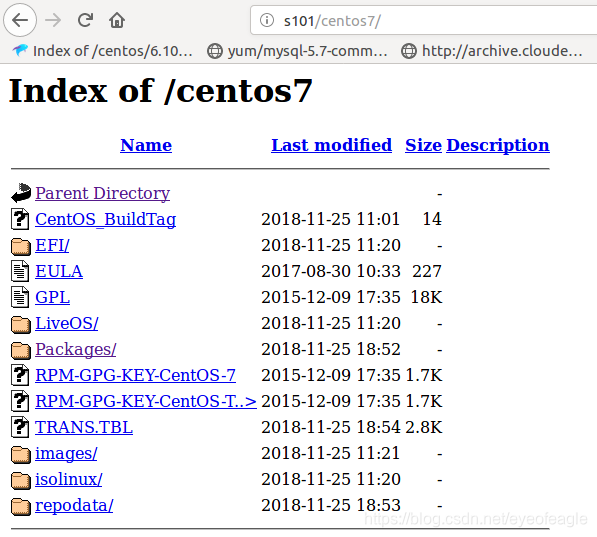
[root@s101 ~]# mkdir /var/www/html/centos7/
[root@s101 yum.repos.d]# mount ~/CentOS-7-x86_64-DVD-1810.iso /var/www/html/centos7/############# 重新编辑repo文件
[root@s101 yum.repos.d]#mkdir back
[root@s101 yum.repos.d]# mv *.repo back #编辑新的Centos-Base.repo文件,内容如下
[root@s101 yum.repos.d]# cat CentOS-Base.repo
[base]
name=myrepo
baseurl=http://s101:80/centos7/
enabled=1
gpgcheck=0
gpgkey=http://s101:80/centos7/RPM-GPG-KEY-CentOS-7#重新创建仓库缓存(可选)
[root@s101 yum.repos.d]# yum clean all
[root@s101 yum.repos.d]#  yum makecache
2, nginx搭建下载服务器
登录验证:用户名/密码, 创建密码文件 /etc/nginx/conf.d/user-htpasswd.txt
[root@localhost aa]# htpasswd -c /etc/nginx/conf.d/user-htpasswd.txt test1
New password:
Re-type new password:
Adding password for user test1
[root@localhost aa]# cat /etc/nginx/conf.d/user-htpasswd.txt
test1:$apr1$w42CneLz$JsvB/IangXMOpWQktJDiF1[root@localhost aa]# htpasswd  /etc/nginx/conf.d/user-htpasswd.txt test2
New password:
Re-type new password:
Adding password for user test2
[root@localhost aa]# cat /etc/nginx/conf.d/user-htpasswd.txt
test1:$apr1$w42CneLz$JsvB/IangXMOpWQktJDiF1
test2:$apr1$DVYRvZNY$xxB8Rx5Xi4jsazIjsAVTP/
配置/etc/nginx/nginx.conf 文件
http{ ...#下载服务server { listen    8080;    #端口 server_name localhost;  #服务名 charset utf-8; # 避免中文乱码root  /mypacks; #显示的根索引目录,注意这里要改成你自己的,目录要存在 location / { autoindex on;       #开启索引功能 autoindex_exact_size off; # 关闭计算文件确切大小(单位bytes),只显示大概大小(单位kb、mb、gb) autoindex_localtime on;  # 显示本机时间而非 GMT 时间 #auth_basic           "input user/name:";#auth_basic_user_file conf.d/user-htpasswd.txt;}   }
}
本文来自互联网用户投稿,文章观点仅代表作者本人,不代表本站立场,不承担相关法律责任。如若转载,请注明出处。 如若内容造成侵权/违法违规/事实不符,请点击【内容举报】进行投诉反馈!