SpringBoot+Nginx+MapReduce+Flume+HDFS+Hive的ETL项目
本项目目的:通过模仿用flume采集nginx的日志进行用mapreduce进行etl操作
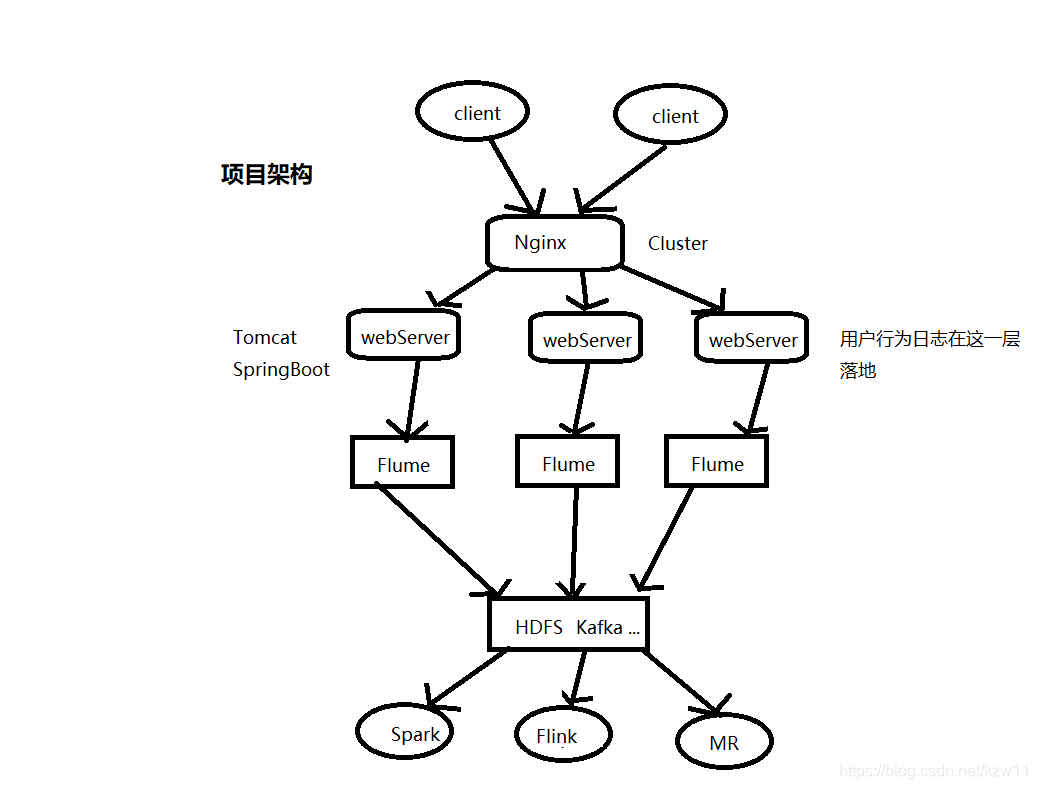
一 搭建好nginx
[root@itdragon ~]# wget http://nginx.org/download/nginx-1.16.1.tar.gz
[root@itdragon ~]# tar -zxvf nginx-1.16.1.tar.gz
[root@itdragon ~]# ll
total 824
drwxr-xr-x 9 1001 1001   4096 Nov 14 14:26 nginx-1.16.1
-rw-r--r-- 1 root root 832104 Nov 14 14:18 nginx-1.16.1.tar.gz
[root@itdragon ~]# cd nginx-1.16.1
[root@itdragon nginx-1.16.1]# ./configure
[root@itdragon nginx-1.16.1]# make
[root@itdragon nginx-1.16.1]# make install
[root@itdragon nginx-1.16.1]# whereis nginx
[root@itdragon sbin]# cd /usr/local/nginx/sbin/
[root@itdragon sbin]#./nginx编辑 conf/nginx.conf 加上负载均衡配置
upstream kzw {server master001:7777;}server {listen       80;server_name  localhost;#charset koi8-r;#access_log  logs/host.access.log  main;location / {root   html;index  index.html index.htm;proxy_pass http://kzw;}
二 webServer层
项目采用SpringBoot接收client的请求,并生成响应日志
1.log4j.properties生成日志并落地的重要配置
log4j.appender.kzw.File=org.apache.log4j.DailyRollingFileAppender
log4j.appender.kzw.File.file=data/access.log
log4j.appender.kzw.File.DatePattern='.'yyyy-MM-dd
log4j.appender.kzw.File.layout=org.apache.log4j.PatternLayout
log4j.appender.kzw.File.layout.ConversionPattern=%m%n
log4j.rootLogger=info,kzw.File同时在pom.xml中导入依赖log4j log4j 1.2.17 剩下的一步之需要开发好controller层
@Controller
public class LogController {private static Logger LOG = Logger.getLogger(LogController.class);@RequestMapping(value = "/prodLog")@ResponseBodypublic AccessLog proLog(@RequestBody AccessLog accessLog){String json = JSON.toJSONString(accessLog);LOG.info(json);//这里进来的日志将落地return accessLog;}
}
三 Flume将步骤2中的access.log日志采集至HDFS中
1 flume 安装是解压即用的哪种,这里就不赘述了
2 这里agent选型是
source:TAILDIR
sinks:HDFS
channel:memory
# Name the components on this agent
a1.sources = r1
a1.sinks = k1
a1.channels = c1# Describe/configure the source
a1.sources.r1.type = TAILDIR
# 记录position位置
#a1.sources.r1.positionFile = /home/hadoop/tmp/data/flume/position.json
a1.sources.r1.filegroups = f1
a1.sources.r1.filegroups.f1 = /home/kzw/work/data/access.log# Describe the sinka1.sinks.k1.type = hdfs
a1.sinks.k1.hdfs.fileType = DataStream
a1.sinks.k1.hdfs.writeFormat = Text
a1.sinks.k1.hdfs.useLocalTimeStamp = true
a1.sinks.k1.hdfs.path = /flume/events/%Y%m%d/
a1.sinks.k1.hdfs.filePrefix = events-
a1.sinks.k1.hdfs.round = true
a1.sinks.k1.hdfs.roundValue = 10
a1.sinks.k1.hdfs.roundUnit = minute
# 1000 行为一个文件
a1.sinks.k1.hdfs.rollCount = 1000
a1.sinks.k1.hdfs.rollSize = 0
a1.sinks.k1.hdfs.rollInterval = 0
# 文件压缩 bzip2 ,这里落到hdfs 采用bzip2进行压缩
a1.sinks.k1.hdfs.codeC = bzip2
a1.sinks.k1.hdfs.fileType = CompressedStream# Use a channel which buffers events in memory
a1.channels.c1.type = memory# Bind the source and sink to the channel
a1.sources.r1.channels = c1
a1.sinks.k1.channel = c1
启动命令:
要是没有配flume环境变量要去flume bin 目录下执行
flume-ng agent \
--name a1 \
--conf-file /home/flume/script/sink-hdfs.conf \
--conf /home/flume/apache-flume-1.9.0-bin/conf \
-Dflume.root.logger=INFO,console
四 用MapReduce 进行etl操作
日志形式:
{"appId":"www.ruozedata.com","duration":"6666","ip":"222.87.69.75","platform":"Mac","time":"2019-09-19 10:59:16","traffic":"~~~~","user":"ruozedataLog","version":"1.0.0"}
{"appId":"www.ruozedata.com","duration":"6666","ip":"61.236.131.42","platform":"Windows","time":"2019-09-19 10:59:17","traffic":"800","user":"ruozedataLog","version":"1.0.2"}
根据日志解析出我们所需要的字段信息,etl 的过程就是过滤脏数据,扩展我们所需要的字段。
private String user; //用户账号,可能为nullprivate String platform; // 操作系统private String version; //软件版本号private String ip; // ==> 经纬度 省份/城市/运营商/构建标签/构建商圈private String traffic;private String time;private String duration;private String appId; // 一家公司可能有多个appprivate Long sizes; // 真正统计需要的流量字段private String provice;//根据IP进行解析private String city;private String isp;private String year;//根据时间进行解析private String month;private String day;
这里只贴一下mapper端代码,整个过程没有reducer(可以想想为啥没有)
@Overrideprotected void map(LongWritable key, Text value, Context context) {String json = value.toString();AccessLog accessLog = JSON.parseObject(json, AccessLog.class);try {Date date = format.parse(accessLog.getTime());Calendar calendar = Calendar.getInstance();calendar.setTime(date);//处理IPString ip = accessLog.getIp();List<IpUtil.IpInfo> ipInfoList = getIpInfoList(ipPath);IpUtil.IpInfo info = IpUtil.searchIp(ipInfoList, ip);accessLog.setIsp(info.getIsp());accessLog.setCity(info.getCity());accessLog.setProvice(info.getProvince());int year = calendar.get(Calendar.YEAR);int month = calendar.get(Calendar.MONTH) + 1;int day = calendar.get(Calendar.DATE);accessLog.setYear(year+"");accessLog.setMonth(month<10?"0"+month:month+"");accessLog.setDay(day<10?"0"+day:day+"");// 去除掉不符合要求的流量字段Long sizes = Long.valueOf(accessLog.getTraffic());accessLog.setSizes(sizes);//全局计数器,可以统计正确的数据条数。context.getCounter("etl","valid").increment(1);context.write(new Text(accessLog.toString()), NullWritable.get());} catch (Exception e) {// e.printStackTrace();}
2 etl 调优之处
在setup()方法中可以将IP库addCacheFile将ip库加载分布式缓存中,这样仅需要加载一次,然后进行ip处理
//main 方法中记得加上此配置
job.addCacheFile(new URI("data/ip.txt"));
List infolist = new ArrayList<>(size);@Overrideprotected void setup(Context context) {URI[] cacheFiles = context.getCacheFiles();String path = cacheFiles[0].getPath().toString();//BufferedReader reader = new BufferedReader(new InputStreamReader(new FileInputStream(path)));//idea 本地运行用这个方法读取文件//提交到集群要用hdfs方式读取文件,否则报错FileSystem fileSystem = FileSystem.get(context.getConfiguration());FSDataInputStream fis = fileSystem.open(new Path(path));BufferedReader reader = new BufferedReader(new InputStreamReader(fis));String line ;while(StringUtils.isNotEmpty(line = reader.readLine())) {try {IpUtil.IpInfo info = new IpUtil.IpInfo();String[] ips = line.split("\\|");String start = ips[2];String end = ips[3];String province = ips[6];String city = ips[7];String isp = ips[9];info.setStart(Long.valueOf(start));info.setEnd(Long.valueOf(end));info.setProvince(province);info.setCity(city);info.setIsp(isp);infolist.add(info);}catch (Exception e){}// cache.put(splits[0],splits[1]);}IOUtils.closeStream(reader);}
ip 库长酱紫

五 mr 的输出到hdfs(按天进行归档)中,然后建hive表,然后所有的业务查询都用sql进行
etl 到hive过程 因为每天都要进行操作,所以肯定是用脚本进行操作,然后用任务调度器进行调度。
vi etl.sh
#! /bin/bashif [ $# -eq 1 ];thentime=$1
elsetime=`date -d "yesterday" +%Y%m%d`
fiecho ${time}
echo "step 0: start etl"
# mr
hadoop jar /workjar/etlmr/bigdata-1.0-SNAPSHOT.jar com.kzw.mr2.ETLApp /flume/events/${time} /hadoop/project/wide/access/out/${time} /ruozedata/ip.txt
echo "step 1: mr job finish"# 移动 out 下文件到 hive 路径下
hadoop fs -rm -r /project/hadoop/access/wide/day=${time}
echo "stpe 2: 删除之前 hive 路径下之前存在的分区数据"hadoop fs -mkdir -p /project/hadoop/access/wide/day=${time}
hadoop fs -mv /hadoop/project/wide/access/out/${time}/part* /project/hadoop/access/wide/day=${time}/
echo "stpe 3: 移动 ETL 后的数据到 hive 路径"hadoop fs -rm -r  /hadoop/project/wide/access/out/${time}
echo "stpe 3: 删除 ETL 后的数据"# 刷新 hive
hive -e "ALTER TABLE ruozedata.access_wide ADD IF NOT EXISTS PARTITION(day=${time});"
echo "step 4: 刷新分区元数据: ${time}"
shell 执行成功截图

去 hive中查询(建表语句略):(要是能查询出结果就代表整个过程成功!)
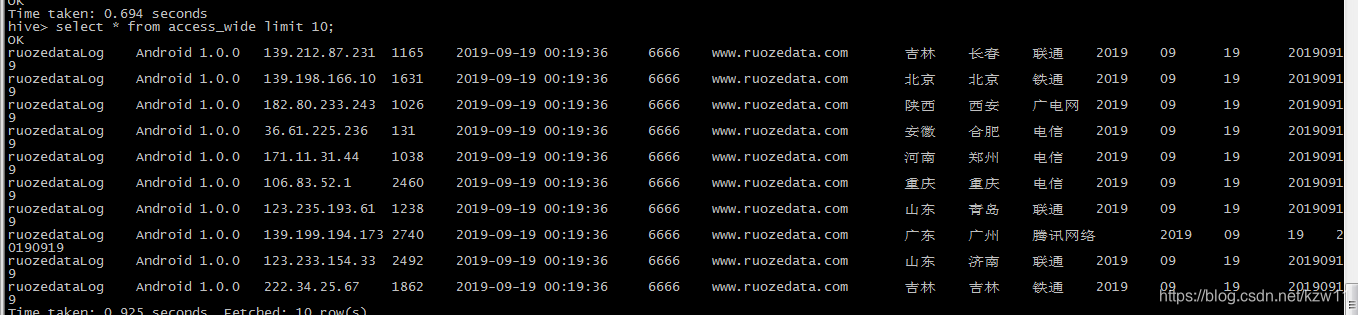
六 整个过程正常开发结束,这里因为个人测试还有一步是模拟client端向nginx 发送请求(用HttpClient实现)
这一步主要是模拟产生日志,并发送
/*** POST 方式请求* 参数通过 Body 传送,JSON 格式** @param host 请求地址* @param path 接口路径* @param jsonParams 请求参数(json 字符串)* @return*/public static HttpResponse doPost(String host, String path, String jsonParams) throws IOException {CloseableHttpClient httpClient = HttpClientBuilder.create().build();RequestConfig requestConfig = RequestConfig.custom().setConnectionRequestTimeout(10000).setConnectTimeout(5000).build();String uri = host;if (path != null && path.length() > 0) {uri += path;}HttpPost httpPost = new HttpPost(uri);StringEntity stringentity = new StringEntity(jsonParams, ContentType.APPLICATION_JSON);httpPost.setEntity(stringentity);httpPost.setConfig(requestConfig);httpPost.addHeader(HTTP.CONTENT_TYPE, ContentType.APPLICATION_JSON.toString());return httpClient.execute(httpPost);}
public static void main(String[] args) throws Exception{// genterLog("http://localhost:7777");//本地测试genterLog("http://tool:80");//本地发送给nginx}public static void genterLog(String host) throws Exception {SimpleDateFormat formatter = new SimpleDateFormat("yyyy-MM-dd HH:mm:ss");String domainName = "www.ruozedata.com";String[] plat = {"IOS","Android","Windows","Mac"};int count = 1000;for (int i = 0; i < count; i++) {Map paramsMap = new HashMap<>(count);String format = formatter.format(new Date());Random random = new Random();int rd = random.nextInt(3000) + (i/3);String platform = plat[i%4];String flow;String version = "1.0.0."+(i%4);if ( i % 3 == 0 ){flow = "~~~~";}else {flow = String.valueOf(rd);}String randomIp = getRandomIp();paramsMap.put("appId", domainName);paramsMap.put("time", format);paramsMap.put("version", version);paramsMap.put("ip", randomIp);paramsMap.put("platform", platform);paramsMap.put("traffic", flow);paramsMap.put("user", "ruozedataLog");paramsMap.put("duration", "6666");doPostJson(host,paramsMap);// Thread.sleep(500);paramsMap.clear();}}public static void doPostJson(String host,Map map) throws IOException {String path = "/log/prodLog";HttpResponse httpResponse = SimpleHttpClientUtil.doPost(host, path, new ObjectMapper().writeValueAsString(map));System.out.println("response Code: " + httpResponse.getStatusLine().getStatusCode());} 后续分析,持续更新…
本文来自互联网用户投稿,文章观点仅代表作者本人,不代表本站立场,不承担相关法律责任。如若转载,请注明出处。 如若内容造成侵权/违法违规/事实不符,请点击【内容举报】进行投诉反馈!