javaweb项目,将数据写入word文档中,转为PDF格式,并在线预览PDF
ok,大家看到标题就能感受到这个功能的强大,不仅把从数据库中查出来的数据写入到了word文档中,还将word转为了pdf,并且有pdf在线预览的方法,顺便说一下,在线预览页面可是有打印功能,并且手机和各种浏览器全部支持的哦!
废话不多说了,看代码。
第一步:将数据库查出的数据存入到word中。
在这里我们使用一个wordUtil的工具类,源码如下:
 package com.fh.util;import java.io.ByteArrayOutputStream;
import java.io.File;
import java.io.FileInputStream;
import java.io.FileNotFoundException;
import java.io.FileOutputStream;
import java.io.IOException;
import java.io.OutputStream;
import java.nio.channels.FileChannel;
import java.util.HashMap;
import java.util.Map;import org.apache.poi.hwpf.HWPFDocument;
import org.apache.poi.hwpf.extractor.WordExtractor;
import org.apache.poi.hwpf.usermodel.Range;
import org.apache.poi.xwpf.usermodel.XWPFDocument;
import org.apache.poi.xwpf.usermodel.XWPFParagraph;public class WordUtil {/*** 将源文件拷贝一份* @param source* @param target*/public static void nioTransferCopy(File source, File target) {  FileChannel in = null;  FileChannel out = null;  FileInputStream inStream = null;  FileOutputStream outStream = null;  try {  inStream = new FileInputStream(source);  outStream = new FileOutputStream(target);  in = inStream.getChannel();  out = outStream.getChannel();  in.transferTo(0, in.size(), out);  } catch (IOException e) {  e.printStackTrace();  }  } /*** 读取word文件的内容* @param fs* @return* @throws IOException*/public static String doc2String(FileInputStream fs) throws IOException {StringBuilder result = new StringBuilder();WordExtractor re = new WordExtractor(fs);result.append(re.getText());re.close();return result.toString();}/*** 写入word文件的内容* @param path* @param data*/public static void writeDataDoc(String path,String data){OutputStream ostream=null;try {ostream = new FileOutputStream(path);ostream.write(data.getBytes());} catch (FileNotFoundException e) {e.printStackTrace();} catch (IOException e) {e.printStackTrace();}finally{if(ostream != null){try {ostream.close();} catch (IOException e) {e.printStackTrace();}}}}public static void writeDoc(String path,Map map) {  try {  FileInputStream in = new FileInputStream(path);  HWPFDocument hdt = new HWPFDocument(in);  Range range = hdt.getRange();  //读取word文本内容  System.out.println(range.text());  //替换文本内容  for (Map.Entry entry:map.entrySet()) {  range.replaceText(entry.getKey(),entry.getValue());  }  ByteArrayOutputStream ostream = new ByteArrayOutputStream();  FileOutputStream out = new FileOutputStream(path);  hdt.write(ostream);  //输出字节流  out.write(ostream.toByteArray());  ostream.close();  } catch (IOException e) {  e.printStackTrace();  } catch (Exception e) {  e.printStackTrace();  }  }/*** 添加word信息* * @sourcePath 原文档路径* @targetPath 存文档路径* @maps 需要替换的信息map*/public static void addWordInfo(String sourcePath,String targetPath,Map maps) throws FileNotFoundException, IOException{// 创建新的文档File sourceFile = new File(sourcePath);File targetFile = new File(targetPath);WordUtil.nioTransferCopy(sourceFile,targetFile);// 替换某些字段WordUtil.writeDoc(targetPath,maps);}public static void main(String[] args) throws FileNotFoundException, IOException {WordUtil.nioTransferCopy(new File("C:\\javaWork\\apache-tomcat-8.0.15\\webapps\\TCGL\\static\\ceshi\\ceshi.doc"),new File("E:\\ceshi.doc"));// 读取文件的内容File oldFile = new File("E:\\009.doc");String datas =WordUtil.doc2String(new FileInputStream(oldFile));// 替换某些字段Map  maps = new HashMap();maps.put("tihuanziduan1", "焦糖沙琪玛");maps.put("tihuanziduan2, "焦糖橙子");WordUtil.writeDoc("E:\\009.doc",maps);}}
你可以直接复制进去,放到你的工具类包中,改一下包路径即可。
jar包在这里:
https://pan.baidu.com/s/1e1R3ASuhQBiXQY00qJ_KUg
提取码: kan7
第二步:将数据转为word
拿到工具类以后就可以进行数据转word的操作了,这里需要注意的是你要先在“\webapps\你的项目名\static\在建一个文件夹\”的项目路径下,先放置一个word模板。就是这一段代码。new File是生成以后的doc路径。注意:两个路径下都要放,模板是一模一样的。就是下面这段代码。
WordUtil.nioTransferCopy(new File("C:\\javaWork\\apache-tomcat-8.0.15\\webapps\\CSXM\\static\\ceshi\\ceshi.doc"),new File("E:\\ceshi.doc"));
在word模板中需要写入你想要的模板格式,以及需要替换的字段。
以我工具类测试方法为例,他就应该是这样的(没有加表格或者什么样式,单纯的写了两个字段。):
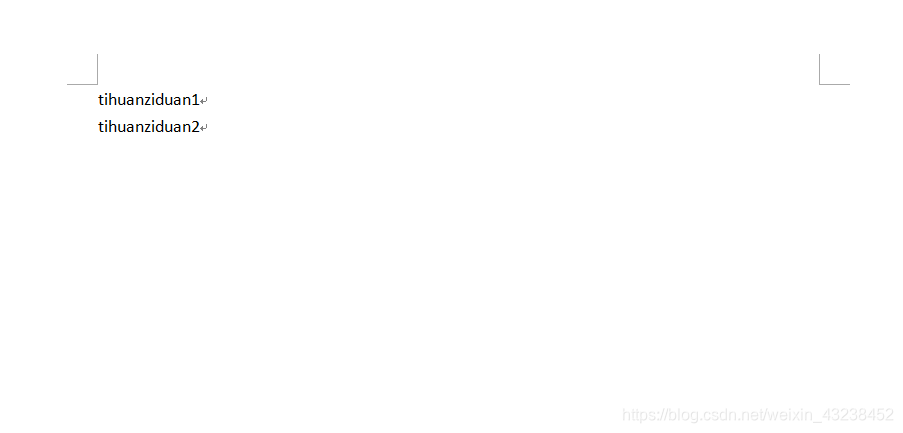
当程序运行的时候,就会将字段替换成 焦糖沙琪玛,焦糖橙子。
要查看的路径呢,就是E:\ceshi.doc 这个文档。
好,就写到这里,下一篇发布word转pdf并在线预览。
本文来自互联网用户投稿,文章观点仅代表作者本人,不代表本站立场,不承担相关法律责任。如若转载,请注明出处。 如若内容造成侵权/违法违规/事实不符,请点击【内容举报】进行投诉反馈!