学习项目实战中的知识点(更新中)
小知识点
1.Mapper主键返回
//增加数据,并返回id值
@Options(useGeneratedKeys = true,keyProperty = "id")
2.Redis常用命令
2.1 开启Redis服务器
redis-server.exe redis.windows.conf
2.2 客户端连接命令
redis-cli.exe -h ip地址(localhost) -p 端口号(6379) -a 密码(123456)
2.3 字符串指令
SET key value       			//设置指定的key值
GET key                 		//获取指定的key值
SETEX  key  seconds  values  	//获取指定的key值,并将key的过期时间设为seconds秒
SETNX  key  values  			//只有在key不存在时设置key的值
2.4 哈希操作命令
HSET key field value  	//将哈希表 key 中的字段 field 的值设为 value
HGET key field          //获取哈希表中的指定的field字段
HDEL key field          //删除存储在哈希表中的指定字段
HKEYS key               //获取哈希表中所有的字段
HVALS key               //获取哈希表中所有的值
2.5 列表操作命令
LPUSH key value1[value2]    //将一个或多个值插入到列表头部
LRANGE key start stop       //获取列表指定范围内的元素
RPOP key                    //移除并获取列表最后一个元素
LLEN  key                   //获取列表的长度
2.6 集合操作命令
SADD  key   member1  [member2]     //给集合表key字段的值设为member
SMEMBERS key                       //返回集合中的所有成员
SCARD         key                  //获取集合的成员数
SINTER        key1[key2]           //返回给定所有集合的交集
SUNION      key1[key2]             //返回给定所有集合的并集
SREM    key  member1[member2]      //删除指定的成员
2.7 有序集合操作命令
ZADD key score1 member1[score2  member2...]     //向有序集合添加一个或多个成员
ZRANGE  key  start  stop  [WITHSCORES]     		//通过索引区间返回有序集合中指定区间内的成员
ZINCRBY key  increment  member          		//有序集合中对指定成员的分数加上增量 increment
ZREM key  member                                //移除有序集合中的一个或多个成员
2.8 通用命令
KEYS pattern      //查询所有符合给定模式的键(key)
EXISTS  key       //检查给定 key 是否存在
TYPE     key      //返回 key 所储存的值的类型
DEL       key     //该命令用于在 key 存在是删除 key
3.使用spring集成的Spring Cache
3.1 关于注解
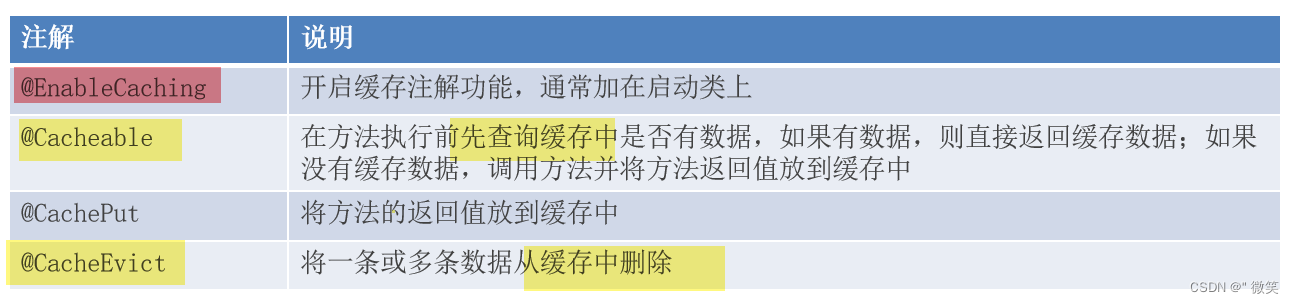
3.2 在启动类配置redis
@EnableCaching //开启缓存注解功能
3.3 在方法上写对应注解
先查再插
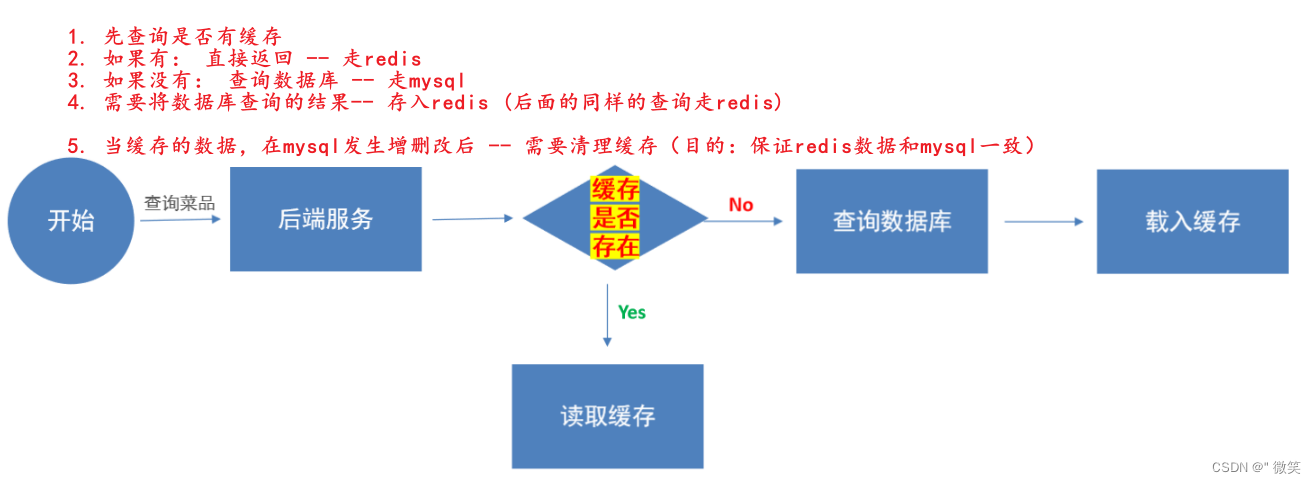
/**
* 数据库优化:
*      先查询缓存,如果有缓存则不进入方法体直接返回redis缓存数据
*      如果没有缓存则执行方法,并把返回值放入缓存
* 注意:
*      真正redis的key是userCache::key  --->>   userCache::101
*/
@Cacheable(cacheNames = "userCache",key = "#id")
删除单个
//清理单个缓存
@CacheEvict(cacheNames = "userCache",key = "#id")
删除全部
//清理全部缓存
@CacheEvict(cacheNames = "userCache",allEntries = true)
存入redis
//存入redis
@CachePut(cacheNames = "userCache",key = "#user.id")//形参 对象导航
//    @CachePut(cacheNames = "userCache",key = "#result.id")//返回值 对象导航
//    @CachePut(cacheNames = "userCache",key = "#p0.id")//第一个参数 对象导航
//    @CachePut(cacheNames = "userCache",key = "#a0.id")//第一个参数 对象导航
//    @CachePut(cacheNames = "userCache",key = "#root.args[0].id")//第一个参数 对象导航
4. 公共字段自动填充
4.1 问题分析
处理每个类的重复代码,可以使用切面类进行自动填充
4.2 步骤
4.2.1 步骤一
自定义注解 AutoFill
package com.sky.annotation;import com.sky.enumeration.OperationType;
import java.lang.annotation.ElementType;
import java.lang.annotation.Retention;
import java.lang.annotation.RetentionPolicy;
import java.lang.annotation.Target;/*** 自定义注解,用于标识某个方法需要进行功能字段自动填充处理*/
@Target(ElementType.METHOD)
@Retention(RetentionPolicy.RUNTIME)
public @interface AutoFill {//数据库操作类型:UPDATE INSERTOperationType value();
}
4.2.2 步骤二
自定义切面 AutoFillAspect
package com.sky.aspect;import com.sky.annotation.AutoFill;
import com.sky.constant.AutoFillConstant;
import com.sky.context.BaseContext;
import com.sky.enumeration.OperationType;
import lombok.extern.slf4j.Slf4j;
import org.aspectj.lang.JoinPoint;
import org.aspectj.lang.annotation.Aspect;
import org.aspectj.lang.annotation.Before;
import org.aspectj.lang.annotation.Pointcut;
import org.aspectj.lang.reflect.MethodSignature;
import org.springframework.stereotype.Component;
import java.lang.reflect.Method;
import java.time.LocalDateTime;/*** 自定义切面,实现公共字段自动填充处理逻辑*/
@Aspect
@Component
@Slf4j
public class AutoFillAspect {/*** 切入点*/@Pointcut("execution(* com.sky.mapper.*.*(..)) && @annotation(com.sky.annotation.AutoFill)")public void autoFillPointCut(){}/*** 前置通知,在通知中进行公共字段的赋值*/@Before("autoFillPointCut()")public void autoFill(JoinPoint joinPoint){log.info("开始进行公共字段自动填充...");//获取到当前被拦截的方法上的数据库操作类型MethodSignature signature = (MethodSignature) joinPoint.getSignature();//方法签名对象AutoFill autoFill = signature.getMethod().getAnnotation(AutoFill.class);//获得方法上的注解对象OperationType operationType = autoFill.value();//获得数据库操作类型//获取到当前被拦截的方法的参数--实体对象Object[] args = joinPoint.getArgs();if(args == null || args.length == 0){return;}Object entity = args[0];//准备赋值的数据LocalDateTime now = LocalDateTime.now();Long currentId = BaseContext.getCurrentId();//根据当前不同的操作类型,为对应的属性通过反射来赋值if(operationType == OperationType.INSERT){//为4个公共字段赋值try {Method setCreateTime = entity.getClass().getDeclaredMethod(AutoFillConstant.SET_CREATE_TIME, LocalDateTime.class);Method setCreateUser = entity.getClass().getDeclaredMethod(AutoFillConstant.SET_CREATE_USER, Long.class);Method setUpdateTime = entity.getClass().getDeclaredMethod(AutoFillConstant.SET_UPDATE_TIME, LocalDateTime.class);Method setUpdateUser = entity.getClass().getDeclaredMethod(AutoFillConstant.SET_UPDATE_USER, Long.class);//通过反射为对象属性赋值setCreateTime.invoke(entity,now);setCreateUser.invoke(entity,currentId);setUpdateTime.invoke(entity,now);setUpdateUser.invoke(entity,currentId);} catch (Exception e) {e.printStackTrace();}}else if(operationType == OperationType.UPDATE){//为2个公共字段赋值try {Method setUpdateTime = entity.getClass().getDeclaredMethod(AutoFillConstant.SET_UPDATE_TIME, LocalDateTime.class);Method setUpdateUser = entity.getClass().getDeclaredMethod(AutoFillConstant.SET_UPDATE_USER, Long.class);//通过反射为对象属性赋值setUpdateTime.invoke(entity,now);setUpdateUser.invoke(entity,currentId);} catch (Exception e) {e.printStackTrace();}}}
}
4.2.3 步骤三
在Mapper接口的方法上加入 AutoFill 注解
写上autoFillPointCut注解并声明类型即可使用自动装配
1. HttpClient
1.1 用法
引入依赖
org.apache.httpcomponents httpclient 4.5.13
发送请求步骤:
创建HttpClient对象
创建Http请求对象
调用HttpClient的execute方法发送请求
1.2 java代码
GET方式请求
//http客户端对象,可以发送http请求
CloseableHttpClient httpClient = HttpClients.createDefault();
//构造Get方式请求
HttpGet httpGet = new HttpGet("http://localhost:8080/user/shop/status");
//发送请求
CloseableHttpResponse response = httpClient.execute(httpGet);
//http响应码
int statusCode = response.getStatusLine().getStatusCode();
//http响应体
HttpEntity entity = response.getEntity();
//将响应体转为String字符串
String body = EntityUtils.toString(entity);
System.out.println(body);
//关闭资源
response.close();
httpClient.close();
POST方式请求
CloseableHttpClient httpClient = HttpClients.createDefault();
//Post方式请求
HttpPost httpPost = new HttpPost("http://localhost:8080/admin/employee/login");
//构造json数据
JSONObject jsonObject = new JSONObject();
jsonObject.put("username","admin");
jsonObject.put("password", "123456");
//构造请求体
StringEntity stringEntity = new StringEntity(jsonObject.toString());
//设置请求编码
stringEntity.setContentEncoding("utf-8");
//设置数据类型
stringEntity.setContentType("application/json");
//设置当前Post请求的请求体httpPost.setEntity(stringEntity);
//发送请求
CloseableHttpResponse response = httpClient.execute(httpPost);
//http响应码
int statusCode = response.getStatusLine().getStatusCode();
//http响应体
HttpEntity entity = response.getEntity();
//将响应体转为String字符串
String body = EntityUtils.toString(entity);
System.out.println(body);
//关闭资源
response.close();
httpClient.close();
2. 微信小程序开发
2.1 流程图
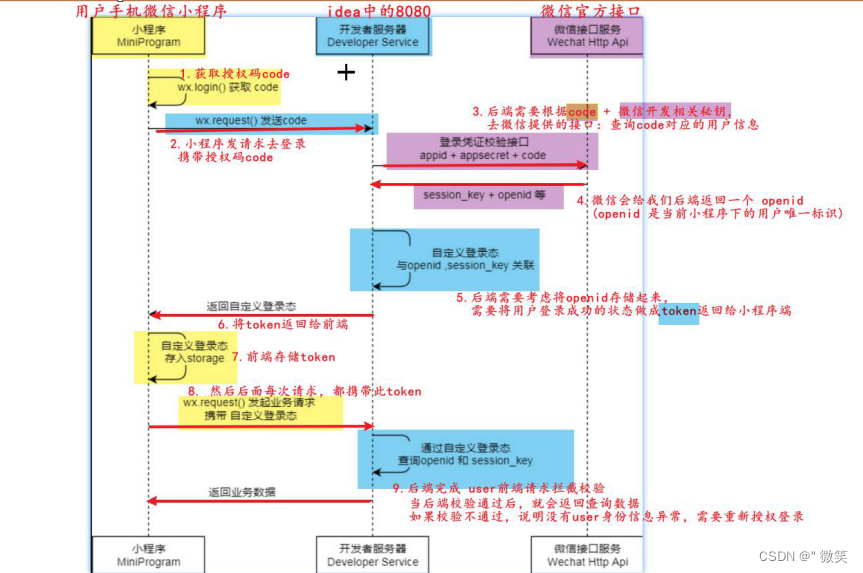
2.2 全部流程
2.2.1 小程序
-
获取授权码
<view><button bindtap="wxLogin" type="warn">微信登录button>授权码:{{code}} view> -
js获得到该用户的授权码,每点击一次生成不同的授权码,将授权码发送到服务器,调用wx.request()发送请求并携带code
Page({code:'',},//微信登录,获取微信用户的授权码wxLogin(){wx.login({success : (res) => {console.log(res.code)this.setData({code:res.code})}})},
}
2.2.2 后端
-
创建UserController类,Login方法,配置路径为"/user/user/login",在controller类中获得微信端的授权码code,传到service,传回的以user类封装
User user = userService.wxLogin(userLoginDTO); -
将创建者的appid和secret写入yml文件,通过@ConfigurationProperties自动配置到WeChatProperties类
- yml文件
sky:wechat:appid: wxcb56ecdf2d73af26secret: d64885fb53145ea3ff5d386e44f0a65f- WeChatProperties配置类
@Component
@ConfigurationProperties(prefix = "sky.wechat")
@Data
public class WeChatProperties {//可通过yml赋值private String appid; //小程序的appidprivate String secret; //小程序的秘钥private String mchid; //商户号private String mchSerialNo; //商户API证书的证书序列号private String privateKeyFilePath; //商户私钥文件private String apiV3Key; //证书解密的密钥private String weChatPayCertFilePath; //平台证书private String notifyUrl; //支付成功的回调地址private String refundNotifyUrl; //退款成功的回调地址
}
3.配置为微信用户生成jwt令牌时使用的配置项:
sky:jwt:# 设置jwt签名加密时使用的秘钥admin-secret-key: itcast# 设置jwt过期时间admin-ttl: 7200000# 设置前端传递过来的令牌名称admin-token-name: tokenuser-secret-key: itheimauser-ttl: 7200000user-token-name: authentication
4.jwt用户配置类
@Component
@ConfigurationProperties(prefix = "sky.jwt")
@Data
public class JwtProperties {/*** 用户端微信用户生成jwt令牌相关配置*/private String userSecretKey;private long userTtl;private String userTokenName;
}
5.通过微信第三方接口获得openId(唯一)
链接: https://api.weixin.qq.com/sns/jscode2session?appid=APPID&secret=SECRET&js_code=JSCODE&grant_type=authorization_code
private String getOpenId(String code){//调用微信接口服务,获得当前微信用户的openidMap<String, String> map = new HashMap<>();//微信用户授权码map.put("js_code",code);//appidmap.put("appid",weChatProperties.getAppid());//secretmap.put("secret",weChatProperties.getSecret());//固定字符串,写死map.put("grant_type","authorization_code");//使用get请求 --- 发送到微信第三方接口,回的json有包括openid//WX_LOGIN --> https://api.weixin.qq.com/sns/jscode2sessionString json = HttpClientUtil.doGet(WX_LOGIN, map);//将拿到的json字符串抓换成json,再拿到openId值JSONObject jsonObject = JSON.parseObject(json);String openid = jsonObject.getString("openid");return openid;}
6.将openId进行一个判断,如果为空抛出一个登录异常
拿到了则通过拿到的openId去数据库查询,如果查到了返回用户信息,没查到则插入新数据进数据库
public User wxLogin(UserLoginDTO userLoginDTO) {String openid = getOpenId(userLoginDTO.getCode());//判断openid是否为空,如果为空表示登陆失败,抛出业务异常if (openid == null){throw new LoginFailedException(MessageConstant.LOGIN_FAILED);}//判断当前用户是否为新用户User user = userMapper.getByOpenId(openid);if (user == null){//如果是新用户,自动完成注册user = User.builder().openid(openid).createTime(LocalDateTime.now()).build();//执行新增]userMapper.addUser(user);}//返回这个用户对象return user;}
7.将反上来的user的id放入到Jwt令牌生成,把id、openid和token返回到前端
Map<String, Object> claims = new HashMap<>();claims.put(JwtClaimsConstant.USER_ID, user.getId());String jwt = JwtUtil.createJWT(jwtProperties.getUserSecretKey(),jwtProperties.getUserTtl(),claims);
8.设置拦截器
@Component
@Slf4j
public class JwtTokenUserInterceptor implements HandlerInterceptor {@Autowiredprivate JwtProperties jwtProperties;@Overridepublic boolean preHandle(HttpServletRequest request, HttpServletResponse response, Object handler) throws Exception {//判断是否是controller方法if (!(handler instanceof HandlerMethod)){//不是controller方法就放行return true;}try {//拿到token的jwt令牌String jwt = request.getHeader(jwtProperties.getUserTokenName());log.info("用户jwt校验{}",jwt);//通过工具类解析jwtMap<String, Object> claims = JwtUtil.parseJWT(jwtProperties.getUserSecretKey(), jwt);//得到jwt中的userIdLong userId = Long.valueOf(claims.get(JwtClaimsConstant.USER_ID).toString());log.info("当前用户id{}",userId);//为当前线程存入useridBaseContext.setCurrentId(userId);return true;} catch (Exception e) {//jwt校验有错,返回404response.setStatus(404);return false;}}@Overridepublic void afterCompletion(HttpServletRequest request, HttpServletResponse response, Object handler, Exception ex) throws Exception {//最后清除当前线程存放的值BaseContext.removeCurrentId();}
}
9.在WebMvcConfiguration配置类中注册拦截器
由于想要客户在登录时也要看到当前店铺是否营业状态,这里排除掉状态的请求路径
//配置user的拦截器registry.addInterceptor(jwtTokenUserInterceptor).addPathPatterns("/user/**").excludePathPatterns("/user/user/login").excludePathPatterns("/user/shop/status");
3. 防止非本地ip(127.0.0.1)入侵系统
3.1 在nginx中更改反向代理的配置文件
location /api/ {# 反向代理proxy_pass   http://localhost:8080/admin/;# 获取客户端(client)的真实域名和端口号;proxy_set_header Host $http_host;#将用户的真实IP存放到X-Real-IP这个变量中# 后端使用HttpServletRequest request.getHeader("X-Real-IP") 获取真实ipproxy_set_header X-Real-IP $remote_addr;# 也是获取客户端真实 IP,如果有多层代理时会获取客户端真实 IP 及每层代理服务器的 IP# request.getHeader("X-Forwarded-For");proxy_set_header X-Forwarded-For $proxy_add_x_forwarded_for;#获取客户端的真实协议(如 http、https)proxy_set_header X-Forwarded-Proto $scheme;
}
3.2 过滤器代码编写
//获取到真实ip地址
String ip = request.getHeader("x-forwarded-for");
log.info("ip:{}", ip);
//比对是否是本机地址访问的
if (!ip.equals("127.0.0.1")) {log.error("!!!有人入侵!!!-------ip:{}", ip);return false;
}
3.3 登录controller类中代码编写
-
将访问者ip地址存到jwt中
//获得访问网站的ip地址 String ip = request.getHeader("x-forwarded-for"); //登录成功后,生成jwt令牌 Map<String, Object> claims = new HashMap<>(); claims.put(JwtClaimsConstant.EMP_ID, employee.getId()); claims.put("ip",ip); String token = JwtUtil.createJWT(jwtProperties.getAdminSecretKey(),jwtProperties.getAdminTtl(),claims); -
在过滤器校验jwt的ip地址
JwtUtil.parseJWT(jwtProperties.getAdminSecretKey(), token); String loginIp = (String) claims.get("ip"); if (!loginIp.equals("127.0.0.1")){ log.error("!!!有人入侵!!!-------ip:{}", ip); return false; }``` -
回到控制类编写判断代码
if(!ip.equals("127.0.0.1")){if (ip.equals("192.168.84.153")){//页面返回错误信息return Result.error("小小***,快爬!!!");}if (ip.equals("192.168.84.166"))return Result.error("小小***,快爬!!!");return Result.error("想悄咪咪进爷系统?快爬!!!");
}
4. 微信支付
整体流程
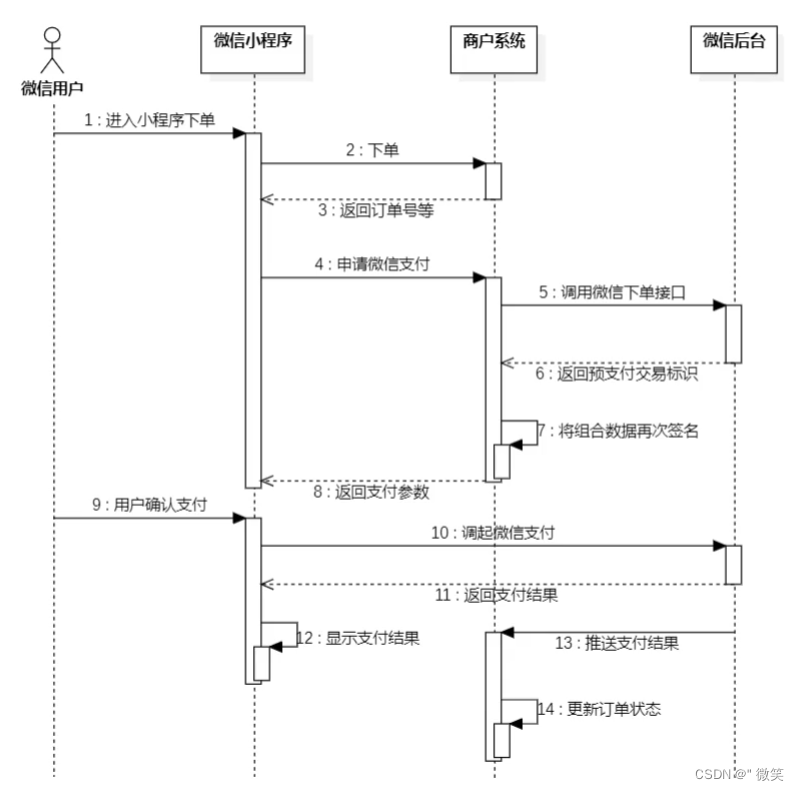
- 用户在微信端发起支付请求
- 后台生成订单,随后请求微信端的预支付接口,拿到预支付标识码
- 把预支付标识码配合appid、时间戳和随机数(数据安全)打成一个包发送到前端
- 前端展示给用户一个支付按钮,确定则直接发送到微信后端接口随后微信端给前端和后端返回数据,在前端返回支付结果,后端根据设置好的接口调用其以去解析微信的数据包,在数据库修改订单信息
5. Spring Task
处理定时任务
5.1 Cron表达式
cron表达式其实就是一个字符串,通过cron表达式可以定义任务触发的时间
**构成规则:**分为6或7个域,由空格分隔开,每个域代表一个含义
每个域的含义分别为:秒、分钟、小时、日、月、周、年(可选)
举例:
2022年10月12日上午9点整 对应的cron表达式为:0 0 9 12 10 ? 2022

说明:一般日和周的值不同时设置,其中一个设置,另一个用?表示。
**比如:**描述2月份的最后一天,最后一天具体是几号呢?可能是28号,也有可能是29号,所以就不能写具体数字。
为了描述这些信息,提供一些特殊的字符。这些具体的细节,我们就不用自己去手写,因为这个cron表达式,它其实有在线生成器。
cron表达式在线生成器:https://cron.qqe2.com/
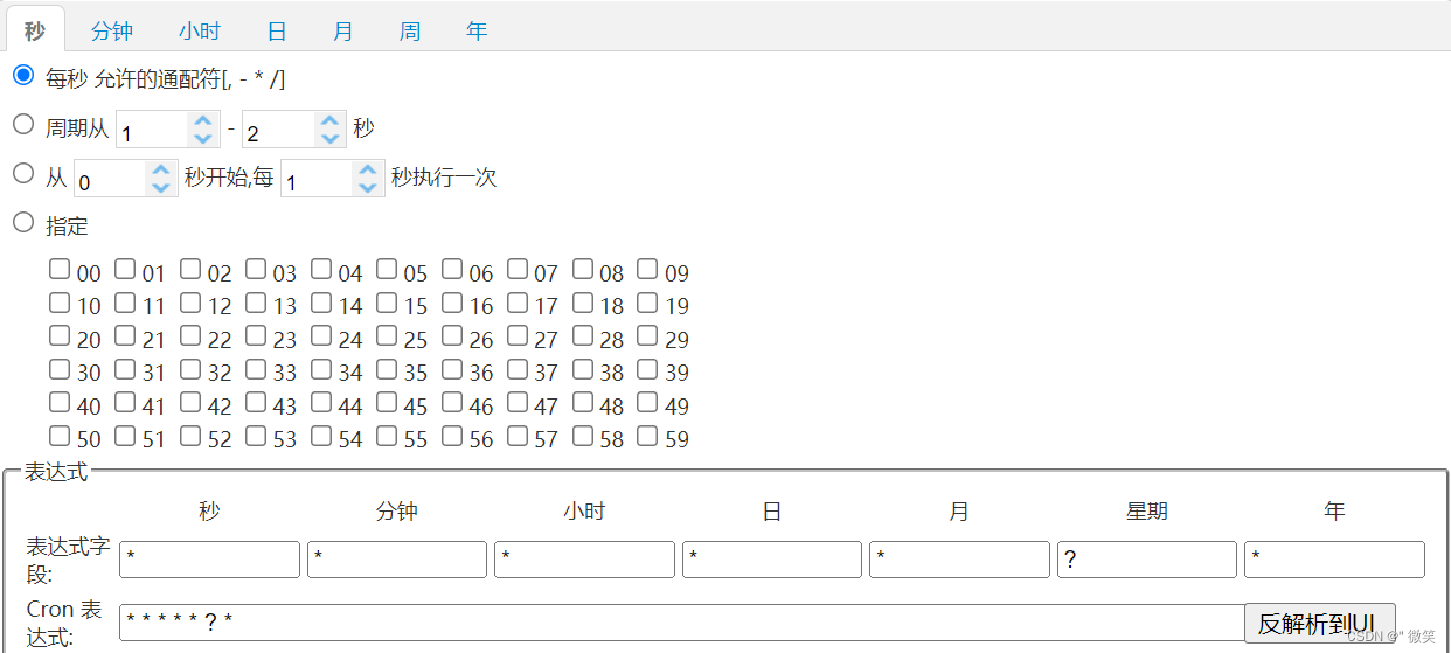
可以直接在这个网站上面,只要根据自己的要求去生成corn表达式即可。所以一般就不用自己去编写这个表达式。
通配符:
* 表示所有值;
? 表示未说明的值,即不关心它为何值;
- 表示一个指定的范围;
, 表示附加一个可能值;
/ 符号前表示开始时间,符号后表示每次递增的值;
cron表达式案例:
*/5 * * * * ? 每隔5秒执行一次
0 */1 * * * ? 每隔1分钟执行一次
0 0 5-15 * * ? 每天5-15点整点触发
0 0/3 * * * ? 每三分钟触发一次
0 0-5 14 * * ? 在每天下午2点到下午2:05期间的每1分钟触发
0 0/5 14 * * ? 在每天下午2点到下午2:55期间的每5分钟触发
0 0/5 14,18 * * ? 在每天下午2点到2:55期间和下午6点到6:55期间的每5分钟触发
0 0/30 9-17 * * ? 朝九晚五工作时间内每半小时
0 0 10,14,16 * * ? 每天上午10点,下午2点,4点
5.2 操作步骤
-
导入maven坐标spring-context(已关联到spring-boot-starter)
-
启动类注解
@EnableScheduling //开启spring task定时调度服务 -
Task类注解
 @Componentpublic class OrderTask {@Scheduled(cron = "0 0/1 * * * ?") //每分钟触发一次public void processTimeoutOrder(){/*** 需要定时任务的代码块*/}
}
6. WebSocker
6.1 介绍
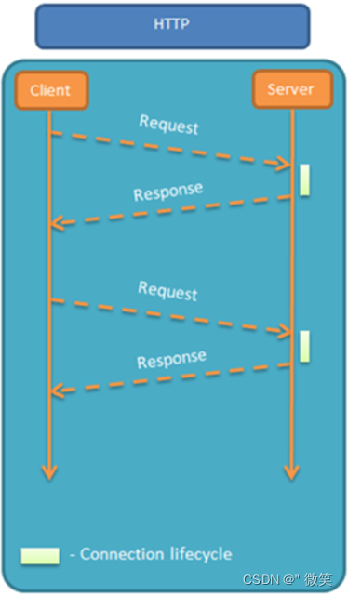
WebSocket 是基于 TCP 的一种新的网络协议。它实现了浏览器与服务器全双工通信——浏览器和服务器只需要完成一次握手,两者之间就可以创建持久性的连接, 并进行双向数据传输。
HTTP协议和WebSocket协议对比:
- HTTP是短连接
- WebSocket是长连接
- HTTP通信是单向的,基于请求响应模式
- WebSocket支持双向通信
- HTTP和WebSocket底层都是TCP连接
6.2 操作流程
1). 导入maven坐标
在sky-server模块pom.xml中已定义
<dependency><groupId>org.springframework.bootgroupId><artifactId>spring-boot-starter-websocketartifactId>
dependency>
2). 定义WebSocket服务端组件(资料中已提供)
直接导入到sky-server模块即可
package com.sky.websocket;import org.springframework.stereotype.Component;
import javax.websocket.OnClose;
import javax.websocket.OnMessage;
import javax.websocket.OnOpen;
import javax.websocket.Session;
import javax.websocket.server.PathParam;
import javax.websocket.server.ServerEndpoint;
import java.util.Collection;
import java.util.HashMap;
import java.util.Map;/*** WebSocket服务*/
@Component
@ServerEndpoint("/ws/{sid}")
public class WebSocketServer {//存放会话对象private static Map<String, Session> sessionMap = new HashMap();/*** 连接建立成功调用的方法*/@OnOpenpublic void onOpen(Session session, @PathParam("sid") String sid) {System.out.println("客户端:" + sid + "建立连接");sessionMap.put(sid, session);}/*** 收到客户端消息后调用的方法** @param message 客户端发送过来的消息*/@OnMessagepublic void onMessage(String message, @PathParam("sid") String sid) {System.out.println("收到来自客户端:" + sid + "的信息:" + message);}/*** 连接关闭调用的方法** @param sid*/@OnClosepublic void onClose(@PathParam("sid") String sid) {System.out.println("连接断开:" + sid);sessionMap.remove(sid);}/*** 群发** @param message*/public void sendToAllClient(String message) {Collection<Session> sessions = sessionMap.values();for (Session session : sessions) {try {//服务器向客户端发送消息session.getBasicRemote().sendText(message);} catch (Exception e) {e.printStackTrace();}}}}
3). 定义配置类,注册WebSocket的服务端组件(从资料中直接导入即可)
package com.sky.config;import org.springframework.context.annotation.Bean;
import org.springframework.context.annotation.Configuration;
import org.springframework.web.socket.server.standard.ServerEndpointExporter;/*** WebSocket配置类,用于注册WebSocket的Bean*/
@Configuration
public class WebSocketConfiguration {@Beanpublic ServerEndpointExporter serverEndpointExporter() {return new ServerEndpointExporter();}
}
7. 报表导出Apache POI
7.1 介绍
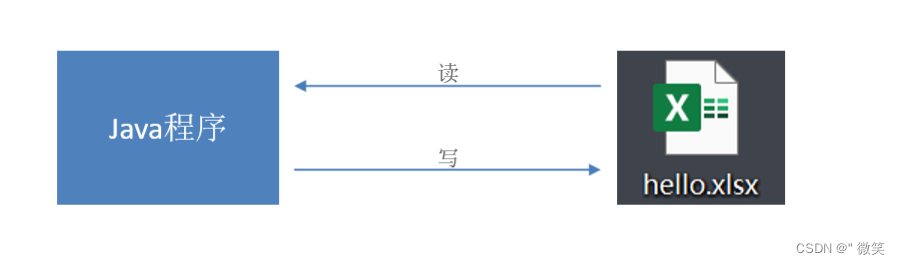
Apache POI 是一个处理Miscrosoft Office各种文件格式的开源项目。简单来说就是,我们可以使用 POI 在 Java 程序中对Miscrosoft Office各种文件进行读写操作。
一般情况下,POI 都是用于操作 Excel 文件。
7.2 入门案例
Apache POI既可以将数据写入Excel文件,也可以读取Excel文件中的数据,接下来分别进行实现。
Apache POI的maven坐标:(项目中已导入)
<dependency><groupId>org.apache.poigroupId><artifactId>poiartifactId><version>3.16version>
dependency>
<dependency><groupId>org.apache.poigroupId><artifactId>poi-ooxmlartifactId><version>3.16version>
dependency>
7.2.1 将数据写入Excel文件
1). 代码开发
package com.sky.test;import org.apache.poi.xssf.usermodel.XSSFCell;
import org.apache.poi.xssf.usermodel.XSSFRow;
import org.apache.poi.xssf.usermodel.XSSFSheet;
import org.apache.poi.xssf.usermodel.XSSFWorkbook;
import java.io.File;
import java.io.FileInputStream;
import java.io.FileOutputStream;public class POITest {/*** 基于POI向Excel文件写入数据* @throws Exception*/public static void write() throws Exception{//在内存中创建一个Excel文件对象XSSFWorkbook excel = new XSSFWorkbook();//创建Sheet页XSSFSheet sheet = excel.createSheet("itcast");//在Sheet页中创建行,0表示第1行XSSFRow row1 = sheet.createRow(0);//创建单元格并在单元格中设置值,单元格编号也是从0开始,1表示第2个单元格row1.createCell(1).setCellValue("姓名");row1.createCell(2).setCellValue("城市");XSSFRow row2 = sheet.createRow(1);row2.createCell(1).setCellValue("张三");row2.createCell(2).setCellValue("北京");XSSFRow row3 = sheet.createRow(2);row3.createCell(1).setCellValue("李四");row3.createCell(2).setCellValue("上海");FileOutputStream out = new FileOutputStream(new File("D:\\itcast.xlsx"));//通过输出流将内存中的Excel文件写入到磁盘上excel.write(out);//关闭资源out.flush();out.close();excel.close();}public static void main(String[] args) throws Exception {write();}
}
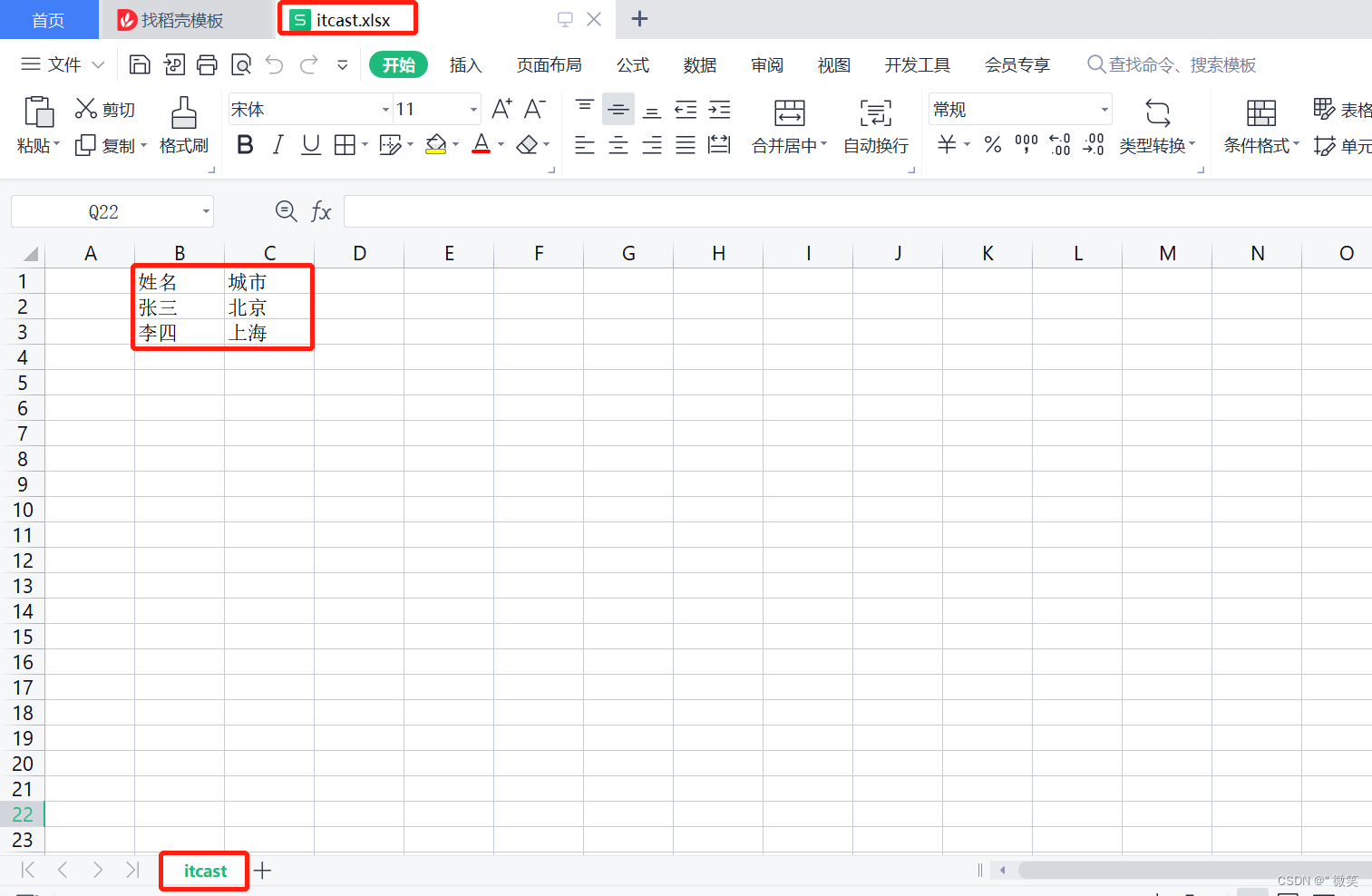
2). 实现效果
在D盘中生成itcast.xlsx文件,创建名称为itcast的Sheet页,同时将内容成功写入。
7.2.2 读取Excel文件中的数据
1). 代码开发
package com.sky.test;import org.apache.poi.xssf.usermodel.XSSFCell;
import org.apache.poi.xssf.usermodel.XSSFRow;
import org.apache.poi.xssf.usermodel.XSSFSheet;
import org.apache.poi.xssf.usermodel.XSSFWorkbook;
import java.io.File;
import java.io.FileInputStream;
import java.io.FileOutputStream;public class POITest {/*** 基于POI读取Excel文件* @throws Exception*/public static void read() throws Exception{FileInputStream in = new FileInputStream(new File("D:\\itcast.xlsx"));//通过输入流读取指定的Excel文件XSSFWorkbook excel = new XSSFWorkbook(in);//获取Excel文件的第1个Sheet页XSSFSheet sheet = excel.getSheetAt(0);//获取Sheet页中的最后一行的行号int lastRowNum = sheet.getLastRowNum();for (int i = 0; i <= lastRowNum; i++) {//获取Sheet页中的行XSSFRow titleRow = sheet.getRow(i);//获取行的第2个单元格XSSFCell cell1 = titleRow.getCell(1);//获取单元格中的文本内容String cellValue1 = cell1.getStringCellValue();//获取行的第3个单元格XSSFCell cell2 = titleRow.getCell(2);//获取单元格中的文本内容String cellValue2 = cell2.getStringCellValue();System.out.println(cellValue1 + " " +cellValue2);}//关闭资源in.close();excel.close();}public static void main(String[] args) throws Exception {read();}
}
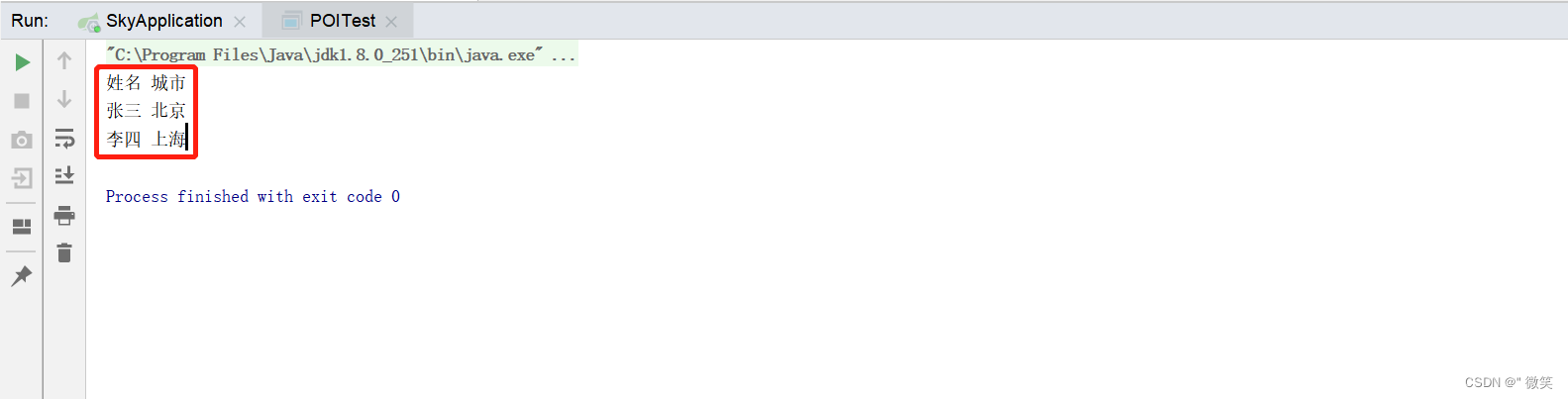
2). 实现效果
将itcast.xlsx文件中的数据进行读取
注:导出到浏览器以供下载
public void exportBusinessData(HttpServletResponse response) {/*** 报表相关操作*///得到模板文件流InputStream inputStream = this.getClass().getClassLoader().getResourceAsStream("template/运营数据报表模板.xlsx");//基于提供好的模板文件创建一个新的Excel表格对象XSSFWorkbook excel = new XSSFWorkbook(inputStream);//通过输出流将文件下载到客户端浏览器中ServletOutputStream out = response.getOutputStream();excel.write(out);
}
.getCell(1);//获取单元格中的文本内容String cellValue1 = cell1.getStringCellValue();//获取行的第3个单元格XSSFCell cell2 = titleRow.getCell(2);//获取单元格中的文本内容String cellValue2 = cell2.getStringCellValue();System.out.println(cellValue1 + " " +cellValue2);}//关闭资源in.close();excel.close();}public static void main(String[] args) throws Exception {read();}
}
本文来自互联网用户投稿,文章观点仅代表作者本人,不代表本站立场,不承担相关法律责任。如若转载,请注明出处。 如若内容造成侵权/违法违规/事实不符,请点击【内容举报】进行投诉反馈!