Nginx做伪静态
Nginx做伪静态rewrite
- Rewrite
- Rewrite的flag
- 简单的rewrite跳转
- rewrite实战
- wordpress 页面rewrite实战
- rewrite 规则补充
Rewrite
什么是Rewrite?
Rewrite主要实现url地址重写,以及重定向,就是把传入 web 的请求重定向到其他 url 的过程。
- rewrite作用
1.地址跳转,用户访问www.drz.com这个URL是,将其定向至一个新的域名mobile.drz.com
2.协议跳转,用户通过http协议请求网站时,将其重新跳转至https协议方式
3.伪静态,将动态页面显示为静态页面方式的一种技术,便于搜索引擎的录入,同时建上动态URL地址对外暴露过多
的参数,提升更高的安全性。
4.搜索引擎,SEO优化依赖于url路径,好记的url便于智齿搜索引擎录入 - Rewrite语法
句法:Syntax: rewrite regex replacement [flag]
默认:Default: –
语境:Context: server,location,if
Rewrite的flag
rewrite 指令根据表达式来重定向 URL ,或者修改字符串,可以应用于 server,location,if 环境下,每行
rewrite 指令最后跟一个 flag 标记,支持的 flag 标记有如下表格所示:
| flag | 作用 |
|---|---|
| last | 本条规则匹配完成后,停止匹配,不再匹配后面的规则 |
| break | 本条规则匹配完成后,停止匹配,不再匹配后面的规则 |
| redirect | 返回302临时重定向,地址栏会显示跳转后的地址 |
| permanent | 返回301永久重定向,地址栏会显示跳转后的地址 |
[~]# vim /etc/nginx/conf.d/rewrite.confserver {listen 80;server_name rewrite.drz.com;root /code;location ~ ^/bk {rewrite ^/bk /test/ break;}location ~ ^/last {rewrite ^/last /test/ last;}location /test/ {default_type application/json;return 200 "ok";}
}
简单的rewrite跳转
[~]# vim blog.drz.com.conf
server {listen 80;server_name blog.drz.com;root /code/wordpress;index index.php index.html;  location ~ \.php$ {fastcgi_pass unix:/dev/shm/php71w.sock;fastcgi_param SCRIPT_FILENAME $document_root$fastcgi_script_name;include /etc/nginx/fastcgi_params;}location /zls {rewrite ^/zls$ http://www.baidu.com redirect;}
}
rewrite实战
- 开启rewrite日志
[root@web01 ~]# vim /etc/nginx/nginx.conf
[root@web01 ~]# nginx -t
[root@web01 ~]# systemctl reload nginx
案例一
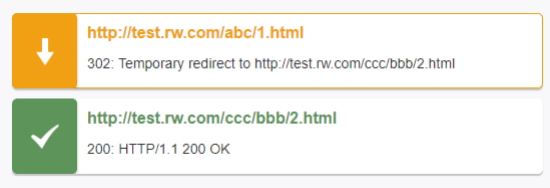
用户访问/abc/1.html实际上真实访问的是/ccc/bbb/2.html
1.创建站点目录
[root@web01 ~]# mkdir /code/ccc/bbb -p
2.创建默认页面
[root@web01 ~]# echo '/ccc/bbb/2.html' > /code/ccc/bbb/2.html
3.rewrite编写
[root@web01 ~]# vim /etc/nginx/conf.d/test_rewrite.conf
server {listen 80;server_name test.rw.com;location / {root /code;index index.html;}location /abc {rewrite ^/abc/(.*)$ /ccc/bbb/2.html redirect;}
}
案例二
用户访问 /2018/ccc/2.html 实际上真实访问的是 /2014/ccc/bbb/2.html
[root@web01 ~]# mkdir /code/2014/ccc/bbb/ -p
[root@web01 ~]# echo '/2014/ccc/bbb/2.html' > /code/2014/ccc/bbb/2.html
server {listen 80;server_name test.rw.com;location / {root /code;index index.html;}location /abc {rewrite ^/abc/(.*)$ /ccc/bbb/2.html redirect;}location /2018 {rewrite ^/2018/(.*) /2014/$1 redirect;}
}
案例三
用户访问 course-11-22-33.html 实际上真实访问的是 /course/11/22/33/course_33.html
[root@web01 ~]# mkdir /code/course/11/22/33/ -p
[root@web01 ~]# echo '[root@web01 ~]# mkdir /code/course/11/22/33/ -p' >
/code/course/11/22/33/course_33.html
[root@web01 nginx]# vim /etc/nginx/conf.d/test_rewrite.conf
server {listen 80;server_name test.rw.com;root /code;index index.html;location /abc {rewrite ^/abc/(.*)$ /ccc/bbb/2.html 			redirect;}location /2018 {rewrite ^/2018/(.*) /2014/$1 redirect;}location ~ ^/course {rewrite course-(.*)-(.*)-(.*).html /course/$1/$2/$3/course_$3.html
redirect;}
}
wordpress 页面rewrite实战
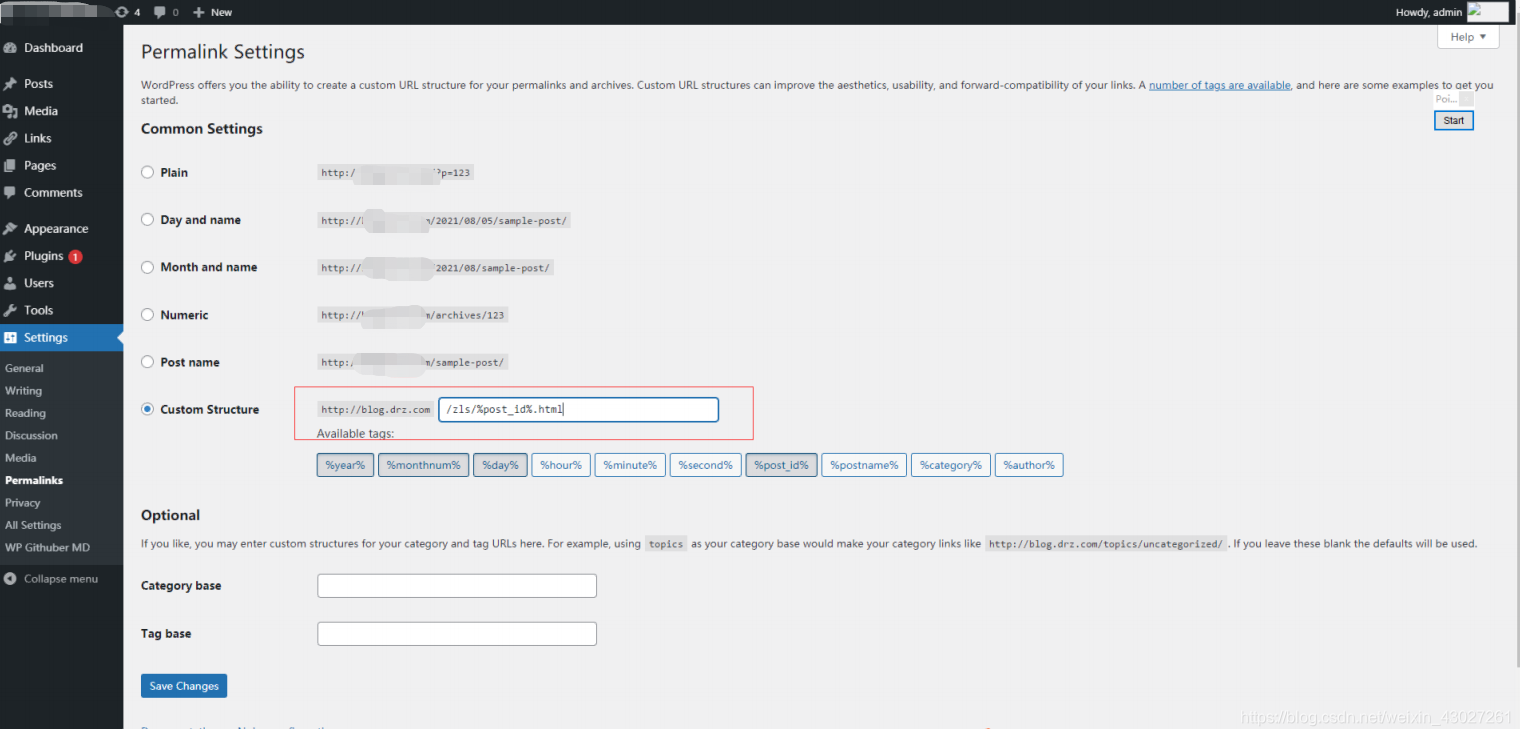
			if ( -f $request_filename/index.html ){rewrite (.*) $1/index.html break;}if ( -f $request_filename/index.php ){rewrite (.*) $1/index.php;}if ( !-f $request_filename ){rewrite (.*) /index.php;}if ($http_user_agent ~*
"Wget|ApacheBench|webBench|isouSpider|MJ12bot|YoudaoBot|Tomato|bingbot/2.0|com
patible"){set $block_user_agent 1;}if ($block_user_agent = 1){return 403;}
rewrite 规则补充
rewrite优先级
1.先执行server块的rewrite指令
2.其次执行location匹配规则
3.最后执行location中的rewrite
rewrite可以使用nginx中的全局变量
server {listen 80;server_name php.drz.com;return 302 https://$server_name$request_uri;rewrite ^(.*)$ https://$server_name$request_uri redirect;
}
本文来自互联网用户投稿,文章观点仅代表作者本人,不代表本站立场,不承担相关法律责任。如若转载,请注明出处。 如若内容造成侵权/违法违规/事实不符,请点击【内容举报】进行投诉反馈!