Python3离线安装requests模块
requests模块的依赖包检查
在可以上网且已安装python的机器上检查requests模块需要哪些依赖包,要是没有依赖包,直接下载一个直接安装最好。
在CMD命令窗口中输入 pip show requests
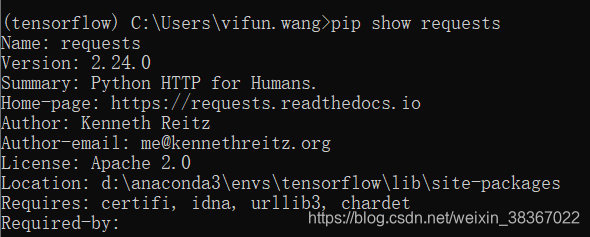
发现需要certifi,idna,urllib3,chardet
下载依赖包模块和requests模块
链接:https://pan.baidu.com/s/1r9JcMwfaJRMOkgwTfhJz4w
提取码:mj0z
或者在网站 https://www.lfd.uci.edu/~gohlke/pythonlibs 上找到相应的程序,下载。
certifi-2019.9.11-py2.py3-none-any.whl
chardet-3.0.4-py2.py3-none-any.whl
idna-2.8-py2.py3-none-any.whl
requests-2.22.0-py2.py3-none-any.whl
urllib3-1.25.6-py2.py3-none-any.whl
安装模块
将以上下载的文件传到测试环境。离线装模块。
安装命令为 pip install XXXXX.whl
切记,先安装依赖包,如果直接安装requests,由于有依赖包,还是会去连外网找依赖包。
D:\软件>pip install certifi-2019.9.11-py2.py3-none-any.whl
Processing d:\软件\certifi-2019.9.11-py2.py3-none-any.whl
Installing collected packages: certifi
Successfully installed certifi-2019.9.11
D:\软件>pip install chardet-3.0.4-py2.py3-none-any.whl
Processing d:\软件\chardet-3.0.4-py2.py3-none-any.whl
Installing collected packages: chardet
Successfully installed chardet-3.0.4
D:\软件>pip install idna-2.8-py2.py3-none-any.whl
Processing d:\软件\idna-2.8-py2.py3-none-any.whl
Installing collected packages: idna
Successfully installed idna-2.8
D:\软件>pip install urllib3-1.25.6-py2.py3-none-any.whl
Processing d:\软件\urllib3-1.25.6-py2.py3-none-any.whl
Installing collected packages: urllib3
Successfully installed urllib3-1.25.6
D:\软件>pip install requests-2.22.0-py2.py3-none-any.whl
Processing d:\软件\requests-2.22.0-py2.py3-none-any.whl
Requirement already satisfied: idna in c:\users\administrator\appdata\local\prog
rams\python\python37\lib\site-packages (from requests==2.22.0) (2.8)
Requirement already satisfied: chardet in c:\users\administrator\appdata\local\p
rograms\python\python37\lib\site-packages (from requests==2.22.0) (3.0.4)
Requirement already satisfied: urllib3 in c:\users\administrator\appdata\local\p
rograms\python\python37\lib\site-packages (from requests==2.22.0) (1.25.6)
Requirement already satisfied: certifi in c:\users\administrator\appdata\local\p
rograms\python\python37\lib\site-packages (from requests==2.22.0) (2019.9.11)
Installing collected packages: requests
Successfully installed requests-2.22.0
验证是否安装成功
在CMD命令窗口输入python进入python编辑状态,输入import requests
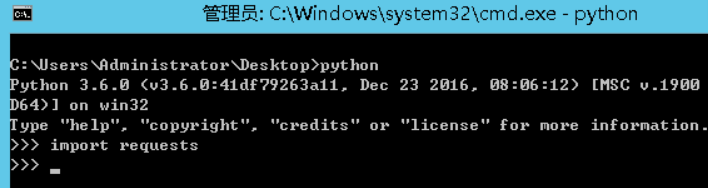
如图,未报错则安装成功
转载自:https://www.jb51.net/article/171812.htm
本文来自互联网用户投稿,文章观点仅代表作者本人,不代表本站立场,不承担相关法律责任。如若转载,请注明出处。 如若内容造成侵权/违法违规/事实不符,请点击【内容举报】进行投诉反馈!