Minecraft 1.12.2模组开发(三十六) 配置文件
我们今天尝试为模组添加属于自己的配置文件(.cfg文件)
通过编写配置文件,可以让玩家对我们模组中的一些数据进行自行修改(生物生成概率、建筑物生成概率等),对于整合包的作者们是一件美事啊~
1.新建ModConfig.java文件:
在文件中编写:
package com.Joy187.newmod.init;import com.Joy187.newmod.utils.Reference;
import net.minecraftforge.common.config.Config;
import net.minecraftforge.common.config.ConfigManager;
import net.minecraftforge.fml.client.event.ConfigChangedEvent;
import net.minecraftforge.fml.common.Mod;
import net.minecraftforge.fml.common.eventhandler.SubscribeEvent;@Config(modid = Reference.Mod_ID, category = "")
public class ModConfig {@Mod.EventBusSubscriber(modid = Reference.Mod_ID)private static class EventHandler {private EventHandler() {}@SubscribeEventpublic static void onConfigChanged(final ConfigChangedEvent.OnConfigChangedEvent event) {if (event.getModID().equals(Reference.Mod_ID)) {ConfigManager.sync(Reference.Mod_ID, Config.Type.INSTANCE);}}}@Config.LangKey("configgui.rejoymod.category.Menu0.GeneralConf")@Config.Comment("rejoymod general config.")public static final GeneralConf GeneralConf = new GeneralConf();public static class GeneralConf {
//        @Config.LangKey("rejoymod.conf.general.welcome")
//        @Config.Comment("The text shown when a player logs in. Can be a key or a string.")
//        public String WELCOME_MSG = "rejoymod.msg.welcome";}@Config.LangKey("configgui.rejoymod.category.Menu0.DebugConf")@Config.Comment("Config for developers")public static final DebugConf DEBUG_CONF = new DebugConf();public static class DebugConf {}@Config.LangKey("configgui.rejoymod.category.Menu0.SpawnConf")@Config.Comment("Spawning")public static final SpawnConf SPAWN_CONF = new SpawnConf();public static class SpawnConf {@Config.LangKey("conf.spawn.enabled")@Config.Comment("Spawn mod creatures")@Config.RequiresMcRestart// 决定模组中的生物能否在主世界自动生成public boolean SPAWN = true;//设定每个生物的生成概率@Config.LangKey("entity.wp.name")@Config.Comment("Spawn White Pig")@Config.RequiresMcRestartpublic int SPAWN_White_Pig = 5;@Config.LangKey("entity.bp.name")@Config.Comment("Spawn Black Pig")@Config.RequiresMcRestartpublic int SPAWN_Black_Pig = 10;//设定每个建筑物的生成概率@Config.LangKey("structures.xchamberx")@Config.Comment("Spawn xchamberx")@Config.RequiresMcRestartpublic int SPAWN_DCHURCH = 10;@Config.LangKey("structures.factory1")@Config.Comment("Spawn factory1")@Config.RequiresMcRestartpublic int SPAWN_FACTORY1 = 10;@Config.LangKey("structures.factory2")@Config.Comment("Spawn factory2")@Config.RequiresMcRestartpublic int SPAWN_FACTORY2 = 10;@Config.LangKey("structures.tank2")@Config.Comment("Spawn tank2")@Config.RequiresMcRestartpublic int SPAWN_TANK2 = 10;}
}
2.当我们设置好相关数值后,可以在相应的位置调用这些参数:
修改前可以参照一下:Minecraft 1.12.2模组开发(十六) 生物生成机制
调用参数修改生物生成概率:
private static void addNormalSpawn(Map> biomeMap) {//使用Config中的参数修改生物生成概率addC(EntityBP.class,ModConfig.SPAWN_CONF.SPAWN_Black_Pig, 1, 3, biome);addC(EntityWp.class,ModConfig.SPAWN_CONF.SPAWN_Black_Pig, 1, 1, biome);}}
3.同理,我们调用参数修改建筑物生成概率
if(next1==1) {
//将数值换成诸如ModConfig.SPAWN_CONF.SPAWN_DCHURCH的参数generateStructureDCH(new ModWorldGenStructure("dchurch2"), world, random, chunkX, chunkZ, ModConfig.SPAWN_CONF.SPAWN_DCHURCH, ModBlocks.WASTELAND_BLOCK, BiomeOne.class);}else if(next1==2){generateStructureFac1(new ModWorldGenStructure("factory1"), world, random, chunkX, chunkZ, ModConfig.SPAWN_CONF.SPAWN_FACTORY1, ModBlocks.WASTELAND_ROCK_BLOCK, BiomeOne.class);}else if(next1==3){generateStructureFac2(new ModWorldGenStructure("factory2e"), world, random, chunkX, chunkZ, ModConfig.SPAWN_CONF.SPAWN_FACTORY2, ModBlocks.WASTELAND_ROCK_BLOCK, BiomeOne.class);}elsegenerateStructureTank2(new ModWorldGenStructure("tank2"), world, random, chunkX, chunkZ, ModConfig.SPAWN_CONF.SPAWN_TANK2, ModBlocks.WASTELAND_BLOCK, BiomeOne.class);
4.启动游戏调试,我们可以在run\config文件夹中找到刚刚书写的配置文件:
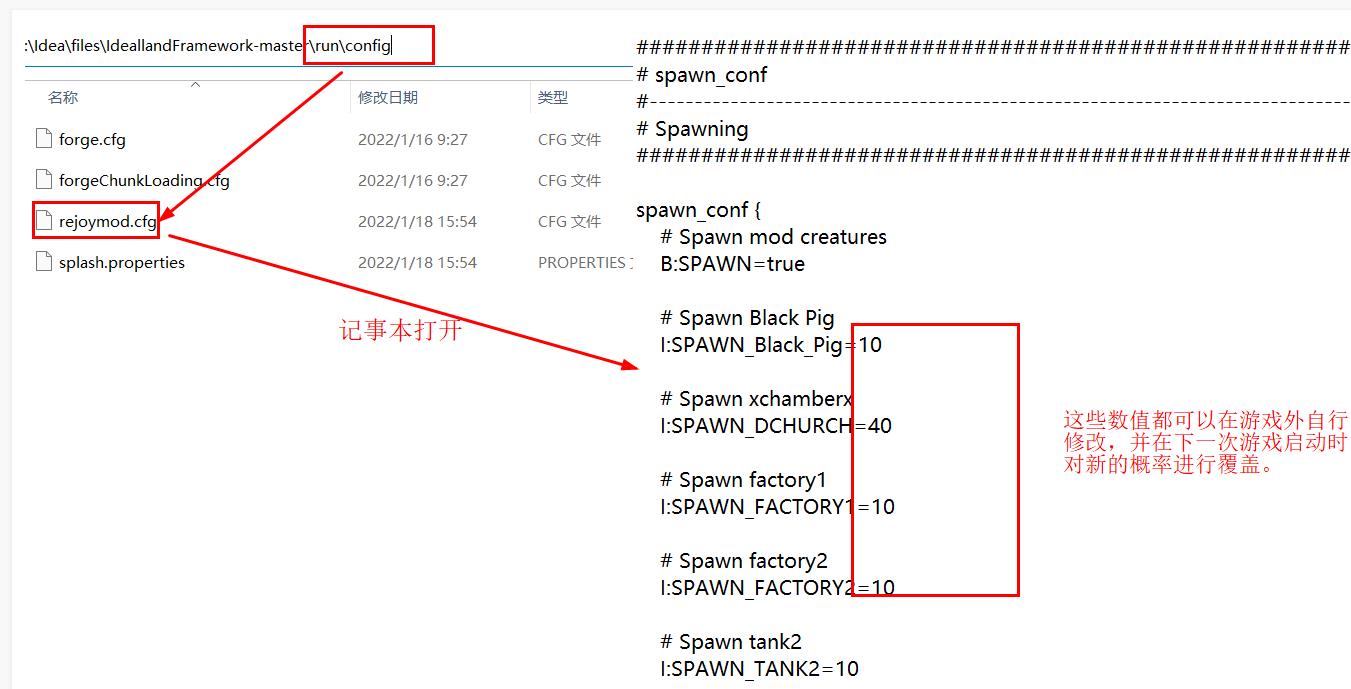
5.通过对参数的修改我们可以不断优化模组的用户体验效果
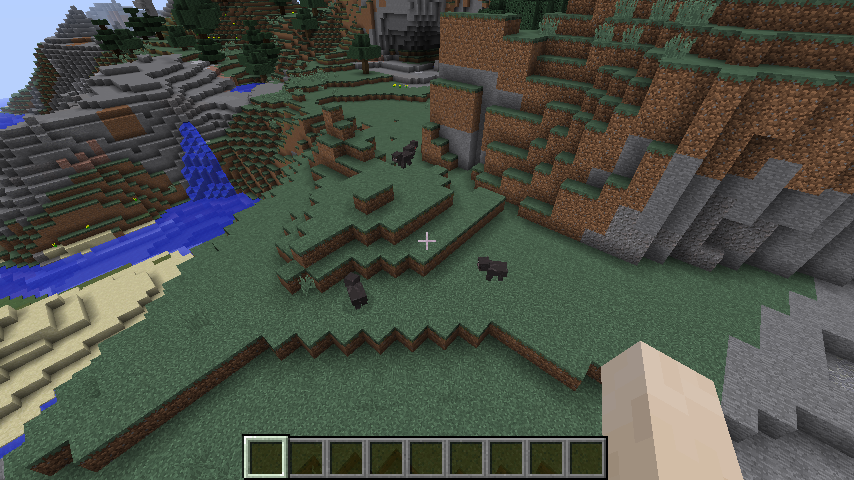
当我们减少黑猪的生成概率,游戏中的生成数量也相应减少了:
本文来自互联网用户投稿,文章观点仅代表作者本人,不代表本站立场,不承担相关法律责任。如若转载,请注明出处。 如若内容造成侵权/违法违规/事实不符,请点击【内容举报】进行投诉反馈!