vue-element-表格 Excel 【导入】功能 (2023元旦快乐~~~)
一、页面表格导入功能
我们借鉴vue-element-admin文件来学习表格导入功能,如果你有vue-element-admin的完整文件,可以去这里找
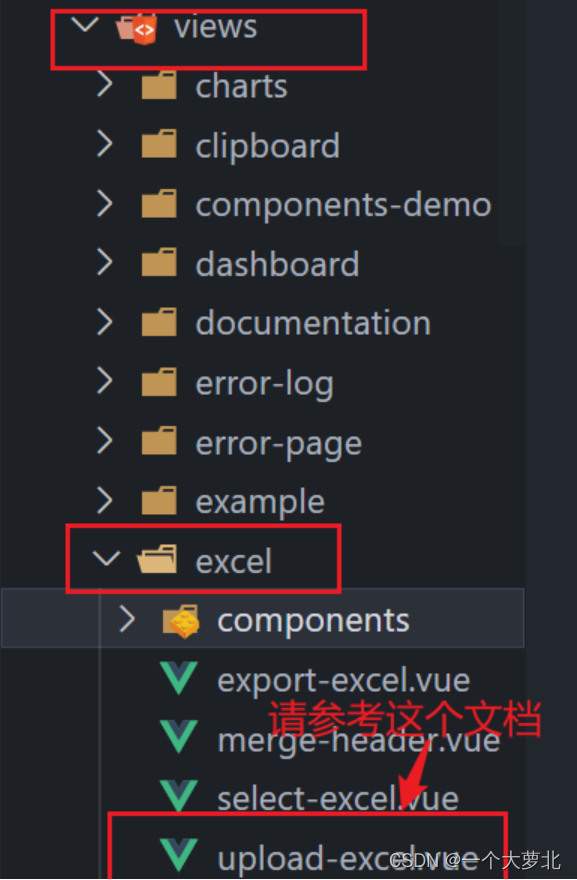
or 用我这里的代码
1. 整体复制到你要用到的页面
就是你要上传文件这个功能的页面,可以新建一个import.vue页面,然后另一个页面点击跳转到这个页面来进行上传功能.记得路由配置哦
<template><div class="app-container"><upload-excel-component :on-success="handleSuccess" :before-upload="beforeUpload" /><el-table :data="tableData" border highlight-current-row style="width: 100%;margin-top:20px;"><el-table-column v-for="item of tableHeader" :key="item" :prop="item" :label="item" /></el-table></div>
</template><script>
import UploadExcelComponent from '@/components/UploadExcel/index.vue'export default {name: 'UploadExcel',components: { UploadExcelComponent },data() {return {tableData: [],tableHeader: []}},methods: {beforeUpload(file) {const isLt1M = file.size / 1024 / 1024 < 1if (isLt1M) {return true}this.$message({message: 'Please do not upload files larger than 1m in size.',type: 'warning'})return false},handleSuccess({ results, header }) {this.tableData = resultsthis.tableHeader = header}}
}
</script>
然后 ----注意导入文件!
-
将vue-element-admin中的
src/components/UploadExcel文件拖入到自己项目中,存放在相同位置,如果修改位置记得在导入的地方修改路径

-
or 自己创文件路径然后复制这个到
components/UploadExcel/index.vue
<template><div><input ref="excel-upload-input" class="excel-upload-input" type="file" accept=".xlsx, .xls" @change="handleClick"><div class="drop" @drop="handleDrop" @dragover="handleDragover" @dragenter="handleDragover">Drop excel file here or<el-button :loading="loading" style="margin-left:16px;" size="mini" type="primary" @click="handleUpload">Browse</el-button></div></div>
</template><script>
import XLSX from 'xlsx'export default {props: {beforeUpload: Function, // eslint-disable-lineonSuccess: Function// eslint-disable-line},data() {return {loading: false,excelData: {header: null,results: null}}},methods: {generateData({ header, results }) {this.excelData.header = headerthis.excelData.results = resultsthis.onSuccess && this.onSuccess(this.excelData)},handleDrop(e) {e.stopPropagation()e.preventDefault()if (this.loading) returnconst files = e.dataTransfer.filesif (files.length !== 1) {this.$message.error('Only support uploading one file!')return}const rawFile = files[0] // only use files[0]if (!this.isExcel(rawFile)) {this.$message.error('Only supports upload .xlsx, .xls, .csv suffix files')return false}this.upload(rawFile)e.stopPropagation()e.preventDefault()},handleDragover(e) {e.stopPropagation()e.preventDefault()e.dataTransfer.dropEffect = 'copy'},handleUpload() {this.$refs['excel-upload-input'].click()},handleClick(e) {const files = e.target.filesconst rawFile = files[0] // only use files[0]if (!rawFile) returnthis.upload(rawFile)},upload(rawFile) {this.$refs['excel-upload-input'].value = null // fix can't select the same excelif (!this.beforeUpload) {this.readerData(rawFile)return}const before = this.beforeUpload(rawFile)if (before) {this.readerData(rawFile)}},readerData(rawFile) {this.loading = truereturn new Promise((resolve, reject) => {const reader = new FileReader()reader.onload = e => {const data = e.target.resultconst workbook = XLSX.read(data, { type: 'array' })const firstSheetName = workbook.SheetNames[0]const worksheet = workbook.Sheets[firstSheetName]const header = this.getHeaderRow(worksheet)const results = XLSX.utils.sheet_to_json(worksheet)this.generateData({ header, results })this.loading = falseresolve()}reader.readAsArrayBuffer(rawFile)})},getHeaderRow(sheet) {const headers = []const range = XLSX.utils.decode_range(sheet['!ref'])let Cconst R = range.s.r/* start in the first row */for (C = range.s.c; C <= range.e.c; ++C) { /* walk every column in the range */const cell = sheet[XLSX.utils.encode_cell({ c: C, r: R })]/* find the cell in the first row */let hdr = 'UNKNOWN ' + C // <-- replace with your desired defaultif (cell && cell.t) hdr = XLSX.utils.format_cell(cell)headers.push(hdr)}return headers},isExcel(file) {return /\.(xlsx|xls|csv)$/.test(file.name)}}
}
</script><style scoped>
.excel-upload-input{display: none;z-index: -9999;
}
.drop{border: 2px dashed #bbb;width: 600px;height: 160px;line-height: 160px;margin: 0 auto;font-size: 24px;border-radius: 5px;text-align: center;color: #bbb;position: relative;
}
</style>
2. 下载xlsx文件
由于admin中的xlsx版本不一样,我们需要下载它的版本,在package.json可以看到版本
![[外链图片转存失败,源站可能有防盗链机制,建议将图片保存下来直接上传(img-sAUEnsEl-1672500415987)(C:\Users\28132\AppData\Roaming\Typora\typora-user-images\1672474513815.png)]](https://img-blog.csdnimg.cn/18e98b84cb9842249121a6876acc6078.png)
我们直接复制到自己项目中的package.json相同位置
"xlsx": "0.14.1"
然后在控制台下载依赖
npm i
3. 重启服务器,测试是否能上传Excel,正确效果如下
![[外链图片转存失败,源站可能有防盗链机制,建议将图片保存下来直接上传(img-CAoQH2Q8-1672500415988)(C:\Users\28132\AppData\Roaming\Typora\typora-user-images\1672474640736.png)]](https://img-blog.csdnimg.cn/f44bac1962bb43bfb9f53174b0e81181.png)
二、表格导入格式转换
原本格式:
![[外链图片转存失败,源站可能有防盗链机制,建议将图片保存下来直接上传(img-LD1BssCW-1672500415988)(C:\Users\28132\AppData\Roaming\Typora\typora-user-images\1672478594240.png)]](https://img-blog.csdnimg.cn/3fc1506553e3468da32bc2b63cd6cb01.png)
转化后格式:
![[外链图片转存失败,源站可能有防盗链机制,建议将图片保存下来直接上传(img-Ih1KJpjO-1672500415990)(C:\Users\28132\AppData\Roaming\Typora\typora-user-images\1672478624741.png)]](https://img-blog.csdnimg.cn/126f660fc3244f88a6bf228114674888.png)
转换函数:
// 表格数据转换函数
export function transformData(result) {const mapInfo = {'入职日期': 'timeOfEntry','手机号': 'mobile','姓名': 'username','转正日期': 'correctionTime','工号': 'workNumber','部门': 'departmentName','聘用形式': 'formOfEmployment'}return result.map(item => {const zhKeys = Object.keys(item)const obj = {}zhKeys.forEach(zhKey => {const enKey = mapInfo[zhKey]if (enKey === 'timeOfEntry' || enKey === 'correctionTime') {obj[enKey] = formatExcelDate(item[zhKey])} else {obj[enKey] = item[zhKey]}})return obj})
}
// 转换表格时间为2021/1/2格式
export function formatExcelDate(numb, format = '/') {const time = new Date((numb - 25567) * 24 * 3600000 - 5 * 60 * 1000 - 43 * 1000 - 24 * 3600000 - 8 * 3600000)time.setYear(time.getFullYear())const year = time.getFullYear() + ''const month = time.getMonth() + 1 + ''const date = time.getDate() + ''if (format && format.length === 1) {return year + format + month + format + date}return year + (month < 10 ? '0' + month : month) + (date < 10 ? '0' + date : date)
}
使用函数转换:
handleSuccess({ results, header }) {console.log(results, header)//表格的初始数据this.tableData = resultsthis.tableHeader = headerconst data = transformData(results)//调用函数转换格式console.log(data)//最终得到图2效果---因为后台需要这样的数据}
如果需要转换为标准格式可以用new Date():(18行)
// 表格数据转换函数
export function transformData(result) {const mapInfo = {'入职日期': 'timeOfEntry','手机号': 'mobile','姓名': 'username','转正日期': 'correctionTime','工号': 'workNumber','部门': 'departmentName','聘用形式': 'formOfEmployment'}return result.map(item => {const zhKeys = Object.keys(item)const obj = {}zhKeys.forEach(zhKey => {const enKey = mapInfo[zhKey]if (enKey === 'timeOfEntry' || enKey === 'correctionTime') {obj[enKey] = new Date(formatExcelDate(item[zhKey]))} else {obj[enKey] = item[zhKey]}})return obj})
}
// 转换表格时间为2021/1/2格式
// 把excel文件中的日期格式的内容转回成标准时间
export function formatExcelDate(numb, format = '/') {const time = new Date((numb - 25567) * 24 * 3600000 - 5 * 60 * 1000 - 43 * 1000 - 24 * 3600000 - 8 * 3600000)time.setYear(time.getFullYear())const year = time.getFullYear() + ''const month = time.getMonth() + 1 + ''const date = time.getDate() + ''if (format && format.length === 1) {return year + format + month + format + date}return year + (month < 10 ? '0' + month : month) + (date < 10 ? '0' + date : date)
}
现在是2022年12.31号晚上23:37分,马上又是充满希望的一年~
加油加油! O(∩_∩)O
本文来自互联网用户投稿,文章观点仅代表作者本人,不代表本站立场,不承担相关法律责任。如若转载,请注明出处。 如若内容造成侵权/违法违规/事实不符,请点击【内容举报】进行投诉反馈!