Apache POI 读写 Word、PPT、Excel,Excel 中文列名与数字转换
目录
Apache POI 概述与下载
HSLF and XSLF 操作 PPT
HSSF and XSSF 操作 Excel
Excel 列位置 A-Z 与 数字 0-26 相互转换
设置单元格格式
XWPF 操作 Word 文档
Word 文档替换模板文件占位符
解决下载文件名称乱码
Apache POI 概述与下载
1、Apache POI 是用 Java 编写的免费开源跨平台的 Java API,提供对 Microsoft Office 格式文档读和写的功能。
2、web 开发中,有一个经典的功能,就是数据的导入导出,特别是数据的导出,在生产管理或者财务系统中用的非常普遍,因为这些系统经常要做一些报表打印的工作,而数据导出的格式一般是 EXCEL 或者 PDF。
3、主流操作 Excel 文件的开源工具有很多,用得比较多的就是 Apache POI 与 JExcel API。
4、Apache POI 是 Apache 的顶级项目,主页地址:Apache POI - the Java API for Microsoft Documents,本文以最新的 4.1.0 版本作为介绍。
5、所有版本的二进制包下载地址:Index of /dist/poi/release/bin
6、并非每种格式都需要所有的 jar 包,针对不同的文件格式,POI 提供了不同的 Jar 包,下表显示了 POI 组件、Maven 存储库标记和项目的 JAR 文件之间的关系:
| Component | Application type | Maven artifactId |
|---|---|---|
| POIFS | OLE2 Filesystem | poi |
| HPSF | OLE2 Property Sets | poi |
| HSSF | Excel XLS | poi |
| HSLF | PowerPoint PPT | poi-scratchpad |
| HWPF | Word DOC | poi-scratchpad |
| HDGF | Visio VSD | poi-scratchpad |
| HPBF | Publisher PUB | poi-scratchpad |
| HSMF | Outlook MSG | poi-scratchpad |
| DDF | Escher common drawings | poi |
| HWMF | WMF drawings | poi-scratchpad |
| OpenXML4J | OOXML | poi-ooxml plus either poi-ooxml-schemas or ooxml-schemas and ooxml-security |
| XSSF | Excel XLSX | poi-ooxml |
| XSLF | PowerPoint PPTX | poi-ooxml |
| XWPF | Word DOCX | poi-ooxml |
| XDGF | Visio VSDX | poi-ooxml |
| Common SL | PowerPoint PPT and PPTX | poi-scratchpad and poi-ooxml |
| Common SS | Excel XLS and XLSX | poi-ooxml |
| Maven artifactId | Prerequisites(先决条件) | JAR |
|---|---|---|
| poi | commons-logging, commons-codec, commons-collections (since POI 3.15 beta 3), commons-math (since POI 4.0.0), log4j | poi-version-yyyymmdd.jar |
| poi-scratchpad | poi | poi-scratchpad-version-yyyymmdd.jar |
| poi-ooxml | poi, poi-ooxml-schemas, commons-compress (since POI 4.0.0) For SVG support: batik-all, xml-apis-ext, xmlgraphics-commons | poi-ooxml-version-yyyymmdd.jar |
| poi-ooxml-schemas | xmlbeans | poi-ooxml-schemas-version-yyyymmdd.jar |
| poi-examples | poi, poi-scratchpad, poi-ooxml | poi-examples-version-yyyymmdd.jar |
| ooxml-schemas | xmlbeans | ooxml-schemas-1.4.jar |
| ooxml-security | xmlbeans For signing: bcpkix-jdk15on, bcprov-jdk15on, xmlsec, slf4j-api | ooxml-security-1.1.jar |
| org.apache.poi 可以直接从官网获取:Apache POI - Component Overview POI Maven 依赖也可以从 Maven 中央仓库获取:https://mvnrepository.com/search?q=apache+poi | ||
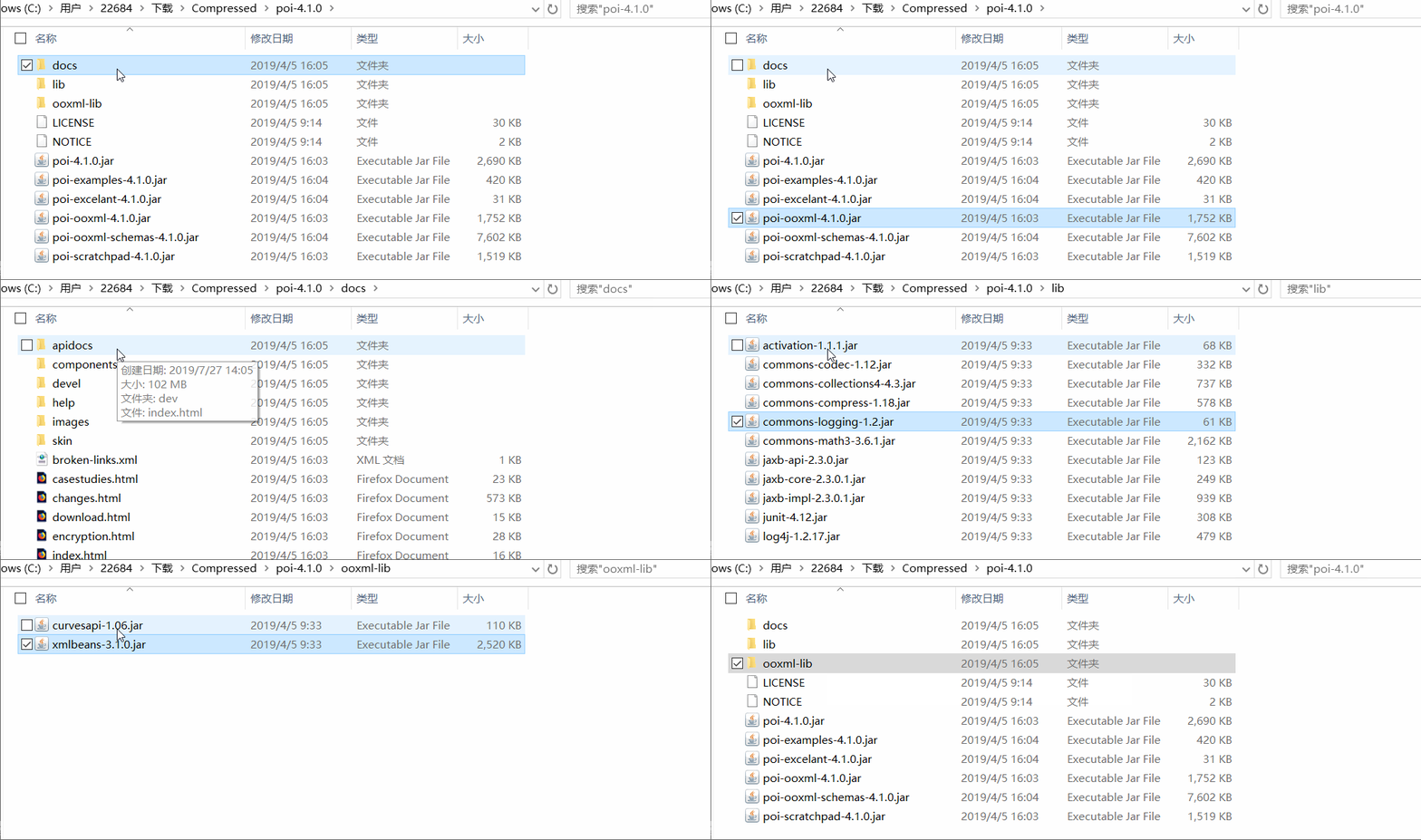
7、如果手动导包的方式,则可以从官网下载二进制 jar 包,如下所示,根据需要操作文档类型,导入合适的 jar 即可(lib、ooxml-lib 目录下是依赖包):
8、推荐使用 Maven 依赖,上面表格中已经很清楚了,操作什么类型的文档,则导入什么依赖;
org.apache.poi poi-ooxml 4.1.0
org.apache.poi poi-scratchpad 4.1.0
poi-ooxml 基本依赖了其它的组件,所以推荐导入 poi-ooxml 与 poi-scratchpad 即可:

9、不需要重复的造轮子,官网已经提供了详细的示例可以参考学习:
| 如果二进制 jar 包方式,则里面提供了一个 poi-examples-xxxx.jar 包 如果是 Maven 工程,则可以使用 poi-examples 也可以直接在线获取:https://svn.apache.org/repos/asf/poi/trunk/src/examples/src/org/apache/poi/ |
HSLF and XSLF 操作 PPT
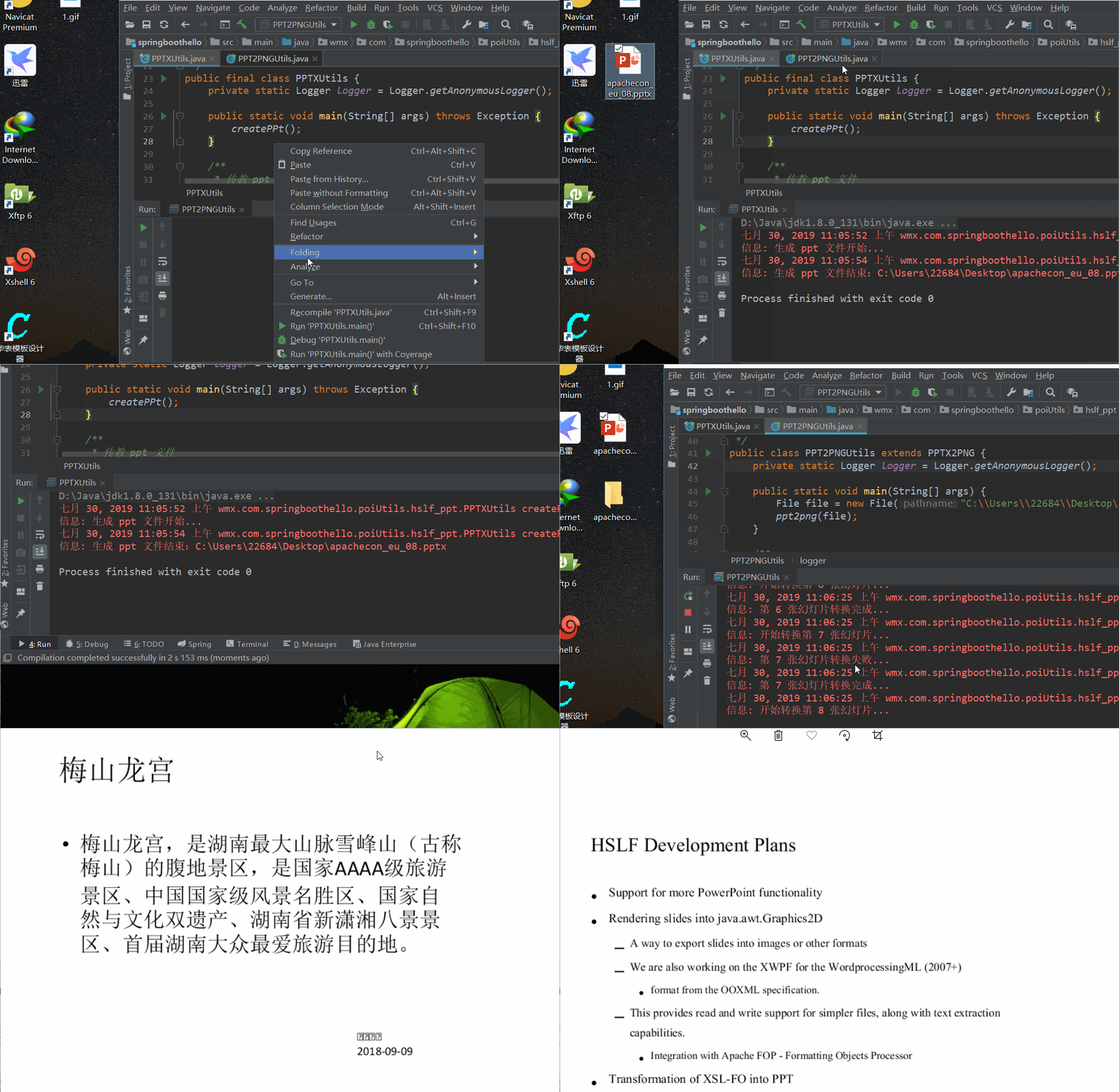
演示源码地址:https://gitee.com/wangmx1993/apache-poi-study/blob/master/src/main/java/com/wmx/poi/util
更多官网示例:https://svn.apache.org/repos/asf/poi/trunk/src/examples/src/org/apache/poi/
HSSF and XSSF 操作 Excel
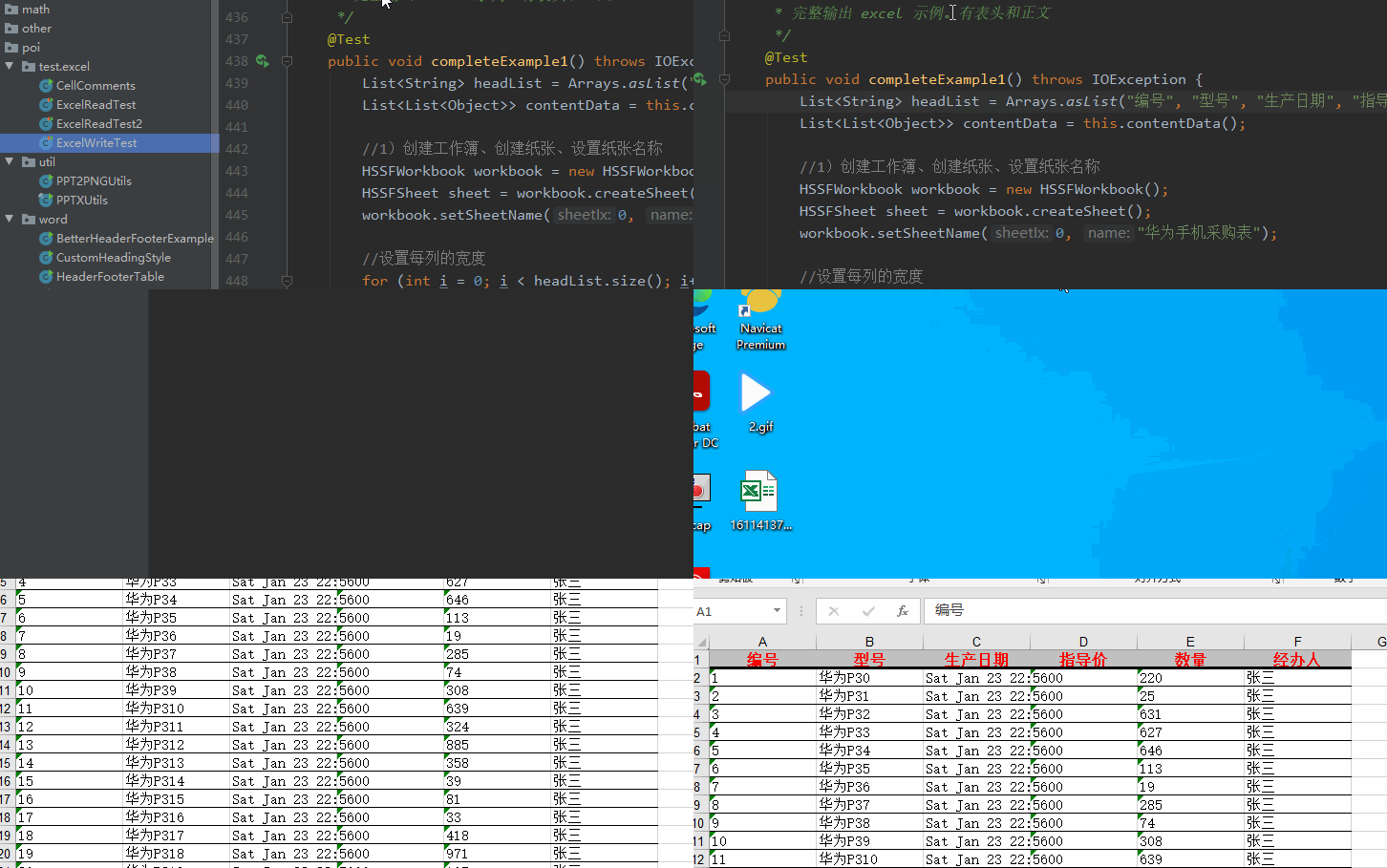
在线 API 演示源码:https://gitee.com/wangmx1993/apache-poi-study/blob/master/src/main/java/com/wmx/poi/test/excel/
web 下载 excel 文件:https://gitee.com/wangmx1993/apache-poi-study/blob/master/src/main/java/com/wmx/controller/ExcelController.java
官网示例:https://svn.apache.org/repos/asf/poi/trunk/src/examples/src/org/apache/poi/
Excel2003(xls) 最多 65536行,256 列,超过就会报错。
Excel2007(xlsx) 最多1048576 行,16384列(采取的是xml存储)超过就会报错,不过已经完全够用了。
Excel 列位置 A-Z 与 数字 0-26 相互转换
1、也可以使用第三方工具:cn.hutool.poi.excel.ExcelUtil.colNameToIndex(s)、indexToColName(n)。
/*** 将程序中的列索引转为 Excel 文件中实际对应的列索引,如 0 对应 A、1 对应 B、26 对应 AA,依次类推。* * 对于 excel 中一个 sheet 的行数根据版本不同有一定差异:* * 2003及以下版本为65536行,256列;* * 2007版及以后版本是1048576行,16384 列* * 按CTRL键加上下左右键即可直接查看;** @param cellNum :程序中的列索引,从 0 开始,0 表示第一列。* @return :0 -> A,2 -> C,26 -> AA,52 -> BA、104 -> DA ...*/public static String cellNum2String(int cellNum) {if (cellNum < 26) {return String.valueOf((char) ((cellNum % 26) + 65));}return cellNum2String((cellNum / 26) - 1) + (char) ((cellNum % 26) + 65);}/*** 将 Excel 中的列索引转为程序中的数字列索引(从0开始),如 A 对应 0、B 对应 1、AA 对应 26,依次类推。*
* 对于 excel 中一个 sheet 的行数根据版本不同有一定差异:* * 2003及以下版本为65536行,256列;* * 2007版及以后版本是1048576行,16384列* * 按CTRL键加上下左右键即可直接查看;** @param cellNum :Excel 中的列索引,A-Z,AA-AZ,BA-BZ,CA-CZ 。* @return :A -> 0,C -> 2,AA -> 26,BA -> 52、DA -> 104、IV -> 255 、XFD -> 16383*/public static int string2CellNum(String cellNum) {cellNum = cellNum.toUpperCase();// 当为A-Z列时,由ASCII码减65即可,即 A - 65if (cellNum.length() == 1) {return cellNum.charAt(0) - 65;}// 当大于Z列时,为阶乘 (A - 64)*26^nreturn (cellNum.charAt(0) - 64) * (int) Math.pow(26, cellNum.length() - 1) + string2CellNum(cellNum.substring(1));}
https://gitee.com/wangmx1993/apache-poi-study/blob/master/src/main/java/com/wmx/poi/test/excel/ExcelUtil.java#
设置单元格格式
1、文本、小数、百分比、货币、日期、科学计数法和中文大写等.
2、格式标记可以打开 excel 文件,单元格右键选择 '设置单元格格式', 自定义中可以看到完整的格式.

// 文本格式// 在文本单元格格式中,数字作为文本处理。单元格显示的内容与输入的内容完全一致。CellStyle textCellStyle = workbook.createCellStyle();DataFormat textDataFormat = workbook.createDataFormat();textCellStyle.setDataFormat(textDataFormat.getFormat("@"));Cell textCell = dataRow2.createCell(1);textCell.setCellStyle(textCellStyle);textCell.setCellValue("单位编码");// 日期格式CellStyle dateCellStyle = workbook.createCellStyle();DataFormat dateDataFormat = workbook.createDataFormat();// 只展示年月日dateCellStyle.setDataFormat(dateDataFormat.getFormat("yyyy/MM/dd"));Cell dateCell = dataRow2.createCell(2);dateCell.setCellStyle(dateCellStyle);dateCell.setCellValue(new Date());// 数值格式CellStyle numCellStyle1 = workbook.createCellStyle();CellStyle numCellStyle2 = workbook.createCellStyle();DataFormat numDataFormat1 = workbook.createDataFormat();DataFormat numDataFormat2 = workbook.createDataFormat();// 只显示整数numCellStyle1.setDataFormat(numDataFormat1.getFormat("0"));// 0.00 -> 显示两位小数// 0.00;[red]-0.00 -> 显示两位小数, 且如果值为负数时,则自动标记为红色(如 -26225600.89)numCellStyle2.setDataFormat(numDataFormat2.getFormat("0.00;[red]-0.00"));Cell numCell2 = dataRow2.createCell(3);Cell numCell3 = dataRow3.createCell(3);numCell2.setCellStyle(numCellStyle1);numCell2.setCellValue(-16225600.786541);numCell3.setCellStyle(numCellStyle2);numCell3.setCellValue(-26225600.886945);// 货币格式CellStyle moneyCellStyle1 = workbook.createCellStyle();CellStyle moneyCellStyle2 = workbook.createCellStyle();DataFormat moneyDataFormat1 = workbook.createDataFormat();DataFormat moneyDataFormat2 = workbook.createDataFormat();// 展示千分符并保留2位小数(如 36,225,600.47)moneyCellStyle1.setDataFormat(moneyDataFormat1.getFormat("#,##0.00"));// #,##0.00 -> 展示千分符并保留2位小数// #,##0.00;[red]-#,##0.00 -> 展示千分符并保留2位小数, 且当为负数时自动将内容标记为红色(如 -46,225,600.47)// ¥#,##0.00;[red]¥-#,##0.00 -> 在上面的基础上加了 人民币符号 ¥ 作为前缀// $#,##0.00;[red]$-#,##0.00 -> 在上面的基础上加了 美元符号 $ 作为前缀moneyCellStyle2.setDataFormat(moneyDataFormat1.getFormat("$#,##0.00;[red]$-#,##0.00"));Cell moneyCell1 = dataRow2.createCell(4);Cell moneyCell2 = dataRow3.createCell(4);moneyCell1.setCellStyle(moneyCellStyle1);moneyCell1.setCellValue(36225600.466945);moneyCell2.setCellStyle(moneyCellStyle2);moneyCell2.setCellValue(-46225600.466945);// 百分比格式CellStyle percentageCellStyle1 = workbook.createCellStyle();CellStyle percentageCellStyle2 = workbook.createCellStyle();DataFormat percentageCellStyleDataFormat1 = workbook.createDataFormat();DataFormat percentageCellStyleDataFormat2 = workbook.createDataFormat();// 0.58516867 -> 58.52%percentageCellStyle1.setDataFormat(percentageCellStyleDataFormat1.getFormat("0.00%"));// 值为负数时,自动标记为红色: -0.68516867 -> -68.52%percentageCellStyle2.setDataFormat(percentageCellStyleDataFormat2.getFormat("0.00%;[red]-0.00%"));Cell percentageCell1 = dataRow2.createCell(5);Cell percentageCell2 = dataRow3.createCell(5);percentageCell1.setCellStyle(percentageCellStyle1);percentageCell1.setCellValue(0.58516867);percentageCell2.setCellStyle(percentageCellStyle2);percentageCell2.setCellValue(-0.68516867);// 数字中文大写格式CellStyle chUpperCellStyle = workbook.createCellStyle();DataFormat chUpperDataFormat = workbook.createDataFormat();// 设置中文大写(只对输入的纯整数有效)// 3658415 -> 叁陆伍捌肆壹伍// 3658415.8866 -> 叁陆伍捌肆壹陆// "3658415" -> "3658415"// "3658415x" -> "3658415x"chUpperCellStyle.setDataFormat(chUpperDataFormat.getFormat("[DbNum2][$-804]0"));Cell chUpperCell1 = dataRow2.createCell(6);chUpperCell1.setCellStyle(chUpperCellStyle);chUpperCell1.setCellValue(3658415);// 科学计数法CellStyle scienceCellStyle1 = workbook.createCellStyle();CellStyle scienceCellStyle2 = workbook.createCellStyle();DataFormat scienceFormat1 = workbook.createDataFormat();DataFormat scienceFormat2 = workbook.createDataFormat();// 设置科学计数法// 3658415 -> 3.66E+06scienceCellStyle1.setDataFormat(scienceFormat1.getFormat("0.00E+00"));// 如果值是负数,则自动将内容标红, 如 -3658415.89745 -> -3.6584E+06scienceCellStyle2.setDataFormat(scienceFormat1.getFormat("0.0000E+00;[red]-0.0000E+00"));Cell scienceCell1 = dataRow2.createCell(7);Cell scienceCell2 = dataRow3.createCell(7);scienceCell1.setCellStyle(scienceCellStyle1);scienceCell1.setCellValue(3658415);scienceCell2.setCellStyle(scienceCellStyle2);scienceCell2.setCellValue(-3658415.89745);src/main/java/com/wmx/poi/test/excel/ExcelWriteTest.java · 汪少棠/apache-poi-study - Gitee.com
XWPF 操作 Word 文档
官网示例文档:https://svn.apache.org/repos/asf/poi/trunk/poi-examples/src/main/java/org/apache/poi/examples/xwpf/usermodel/
单元测试演示源码地址:https://gitee.com/wangmx1993/apache-poi-study/blob/master/src/main/java/com/wmx/poi/word/
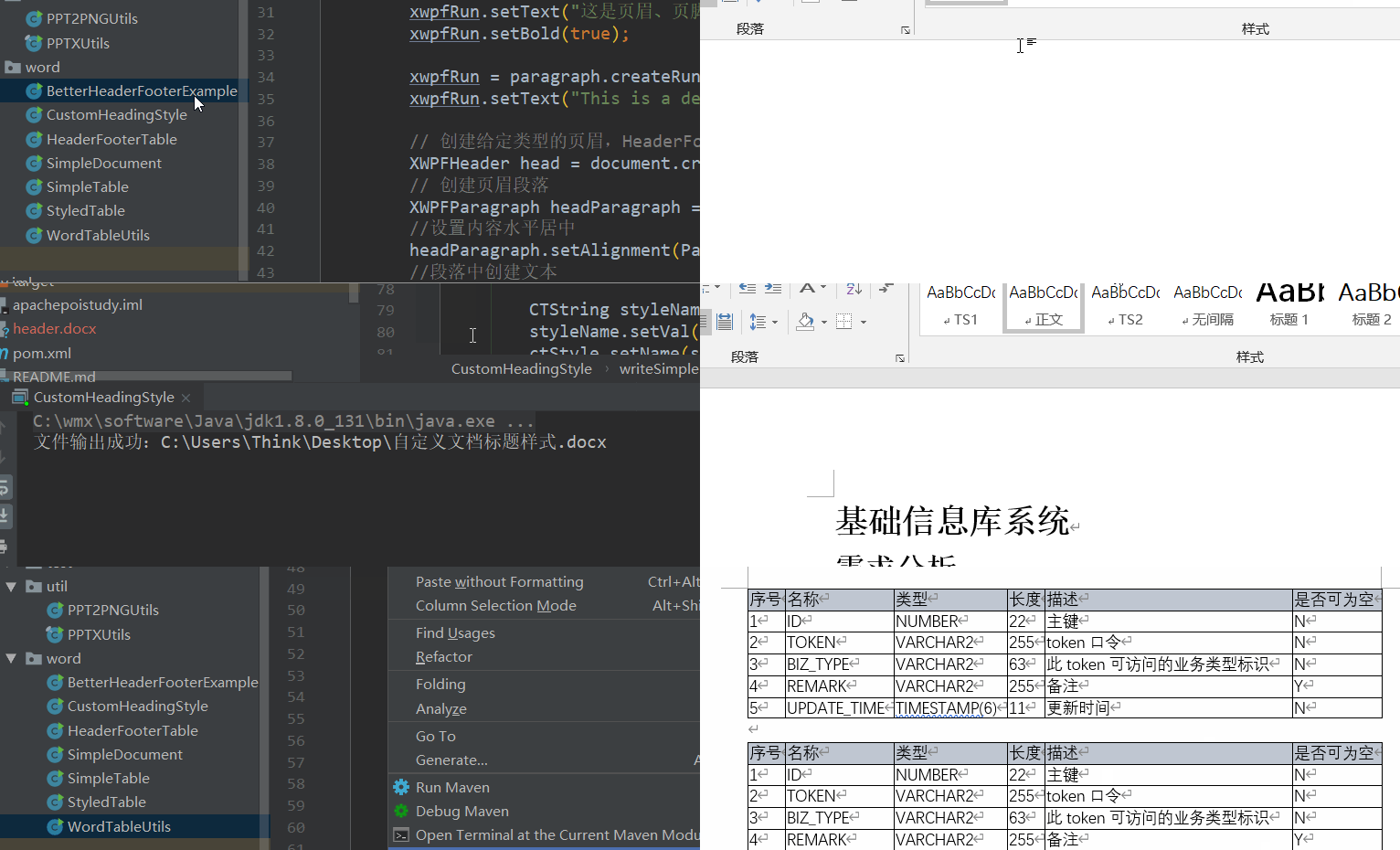
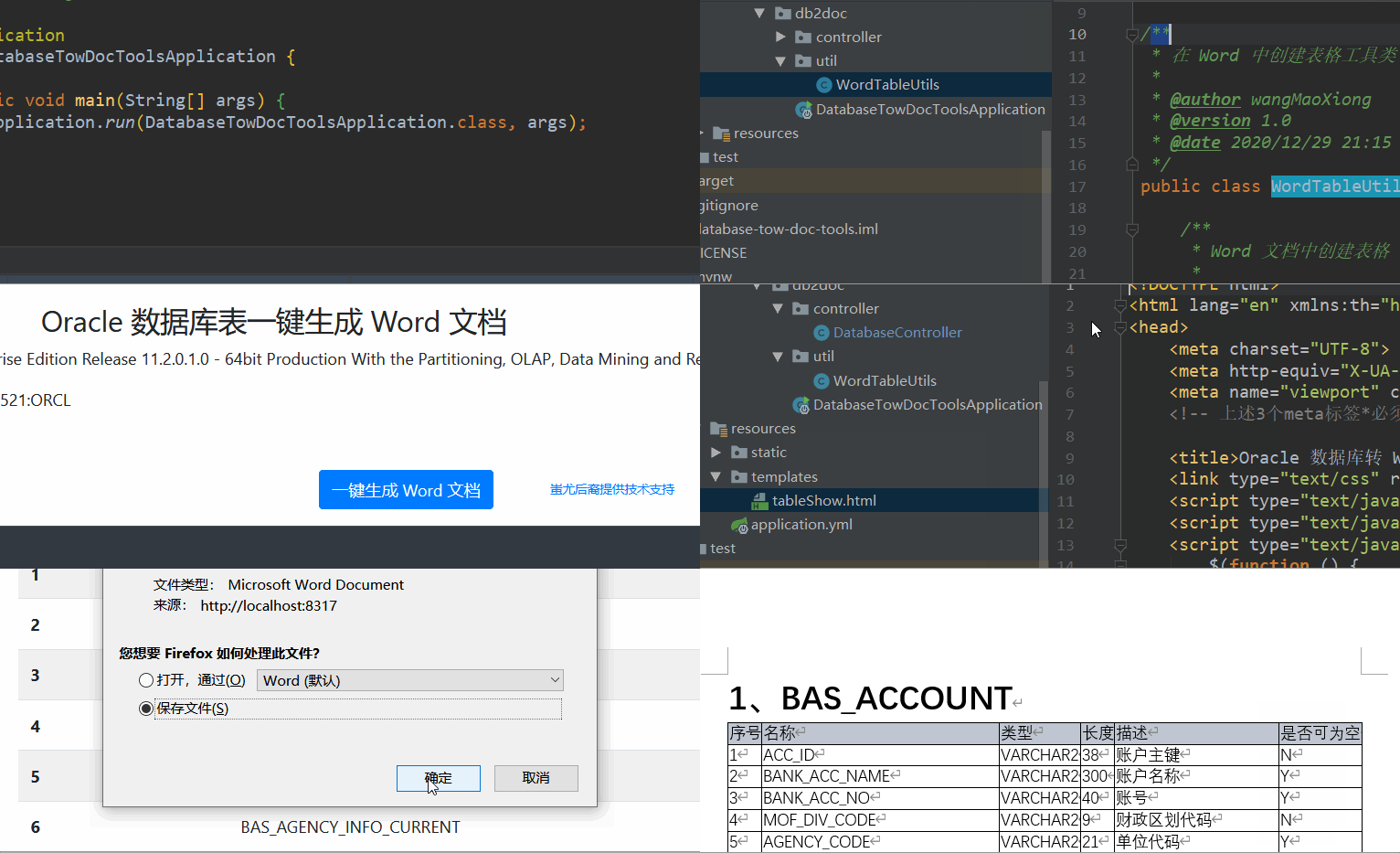
post 请求文档下载在线演示源码:后端导出接口、POI Word工具类、前端页面
Word 文档替换模板文件占位符
1、提供一个 word 模板文件,其中需要替换的数据使用占位符占着,比如 ${name},后面使用程序将数据替换占位符即可生产与源文件格式一样的文件。
2、在线演示源码:
src/main/java/com/wmx/poi/word/TemplateDoc2Test.java · 汪少棠/apache-poi-study - Gitee.com
src/main/java/com/wmx/poi/word/TemplateDocTest.java · 汪少棠/apache-poi-study - Gitee.com
解决下载文件名称乱码
https://wangmaoxiong.blog.csdn.net/article/details/106978811#t5
本文来自互联网用户投稿,文章观点仅代表作者本人,不代表本站立场,不承担相关法律责任。如若转载,请注明出处。 如若内容造成侵权/违法违规/事实不符,请点击【内容举报】进行投诉反馈!