Vue-v-if及switch的使用
首先讲下v-for
<meta charset="utf-8"><script src="js/vue.js">script><title> vue的实例title>head><body><div id="app"><p v-pre>{{msg}}p><hr /><p v-for="item in items">{{item}}p><hr /><p v-for="val in values">{{val}}p><hr /><p v-for="(val,key) in values">{{key}}-{{val}}p><hr /><p v-for="(stu,index) in students">{{index}}-{{stu.score}}p><hr />{}}取值--><select><option v-for="obj in objects" v-bind:value="obj.value">{{obj.text}}option>select><br/><br/><br/><br/><br/>div>body><script>var vm=new Vue({el:"#app",data:{msg:100,items:[10,20,30,40,50], // 数组类型values:{ // jsontitle: 'How to do lists in Vue',author: 'Jane Doe',publishedAt: '2016-04-10'},students:[ //数组+json{score:50},{score:80},{score:60},{score:90}],objects:{ // json+jsoncity1:{text:'请选择',value:-1},city2:{text:'湖南',value:1},city3:{text:'北京',value:2},}}})script>
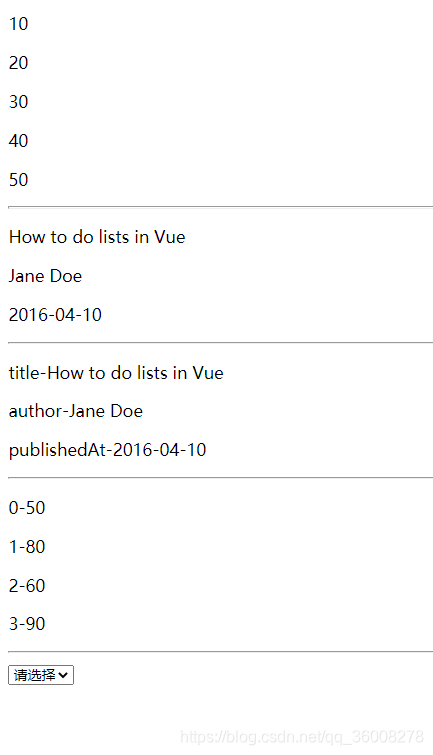
可以正常打印
然后是v-if
很简单 看官方文档就能一下子理解,这里写个小案例
<div class="box"><br/><br/><br/><br/><button v-on:click="toggle($event)">显示切换button><div v-if="toggleValue" class="test" style="width: 100px;height: 100px;background-color: #009E94;">div><p>结果为:{{toggleValue}}p>div><script>const vm = new Vue({el:".box",data:{toggleValue:true},methods:{// 方法toggle(event){if(this.toggleValue==true){this.toggleValue = false;}else{this.toggleValue = true;}}}})script>
最后是switch
<div class="box"><input type="text" v-model="num1" /><select v-model="type"><option v-for="num in nums" :value="num.value">{{num.text}}option>select><input type="text" v-model="num2" /><button v-on:click="math($event)">计算button><p>结果为:{{sum}}p>div><script>const vm = new Vue({el:".box",data:{nums:{type1:{text:'加法',value:0},type2:{text:'减法',value:1},type3:{text:'乘法',value:2},type4:{text:'除法',value:3}},num1:0,num2:0,type:0,sum:0},methods:{math(event){switch(this.type){case 0 :this.sum=parseInt(this.num1)+parseInt(this.num2); break;case 1 :this.sum=parseInt(this.num1)-parseInt(this.num2); break;case 2 :this.sum=parseInt(this.num1)*parseInt(this.num2); break;case 3 :this.sum=parseInt(this.num1)/parseInt(this.num2); break;}}}})script>
共勉
本文来自互联网用户投稿,文章观点仅代表作者本人,不代表本站立场,不承担相关法律责任。如若转载,请注明出处。 如若内容造成侵权/违法违规/事实不符,请点击【内容举报】进行投诉反馈!