JavaScript 工具函数大全(新)
前言
一线大厂笔试题灵感来源
目录:
-
第一部分:数组
-
第二部分:函数
-
第三部分:字符串
-
第四部分:对象
-
第五部分:数字
-
第六部分:浏览器操作及其它
筛选自以下两篇文章:
《127 Helpful JavaScript Snippets You Can Learn in 30 Seconds or Less》
《30 seconds of code》
原本只想筛选下上面的那篇文章,在精简掉了部分多余且无用的代码片段后,感觉不够。于是顺藤摸瓜,找到了原地址:30 seconds of code
然后将所有代码段都看了遍,筛选了以下一百多段代码片段,并加入了部分自己的理解。

另外,本文工具函数的命名非常值得借鉴。
1. 第一部分:数组
1. `all`:布尔全等判断
const all = (arr, fn = Boolean) => arr.every(fn);all([4, 2, 3], x => x > 1); // true
all([1, 2, 3]); // true
2. `allEqual`:检查数组各项相等
const allEqual = arr => arr.every(val => val === arr[0]);allEqual([1, 2, 3, 4, 5, 6]); // false
allEqual([1, 1, 1, 1]); // true
3.`approximatelyEqual`:约等于
const approximatelyEqual = (v1, v2, epsilon = 0.001) => Math.abs(v1 - v2) < epsilon;approximatelyEqual(Math.PI / 2.0, 1.5708); // true
4.`arrayToCSV`:数组转`CSV`格式(带空格的字符串)
const arrayToCSV = (arr, delimiter = ',') =>arr.map(v => v.map(x => `"${x}"`).join(delimiter)).join('\n');arrayToCSV([['a', 'b'], ['c', 'd']]); // '"a","b"\n"c","d"'
arrayToCSV([['a', 'b'], ['c', 'd']], ';'); // '"a";"b"\n"c";"d"'
5.`arrayToHtmlList`:数组转`li`列表
此代码段将数组的元素转换为标签,并将其附加到给定ID的列表中。
const arrayToHtmlList = (arr, listID) =>(el => ((el = document.querySelector('#' + listID)),(el.innerHTML += arr.map(item => `${item} `).join(''))))();arrayToHtmlList(['item 1', 'item 2'], 'myListID');
6. `average`:平均数
const average = (...nums) => nums.reduce((acc, val) => acc + val, 0) / nums.length;
average(...[1, 2, 3]); // 2
average(1, 2, 3); // 2
7. `averageBy`:数组对象属性平均数
此代码段将获取数组对象属性的平均值
const averageBy = (arr, fn) =>arr.map(typeof fn === 'function' ? fn : val => val[fn]).reduce((acc, val) => acc + val, 0) /arr.length;averageBy([{ n: 4 }, { n: 2 }, { n: 8 }, { n: 6 }], o => o.n); // 5
averageBy([{ n: 4 }, { n: 2 }, { n: 8 }, { n: 6 }], 'n'); // 5
8.`bifurcate`:拆分断言后的数组
可以根据每个元素返回的值,使用reduce()和push() 将元素添加到第二次参数fn中 。
const bifurcate = (arr, filter) =>arr.reduce((acc, val, i) => (acc[filter[i] ? 0 : 1].push(val), acc), [[], []]);
bifurcate(['beep', 'boop', 'foo', 'bar'], [true, true, false, true]);
// [ ['beep', 'boop', 'bar'], ['foo'] ]
9. `castArray`:其它类型转数组
const castArray = val => (Array.isArray(val) ? val : [val]);castArray('foo'); // ['foo']
castArray([1]); // [1]
castArray(1); // [1]
10. `compact`:去除数组中的无效/无用值
const compact = arr => arr.filter(Boolean);compact([0, 1, false, 2, '', 3, 'a', 'e' * 23, NaN, 's', 34]);
// [ 1, 2, 3, 'a', 's', 34 ]
11. `countOccurrences`:检测数值出现次数
const countOccurrences = (arr, val) => arr.reduce((a, v) => (v === val ? a + 1 : a), 0);
countOccurrences([1, 1, 2, 1, 2, 3], 1); // 3
12. `deepFlatten`:递归扁平化数组
const deepFlatten = arr => [].concat(...arr.map(v => (Array.isArray(v) ? deepFlatten(v) : v)));deepFlatten([1, [2], [[3], 4], 5]); // [1,2,3,4,5]
13. `difference`:寻找差异
此代码段查找两个数组之间的差异。
const difference = (a, b) => {const s = new Set(b);return a.filter(x => !s.has(x));
};difference([1, 2, 3], [1, 2, 4]); // [3]
14. `differenceBy`:先执行再寻找差异
在将给定函数应用于两个列表的每个元素之后,此方法返回两个数组之间的差异。
const differenceBy = (a, b, fn) => {const s = new Set(b.map(fn));return a.filter(x => !s.has(fn(x)));
};differenceBy([2.1, 1.2], [2.3, 3.4], Math.floor); // [1.2]
differenceBy([{ x: 2 }, { x: 1 }], [{ x: 1 }], v => v.x); // [ { x: 2 } ]
15. `dropWhile`:删除不符合条件的值
此代码段从数组顶部开始删除元素,直到传递的函数返回为true。
const dropWhile = (arr, func) => {while (arr.length > 0 && !func(arr[0])) arr = arr.slice(1);return arr;
};dropWhile([1, 2, 3, 4], n => n >= 3); // [3,4]
16. `flatten`:指定深度扁平化数组
此代码段第二参数可指定深度。
const flatten = (arr, depth = 1) =>arr.reduce((a, v) => a.concat(depth > 1 && Array.isArray(v) ? flatten(v, depth - 1) : v), []);flatten([1, [2], 3, 4]); // [1, 2, 3, 4]
flatten([1, [2, [3, [4, 5], 6], 7], 8], 2); // [1, 2, 3, [4, 5], 6, 7, 8]
17. `indexOfAll`:返回数组中某值的所有索引
此代码段可用于获取数组中某个值的所有索引,如果此值中未包含该值,则返回一个空数组。
const indexOfAll = (arr, val) => arr.reduce((acc, el, i) => (el === val ? [...acc, i] : acc), []);indexOfAll([1, 2, 3, 1, 2, 3], 1); // [0,3]
indexOfAll([1, 2, 3], 4); // []
18. `intersection`:两数组的交集
const intersection = (a, b) => {const s = new Set(b);return a.filter(x => s.has(x));
};intersection([1, 2, 3], [4, 3, 2]); // [2, 3]
19. `intersectionWith`:两数组都符合条件的交集
此片段可用于在对两个数组的每个元素执行了函数之后,返回两个数组中存在的元素列表。
const intersectionBy = (a, b, fn) => {const s = new Set(b.map(fn));return a.filter(x => s.has(fn(x)));
};intersectionBy([2.1, 1.2], [2.3, 3.4], Math.floor); // [2.1]
20. `intersectionWith`:先比较后返回交集
const intersectionWith = (a, b, comp) => a.filter(x => b.findIndex(y => comp(x, y)) !== -1);intersectionWith([1, 1.2, 1.5, 3, 0], [1.9, 3, 0, 3.9], (a, b) => Math.round(a) === Math.round(b)); // [1.5, 3, 0]
21. `minN`:返回指定长度的升序数组
const minN = (arr, n = 1) => [...arr].sort((a, b) => a - b).slice(0, n);minN([1, 2, 3]); // [1]
minN([1, 2, 3], 2); // [1,2]
22. `negate`:根据条件反向筛选
const negate = func => (...args) => !func(...args);[1, 2, 3, 4, 5, 6].filter(negate(n => n % 2 === 0)); // [ 1, 3, 5 ]
23. `randomIntArrayInRange`:生成两数之间指定长度的随机数组
const randomIntArrayInRange = (min, max, n = 1) =>Array.from({ length: n }, () => Math.floor(Math.random() * (max - min + 1)) + min);randomIntArrayInRange(12, 35, 10); // [ 34, 14, 27, 17, 30, 27, 20, 26, 21, 14 ]
24. `sample`:在指定数组中获取随机数
const sample = arr => arr[Math.floor(Math.random() * arr.length)];sample([3, 7, 9, 11]); // 9
25. `sampleSize`:在指定数组中获取指定长度的随机数
此代码段可用于从数组中获取指定长度的随机数,直至穷尽数组。
使用Fisher-Yates算法对数组中的元素进行随机选择。
const sampleSize = ([...arr], n = 1) => {let m = arr.length;while (m) {const i = Math.floor(Math.random() * m--);[arr[m], arr[i]] = [arr[i], arr[m]];}return arr.slice(0, n);
};sampleSize([1, 2, 3], 2); // [3,1]
sampleSize([1, 2, 3], 4); // [2,3,1]
26. `shuffle`:“洗牌” 数组
此代码段使用Fisher-Yates算法随机排序数组的元素。
const shuffle = ([...arr]) => {let m = arr.length;while (m) {const i = Math.floor(Math.random() * m--);[arr[m], arr[i]] = [arr[i], arr[m]];}return arr;
};const foo = [1, 2, 3];
shuffle(foo); // [2, 3, 1], foo = [1, 2, 3]
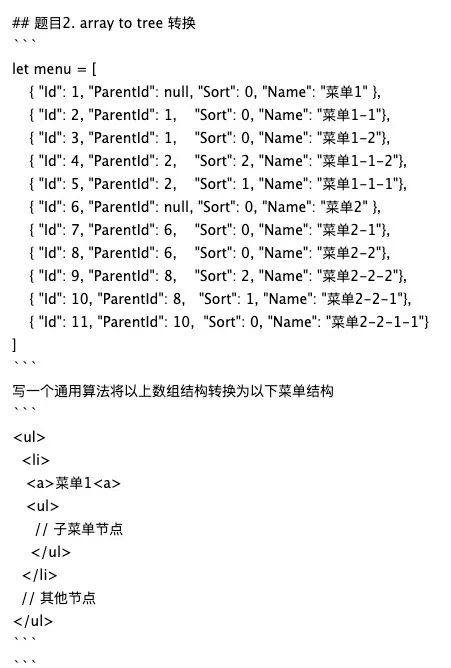
27. `nest`:根据`parent_id`生成树结构(阿里一面真题)
根据每项的parent_id,生成具体树形结构的对象。
const nest = (items, id = null, link = 'parent_id') =>items.filter(item => item[link] === id).map(item => ({ ...item, children: nest(items, item.id) }));
用法:
const comments = [{ id: 1, parent_id: null },{ id: 2, parent_id: 1 },{ id: 3, parent_id: 1 },{ id: 4, parent_id: 2 },{ id: 5, parent_id: 4 }
];
const nestedComments = nest(comments); // [{ id: 1, parent_id: null, children: [...] }]
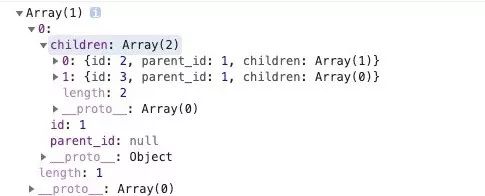
强烈建议去理解这个的实现,因为这是我亲身遇到的阿里一面真题:
2. 第二部分:函数
1.`attempt`:捕获函数运行异常
该代码段执行一个函数,返回结果或捕获的错误对象。
onst attempt = (fn, ...args) => {try {return fn(...args);} catch (e) {return e instanceof Error ? e : new Error(e);}
};
var elements = attempt(function(selector) {return document.querySelectorAll(selector);
}, '>_>');
if (elements instanceof Error) elements = []; // elements = []
2. `defer`:推迟执行
此代码段延迟了函数的执行,直到清除了当前调用堆栈。
const defer = (fn, ...args) => setTimeout(fn, 1, ...args);defer(console.log, 'a'), console.log('b'); // logs 'b' then 'a'
3. `runPromisesInSeries`:运行多个`Promises`
const runPromisesInSeries = ps => ps.reduce((p, next) => p.then(next), Promise.resolve());
const delay = d => new Promise(r => setTimeout(r, d));runPromisesInSeries([() => delay(1000), () => delay(2000)]);
//依次执行每个Promises ,总共需要3秒钟才能完成
4. `timeTaken`:计算函数执行时间
const timeTaken = callback => {console.time('timeTaken');const r = callback();console.timeEnd('timeTaken');return r;
};timeTaken(() => Math.pow(2, 10)); // 1024, (logged): timeTaken: 0.02099609375ms
5. `createEventHub`:简单的发布/订阅模式
创建一个发布/订阅(发布-订阅)事件集线,有emit,on和off方法。
-
使用
Object.create(null)创建一个空的hub对象。 -
emit,根据event参数解析处理程序数组,然后.forEach()通过传入数据作为参数来运行每个处理程序。 -
on,为事件创建一个数组(若不存在则为空数组),然后.push()将处理程序添加到该数组。 -
off,用.findIndex()在事件数组中查找处理程序的索引,并使用.splice()删除。
const createEventHub = () => ({hub: Object.create(null),emit(event, data) {(this.hub[event] || []).forEach(handler => handler(data));},on(event, handler) {if (!this.hub[event]) this.hub[event] = [];this.hub[event].push(handler);},off(event, handler) {const i = (this.hub[event] || []).findIndex(h => h === handler);if (i > -1) this.hub[event].splice(i, 1);if (this.hub[event].length === 0) delete this.hub[event];}
});
用法:
const handler = data => console.log(data);
const hub = createEventHub();
let increment = 0;// 订阅,监听不同事件
hub.on('message', handler);
hub.on('message', () => console.log('Message event fired'));
hub.on('increment', () => increment++);// 发布:发出事件以调用所有订阅给它们的处理程序,并将数据作为参数传递给它们
hub.emit('message', 'hello world'); // 打印 'hello world' 和 'Message event fired'
hub.emit('message', { hello: 'world' }); // 打印 对象 和 'Message event fired'
hub.emit('increment'); // increment = 1// 停止订阅
hub.off('message', handler);
6.`memoize`:缓存函数
通过实例化一个Map对象来创建一个空的缓存。
通过检查输入值的函数输出是否已缓存,返回存储一个参数的函数,该参数将被提供给已记忆的函数;如果没有,则存储并返回它。
const memoize = fn => {const cache = new Map();const cached = function(val) {return cache.has(val) ? cache.get(val) : cache.set(val, fn.call(this, val)) && cache.get(val);};cached.cache = cache;return cached;
};
Ps: 这个版本可能不是很清晰,还有Vue源码版的:
/*** Create a cached version of a pure function.*/
export function cached (fn: F): F {const cache = Object.create(null)return (function cachedFn (str: string) {const hit = cache[str]return hit || (cache[str] = fn(str))}: any)
}
7. `once`:只调用一次的函数
const once = fn => {let called = falsereturn function () {if (!called) {called = truefn.apply(this, arguments)}}
};
8.`flattenObject`:以键的路径扁平化对象
使用递归。
-
利用
Object.keys(obj)联合Array.prototype.reduce(),以每片叶子节点转换为扁平的路径节点。 -
如果键的值是一个对象,则函数使用调用适当的自身
prefix以创建路径Object.assign()。 -
否则,它将适当的前缀键值对添加到累加器对象。
-
prefix除非您希望每个键都有一个前缀,否则应始终省略第二个参数。
const flattenObject = (obj, prefix = '') =>Object.keys(obj).reduce((acc, k) => {const pre = prefix.length ? prefix + '.' : '';if (typeof obj[k] === 'object') Object.assign(acc, flattenObject(obj[k], pre + k));else acc[pre + k] = obj[k];return acc;}, {});flattenObject({ a: { b: { c: 1 } }, d: 1 }); // { 'a.b.c': 1, d: 1 }
9. `unflattenObject`:以键的路径展开对象
与上面的相反,展开对象。
const unflattenObject = obj =>Object.keys(obj).reduce((acc, k) => {if (k.indexOf('.') !== -1) {const keys = k.split('.');Object.assign(acc,JSON.parse('{' +keys.map((v, i) => (i !== keys.length - 1 ? `"${v}":{` : `"${v}":`)).join('') +obj[k] +'}'.repeat(keys.length)));} else acc[k] = obj[k];return acc;}, {});unflattenObject({ 'a.b.c': 1, d: 1 }); // { a: { b: { c: 1 } }, d: 1 }
这个的用途,在做Tree组件或复杂表单时取值非常舒服。
3. 第三部分:字符串
1.`byteSize`:返回字符串的字节长度
const byteSize = str => new Blob([str]).size;byteSize('😀'); // 4
byteSize('Hello World'); // 11
2. `capitalize`:首字母大写
const capitalize = ([first, ...rest]) =>first.toUpperCase() + rest.join('');capitalize('fooBar'); // 'FooBar'
capitalize('fooBar', true); // 'Foobar'
3. `capitalizeEveryWord`:每个单词首字母大写
const capitalizeEveryWord = str => str.replace(/\b[a-z]/g, char => char.toUpperCase());capitalizeEveryWord('hello world!'); // 'Hello World!'
4. `decapitalize`:首字母小写
const decapitalize = ([first, ...rest]) =>first.toLowerCase() + rest.join('')decapitalize('FooBar'); // 'fooBar'
decapitalize('FooBar'); // 'fooBar'
5. `luhnCheck`:银行卡号码校验(`luhn`算法)
Luhn算法的实现,用于验证各种标识号,例如信用卡号,IMEI号,国家提供商标识号等。
与String.prototype.split('')结合使用,以获取数字数组。获得最后一个数字。实施luhn算法。如果被整除,则返回,否则返回。
const luhnCheck = num => {let arr = (num + '').split('').reverse().map(x => parseInt(x));let lastDigit = arr.splice(0, 1)[0];let sum = arr.reduce((acc, val, i) => (i % 2 !== 0 ? acc + val : acc + ((val * 2) % 9) || 9), 0);sum += lastDigit;return sum % 10 === 0;
};
用例:
luhnCheck('4485275742308327'); // true
luhnCheck(6011329933655299); //  false
luhnCheck(123456789); // false
补充:银行卡号码的校验规则:
关于luhn算法,可以参考以下文章:
银行卡号码校验算法(Luhn算法,又叫模10算法)
银行卡号码的校验采用Luhn算法,校验过程大致如下:
-
从右到左给卡号字符串编号,最右边第一位是1,最右边第二位是2,最右边第三位是3….
-
从右向左遍历,对每一位字符t执行第三个步骤,并将每一位的计算结果相加得到一个数s。
-
对每一位的计算规则:如果这一位是奇数位,则返回t本身,如果是偶数位,则先将t乘以2得到一个数n,如果n是一位数(小于10),直接返回n,否则将n的个位数和十位数相加返回。
-
如果s能够整除10,则此号码有效,否则号码无效。
因为最终的结果会对10取余来判断是否能够整除10,所以又叫做模10算法。
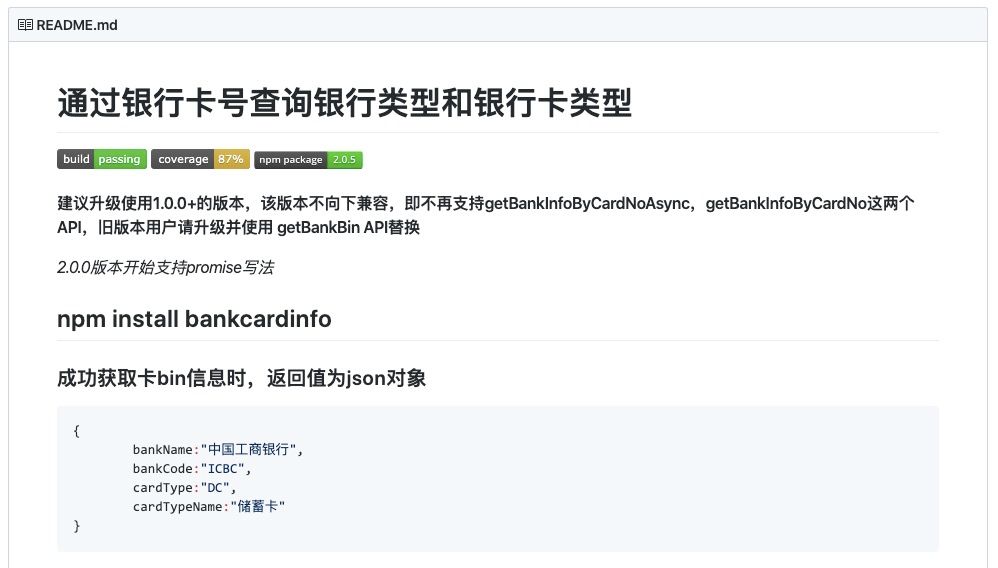
当然,还是库比较香: bankcardinfo
6. `splitLines`:将多行字符串拆分为行数组。
使用String.prototype.split()和正则表达式匹配换行符并创建一个数组。
const splitLines = str => str.split(/\r?\n/);splitLines('This\nis a\nmultiline\nstring.\n'); // ['This', 'is a', 'multiline', 'string.' , '']
7. `stripHTMLTags`:删除字符串中的`HTMl`标签
从字符串中删除HTML / XML标签。
使用正则表达式从字符串中删除HTML / XML 标记。
const stripHTMLTags = str => str.replace(/<[^>]*>/g, '');stripHTMLTags('lorem ipsum
'); // 'lorem ipsum'
4. 第四部分:对象
1. `dayOfYear`:当前日期天数
const dayOfYear = date =>Math.floor((date - new Date(date.getFullYear(), 0, 0)) / 1000 / 60 / 60 / 24);dayOfYear(new Date()); // 285
2. `forOwn`:迭代属性并执行回调
const forOwn = (obj, fn) => Object.keys(obj).forEach(key => fn(obj[key], key, obj));
forOwn({ foo: 'bar', a: 1 }, v => console.log(v)); // 'bar', 1
3. `Get Time From Date`:返回当前24小时制时间的字符串
const getColonTimeFromDate = date => date.toTimeString().slice(0, 8);getColonTimeFromDate(new Date()); // "08:38:00"
4. `Get Days Between Dates`:返回日期间的天数
const getDaysDiffBetweenDates = (dateInitial, dateFinal) =>(dateFinal - dateInitial) / (1000 * 3600 * 24);getDaysDiffBetweenDates(new Date('2019-01-01'), new Date('2019-10-14')); // 286
5. `is`:检查值是否为特定类型。
const is = (type, val) => ![, null].includes(val) && val.constructor === type;is(Array, [1]); // true
is(ArrayBuffer, new ArrayBuffer()); // true
is(Map, new Map()); // true
is(RegExp, /./g); // true
is(Set, new Set()); // true
is(WeakMap, new WeakMap()); // true
is(WeakSet, new WeakSet()); // true
is(String, ''); // true
is(String, new String('')); // true
is(Number, 1); // true
is(Number, new Number(1)); // true
is(Boolean, true); // true
is(Boolean, new Boolean(true)); // true
6. `isAfterDate`:检查是否在某日期后
const isAfterDate = (dateA, dateB) => dateA > dateB;isAfterDate(new Date(2010, 10, 21), new Date(2010, 10, 20)); // true
7. `isBeforeDate`:检查是否在某日期前
const isBeforeDate = (dateA, dateB) => dateA < dateB;isBeforeDate(new Date(2010, 10, 20), new Date(2010, 10, 21)); // true
8 `tomorrow`:获取明天的字符串格式时间
const tomorrow = () => {let t = new Date();t.setDate(t.getDate() + 1);return t.toISOString().split('T')[0];
};tomorrow(); // 2019-10-15 (如果明天是2019-10-15)
9. `equals`:全等判断
在两个变量之间进行深度比较以确定它们是否全等。
此代码段精简的核心在于Array.prototype.every()的使用。
const equals = (a, b) => {if (a === b) return true;if (a instanceof Date && b instanceof Date) return a.getTime() === b.getTime();if (!a || !b || (typeof a !== 'object' && typeof b !== 'object')) return a === b;if (a.prototype !== b.prototype) return false;let keys = Object.keys(a);if (keys.length !== Object.keys(b).length) return false;return keys.every(k => equals(a[k], b[k]));
};
用法:
equals({ a: [2, { e: 3 }], b: [4], c: 'foo' }, { a: [2, { e: 3 }], b: [4], c: 'foo' }); // true
5. 第五部分:数字
1. `randomIntegerInRange`:生成指定范围的随机整数
const randomIntegerInRange = (min, max) => Math.floor(Math.random() * (max - min + 1)) + min;randomIntegerInRange(0, 5); // 3
2. `randomNumberInRange`:生成指定范围的随机小数
const randomNumberInRange = (min, max) => Math.random() * (max - min) + min;randomNumberInRange(2, 10); // 6.0211363285087005
3. `round`:四舍五入到指定位数
const round = (n, decimals = 0) => Number(`${Math.round(`${n}e${decimals}`)}e-${decimals}`);round(1.005, 2); // 1.01
4. `sum`:计算数组或多个数字的总和
const sum = (...arr) => [...arr].reduce((acc, val) => acc + val, 0);sum(1, 2, 3, 4); // 10
sum(...[1, 2, 3, 4]); // 10
5. `toCurrency`:简单的货币单位转换
const toCurrency = (n, curr, LanguageFormat = undefined) =>Intl.NumberFormat(LanguageFormat, { style: 'currency', currency: curr }).format(n);toCurrency(123456.789, 'EUR'); // €123,456.79
toCurrency(123456.789, 'USD', 'en-us'); // $123,456.79
toCurrency(123456.789, 'USD', 'fa'); // ۱۲۳٬۴۵۶٫۷۹
toCurrency(322342436423.2435, 'JPY'); // ¥322,342,436,423
6. 第六部分:浏览器操作及其它
1. `bottomVisible`:检查页面底部是否可见
const bottomVisible = () =>document.documentElement.clientHeight + window.scrollY >=(document.documentElement.scrollHeight || document.documentElement.clientHeight);bottomVisible(); // true
2. `Create Directory`:检查创建目录
此代码段调用fs模块的existsSync()检查目录是否存在,如果不存在,则mkdirSync()创建该目录。
const fs = require('fs');
const createDirIfNotExists = dir => (!fs.existsSync(dir) ? fs.mkdirSync(dir) : undefined);
createDirIfNotExists('test');
3. `currentURL`:返回当前链接`url`
const currentURL = () => window.location.href;currentURL(); // 'https://juejin.im'
4. `distance`:返回两点间的距离
该代码段通过计算欧几里得距离来返回两点之间的距离。
const distance = (x0, y0, x1, y1) => Math.hypot(x1 - x0, y1 - y0);distance(1, 1, 2, 3); // 2.23606797749979
5. `elementContains`:检查是否包含子元素
此代码段检查父元素是否包含子元素。
const elementContains = (parent, child) => parent !== child && parent.contains(child);elementContains(document.querySelector('head'), document.querySelector('title')); // true
elementContains(document.querySelector('body'), document.querySelector('body')); // false
6. `getStyle`:返回指定元素的生效样式
const getStyle = (el, ruleName) => getComputedStyle(el)[ruleName];getStyle(document.querySelector('p'), 'font-size'); // '16px'
7. `getType`:返回值或变量的类型名
const getType = v =>v === undefined ? 'undefined' : v === null ? 'null' : v.constructor.name.toLowerCase();getType(new Set([1, 2, 3])); // 'set'
getType([1, 2, 3]); // 'array'
8. `hasClass`:校验指定元素的类名
const hasClass = (el, className) => el.classList.contains(className);
hasClass(document.querySelector('p.special'), 'special'); // true
9. `hide`:隐藏所有的指定标签
const hide = (...el) => [...el].forEach(e => (e.style.display = 'none'));hide(document.querySelectorAll('img')); // 隐藏所有![]() 标签
标签
10. `httpsRedirect`:`HTTP` 跳转 `HTTPS`
const httpsRedirect = () => {if (location.protocol !== 'https:') location.replace('https://' + location.href.split('//')[1]);
};httpsRedirect(); // 若在`http://www.baidu.com`, 则跳转到`https://www.baidu.com`
11.`insertAfter`:在指定元素之后插入新元素
const insertAfter = (el, htmlString) => el.insertAdjacentHTML('afterend', htmlString);// ... after
insertAfter(document.getElementById('myId'), 'after
');
12.`insertBefore`:在指定元素之前插入新元素
const insertBefore = (el, htmlString) => el.insertAdjacentHTML('beforebegin', htmlString);insertBefore(document.getElementById('myId'), 'before
'); // before
...
13. `isBrowser`:检查是否为浏览器环境
此代码段可用于确定当前运行时环境是否为浏览器。这有助于避免在服务器(节点)上运行前端模块时出错。
const isBrowser = () => ![typeof window, typeof document].includes('undefined');isBrowser(); // true (browser)
isBrowser(); // false (Node)
14. ` isBrowserTab`:检查当前标签页是否活动
const isBrowserTabFocused = () => !document.hidden;isBrowserTabFocused(); // true
15. `nodeListToArray`:转换`nodeList`为数组
const nodeListToArray = nodeList => [...nodeList];nodeListToArray(document.childNodes); // [ , html ]
16. `Random Hexadecimal Color Code`:随机十六进制颜色
const randomHexColorCode = () => {let n = (Math.random() * 0xfffff * 1000000).toString(16);return '#' + n.slice(0, 6);
};randomHexColorCode(); // "#e34155"
17. `scrollToTop`:平滑滚动至顶部
该代码段可用于平滑滚动到当前页面的顶部。
const scrollToTop = () => {const c = document.documentElement.scrollTop || document.body.scrollTop;if (c > 0) {window.requestAnimationFrame(scrollToTop);window.scrollTo(0, c - c / 8);}
};scrollToTop();
18. `smoothScroll`:滚动到指定元素区域
该代码段可将指定元素平滑滚动到浏览器窗口的可见区域。
const smoothScroll = element =>document.querySelector(element).scrollIntoView({behavior: 'smooth'});smoothScroll('#fooBar');
smoothScroll('.fooBar');
19. `detectDeviceType`:检测移动/PC设备
const detectDeviceType = () =>/Android|webOS|iPhone|iPad|iPod|BlackBerry|IEMobile|Opera Mini/i.test(navigator.userAgent)? 'Mobile': 'Desktop';
20. `getScrollPosition`:返回当前的滚动位置
默认参数为window ,pageXOffset(pageYOffset)为第一选择,没有则用scrollLeft(scrollTop)
const getScrollPosition = (el = window) => ({x: el.pageXOffset !== undefined ? el.pageXOffset : el.scrollLeft,y: el.pageYOffset !== undefined ? el.pageYOffset : el.scrollTop
});getScrollPosition(); // {x: 0, y: 200}
21. `size`:获取不同类型变量的长度
这个的实现非常巧妙,利用Blob类文件对象的特性,获取对象的长度。
另外,多重三元运算符,是真香。
const size = val =>Array.isArray(val)? val.length: val && typeof val === 'object'? val.size || val.length || Object.keys(val).length: typeof val === 'string'? new Blob([val]).size: 0;size([1, 2, 3, 4, 5]); // 5
size('size'); // 4
size({ one: 1, two: 2, three: 3 }); // 3
22. `escapeHTML`:转义`HTML`
当然是用来防XSS攻击啦。
const escapeHTML = str =>str.replace(/[&<>'"]/g,tag =>({'&': '&','<': '<','>': '>',"'": ''','"': '"'}[tag] || tag));escapeHTML('Me & you'); // '<a href="#">Me & you</a>本文来自互联网用户投稿,文章观点仅代表作者本人,不代表本站立场,不承担相关法律责任。如若转载,请注明出处。 如若内容造成侵权/违法违规/事实不符,请点击【内容举报】进行投诉反馈!