Mybatis-Plus使用案例(包括初始化以及常用插件)
| 序号 | 类型 | 地址 |
|---|---|---|
| 1 | MySQL | MySQL操作之概念、SQL约束(一) |
| 2 | MySQL | MySQL操作之数据定义语言(DDL)(二) |
| 3 | MySQL | MySQL操作之数据操作语言(DML)(三) |
| 4 | MySQL | MySQL操作之数据查询语言:(DQL)(四-1)(单表操作) |
| 5 | MySQL | MySQL操作之数据查询语言:(DQL)(四-2)(多表查询) |
| 6 | MySQL | MySQL操作之数据控制语言:(DC)(五) |
| 7 | MySQL | MySQL操作之数据库函数 |
| 8 | MySQL | MySQL管理之数据类型 |
| 9 | MySQL | MySQL管理之索引 |
| 10 | MySQL | MySQL管理之事务管理 |
| 11 | MySQL | MySQL管理之存储过程 |
| 12 | MySQL | MySQL管理之视图 |
| 13 | MySQL | MySQL管理之数据备份与还原 |
| 14 | MySQL | Linux(centos 7.5)服务器安装MySQL |
| 15 | MyBatis | MyBatis从入门到多表关联 |
| 16 | MyBatis | MyBatis常用方法 |
| 17 | MyBatis | Mybatis逆向工程的使用(附文件地址) |
| 18 | MyBatis | spring boot连接Mybatis数据库的配置文件(MySql、SQLserver、Oracle) |
| 19 | MyBatis-Plus | Mybatis-Plus使用案例(包括初始化以及常用插件) |
| 20 | MyBatis-Plus | Mybatis-Plus(Service CRUD 接口) |
| 21 | MyBatis-Plus | Mybatis-plus 4种条件构造器方式 |
| 22 | MyBatis-Plus | Mybatis-Plus 执行自定义SQL |
| 23 | MyBatis-Plus | MyBatis-plus配置自定义SQL(执行用户传入SQL) |
| 24 | MyBatis-Plus | Mybatis-Plus(连接Hive) |
| 25 | MyBatis-Plus | Mybatis-Plus 代码生成器 |
文章目录
- 一、简介
- 1、特性
- 二、起始案例
- 1、POM.xml
- 2、User.java
- 3、UserMapper.Java
- 4、启动类
- 5、application.properties
- 6、测试类
- 三、实体类中注解
- 1、@TableId主键策略
- 2、@TableName注解
- 3、@TableField
- 四、通用CRUD
- 1、解释
- 2、insert( )
- 3、updateById( )
- 4、update( )
- 5、deleteById( )
- 6、deleteByMap( )
- 7、delete( )
- 8、deleteBatchIds( )
- 9、selectById( )
- 10、selectBatchIds( )
- 11、selectOne( )
- 12、selectCount( )
- 13、selectList( )
- 14、selectPage( )
- 五、基本配置(application.properties)
- 1、打开执行SQL的日志(打印执行SQL)
- 2、confifigLocation
- 3、mapperLocations
- 4、typeAliasesPackage
- 5、mapUnderscoreToCamelCase
- 6、idType
- 7、tablePrefix
- 六、查询条件配置
- 1、allEq
- 2、基本比较操作
- 3、模糊查询
- 4、排序
- 5、关联拼接
- 七、Oracle主键Sequence
- 1、application.properties配置
- 2、配置序列
- 3、测试类(Test)
- 八、自动填充功能
- 1、添加@TableField注解
- 2、编写MyMetaObjectHandler
- 3、测试类(Test)
- 九、逻辑删除
- 1、修改表结构
- 2、配置
- 3、测试
- 4、方式2:全局配置
- 十、通用枚举
- 1、修改表结构:
- 2、定义枚举
- 3、application.properties配置
- 4、修改实体
- 5、测试
- 6、根据ID查询数据
- 7、条件查询
- 十一、代码生成器
- 1、pom.xml
- 2、执行文件代码
- 3、需要修改的位置
- 4、各配置与项目位置关系
- 5、测试
- 6、项目源码包
一、简介
MyBatis-Plus(简称 MP)是一个 MyBatis 的增强工具,在 MyBatis 的基础上只做增强不做改变,为简化开发、提高
效率而生。
官网: https://mybatis.plus/ 或 https://mp.baomidou.com/
1、特性
-
支持主键自动生成:支持多达 4 种主键策略(内含分布式唯一 ID 生成器 - Sequence),可自由配置,完美解决主键问题。
-
支持 ActiveRecord 模式:支持 ActiveRecord 形式调用,实体类只需继承 Model 类即可进行强大的 CRUD 操作。
-
内置分页插件:基于 MyBatis 物理分页,开发者无需关心具体操作,配置好插件之后,写分页等同于普通 List
查询。
二、起始案例
1、POM.xml
<project xmlns="http://maven.apache.org/POM/4.0.0" xmlns:xsi="http://www.w3.org/2001/XMLSchema-instance"xsi:schemaLocation="http://maven.apache.org/POM/4.0.0 https://maven.apache.org/xsd/maven-4.0.0.xsd"><modelVersion>4.0.0modelVersion><parent><groupId>org.springframework.bootgroupId><artifactId>spring-boot-starter-parentartifactId><version>2.5.1version><relativePath/> parent><groupId>com.lydmsgroupId><artifactId>mybatis-plusartifactId><version>0.0.1-SNAPSHOTversion><name>mybatis-plusname><description>Demo project for Spring Bootdescription><properties><java.version>1.8java.version>properties><dependencies><dependency><groupId>org.springframework.bootgroupId><artifactId>spring-boot-starter-webartifactId>dependency><dependency><groupId>org.springframework.bootgroupId><artifactId>spring-boot-starter-testartifactId><scope>testscope>dependency><dependency><groupId>junitgroupId><artifactId>junitartifactId><scope>testscope>dependency><dependency><groupId>org.projectlombokgroupId><artifactId>lombokartifactId><optional>trueoptional>dependency><dependency><groupId>com.baomidougroupId><artifactId>mybatis-plus-boot-starterartifactId><version>3.1.1version>dependency><dependency><groupId>mysqlgroupId><artifactId>mysql-connector-javaartifactId><version>5.1.47version>dependency>dependencies><build><plugins><plugin><groupId>org.springframework.bootgroupId><artifactId>spring-boot-maven-pluginartifactId>plugin>plugins>build>project>2、User.java
package com.lydms.mybatisplus.pojo;import com.baomidou.mybatisplus.annotation.IdType;
import com.baomidou.mybatisplus.annotation.TableField;
import com.baomidou.mybatisplus.annotation.TableId;
import com.baomidou.mybatisplus.annotation.TableName;
import lombok.Data;@Data
@TableName("tb_user")
public class User {@TableId(value = "id", type = IdType.AUTO)private Long id;@TableField("user_name")private String userName;@TableField(value = "password")private String password;@TableField(value = "name")private String name;@TableField(value = "age")private Integer age;@TableField(value = "email")private String mail;}
3、UserMapper.Java
import com.baomidou.mybatisplus.core.mapper.BaseMapper;
import com.lydms.mybatisplus.pojo.User;public interface UserMapper extends BaseMapper<User> {}
4、启动类
import org.mybatis.spring.annotation.MapperScan;
import org.springframework.boot.SpringApplication;
import org.springframework.boot.autoconfigure.SpringBootApplication;@MapperScan("com.lydms.mybatisplus.mapper")
@SpringBootApplication
public class MybatisPlusApplication {public static void main(String[] args) {SpringApplication.run(MybatisPlusApplication.class, args);}}
5、application.properties
server.port=8080spring.datasource.driver-class-name=com.mysql.jdbc.Driver
spring.datasource.url=jdbc:mysql://49.142.13.131:3306/myself?
spring.datasource.username=root
spring.datasource.password=231412
6、测试类
import com.lydms.mybatisplus.mapper.UserMapper;
import com.lydms.mybatisplus.pojo.User;
import org.junit.jupiter.api.Test;
import org.junit.runner.RunWith;
import org.springframework.beans.factory.annotation.Autowired;
import org.springframework.boot.test.context.SpringBootTest;
import org.springframework.test.context.junit4.SpringRunner;import java.util.List;@RunWith(SpringRunner.class)
@SpringBootTest
class UserMapperTestTest {@Autowiredprivate UserMapper userMapper;@Testpublic void getUserMapper() {List<User> users = userMapper.selectList(null);for (User user : users) {System.out.println(user.toString());}}
}
三、实体类中注解
1、@TableId主键策略
- 描述:主键注解
| 属性 | 类型 | 必须指定 | 默认值 | 描述 |
|---|---|---|---|---|
| value | String | 否 | “” | 主键字段名 |
| type | Enum | 否 | IdType.NONE | 主键类型 |
type中主键类型:
一共有三种策略:
-
数据库ID自增
-
该类型为未设置主键类型
-
用户输入ID(该类型可以通过自己注册自动填充插件进行填充)
-
只有当插入对象ID 为空,才自动填充(idWorker/UUID/idWorker 的字符串表示)。
**源码: **
/*** 生成ID类型枚举类*/
@Getter
public enum IdType {// 1.数据库ID自增AUTO(0),//2.该类型为未设置主键类型NONE(1),//3.用户输入ID(该类型可以通过自己注册自动填充插件进行填充)INPUT(2),//4.以下3种类型、只有当插入对象ID 为空,才自动填充。//4.1全局唯一ID (idWorker)ID_WORKER(3),//4.2全局唯一ID (UUID)UUID(4),//4.3字符串全局唯一ID (idWorker 的字符串表示)ID_WORKER_STR(5);private final int key;
}
案例:
@TableId(value = "id", type = IdType.AUTO)
private Long id;
2、@TableName注解
- 描述:表名注解
@Data
@TableName("tb_user")
public class User {@TableId(value = "id", type = IdType.AUTO)private Long id;private String userName;private String password;private String name;private Integer age;private String email;
}
3、@TableField
在MP中通过@TableField注解可以指定字段的一些属性,常常解决的问题有2个:
-
对象中的属性名和字段名不一致的问题(非驼峰)
-
对象中的属性字段在表中不存在的问题
| 属性 | 类型 | 必须指定 | 默认值 | 描述 |
|---|---|---|---|---|
| value | String | 否 | “” | 数据库字段名 |
| exist | boolean | 否 | true | 是否为数据库表字段 |
| select | boolean | 否 | true | 是否进行 select 查询 |
使用:
@Data
@TableName("tb_user")
public class User {@TableId(value = "id", type = IdType.)private Long id;//  改字段在数据库中是否存在(false:不存在)@TableField(exist = false)private String name;//  是否从数据库中查询该字段@TableField(select = false)private Integer age;//  字段名与数据库不一致@TableField(value = "email")private String mail;
}
四、通用CRUD
- 插入一条数据
- int insert(entity);
- 根据 ID 删除
- int deleteById(id);
- int deleteByMap(@Param(columnMap);
1、解释
/*** Mapper 继承该接口后,无需编写 mapper.xml 文件,即可获得CRUD功能* 这个 Mapper 支持 id 泛型
*/
public interface BaseMapper<T> extends Mapper<T> {/*** 插入一条记录** @param entity 实体对象*/int insert(T entity);/*** 根据 ID 删除** @param id 主键ID*/int deleteById(Serializable id);/*** 根据 columnMap 条件,删除记录** @param columnMap 表字段 map 对象*/int deleteByMap(@Param(Constants.COLUMN_MAP) Map<String, Object> columnMap);/*** 根据 entity 条件,删除记录** @param wrapper 实体对象封装操作类(可以为 null)*/int delete(@Param(Constants.WRAPPER) Wrapper<T> wrapper);/*** 删除(根据ID 批量删除)** @param idList 主键ID列表(不能为 null 以及 empty)*/int deleteBatchIds(@Param(Constants.COLLECTION) Collection<? extends Serializable> idList);/*** 根据 ID 修改** @param entity 实体对象*/int updateById(@Param(Constants.ENTITY) T entity);/*** 根据 whereEntity 条件,更新记录** @param entity 实体对象 (set 条件值,可以为 null)* @param updateWrapper 实体对象封装操作类(可以为 null,里面的 entity 用于生成 where 语句)*/int update(@Param(Constants.ENTITY) T entity, @Param(Constants.WRAPPER) Wrapper<T> updateWrapper);/*** 根据 ID 查询** @param id 主键ID*/T selectById(Serializable id);/*** 查询(根据ID 批量查询)** @param idList 主键ID列表(不能为 null 以及 empty)*/List<T> selectBatchIds(@Param(Constants.COLLECTION) Collection<? extends Serializable> idList);/*** 查询(根据 columnMap 条件)** @param columnMap 表字段 map 对象*/List<T> selectByMap(@Param(Constants.COLUMN_MAP) Map<String, Object> columnMap);/*** 根据 entity 条件,查询一条记录** @param queryWrapper 实体对象封装操作类(可以为 null)*/T selectOne(@Param(Constants.WRAPPER) Wrapper<T> queryWrapper);/*** 根据 Wrapper 条件,查询总记录数** @param queryWrapper 实体对象封装操作类(可以为 null)*/Integer selectCount(@Param(Constants.WRAPPER) Wrapper<T> queryWrapper);/*** 根据 entity 条件,查询全部记录** @param queryWrapper 实体对象封装操作类(可以为 null)*/List<T> selectList(@Param(Constants.WRAPPER) Wrapper<T> queryWrapper);/*** 根据 Wrapper 条件,查询全部记录** @param queryWrapper 实体对象封装操作类(可以为 null)*/List<Map<String, Object>> selectMaps(@Param(Constants.WRAPPER) Wrapper<T> queryWrapper);/*** 根据 Wrapper 条件,查询全部记录* 注意: 只返回第一个字段的值
** @param queryWrapper 实体对象封装操作类(可以为 null)*/List<Object> selectObjs(@Param(Constants.WRAPPER) Wrapper<T> queryWrapper);/*** 根据 entity 条件,查询全部记录(并翻页)** @param page 分页查询条件(可以为 RowBounds.DEFAULT)* @param queryWrapper 实体对象封装操作类(可以为 null)*/IPage<T> selectPage(IPage<T> page, @Param(Constants.WRAPPER) Wrapper<T> queryWrapper);/*** 根据 Wrapper 条件,查询全部记录(并翻页)** @param page 分页查询条件* @param queryWrapper 实体对象封装操作类*/IPage<Map<String, Object>> selectMapsPage(IPage<T> page, @Param(Constants.WRAPPER) Wrapper<T> queryWrapper);
}
2、insert( )
- 插入一条记录
@Test//测试插入一条记录public void testInser() {User user = new User();user.setUserName("张三");user.setPassword("sfdsf");user.setEmail("1231231@qq.com");// 返回受影响的行int row = userMapper.insert(user);}
3、updateById( )
- 根据主键进行更新
@Testpublic void testUpdateById() {User user = new User();user.setId(2L);user.setName("赵六");// 返回受影响的行数int row = userMapper.updateById(user);System.out.println(row);}
4、update( )
- 根据条件进行更新
案例:
@Testpublic void testUpdate() {// 更新内容User user = new User();user.setAge(22);// 设置更新条件QueryWrapper<User> wrapper = new QueryWrapper<>();wrapper.eq("id", 6);// 返回受影响行数int row = userMapper.update(user, wrapper);}
通过UPdateWrapper更新
@Testpublic void testUpdate() {// 设置更新条件UpdateWrapper<User> wrapper = new UpdateWrapper<>();wrapper.eq("id", 6).set("age", 12);// 返回受影响行数int row = userMapper.update(null, wrapper);}
5、deleteById( )
- 根据主键删除
@Testpublic void testDeleteById(){// 执行删除操作int row = userMapper.deleteById(3L);}
6、deleteByMap( )
- 根据columnMap条件删除
- 将columnMap中的元素设置为删除的条件,多个之间为and关系
@Testpublic void testDeleteByMap(){HashMap<String, Object> columnMap = new HashMap<>();columnMap.put("age",20);columnMap.put("name","张三");// 执行删除操作int row = userMapper.deleteByMap(columnMap);}
7、delete( )
- 根据 entity 条件,删除记录
@Testpublic void testDelete(){User user = new User();user.setAge(20);user.setName("张三");// 将实体对象封装为查询条件QueryWrapper<User> queryWrapper = new QueryWrapper<>();int row = userMapper.delete(queryWrapper);}
8、deleteBatchIds( )
- 删除(根据ID 批量删除)
@Testpublic void DeleteBatchIds() {List<Long> list = Arrays.asList(1L, 3L, 5L);// 根据id集合批量删除int row = userMapper.deleteBatchIds(list);}
9、selectById( )
- 根据 ID 查询
@Testpublic void selectById() {//根据id查询数据 User user = userMapper.selectById(2L);}
10、selectBatchIds( )
- 查询(根据ID 批量查询)
@Testpublic void selectBatchIds() {List<Long> list = Arrays.asList(2L, 3L, 10L);//根据id集合批量查询List<User> users = userMapper.selectBatchIds(list);for (User user : users) {System.out.println(user);}}
11、selectOne( )
- 根据 entity 条件,查询一条记录
- 如果结果超过一条会报错
@Testpublic void testSelectOne() {QueryWrapper<User> wrapper = new QueryWrapper<User>();wrapper.eq("name", "李四");//根据条件查询一条数据,如果结果超过一条会报错 User user = userMapper.selectOne(wrapper);}
12、selectCount( )
- 根据 Wrapper 条件,查询总记录数
@Testpublic void testSelectCount() {QueryWrapper<User> wrapper = new QueryWrapper<User>();wrapper.gt("age", 23);// 查询年龄大于23岁数量Integer count = this.userMapper.selectCount(wrapper);}
13、selectList( )
- 根据 entity 条件,查询全部记录
@Testpublic void selectList() {// 设置查询条件 年龄大于23岁QueryWrapper<User> wrapper = new QueryWrapper<User>();wrapper.gt("age", 23);// 根据条件查询数据 List<User> users = userMapper.selectList(wrapper);for (User user : users) {System.out.println(user);}}
14、selectPage( )
- 根据 entity 条件,查询全部记录(并分页)
配置类:
import com.baomidou.mybatisplus.extension.plugins.PaginationInterceptor;
import org.mybatis.spring.annotation.MapperScan;
import org.springframework.context.annotation.Bean;
import org.springframework.context.annotation.Configuration;@Configuration
@MapperScan("com.lydms.mybatisplus")
//设置mapper接口的扫描包
public class MybatisPlusConfig {@Bean
//    分页插件public PaginationInterceptor paginationInterceptor() {return new PaginationInterceptor();}
}
执行查询条件:
    @Testpublic void testSelePage() {
//        配置查询条件QueryWrapper<User> wrapper = new QueryWrapper<>();wrapper.gt("age", 20);//        配置分页条件Page<User> userPage = new Page<>(0, 2);//        分页查询数据IPage<User> iPage = userMapper.selectPage(userPage, wrapper);System.out.println("数据总条数:" + iPage.getTotal());System.out.println("总页数:" + iPage.getPages());List<User> users = iPage.getRecords();for (User user : users) {System.out.println("user = " + user);}}
执行结果:
数据总条数:3
总页数:2
user = User(id=3, userName=wangwu, password=123456, name=王五, age=null, mail=test3@qq.com)
user = User(id=4, userName=zhaoliu, password=123456, name=赵六, age=null, mail=test3@qq.com)
五、基本配置(application.properties)
1、打开执行SQL的日志(打印执行SQL)
mybatis-plus.configuration.log-impl=org.apache.ibatis.logging.stdout.StdOutImpl
2、confifigLocation
- MyBatis 配置文件位置,如果您有单独的 MyBatis 配置,请将其路径配置到 confifigLocation 中。
mybatis-plus.config-location = classpath:mybatis-config.xml
3、mapperLocations
- MyBatis Mapper 所对应的 XML 文件位置,如果您在 Mapper 中有自定义方法(XML 中有自定义实现),需要进行该配置,告诉 Mapper 所对应的 XML 文件位置。
mybatis-plus.mapper-locations = classpath*:mybatis/*.xml
案例:
UserMapper.xml:
DOCTYPE mapper PUBLIC "-//mybatis.org//DTD Mapper 3.0//EN" "http://mybatis.org/dtd/mybatis-3-mapper.dtd">
<mapper namespace="com.lydms.mybatisplus.mapper.UserMapper"><select id="findById" resultType="com.lydms.mybatisplus.pojo.User"> select * from tb_user where id = #{id} select>
mapper>
User:
import com.lydms.mybatisplus.pojo.User;
import com.baomidou.mybatisplus.core.mapper.BaseMapper;
public interface UserMapper extends BaseMapper<User> { User findById(Long id);
}
4、typeAliasesPackage
-
MyBaits 别名包扫描路径,通过该属性可以给包中的类注册别名,注册后在 Mapper 对应的 XML 文件中可以直接使
用类名,而不用使用全限定的类名(即 XML 中调用的时候不用包含包名)。
mybatis-plus.type-aliases-package = com.lydms.mybatisplus.pojo
5、mapUnderscoreToCamelCase
- 是否开启自动驼峰命名规则(camel case)映射,即从经典数据库列名 A_COLUMN(下划线命名) 到经典 Java 属性名 aColumn(驼峰命名) 的类似映射。
- 此属性在 MyBatis 中原默认值为 false,在 MyBatis-Plus 中默认开启
- 如果数据库命名符合规则无需使用 @TableField 注解指定数据库字段名
#关闭自动驼峰映射,该参数不能和mybatis-plus.config-location同时存在
mybatis-plus.configuration.map-underscore-to-camel-case=false
6、idType
- 全局默认主键类型,设置后,即可省略实体对象中的@TableId(type = IdType.AUTO)配置。
mybatis-plus.global-config.db-config.id-type=auto
7、tablePrefix
- 表名前缀,全局配置后可省略@TableName()配置。
mybatis-plus.global-config.db-config.table-prefix=tb_
六、查询条件配置
1、allEq
- 全部eq(或个别isNull)
- 用来匹配多个条件(and)
allEq(Map<R, V> params)
allEq(Map<R, V> params, boolean null2IsNull)
allEq(boolean condition, Map<R, V> params, boolean null2IsNull)
个别参数说明:
params : key 为数据库字段名, value 为字段值
null2IsNull : 为 true 则在 map 的 value 为 null 时调用 isNull 方法,为 false 时则忽略 value 为 null 的
案例:
例1: allEq({id:1,name:"老王",age:null}) ---> id = 1 and name = '老王' and age is null \
例2: allEq({id:1,name:"老王",age:null}, false) ---> id = 1 and name = '老王'
案例:
@Testpublic void testWrapper() {QueryWrapper<User> wrapper = new QueryWrapper<>();//设置条件Map<String, Object> params = new HashMap<>();params.put("name", "曹操");params.put("age", "20");params.put("password", null);wrapper.allEq(params);// SELECT * FROM tb_user WHERE password IS NULL AND name = ? AND age = ?wrapper.allEq(params,false);// SELECT * FROM tb_user WHERE name = ? AND age = ?List<User> users = this.userMapper.selectList(wrapper);for (User user : users) {System.out.println(user);}}
2、基本比较操作
- eq
等于 =
- ne
不等于 <>
- gt
大于 >
- ge
大于等于 >=
- lt
小于 <
- le
小于等于 <=
- between
BETWEEN 值1 AND 值2
- notBetween
NOT BETWEEN 值1 AND 值2
- in
字段 IN (value.get(0), value.get(1), ...)
3、模糊查询
- like
LIKE '%值%'
例: like("name", "王") ---> name like '%王%'
- notLike
NOT LIKE '%值%'
例: notLike("name", "王") ---> name not like '%王%'
- likeLeft
LIKE '%值'
例: likeLeft("name", "王") ---> name like '%王'
- likeRight
LIKE '值%'
例: likeRight("name", "王") ---> name like '王%'
案例:
@Testpublic void testLikeWrapper() {QueryWrapper<User> wrapper = new QueryWrapper<>();//SELECT id,user_name,password,name,age,email FROM tb_user WHERE name LIKE ?// Parameters: %曹%(String)wrapper.like("name", "曹");List<User> users = userMapper.selectList(wrapper);for (User user : users) {System.out.println(user);}}
4、排序
- orderBy
排序:ORDER BY 字段, ...
例: orderBy(true, true, "id", "name") ---> order by id ASC,name ASC
- orderByAsc
排序:ORDER BY 字段, ... ASC
例: orderByAsc("id", "name") ---> order by id ASC,name ASC
- orderByDesc
排序:ORDER BY 字段, ... DESC
例: orderByDesc("id", "name") ---> order by id DESC,name DESC
案例:
@Testpublic void testOrderByWrapper() {QueryWrapper<User> wrapper = new QueryWrapper<>();//SELECT id,user_name,password,name,age,email FROM tb_user ORDER BY age DESCwrapper.orderByDesc("age");List<User> users = userMapper.selectList(wrapper);for (User user : users) {System.out.println(user);}}
5、关联拼接
- or( )
主动调用or表示紧接着下一个方法不是用and连接!(不调用or则默认为使用and连接)
or()
or(boolean condition)
案例
拼接
eq("id",1).or().eq("name","老王")
等效:
id = 1 or name = '老王'
or(Consumer<Param> consumer)
or(boolean condition, Consumer<Param> consumer)
嵌套
or(i -> i.eq("name", "李白").ne("status", "活着"))
等效:
or (name = '李白' and status <> '活着')
- and
and(Consumer<Param> consumer)
and(boolean condition, Consumer<Param> consumer)
案例:
and(i -> i.eq("name", "李白").ne("status", "活着"))
等效:
and (name = '李白' and status <> '活着')常用:
and(i -> i.eq("name", "李白").or().eq("status", "活着"))
七、Oracle主键Sequence
在mysql中,主键往往是自增长的,这样使用起来是比较方便的,如果使用的是Oracle数据库,那么就不能使用自增
长了,就得使用Sequence 序列生成id值了。
1、application.properties配置
#id生成策略
mybatis-plus.global-config.db-config.id-type=input
2、配置序列
1)需要配置MP的序列生成器到Spring容器:
import com.baomidou.mybatisplus.extension.incrementer.OracleKeyGenerator;
import com.baomidou.mybatisplus.extension.plugins.PaginationInterceptor;
import org.springframework.context.annotation.Bean;
import org.springframework.context.annotation.Configuration;@Configuration
//@MapperScan("com.cdp.bdc.campaign")
//设置mapper接口的扫描包
public class MybatisPlusConfig {@Bean
//    分页插件public PaginationInterceptor paginationInterceptor() {return new PaginationInterceptor();}//    序列生成器@Beanpublic OracleKeyGenerator oracleKeyGenerator() {return new OracleKeyGenerator();}
}
2)在实体对象中指定序列的名称:
@KeySequence(value = "SEQ_USER", clazz = Long.class)
public class User{private String id;private String age;private String email;private String name;private String userName;private String password;
}
3、测试类(Test)
import com.lydms.mapper.UserMapper;
import com.lydms.pojo.User;
import org.junit.Test;
import org.junit.runner.RunWith;
import org.springframework.beans.factory.annotation.Autowired;
import org.springframework.boot.test.context.SpringBootTest;
import org.springframework.test.context.junit4.SpringRunner;import java.util.List;@RunWith(SpringRunner.class)
@SpringBootTest
public class UserMapperTest {@Autowiredprivate UserMapper userMapper;@Testpublic void testInsert() {User user = new User();user.setAge(20);user.setEmail("test@itcast.cn");user.setName("曹操");user.setUserName("caocao");user.setPassword("123456");int result = this.userMapper.insert(user);//返回的result是受影响的行数,并不是自增 后的id System.out.println("result = " + result);System.out.println(user.getId());//自增后的id会回填到对象中 }@Testpublic void testSelectById() {User user = this.userMapper.selectById(8L);System.out.println(user);}
}
八、自动填充功能
有些时候我们可能会有这样的需求,插入或者更新数据时,希望有些字段可以自动填充数据,比如密码、version等。在MP中提供了这样的功能,可以实现自动填充。
1、添加@TableField注解
为password添加自动填充功能,在新增数据时有效。
@TableField(fill = FieldFill.INSERT) //插入数据时进行填充
private String password;
FieldFill提供了多种模式选择:
public enum FieldFill {
//	默认不处理DEFAULT,
//	插入时填充字段INSERT,
//	新时填充字段UPDATE,
//	插入和更新时填充字段INSERT_UPDATE
}
2、编写MyMetaObjectHandler
import com.baomidou.mybatisplus.core.injector.AbstractMethod;
import com.baomidou.mybatisplus.core.injector.DefaultSqlInjector;import java.util.List;public class MySqlInjector extends DefaultSqlInjector {@Overridepublic List<AbstractMethod> getMethodList(Class<?> mapperClass) {List<AbstractMethod> methodList = super.getMethodList();methodList.add(new FindAll());// 再扩充自定义的方法methodList.add(new FindAll());return methodList;}
}
3、测试类(Test)
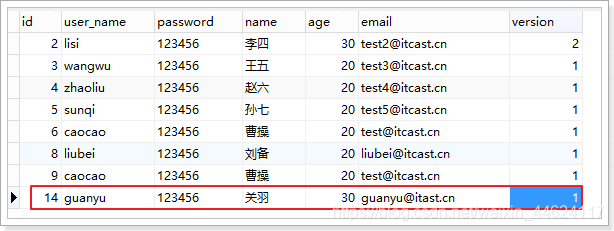
@Test
public void testInsert() {User user = new User();user.setName("关羽");user.setUserName("guanyu");user.setAge(30);user.setEmail("guanyu@itast.cn");user.setVersion(1);int result = this.userMapper.insert(user);System.out.println("result = " + result);
}
测试结果:
九、逻辑删除
开发系统时,有时候在实现功能时,删除操作需要实现逻辑删除,所谓逻辑删除就是将数据标记为删除,而并非真正
的物理删除(非DELETE操作),查询时需要携带状态条件,确保被标记的数据不被查询到。这样做的目的就是避免
数据被真正的删除。
1、修改表结构
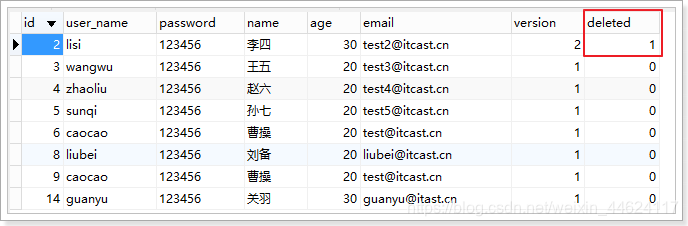
为tb_user表增加deleted字段,用于表示数据是否被删除,1代表删除,0代表未删除。
ALTER TABLE `tb_user` ADD COLUMN `deleted` int(1) NULL DEFAULT 0 COMMENT '1代表删除,0代表未删除' AFTER `version`;
同时,也修改User实体,增加deleted属性并且添加@TableLogic注解:
@TableLogic
private Integer deleted;
所有:
@Data
public class User {private String id;private int age;private String email;private String name;private String userName;private String password;private int version;@TableLogicprivate Integer deleted;
}
2、配置
# 逻辑已删除值(默认为 1)
mybatis-plus.global-config.db-config.logic-delete-value=1
# 逻辑未删除值(默认为 0)
mybatis-plus.global-config.db-config.logic-not-delete-value=0
3、测试
@Test
public void testDeleteById(){this.userMapper.deleteById(2L);
}
4、方式2:全局配置
配置文件:
# 全局逻辑删除的实体字段名(since 3.3.0,配置后可以忽略不配置步骤2)
mybatis-plus.global-config.db-config.logic-delete-field=deleted
# 逻辑已删除值(默认为 1)
mybatis-plus.global-config.db-config.logic-delete-value=1
# 逻辑未删除值(默认为 0)
mybatis-plus.global-config.db-config.logic-not-delete-value=0
实体类:
@Data
public class User {private String id;private int age;private String email;private String name;private String userName;private String password;private int version;private Integer deleted;
}
十、通用枚举
解决了繁琐的配置,让 mybatis 优雅的使用枚举属性!
官网地址
1、修改表结构:
ALTER TABLE `tb_user` ADD COLUMN `sex` int(1) NULL DEFAULT 1 COMMENT '1-男,2-女' AFTER `deleted`;
2、定义枚举
import com.baomidou.mybatisplus.core.enums.IEnum;public enum SexEnum implements IEnum<Integer> {/*** 性别男*/MAN(1, "男"),WOMAN(2, "女");private int value;private String desc;SexEnum(int value, String desc) {this.value = value;this.desc = desc;}@Overridepublic Integer getValue() {return this.value;}@Overridepublic String toString() {return this.desc;}
}
3、application.properties配置
# 枚举包扫描
mybatis-plus.type-enums-package=cn.itcast.mp.enums
4、修改实体
//  性别(1-男,2-女)
private SexEnum sex;
完整版:
import lombok.Data;@Data
public class User {private String id;private int age;private String email;private String name;private String userName;private String password;private int version;//  性别(1-男,2-女)private SexEnum sex;
}
5、测试
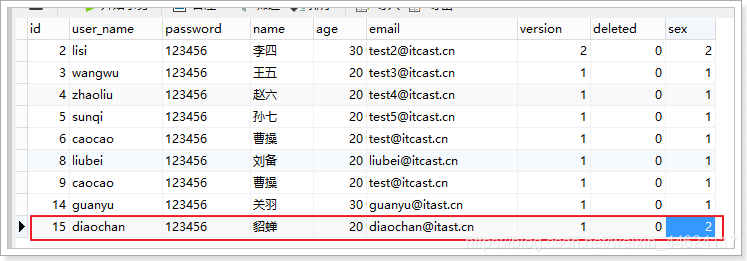
@Test
public void testInsert() {User user = new User();user.setName("貂蝉");user.setUserName("diaochan");user.setAge(20);user.setEmail("diaochan@itast.cn");user.setVersion(1);user.setSex(SexEnum.WOMAN);int result = this.userMapper.insert(user);System.out.println("result = " + result);
}
存入数据库中数据:
6、根据ID查询数据
@Test public void testSelectById(){ User user = this.userMapper.selectById(2L); System.out.println(user);
}
结果:
[main] [cn.itcast.mp.mapper.UserMapper.selectById]-[DEBUG] ==> Preparing: SELECT id,user_name,password,name,age,email,version,deleted,sex FROM tb_user WHERE id=? AND deleted=0User(id=2, userName=lisi, password=123456, name=李四, age=30, email=test2@itcast.cn, address=null, version=2, deleted=0, sex=女)
7、条件查询
@Test public void testSelectBySex() {QueryWrapper<User> wrapper = new QueryWrapper<>();wrapper.eq("sex", SexEnum.WOMAN); List<User> users = this.userMapper.selectList(wrapper); for (User user : users) { System.out.println(user); }
}
结果:
[main] [cn.itcast.mp.mapper.UserMapper.selectList]-[DEBUG] ==> Preparing: SELECT id,user_name,password,name,age,email,version,deleted,sex FROM tb_user WHERE deleted=0 AND sex = ? [main] [cn.itcast.mp.mapper.UserMapper.selectList]-[DEBUG] ==> Parameters: 2(Integer) [main] [cn.itcast.mp.mapper.UserMapper.selectList]-[DEBUG] <== Total: 3
十一、代码生成器
1、pom.xml
<project xmlns="http://maven.apache.org/POM/4.0.0" xmlns:xsi="http://www.w3.org/2001/XMLSchema-instance"xsi:schemaLocation="http://maven.apache.org/POM/4.0.0 https://maven.apache.org/xsd/maven-4.0.0.xsd"><modelVersion>4.0.0modelVersion><parent><groupId>org.springframework.bootgroupId><artifactId>spring-boot-starter-parentartifactId><version>2.5.2version><relativePath/> parent><groupId>com.lydmsgroupId><artifactId>auto-mybatisartifactId><version>0.0.1-SNAPSHOTversion><name>auto-mybatisname><description>Demo project for Spring Bootdescription><properties><java.version>1.8java.version>properties><dependencies><dependency><groupId>org.springframework.bootgroupId><artifactId>spring-boot-starter-testartifactId><scope>testscope>dependency> <dependency><groupId>com.baomidougroupId><artifactId>mybatis-plus-boot-starterartifactId><version>3.1.1version>dependency><dependency><groupId>com.baomidougroupId><artifactId>mybatis-plus-generatorartifactId><version>3.1.1version>dependency><dependency><groupId>org.springframework.bootgroupId><artifactId>spring-boot-starter-freemarkerartifactId>dependency> <dependency><groupId>mysqlgroupId><artifactId>mysql-connector-javaartifactId><version>5.1.47version>dependency><dependency><groupId>org.slf4jgroupId><artifactId>slf4j-log4j12artifactId>dependency>dependencies><build><plugins><plugin><groupId>org.springframework.bootgroupId><artifactId>spring-boot-maven-pluginartifactId>plugin>plugins>build>project>2、执行文件代码
import com.baomidou.mybatisplus.core.exceptions.MybatisPlusException;
import com.baomidou.mybatisplus.core.toolkit.StringPool;
import com.baomidou.mybatisplus.core.toolkit.StringUtils;
import com.baomidou.mybatisplus.generator.AutoGenerator;
import com.baomidou.mybatisplus.generator.InjectionConfig;
import com.baomidou.mybatisplus.generator.config.*;
import com.baomidou.mybatisplus.generator.config.po.TableInfo;
import com.baomidou.mybatisplus.generator.config.rules.NamingStrategy;
import com.baomidou.mybatisplus.generator.engine.FreemarkerTemplateEngine;import java.util.ArrayList;
import java.util.List;
import java.util.Scanner;public class MysqlGenerator {/*** 读取控制台内容** @param tip* @return*/public static String scanner(String tip) {Scanner scanner = new Scanner(System.in);StringBuilder help = new StringBuilder();help.append("请输入" + tip + ":");System.out.println(help.toString());if (scanner.hasNext()) {String ipt = scanner.next();if (StringUtils.isNotEmpty(ipt)) {return ipt;}}throw new MybatisPlusException("请输入正确的" + tip + "!");}/*** RUN THIS** @param args*/public static void main(String[] args) {
// 代码生成器AutoGenerator mpg = new AutoGenerator();
// 全局配置 1、代码路径(setAuthor、setOutputDir)GlobalConfig gc = new GlobalConfig();String projectPath = System.getProperty("user.dir");gc.setOutputDir(projectPath + "/auto-mybatis/src/main/java");gc.setAuthor("lydms");gc.setOpen(false);mpg.setGlobalConfig(gc);// 数据源配置 2、数据库连接信息DataSourceConfig dsc = new DataSourceConfig();dsc.setUrl("jdbc:mysql://10.128.99.02:3306/test?useUnicode=true&useSSL=false&characterEncoding=utf8");
// dsc.setSchemaName("public");dsc.setDriverName("com.mysql.jdbc.Driver");dsc.setUsername("root");dsc.setPassword("root");mpg.setDataSource(dsc);// 包配置 3、模块名PackageConfig pc = new PackageConfig();pc.setModuleName(scanner("模块名"));pc.setParent("com.lydms.automybatis");mpg.setPackageInfo(pc);
// 自定义配置InjectionConfig cfg = new InjectionConfig() {@Overridepublic void initMap() {
// to do nothing}};List<FileOutConfig> focList = new ArrayList<>();focList.add(new FileOutConfig("/templates/mapper.xml.ftl") {@Overridepublic String outputFile(TableInfo tableInfo) {
// 自定义输入文件名称return projectPath + "/auto-mybatis/src/main/resources/mapper/" + pc.getModuleName()+ "/" + tableInfo.getEntityName() + "Mapper" + StringPool.DOT_XML;}});cfg.setFileOutConfigList(focList);mpg.setCfg(cfg);mpg.setTemplate(new TemplateConfig().setXml(null));
// 策略配置StrategyConfig strategy = new StrategyConfig();strategy.setNaming(NamingStrategy.underline_to_camel);strategy.setColumnNaming(NamingStrategy.underline_to_camel);//strategy.setSuperEntityClass("com.baomidou.mybatisplus.samples.generator.common.BaseE ntity");strategy.setEntityLombokModel(true);//strategy.setSuperControllerClass("com.baomidou.mybatisplus.samples.generator.common.B aseController");strategy.setInclude(scanner("表名"));strategy.setSuperEntityColumns("id");strategy.setControllerMappingHyphenStyle(true);strategy.setTablePrefix(pc.getModuleName() + "_");mpg.setStrategy(strategy);// 选择 freemarker 引擎需要指定如下加,注意 pom 依赖必须有!mpg.setTemplateEngine(new FreemarkerTemplateEngine());mpg.execute();}
}
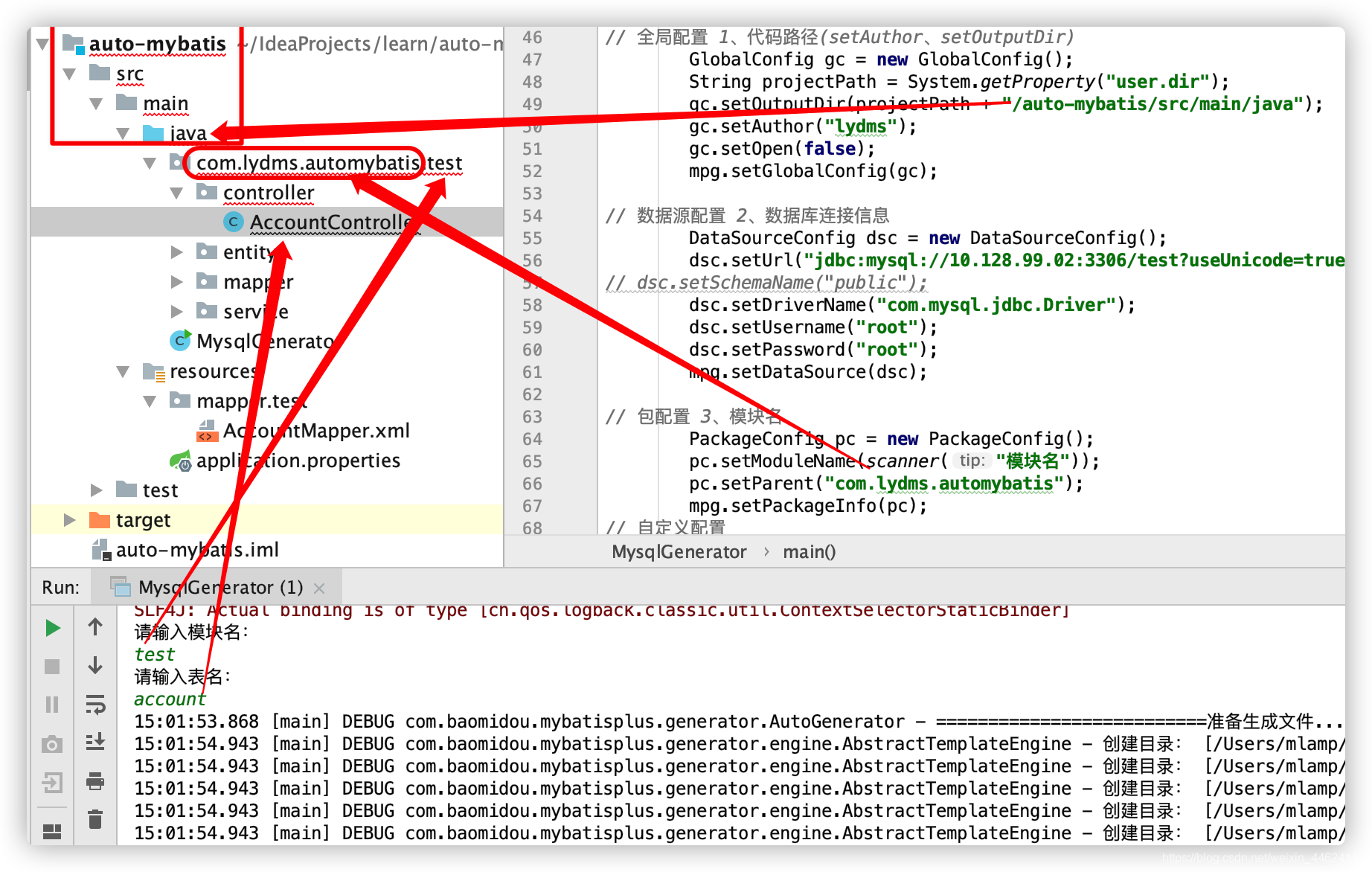
3、需要修改的位置
一共需要修改三个位置。
- 代码路径
// 全局配置 1、代码路径(setAuthor、setOutputDir)GlobalConfig gc = new GlobalConfig();String projectPath = System.getProperty("user.dir");gc.setOutputDir(projectPath + "/auto-mybatis/src/main/java");gc.setAuthor("lydms");gc.setOpen(false);mpg.setGlobalConfig(gc);
- 数据库连接信息(数据库连接地址和账号密码)
// 数据源配置 2、数据库连接信息DataSourceConfig dsc = new DataSourceConfig();dsc.setUrl("jdbc:mysql://10.128.99.02:3306/test?useUnicode=true&useSSL=false&characterEncoding=utf8");dsc.setDriverName("com.mysql.jdbc.Driver");dsc.setUsername("root");dsc.setPassword("root");mpg.setDataSource(dsc);
- 模块名称
// 包配置 3、模块名PackageConfig pc = new PackageConfig();pc.setModuleName(scanner("模块名"));pc.setParent("com.lydms.automybatis");mpg.setPackageInfo(pc);
4、各配置与项目位置关系
5、测试
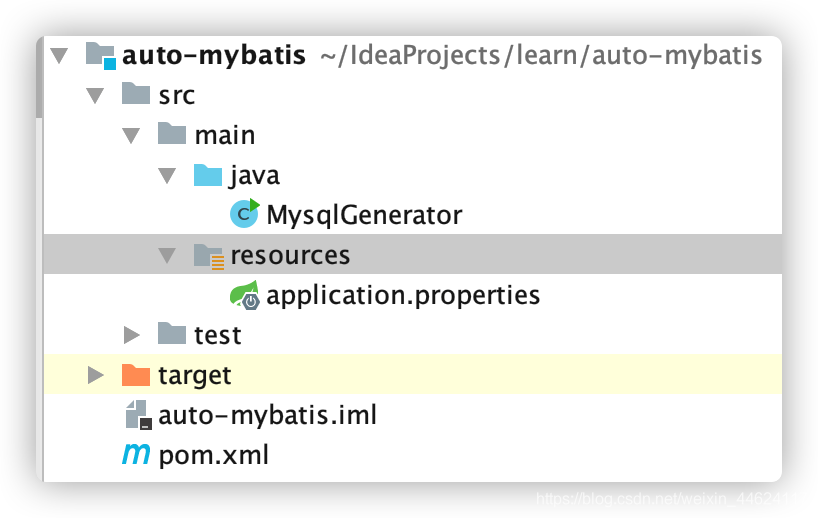
启动之前项目目录结构:
需要输入模块名和数据库表名:
请输入模块名:
test
请输入表名:
account
15:01:53.868 [main] DEBUG com.baomidou.mybatisplus.generator.AutoGenerator - ==========================准备生成文件...==========================
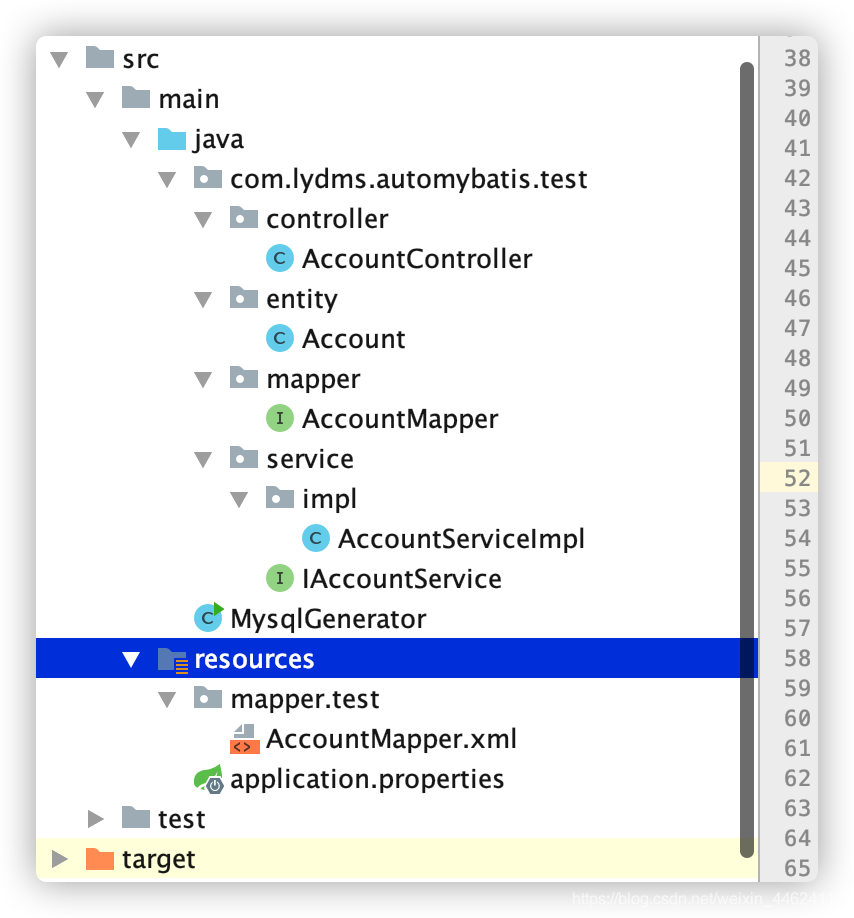
生成的文件结果:
6、项目源码包
源码
https://download.csdn.net/download/weixin_44624117/20450700
本文来自互联网用户投稿,文章观点仅代表作者本人,不代表本站立场,不承担相关法律责任。如若转载,请注明出处。 如若内容造成侵权/违法违规/事实不符,请点击【内容举报】进行投诉反馈!