py程序转化成.exe完美在windows上运行,实现windows Service服务程序,(看门狗实例)
pyInstaller安装配置
1,打开网址:pyInstalller下载网址
pip install pyinstalleror upgrade to a newer version:pip install --upgrade pyinstallerTo install the current development version use:pip install https://github.com/pyinstaller/pyinstaller/archive/develop.tar.gz3.下载一个pywin32(pywin32网址)
看好自己的版本再下载.
4,双击pywin32-221.win-amd64-py3.5.exe安装,注意安装的时候会自动检测之前安装的Python。下一步,下一步。
//省略 5,在CMD命令行进入Python3.5目录下的Scripts目录并执行:python pywin32_postinstall.py -install命令
//省略 6,在CMD命令行中进入D:\Programs\Python\pyinstaller-pyinstaller目录(之前解压的pyInstaller文件夹),然后执行:python setup.py install
7. 制作exe
1,先写一个hello.py
2,将hello.py放到目录D:\Programs\Python\pyinstaller-pyinstaller下。
3,在CMD命令行进入该目录,并执行命令:pyinstaller -F D:\study\python\test.py
4,生成了一个新目录D:\study\python\build\dist
在该目录的dist文件夹下生成了一个test.exe。
5,运行test.exe
---------------------------------------------------------------------
安装python运行环境
快速安装打包插件:
pip install pyinstaller
2.生成exe命令:
pyinstaller -F D:\study\python\test.py
关于命令的参数我在扩展一下:
-F:生成一个文件夹,里面是多文件模式,启动快。
-D:仅仅生成一个文件,不暴露其他信息,启动较慢。
-w:窗口模式打包,不显示控制台。
-c:跟图标路径,作为应用icon。
-----------------------------------
实现windows Service服务程序
必须要借助第三方模块pywin32
下载地址: https://pypi.python.org/pypi/pywin32/214
win32serviceutil.ServiceFramework是封装得很好的Windows服务框架,我们可以通过继承它来实现。
- 通过SvcDoRun方法,实现服务启动,运行服务内的业务代码。
- 通过SvcStop方法,停止服务。
WinPollManager.py
import win32serviceutil
import win32service
import win32event
import winerror
import servicemanager
import time
import sys
import osclass WinPollManager(win32serviceutil.ServiceFramework):"""#1.安装服务python WinPollManager.py install#2.让服务自动启动python WinPollManager.py --startup auto install#3.启动服务python WinPollManager.py start#4.重启服务python WinPollManager.py restart#5.停止服务python WinPollManager.py stop#6.删除/卸载服务python WinPollManager.py remove"""_svc_name_ = "py_agent_poll_manager"  # 服务名_svc_display_name_ = "py_agent_poll_manager"  # 服务在windows系统中显示的名称_svc_description_ = "python windows monitor agent"  # 服务的描述def __init__(self, args):win32serviceutil.ServiceFramework.__init__(self, args)self.hWaitStop = win32event.CreateEvent(None, 0, 0, None)self.isAlive = Trueself._poll_intvl = 30def SvcDoRun(self):while self.isAlive:print 'monitor testing'time.sleep(self._poll_intvl)def SvcStop(self):self.ReportServiceStatus(win32service.SERVICE_STOP_PENDING)win32event.SetEvent(self.hWaitStop)self.isAlive = Falseif __name__ == '__main__':if len(sys.argv) == 1:try:evtsrc_dll = os.path.abspath(servicemanager.__file__)servicemanager.PrepareToHostSingle(WinPollManager)servicemanager.Initialize('WinPollManager', evtsrc_dll)servicemanager.StartServiceCtrlDispatcher()except win32service.error, details:if details[0] == winerror.ERROR_FAILED_SERVICE_CONTROLLER_CONNECT:win32serviceutil.usage()else:win32serviceutil.HandleCommandLine(WinPollManager)  # 括号里参数可以改成其他名字,但是必须与class类名一致;
打包成功后在dist目录下生成exe文件
执行方式
- 安装服务 WinPollManager.exe install
- 服务自动启动 WinPollManager.exe --startup auto install
- 启动服务 WinPollManager.exe start
- 重启服务 WinPollManager.exe restart
- 停止服务 WinPollManager.exe stop
- 删除/卸载服务 WinPollManager.exe remove
--------------------------------------
看门狗程序:
新建:test.py
import os
import time
import subprocess
import psutil
import threading
import datetime
import configparser
import recf = configparser.ConfigParser()
cf.read("wailaizhu.conf")app01 = cf.get("desk", "app_name")
path01 = cf.get("desk", "path")def look_cpu(process_name):res = subprocess.Popen('wmic cpu get LoadPercentage', stdout=subprocess.PIPE, stderr=subprocess.PIPE, shell=True)res_str = res.stdout.read().decode(encoding='gbk')print(res_str)num = re.findall('\d+', res_str)[0]if int(num) > 80:print('cup负载超过10%')time.sleep(10)res_twice = subprocess.Popen('wmic cpu get LoadPercentage', stdout=subprocess.PIPE, stderr=subprocess.PIPE,shell=True)res_twice_str = res_twice.stdout.read().decode(encoding='gbk')num_twice = re.findall('\d+', res_twice_str)[0]# 判断两次监测稳定在5%以内 杀死进程并重启if abs(int(num) - int(num_twice)) < 5:tasklist = subprocess.Popen('tasklist | findstr CloudControlServer.exe', stdout=subprocess.PIPE,stderr=subprocess.PIPE, shell=True)res = tasklist.stdout.read().decode(encoding='gbk')pid = re.search('\d{1,4}', res).group()cmd = 'taskkill -f /pid %s' % pidtime.sleep(0.5)print(cmd)os.system('taskkill -f /pid %s' % pid)os.system(process_name)print('正在监测cpu,cpu占用率:%s,爷爷还是活的!' % num)global timertimer = threading.Timer(30, look_cpu, (path01,))timer.start()def restart_process(process_name):red = subprocess.Popen('tasklist', stdout=subprocess.PIPE, stderr=subprocess.PIPE, shell=True)tasklist_str = red.stdout.read().decode(encoding='gbk')re_path = process_name.split("\\")[-1]formattime = datetime.datetime.now().strftime('%Y-%m-%d %H:%M:%S')if re_path not in tasklist_str:# obj = connect_emai()# sendmail('程序卡掉正在重启。。。', obj)# 发送HTTP请求# url = "http://159.138.131.148/server_offline.html"# request = urllib.request(url)global countcount += 1print(formattime + '第' + str(count) + '次检测发现异常:爷爷要挂了,抢救成功!')cmd = process_nameos.system(process_name)# res = subprocess.Popen(cmd,stdout=subprocess.PIPE, stderr=subprocess.PIPE,shell=True)# print(res.stderr.read().decode(encoding='gbk'),res.stdout.read().decode(encoding='gbk'))# sendmail('重启连接成功!',obj)print('yes,connected')else:global error_counterror_count += 1print(formattime + '第' + str(error_count) + '次检测:OK,爷爷和小妖精在赏月……')global timertimer = threading.Timer(10, restart_process(app01), (path01,))timer.start()count = 0
error_count = 0
look_cpu(app01)   #检查cpu占用率
timer = threading.Timer(10, restart_process(app01), (path01,))
timer.start()
新建:wailaizhu.conf
[desk]
app_name = notepad.exe
path = start notepad.exe
cmd下执行:pyinstaller -F d:\study\python\temp\test.py -i d:\wailaizhu.ico 生成exe文件
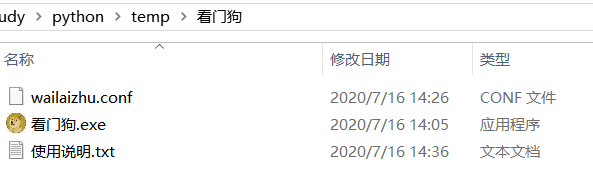
文本编辑器修改wailaizhu.conf配置文件中的:
-------------------------
app_name 检查程序名
path 检查程序路径-------------------------
当守护程序中断异常时  :尝试重启应用
当系统CPU占用率>80%时 :尝试重启应用
当系统守护程序未启动时:尝试启动应用
打包程序下载地址:
https://download.csdn.net/download/wailaizhu/12624634
本文来自互联网用户投稿,文章观点仅代表作者本人,不代表本站立场,不承担相关法律责任。如若转载,请注明出处。 如若内容造成侵权/违法违规/事实不符,请点击【内容举报】进行投诉反馈!