【poi】java使用poi对docx文档进行操作——纯文本篇
目录
- 依赖
- 1.读取段落
- 2.添加内容到word中
- 3.做文本替换
- 4.设置多级标题
- 设置行距
依赖
要注意使用的是poi-ooxml,ooxml不可以省略
<dependency><groupId>org.apache.poigroupId><artifactId>poi-ooxmlartifactId><version>4.1.2version>
dependency>
https://www.w3cschool.cn/apache_poi_word/apache_poi_word_quick_guide.html 直接看文档的快速入门
https://www.cnblogs.com/unruly/p/7552998.html 优秀博客
目前只使用了纯文本功能,若有其他需求再另外测试。
下面进行单元测试各类功能
1.读取段落
一回车为一个段落,可以读到整个docx的所有文本,需要自行检查和计算段落序号来找到自己要获取的内容。
//在使用XWPFWordExtractor读取docx文档的内容时,我们只能获取到其文本,而不能获取到其文本对应的属性值
//而使用到XWPFDocument读XWPFParagraph的话可以获取所有属性值,更佳,当然也更耗时。
InputStream is = new FileInputStream(config.getLocation()+"深圳市大鹏新区防汛应急预案.docx");
XWPFDocument docx = new XWPFDocument(is);
List<XWPFParagraph> paras = docx.getParagraphs();
paras.stream().forEach((p) -> {System.out.println(p.getText());System.out.println("一个回车为段落");
});
2.添加内容到word中
如果使用空白文档,则加入的内容会直接覆盖输出的位置。
如果使用指定文档,则属于追加操作。
//这里选择new一个空白文档,往里面注入段落。我们当然可以使用已有的docx作为Document追加
//XWPFDocument docx = new XWPFDocument();
//使用一个Stream文件流即可
InputStream is = new FileInputStream(config.getLocation()+"xxx.docx");
XWPFDocument docx = new XWPFDocument(is);
XWPFParagraph para = docx.createParagraph();
//一个XWPFRun代表一段具有相同的style的文本
XWPFRun run = para.createRun();
run.setBold(true); //加粗
run.setText("加粗的内容");
//这里就可以是一个段落内的第二个run模块,即与前一个run模块的style不相同的文本
run = para.createRun();
run.setColor("FF0000");
run.setText("红色的字。");
//你要输出的是一个文件,而不是文件夹。
//可以输出到原文件,也可以输出到新文件。
OutputStream os = new FileOutputStream(config.getLocation()+"\\新建word.docx");
//把docx输出到输出到目标目录
docx.write(os);
os.close();
3.做文本替换
可以在模板docx中使用${param}变量,然后通过poi把文本值注入到变量中。
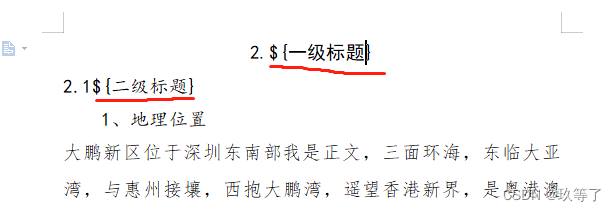
但是要注意保留好字体的样式
代码参考:
https://www.pudn.com/news/62615ba80e75e42012407364.htmlInputStream is = new FileInputStream(config.getLocation()+"\\新建word.docx");
XWPFDocument docx = new XWPFDocument(is);
Map<String, Object> params = new HashMap<String, Object>();
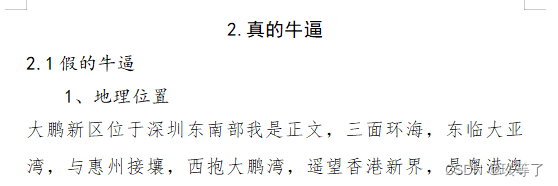
params.put("一级标题", "真的牛逼");
params.put("二级标题", "假的牛逼");
//替换段落里面的变量
this.replaceInPara(docx, params);
OutputStream os = new FileOutputStream(config.getLocation()+"\\新建word.docx");
docx.write(os);
this.close(os);
this.close(is);/**
* 替换段落里面的变量
* @param doc 要替换的文档
* @param params 参数
*/
private void replaceInPara(XWPFDocument doc, Map<String, Object> params) {Iterator<XWPFParagraph> iterator = doc.getParagraphsIterator();XWPFParagraph para;while (iterator.hasNext()) {para = iterator.next();this.replaceInPara(para, params);}
}/**
* 替换段落里面的变量 : 关键方法
* @param para 要替换的段落
* @param params 参数
*/
private void replaceInPara(XWPFParagraph para, Map<String, Object> params) {List<XWPFRun> runs;Matcher matcher;if (this.matcher(para.getParagraphText()).find()) {runs = para.getRuns();for (int i=0; i < runs.size(); i++) {//System.out.println("字体选择:"+runs.get(i).getFontFamily());//System.out.println("字体大小:"+runs.get(i).getFontSize());//System.out.println("字体权重:"+runs.get(i).getColor());//要把样式还回去(目前考虑到的是字体选择和大小):XWPFRun run = runs.get(i);//后续会被删掉,要提前拿出来String fontFamily = run.getFontFamily();int fontSize = run.getFontSize();String color = run.getColor();int kerning = run.getKerning();int characterSpacing = run.getCharacterSpacing();boolean bold = run.isBold();String runText = run.toString();matcher = this.matcher(runText);if (matcher.find()) {while ((matcher = this.matcher(runText)).find()) {runText = matcher.replaceFirst(String.valueOf(params.get(matcher.group(1))));}//直接调用XWPFRun的setText()方法设置文本时,在底层会重新创建一个XWPFRun,把文本附加在当前文本后面,//所以我们不能直接设值,需要先删除当前run,然后再自己手动插入一个新的run。para.removeRun(i);XWPFRun newRun = para.insertNewRun(i);newRun.setText(runText);newRun.setFontFamily(fontFamily);newRun.setFontSize(fontSize);newRun.setColor(color);//字距,暂不知道区别newRun.setKerning(kerning);//字符间距,字间距newRun.setCharacterSpacing(characterSpacing);//是否是粗体newRun.setBold(bold);}}}
}
/**
* 替换表格里面的变量
* @param doc 要替换的文档
* @param params 参数
*/
private void replaceInTable(XWPFDocument doc, Map<String, Object> params) {Iterator<XWPFTable> iterator = doc.getTablesIterator();XWPFTable table;List<XWPFTableRow> rows;List<XWPFTableCell> cells;List<XWPFParagraph> paras;while (iterator.hasNext()) {table = iterator.next();rows = table.getRows();for (XWPFTableRow row : rows) {cells = row.getTableCells();for (XWPFTableCell cell : cells) {paras = cell.getParagraphs();for (XWPFParagraph para : paras) {this.replaceInPara(para, params);}}}}
}
/**
* 正则匹配字符串
* @param str
* @return
*/
private Matcher matcher(String str) {
Pattern pattern = Pattern.compile("\\$\\{(.+?)\\}", Pattern.CASE_INSENSITIVE);
Matcher matcher = pattern.matcher(str);
return matcher;
}/**
* 关闭输入流
* @param is
*/
private void close(InputStream is) {if (is != null) {try {is.close();} catch (IOException e) {e.printStackTrace();}}
}/**
* 关闭输出流
* @param os
*/
private void close(OutputStream os) {if (os != null) {try {os.close();} catch (IOException e) {e.printStackTrace();}}
}
效果如图:
4.设置多级标题
本质就是对字体进行样式格式化
先对已有的标准文档的格式样式进行输出,然后在写入标题的时候使用这套标准样式即可
可参考:
InputStream is = new FileInputStream(config.getLocation()+"\\新建word.docx");
XWPFDocument docx = new XWPFDocument(is);
XWPFParagraph para = docx.createParagraph();
//一个XWPFRun代表具有相同属性的一个区域:一段文本
XWPFRun run = para.createRun();
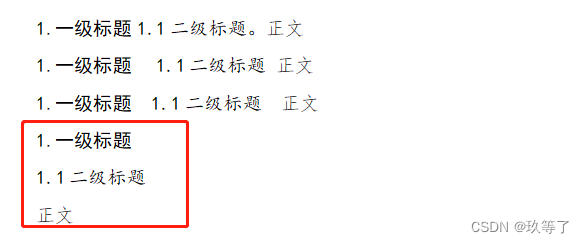
run.setText("1.一级标题\r");
run.setFontFamily("黑体");
run.setFontSize(16);
run.setKerning(0);
run.setColor("000000");
run.setCharacterSpacing(0);run = para.createRun();
run.setText("1.1二级标题\r");
run.setFontFamily("楷体_GB2312");
run.setFontSize(16);
run.setKerning(0);
run.setColor("000000");
run.setCharacterSpacing(0);run = para.createRun();
run.setText("正文\r");
run.setFontFamily("仿宋_GB2312");
run.setFontSize(16);
run.setKerning(0);
run.setColor(null);
run.setCharacterSpacing(0);
//你要输出的是一个文件,而不是文件夹
OutputStream os = new FileOutputStream(config.getLocation()+"\\新建word.docx");
//把docx输出到输出到目标目录
docx.write(os);
os.close();
效果如图
设置行距
设置固定值磅数
public void setSingleLineSpacing(XWPFParagraph para) {CTPPr ppr = para.getCTP().getPPr();if (ppr == null) ppr = para.getCTP().addNewPPr();CTSpacing spacing = ppr.isSetSpacing()? ppr.getSpacing() : ppr.addNewSpacing();spacing.setAfter(BigInteger.valueOf(0));spacing.setBefore(BigInteger.valueOf(0));spacing.setLineRule(STLineSpacingRule.AUTO);spacing.setLine(BigInteger.valueOf(240));
}测试成功: 480 = 24磅;1.5倍行距 = 18磅 = 360
for(XWPFParagraph paragraph : docx.getParagraphs()) {CTP ctp = paragraph.getCTP();CTPPr ppr = ctp.isSetPPr() ? ctp.getPPr() : ctp.addNewPPr();CTSpacing spacing = ppr.isSetSpacing()? ppr.getSpacing() : ppr.addNewSpacing();spacing.setAfter(BigInteger.valueOf(0));spacing.setBefore(BigInteger.valueOf(0));//注意设置行距类型为 EXACTspacing.setLineRule(STLineSpacingRule.EXACT);//1磅数是20spacing.setLine(BigInteger.valueOf(480));
}
本文来自互联网用户投稿,文章观点仅代表作者本人,不代表本站立场,不承担相关法律责任。如若转载,请注明出处。 如若内容造成侵权/违法违规/事实不符,请点击【内容举报】进行投诉反馈!