Android 获取天气和定位 还有一个运动轨迹
先看图
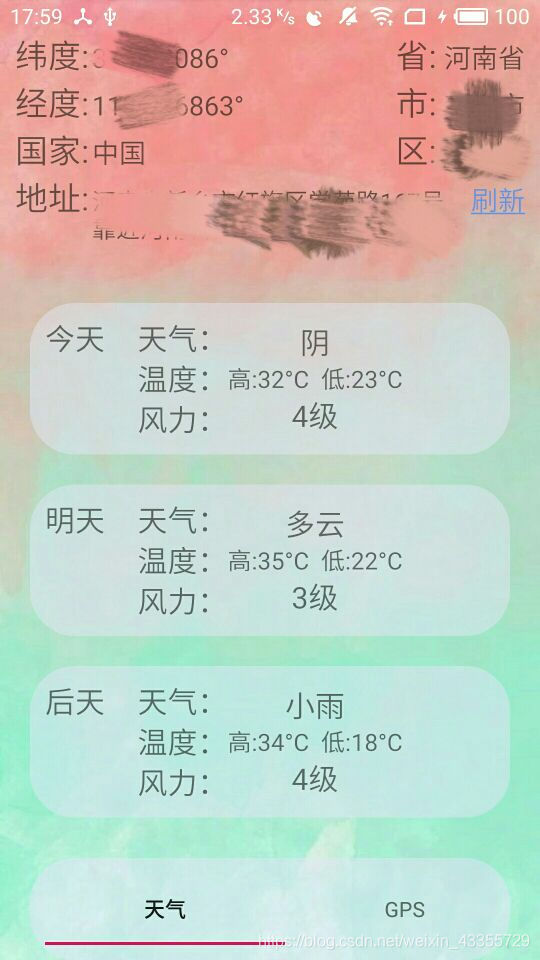
这个是定位和天气显示的界面
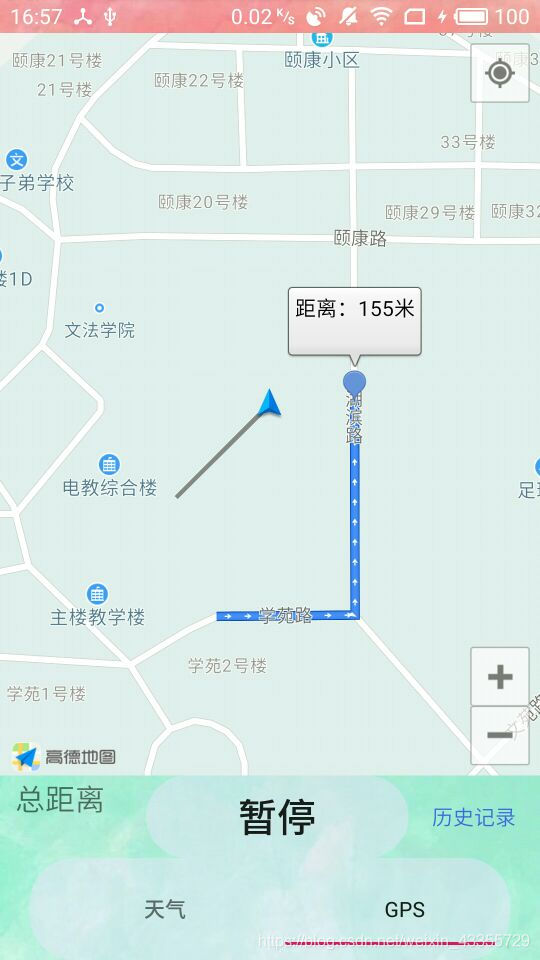
这个是运动轨迹的界面
看图就知道大概功能是什么了
定位还有轨迹我用的是高德的SDK 我这就不说怎么配置环境了,高德那还是很不错的有教程有Demo 看看Demo啥都会了。
天气我用的是心知天气 网址是 https://www.seniverse.com
可以看看官方的帮助文档会发现数据用json返回的 我们只需要把返回的json数据转化一下就能得到了
可以看一下这个网址 https://docs.seniverse.com/api/weather/daily.html
明明白白 只需要把json数据解析一下就ok了
下边是获取网络json信息的代码 很简单一看就能看懂
//开线程获取网络json信息public void StartThread() {new Thread() {@Overridepublic void run() {super.run();try {//城市需要用拼音String city = "xinxiang";String path = "https://api.seniverse.com/v3/weather/daily" +".json?key=你的key &location=" + city +"&language=zh-Hans&unit=c" +"&start=0&days=5";URL url = new URL(path);HttpURLConnection conn = (HttpURLConnection) url.openConnection();conn.setReadTimeout(5000);conn.setRequestMethod("GET");if (conn.getResponseCode() == 200) {//如果请求成功 获取网络上的数据InputStream in = conn.getInputStream();String str = "";int len = -1;byte[] buffer = new byte[1024];while ((len = in.read(buffer)) > 0) {//从buffer第0位取len的长度后拼接成字符串str += new String(buffer, 0, len);}//解析jsonarrayList = MyJsonParser.getWeather(str);getActivity().runOnUiThread(new Runnable() {@Overridepublic void run() {//Log.d("测试", arrayList.get(0).getTime());listViewAdapter = new ListViewAdapter(getContext(), arrayList);listView.setAdapter(listViewAdapter);}});} else {Log.d("测试", "非200");}} catch (Exception e) {e.printStackTrace();Log.d("测试", "错误" + e);}}}.start();}
下边是解析json数据的类的源码 也很简单会json解析就行
public class MyJsonParser {public static ArrayList getWeather(String str) throws Exception {ArrayList arrayList = new ArrayList<>();//获取json对象JSONObject json = new JSONObject(str);JSONArray results = json.getJSONArray("results");//获取城市JSONObject location = (JSONObject) results.get(0);String city = location.getJSONObject("location").getString("name");//获取daily 数组JSONArray daily = location.getJSONArray("daily");for (int i = 0; i < daily.length(); i++) {//初始化WeatherDate对象WeatherDate weatherDate = new WeatherDate();//添加城市weatherDate.setCity(city);JSONObject day = (JSONObject) daily.get(i);//获取最高温度String high = day.getString("high");weatherDate.setHigh(high);//获取最低温度String low = day.getString("low");weatherDate.setLow(low);//获取文字描述(白天)String text_day = day.getString("text_day");weatherDate.setWeather(text_day);//获取风力String wind_scale = day.getString("wind_scale");weatherDate.setFeng(wind_scale);//获取 天气的时间String date = day.getString("date");weatherDate.setTime(date);arrayList.add(weatherDate);}return arrayList;}
}
这样就能获取到需要的数据了 请根据自己的需要去json数据里获取
我是跟着另一个博客学的 非常感谢这位大佬
博客网址:https://blog.csdn.net/qq_42254413/article/details/84572474
定位的话其实看看高德地图的开发文档就行了
/*** 单次客户端的定位监听*/AMapLocationListener locationSingleListener = new AMapLocationListener() {@Overridepublic void onLocationChanged(AMapLocation location) {if (getLocationStr(location)) {Toast.makeText(getContext(), "定位成功", Toast.LENGTH_SHORT).show();} else {Toast.makeText(getContext(), "定位失败", Toast.LENGTH_SHORT).show();}}};/*** 启动单次客户端定位*/void startSingleLocation() {if (null == locationClientSingle) {locationClientSingle = new AMapLocationClient(getContext().getApplicationContext());}AMapLocationClientOption locationClientOption = new AMapLocationClientOption();//使用单次定位locationClientOption.setOnceLocation(true);// 地址信息locationClientOption.setNeedAddress(true);locationClientOption.setLocationCacheEnable(false);locationClientSingle.setLocationOption(locationClientOption);locationClientSingle.setLocationListener(locationSingleListener);locationClientSingle.startLocation();}public boolean getLocationStr(AMapLocation location) {if (null == location) {return false;}//errCode等于0代表定位成功,其他的为定位失败,具体的可以参照官网定位错误码说明if (location.getErrorCode() == 0) {tv_longitude.setText(location.getLongitude() + "°");tv_latitude.setText(location.getLatitude() + "°");tv_country.setText(location.getCountry());tv_address.setText(location.getAddress());tv_province.setText(location.getProvince());tv_city.setText(location.getCity());tv_district.setText(location.getDistrict());return true;} else {return false;}}第一个界面大概就这样
定位轨迹的话我就是根据官方的demo一点一点测试 测试出来的 我感觉轨迹不是特别的准确 大家去看官方的文档吧
这俩功能主要就是学会使用和理解官方的sdk 利用别人的sdk完成自己需要的功能
源码地址:https://github.com/ZhangYH666/Weather_demo
本文来自互联网用户投稿,文章观点仅代表作者本人,不代表本站立场,不承担相关法律责任。如若转载,请注明出处。 如若内容造成侵权/违法违规/事实不符,请点击【内容举报】进行投诉反馈!