多线程项目实战——多线程下载器
多线程下载器
- 最近学习了多线程相关知识,通过一个小项目对所学知识梳理,做一个综合的运用。
项目介绍
- 该项目主要是使用HttpURLConection发起HTTP请求,再结合IO流和多线程对文件进行一个切分下载,最后合并。
项目演示
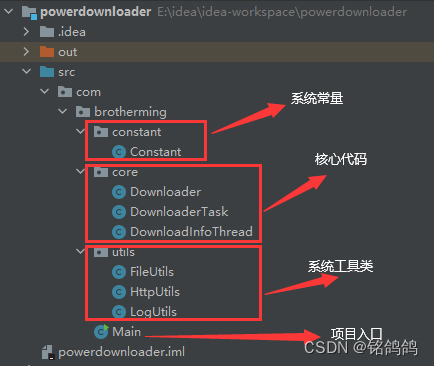
项目目录结构
代码
项目入口类,需要传入下载地址,或者在控制台输入
/*** @author wym* @description 主类  https://dldir1.qq.com/qqfile/qq/PCQQ9.5.6/QQ9.5.6.28129.exe* @date 2022年01月21 14:20*/
public class Main {public static void main(String[] args) {//下载地址String url = null;if (args == null || args.length == 0) {while (url == null) {LogUtils.info("请输入下载地址");Scanner scanner = new Scanner(System.in);url = scanner.next();}}else {url = args[0];}Downloader downloader = new Downloader();downloader.download(url);}}
通过项目入口类我们可以发现,整个项目的细节都在Downloader这个类中,要想弄清楚Downloader类中的细节,我们先把系统工具好好看一看
HttpUtils,主要通过这个工具类获取HTTP请求对象,获取所下载文件的相关信息,如:文件大小、文件名字、分块下载等。
/*** @author wym* @description Http工具类* @date 2022年01月21 14:29*/
public class HttpUtils {/*** 获取下载文件大小* @param url* @return* @throws IOException*/public static long getHttpFileContentLength(String url) throws IOException {int contentLength;HttpURLConnection httpURLConnection = null;try {httpURLConnection = getHttpURLConnection(url);contentLength = httpURLConnection.getContentLength();} finally {if (httpURLConnection != null) {httpURLConnection.disconnect();}}return contentLength;}/*** 分块下载* @param url       下载地址* @param startPos  下载文件起始位置* @param endPos    下载文件结束位置* @return*/public static HttpURLConnection getHttpURLConnection(String url, long startPos, long endPos) throws IOException {HttpURLConnection httpURLConnection = getHttpURLConnection(url);LogUtils.info("下载的区间是:{}-{}",startPos,endPos);if (endPos != 0) {httpURLConnection.setRequestProperty("RANGE","bytes=" + startPos + "-" + endPos);}else {httpURLConnection.setRequestProperty("RANGE","bytes=" + startPos + "-");}return httpURLConnection;}/*** 获取HttpURLConnection链接对象* @param url 下载地址* @return 返回HttpURLConnection对象*/public static HttpURLConnection getHttpURLConnection(String url) throws IOException {URL httpUrl = new URL(url);HttpURLConnection httpURLConnection = (HttpURLConnection) httpUrl.openConnection();//向文件所在的服务器发送标识信息httpURLConnection.setRequestProperty("User-Agent","Mozilla/5.0 (Windows NT 6.1; WOW64) AppleWebKit/535.1 (KHTML, like Gecko) Chrome/14.0.835.163 Safari/535.1");return httpURLConnection;}/*** 获取下载问文件的名字* @param url* @return*/public static String getHttpFileName(String url){return url.substring(url.lastIndexOf("/") + 1);}}
FileUtils中的getFileContentLength方法,主要是用来判断该文件有没有重复下载
/*** @author wym* @description 文件工具类* @date 2022年01月21 16:11*/
public class FileUtils {/*** 获取本地文件的大小*/public static long getFileContentLength(String path){File file = new File(path);return file.exists() && file.isFile() ? file.length() : 0;}}
LogUtils 自定义日志工具类,提供了统一的日志管理,方便阅读。
public class LogUtils {public static void info(String msg,Object... args){print(msg,"-info-",args);}public static void error(String msg,Object... args){print(msg,"-error-",args);}private static void print(String msg,String level,Object... args){if (args != null && args.length > 0) {msg = String.format(msg.replace("{}","%s"),args);}String name = Thread.currentThread().getName();;System.out.println(LocalTime.now().format(DateTimeFormatter.ofPattern("hh:mm:ss")) + " " +name + level + msg);}}
Downloader实现细节
- scheduledExecutorService线程池,是用来打印实时的下载信息,比如下载速度什么的。
- poolExecutor线程池,是用来进行分块下载的,将文件分为多个小块,多个线程并发下载。
- 根据阿里巴巴代码规范手册,最好使用原生方法创建线程池,我这里演示了两种创建方法
public class Downloader {private final ScheduledExecutorService scheduledExecutorService = Executors.newScheduledThreadPool(1);private final ThreadPoolExecutor poolExecutor = new ThreadPoolExecutor(Constant.THREAD_NUM,Constant.THREAD_NUM,0,TimeUnit.SECONDS,new ArrayBlockingQueue<>(Constant.THREAD_NUM));private final CountDownLatch countDownLatch = new CountDownLatch(Constant.THREAD_NUM);public void download(String url){//获取文件名String httpFileName = HttpUtils.getHttpFileName(url);//文件下载路径httpFileName = Constant.PATH + httpFileName;//获取本地文件大小long localFileLength = FileUtils.getFileContentLength(httpFileName);HttpURLConnection httpURLConnection = null;DownloadInfoThread downloadInfoThread = null;//获取连接对象try {httpURLConnection = HttpUtils.getHttpURLConnection(url);//获取下载文件的总大小int contentLength = httpURLConnection.getContentLength();//文件是否已下载过if (localFileLength >= contentLength) {LogUtils.info("{}已下载完毕,无需重新下载",httpFileName);return;}//创建获取下载信息的任务对象downloadInfoThread = new DownloadInfoThread(contentLength);//将任务交给线程池执行,每隔一秒执行一次scheduledExecutorService.scheduleAtFixedRate(downloadInfoThread,1,1, TimeUnit.SECONDS);//切分对象List<Future<Boolean>> list = new ArrayList<>();spilt(url,list);countDownLatch.await();//合并文件if (merge(httpFileName)){clearTemp(httpFileName);}} catch (IOException | InterruptedException e) {e.printStackTrace();} finally {System.out.print("\r");System.out.print("下载完成");//关闭对象if (httpURLConnection != null) {httpURLConnection.disconnect();}//关闭线程池scheduledExecutorService.shutdownNow();poolExecutor.shutdown();}}/*** 文件切分* @param url* @param futureList*/public void spilt(String url, List<Future<Boolean>> futureList){try {//获取下载文件大小long contentLength = HttpUtils.getHttpFileContentLength(url);//计算切分后的文件大小long size = contentLength / Constant.THREAD_NUM;//计算分块个数for (int i = 0; i < Constant.THREAD_NUM; i++) {//计算下载起始位置long startPos = i * size;//计算结束位置long endPos;if (i == Constant.THREAD_NUM - 1) {endPos = 0;}else {endPos = startPos + size;}//如果不是第一块,起始位置+1if (startPos != 0) {startPos++;}//创建任务DownloaderTask downloaderTask = new DownloaderTask(url, startPos, endPos, i,countDownLatch);//提交任务Future<Boolean> submit = poolExecutor.submit(downloaderTask);futureList.add(submit);}}catch (IOException e){e.printStackTrace();}}/*** 文件合并* @param fileName* @return*/public boolean merge(String fileName){LogUtils.info("开始合并文件{}",fileName);byte[] buffer = new byte[Constant.BYTE_SIZE];int len = -1;try (RandomAccessFile accessFile = new RandomAccessFile(fileName, "rw")){for (int i = 0; i < Constant.THREAD_NUM; i++) {try (BufferedInputStream bis = new BufferedInputStream(new FileInputStream(fileName + ".temp" + i));){while ((len = bis.read(buffer)) != -1) {accessFile.write(buffer,0,len);}}}}catch (Exception e){e.printStackTrace();return false;}return true;}/*** 清除临时文件* @param fileName* @return*/public boolean clearTemp(String fileName){for (int i = 0; i < Constant.THREAD_NUM; i++) {File file = new File(fileName + ".temp" + i);file.delete();}return true;}
}
DownloaderTask提交给线程池的任务,也就是分块任务
/*** @author wym* @description 分块下载任务* @date 2022年01月22 14:26*/
public class DownloaderTask implements Callable<Boolean> {private String url;private long startPos;private long endPos;//分块的块号private int part;private CountDownLatch countDownLatch;public DownloaderTask(String url, long startPos, long endPos, int part, CountDownLatch countDownLatch) {this.url = url;this.startPos = startPos;this.endPos = endPos;this.part = part;this.countDownLatch = countDownLatch;}@Overridepublic Boolean call() throws Exception {//获取文件名String httpFileName = HttpUtils.getHttpFileName(url);//分块的文件名httpFileName = httpFileName + ".temp" + part;//下载路径httpFileName = Constant.PATH + httpFileName;//获取分块下载连接HttpURLConnection httpURLConnection = HttpUtils.getHttpURLConnection(url, startPos, endPos);try (InputStream inputStream = httpURLConnection.getInputStream();BufferedInputStream bis = new BufferedInputStream(inputStream);RandomAccessFile accessFile = new RandomAccessFile(httpFileName, "rw");){byte[] buffer = new byte[Constant.BYTE_SIZE];int len = -1;//循环读取数据while ((len = bis.read(buffer)) != -1) {//1秒内下载数据之和DownloadInfoThread.downSize.add(len);accessFile.write(buffer,0,len);}}catch (FileNotFoundException e){LogUtils.error("下载文件不存在{}",url);return false;}catch (Exception e){LogUtils.error("下载出现异常");return false;}finally {httpURLConnection.disconnect();countDownLatch.countDown();}return true;}
}
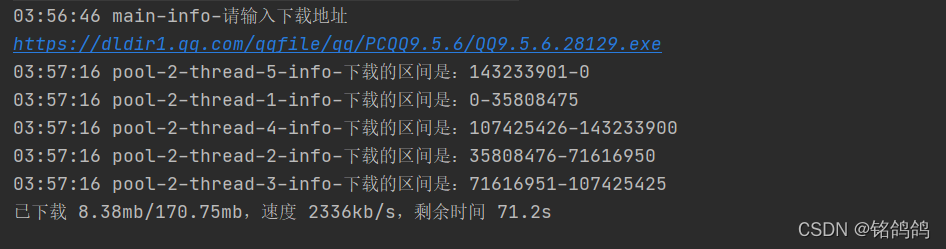
DownloadInfo显示下载信息:
- 已下载 168.61mb/170.75mb,速度 2320kb/s,剩余时间 0.9s
/*** @author wym* @description 展示下载信息的线程* @date 2022年01月21 15:51*/
public class DownloadInfoThread implements Runnable{//下载文件总大小private long httpFileContentLength;//本地已下载文件的大小public static LongAdder finishedSize = new LongAdder();//本次累计下载的大小public static volatile LongAdder downSize = new LongAdder();//前一次下载的大小public double prevSize;public DownloadInfoThread(long httpFileContentLength) {this.httpFileContentLength = httpFileContentLength;}@Overridepublic void run() {//计算文件总大小 单位:mbString httpFileSize = String.format("%.2f",httpFileContentLength / Constant.MB);//计算每秒下载速度kbint speed = (int)((downSize.doubleValue() - prevSize) / 1024d);prevSize = downSize.doubleValue();//剩余文件的大小double remainSize = httpFileContentLength - finishedSize.doubleValue() - downSize.doubleValue();//计算剩余时间String remainTime = String.format("%.1f", remainSize / 1024d / speed);if ("Infinity".equalsIgnoreCase(remainTime)) {remainTime = "-";}//已下载大小String currentFileSize = String.format("%.2f",(downSize.doubleValue() - finishedSize.doubleValue()) / Constant.MB);String downInfo = String.format("已下载 %smb/%smb,速度 %skb/s,剩余时间 %ss",currentFileSize,httpFileSize,speed,remainTime);System.out.print("\r");System.out.print(downInfo);}
}
常量类,便于修改
/*** @author wym* @description 常量类* @date 2022年01月21 14:42*/
public class Constant {public static final String PATH = "下载文件的存放地址,本地地址";public static final double MB = 1024d * 1024d;public static final int BYTE_SIZE = 1024 * 100;//线程数量public static final int THREAD_NUM = 5;
}
本文来自互联网用户投稿,文章观点仅代表作者本人,不代表本站立场,不承担相关法律责任。如若转载,请注明出处。 如若内容造成侵权/违法违规/事实不符,请点击【内容举报】进行投诉反馈!