SpringBoot实现pdf添加水印
在某些情况下,我们需要对 PDF 文件添加水印,以使其更具有辨识度或者保护其版权。本文将介绍几种方案来实现PDF添加水印。
git地址:https://gitee.com/ninesuntec/pdf-add-watermark
1.使用 Apache PDFBox 库
PDFBox 是一个流行的、免费的、用 Java 编写的库,它可以用来创建、修改和提取 PDF 内容。PDFBox 提供了许多 API,包括添加文本水印的功能。
添加 PDFBox 依赖
<dependency><groupId>org.apache.pdfboxgroupId><artifactId>pdfboxartifactId><version>2.0.24version>
dependency>
在添加水印之前,需要读取原始 PDF 文件:
PDDocument document = PDDocument.load(new File("original.pdf"));
遍历 PDF 中的所有页面,并使用 PDPageContentStream 添加水印:
// 遍历 PDF 中的所有页面
for (int i = 0; i < document.getNumberOfPages(); i++) {PDPage page = document.getPage(i);PDPageContentStream contentStream = new PDPageContentStream(document, page, PDPageContentStream.AppendMode.APPEND, true, true);// 设置字体和字号contentStream.setFont(PDType1Font.HELVETICA_BOLD, 36);// 设置透明度contentStream.setNonStrokingColor(200, 200, 200);// 添加文本水印contentStream.beginText();contentStream.newLineAtOffset(100, 100); // 设置水印位置contentStream.showText("Watermark"); // 设置水印内容contentStream.endText();contentStream.close();
}
最后,保存修改后的 PDF 文件:
document.save(new File("output.pdf"));
document.close();
示例:
public static void main(String[] args) throws IOException {// 读取原始 PDF 文件PDDocument document = PDDocument.load(new File("original.pdf"));// 遍历 PDF 中的所有页面for (int i = 0; i < document.getNumberOfPages(); i++) {PDPage page = document.getPage(i);PDPageContentStream contentStream = new PDPageContentStream(document, page, PDPageContentStream.AppendMode.APPEND, true, true);// 设置字体和字号contentStream.setFont(PDType1Font.HELVETICA_BOLD, 36);// 设置透明度contentStream.setNonStrokingColor(200, 200, 200);// 添加文本水印contentStream.beginText();contentStream.newLineAtOffset(100, 100); // 设置水印位置contentStream.showText("Watermark"); // 设置水印内容contentStream.endText();contentStream.close();}// 保存修改后的 PDF 文件document.save(new File("output.pdf"));document.close();}
为了使我们的代码更具备扩展性,我们把一些基本的属性抽取出来
PdfBoxAttributes:
@Data
@AllArgsConstructor
@NoArgsConstructor
public class PdfBoxAttributes {//透明度设置private Integer r = 200;private Integer g = 200;private Integer b = 200;//水印位置private float tx = 100;private float ty = 100;//水印内容private String showTxt = "PdfBoxWaterMark";//水印添加方式(覆盖、添加、)private PDPageContentStream.AppendMode appendMode = PDPageContentStream.AppendMode.APPEND;//字体样式private PDType1Font fontStyle = PDType1Font.HELVETICA_BOLD;private float fontSize = 36;
}
使用方式如下:
import com.example.demo.po.PdfBoxAttributes;
import org.apache.pdfbox.pdmodel.PDDocument;
import org.apache.pdfbox.pdmodel.PDPage;
import org.apache.pdfbox.pdmodel.PDPageContentStream;
import org.apache.pdfbox.pdmodel.font.PDType1Font;import java.io.File;public class PdfBoxWatermarkUtil {public static void addWaterMark(File pdf, String savePath, PdfBoxAttributes pdfBoxAttributes) {try {System.out.println("--------------开始添加水印--------------------");// 读取原始 PDF 文件PDDocument document = PDDocument.load(pdf);// 遍历 PDF 中的所有页面for (int i = 0; i < document.getNumberOfPages(); i++) {PDPage page = document.getPage(i);PDPageContentStream contentStream = new PDPageContentStream(document, page, pdfBoxAttributes.getAppendMode(), true, true);// 设置字体和字号contentStream.setFont(pdfBoxAttributes.getFontStyle(), pdfBoxAttributes.getFontSize());// 设置透明度contentStream.setNonStrokingColor(pdfBoxAttributes.getR(), pdfBoxAttributes.getG(), pdfBoxAttributes.getB());// 添加文本水印contentStream.beginText();contentStream.newLineAtOffset(pdfBoxAttributes.getTx(), pdfBoxAttributes.getTy()); // 设置水印位置contentStream.showText(pdfBoxAttributes.getShowTxt()); // 设置水印内容contentStream.endText();contentStream.close();System.out.println("--------------已完成第"+(i+1)+"页的水印添加--------------------");}// 保存修改后的 PDF 文件document.save(new File(savePath));} catch (Exception e) {e.printStackTrace();}finally {System.out.println("--------------添加水印完成--------------------");}}public static void main(String[] args) {File file=new File("/Users/hb24795/Downloads/自动控制原理.pdf");addWaterMark(file,"/Users/hb24795/Downloads/自动控制原理1.pdf",new PdfBoxAttributes());}
}
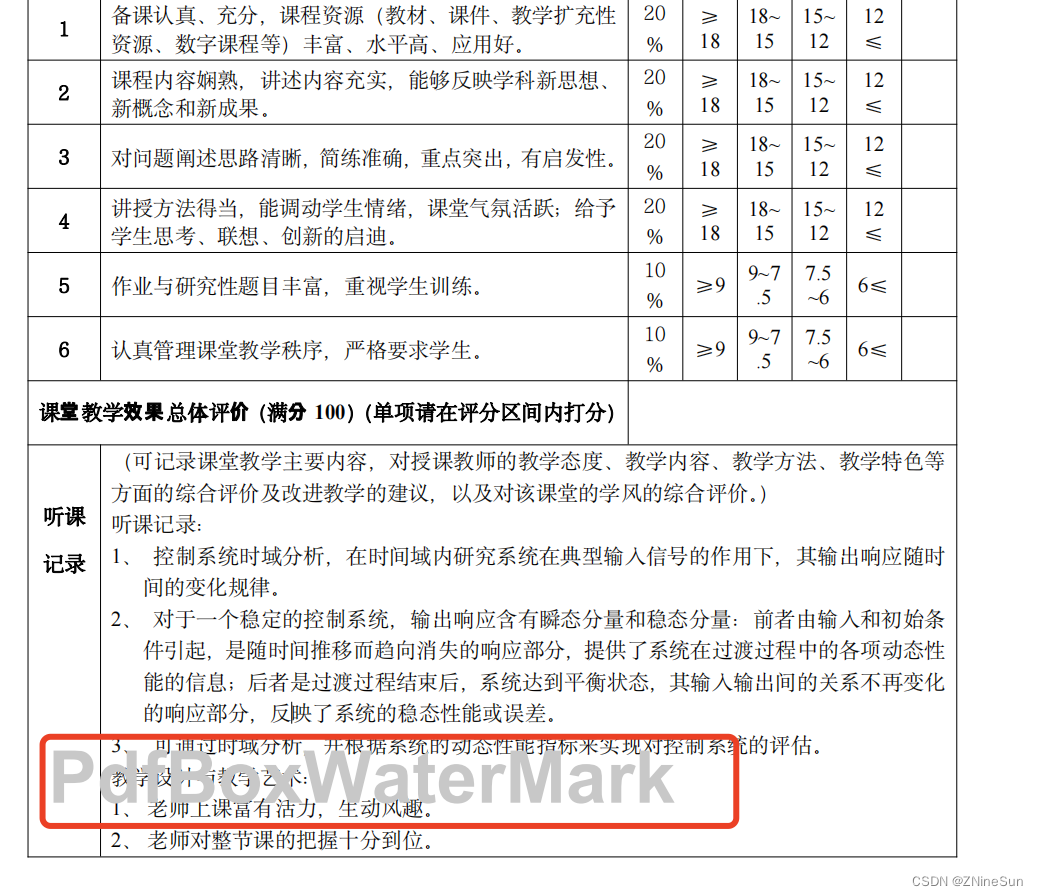
2.使用 iText 库
iText 是一款流行的 Java PDF 库,它可以用来创建、读取、修改和提取 PDF 内容。iText 提供了许多 API,包括添加文本水印的功能。
添加依赖
<dependency><groupId>com.itextpdfgroupId><artifactId>itextpdfartifactId><version>5.5.13version>dependency>
在添加水印之前,需要读取原始 PDF 文件:
PdfReader reader = new PdfReader("original.pdf");
PdfStamper stamper = new PdfStamper(reader, new FileOutputStream("output.pdf"));
然后,遍历 PDF 中的所有页面,并使用 PdfContentByte 添加水印:
// 获取 PDF 中的页数
int pageCount = reader.getNumberOfPages();// 添加水印
for (int i = 1; i <= pageCount; i++) {PdfContentByte contentByte = stamper.getUnderContent(i); // 或者 getOverContent()contentByte.beginText();contentByte.setFontAndSize(BaseFont.createFont(), 36f);contentByte.setColorFill(BaseColor.LIGHT_GRAY);contentByte.showTextAligned(Element.ALIGN_CENTER, "Watermark", 300, 400, 45);contentByte.endText();
}
最后,需要保存修改后的 PDF 文件并关闭文件流:
stamper.close();
reader.close();
示例:
import com.itextpdf.text.*;
import com.itextpdf.text.pdf.*;import java.io.FileOutputStream;
import java.io.IOException;public class ItextWatermark {public static void main(String[] args) throws IOException, DocumentException {// 读取原始 PDF 文件PdfReader reader = new PdfReader("original.pdf");PdfStamper stamper = new PdfStamper(reader, new FileOutputStream("output.pdf"));// 获取 PDF 中的页数int pageCount = reader.getNumberOfPages();// 添加水印for (int i = 1; i <= pageCount; i++) {PdfContentByte contentByte = stamper.getUnderContent(i); // 或者 getOverContent()contentByte.beginText();contentByte.setFontAndSize(BaseFont.createFont(), 36f);contentByte.setColorFill(BaseColor.LIGHT_GRAY);contentByte.showTextAligned(Element.ALIGN_CENTER, "Watermark", 300, 400, 45);contentByte.endText();}// 保存修改后的 PDF 文件并关闭文件流stamper.close();reader.close();}
}
同样我们把他抽取成工具类
import com.itextpdf.text.BaseColor;
import com.itextpdf.text.DocumentException;
import com.itextpdf.text.Element;
import com.itextpdf.text.pdf.BaseFont;
import lombok.Data;import java.io.IOException;@Data
public class ITextAttributes {//字体样式private BaseFont fontStyle = BaseFont.createFont();//字体大小private float fontSize = 36f;//字体颜色private BaseColor fontColor = BaseColor.LIGHT_GRAY;//水印位置private int location = Element.ALIGN_CENTER;//水印内容private String showTxt = "ITextWaterMark";//坐标以及旋转角度private float x = 300, y = 400, rotation = 45;public ITextAttributes() throws DocumentException, IOException {}public ITextAttributes(BaseFont fontStyle, float fontSize, BaseColor fontColor, int location, String showTxt, float x, float y, float rotation)throws DocumentException, IOException  {this.fontStyle = fontStyle;this.fontSize = fontSize;this.fontColor = fontColor;this.location = location;this.showTxt = showTxt;this.x = x;this.y = y;this.rotation = rotation;}
}
import com.example.demo.po.ITextAttributes;
import com.itextpdf.text.DocumentException;
import com.itextpdf.text.pdf.PdfContentByte;
import com.itextpdf.text.pdf.PdfReader;
import com.itextpdf.text.pdf.PdfStamper;import java.io.File;
import java.io.FileOutputStream;
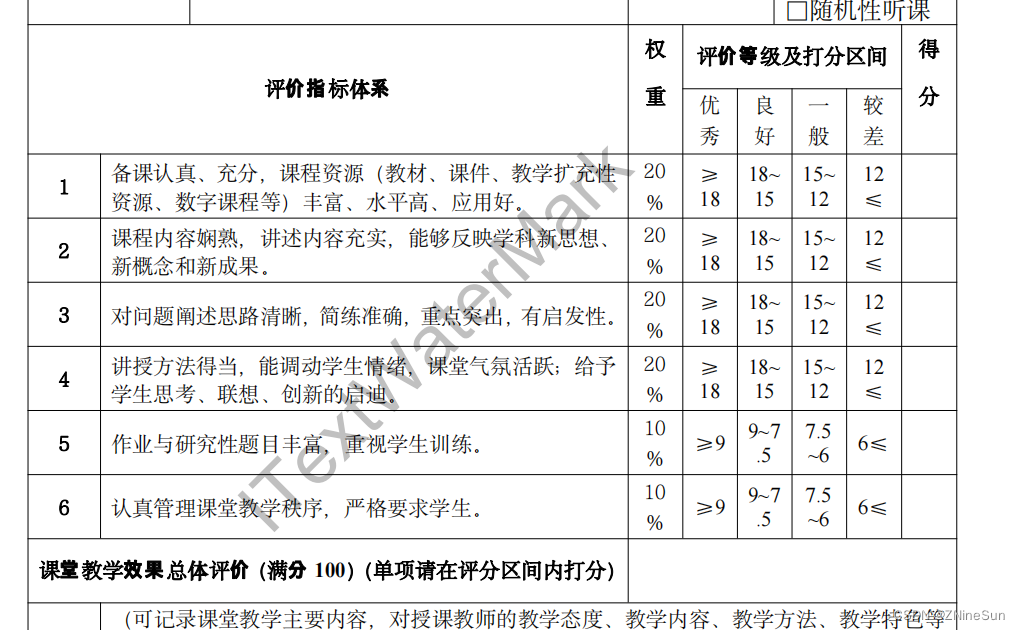
import java.io.IOException;public class ItextWatermarkUtil {public static void addWaterMark(String pdfPath, String outPath, ITextAttributes attributes) {try {System.out.println("--------------开始添加水印--------------------");// 读取原始 PDF 文件PdfReader reader = new PdfReader(pdfPath);PdfStamper stamper = new PdfStamper(reader, new FileOutputStream(outPath));// 获取 PDF 中的页数int pageCount = reader.getNumberOfPages();// 添加水印for (int i = 1; i <= pageCount; i++) {PdfContentByte contentByte = stamper.getUnderContent(i); // 或者 getOverContent()contentByte.beginText();contentByte.setFontAndSize(attributes.getFontStyle(), attributes.getFontSize());contentByte.setColorFill(attributes.getFontColor());contentByte.showTextAligned(attributes.getLocation(), attributes.getShowTxt(), attributes.getX(), attributes.getY(), attributes.getRotation());contentByte.endText();System.out.println("--------------已完成第" + (i) + "页的水印添加--------------------");}// 保存修改后的 PDF 文件并关闭文件流stamper.close();reader.close();} catch (Exception e) {e.printStackTrace();} finally {System.out.println("--------------添加水印完成--------------------");}}public static void main(String[] args) throws DocumentException, IOException {addWaterMark("/Users/hb24795/Downloads/自动控制原理.pdf", "/Users/hb24795/Downloads/自动控制原理1.pdf", new ITextAttributes());}
}
3.Free Spire.PDF for Java
Free Spire.PDF for Java 是一款免费的 Java PDF 库,它提供了一个简单易用的 API,用于创建、读取、修改和提取 PDF 内容。Free Spire.PDF for Java 也支持添加文本水印以及图片水印。
官方文档地址:https://www.e-iceblue.cn/licensing/install-spirepdf-for-java-from-maven-repository.html
添加依赖
配置maven的settiing.xml中的仓库路径

<profile><repositories><repository><id>com.e-iceblueid><url>http://repo.e-iceblue.cn/repository/maven-public/url>repository>repositories>profile>
然后再pom文件中添加依赖
<dependency><groupId>e-icebluegroupId><artifactId>spire.pdf.freeartifactId><version>3.11.6version>dependency>
如果实在不会配置,可以把这个jar包下载下来,下载地址如下:https://repo.e-iceblue.cn/repository/maven-public/e-iceblue/spire.pdf.free/5.1.0/spire.pdf.free-5.1.0.jar
然后在项目中引用该jar包,具体操作可参照:《springBoot引用外部jar包》
在添加水印之前,需要读取原始 PDF 文件:
PdfDocument pdf = new PdfDocument();
pdf.loadFromFile("original.pdf");
然后,遍历 PDF 中的所有页面,并使用 PdfPageBase 添加水印:
// 遍历 PDF 中的所有页面
for (int i = 0; i < pdf.getPages().getCount(); i++) {PdfPageBase page = pdf.getPages().get(i);//添加文本水印AddTextWatermark(page, bandge);
}
最后,需要保存修改后的 PDF 文件:
pdf.saveToFile("output.pdf");
pdf.close();
示例:
import com.spire.pdf.*;
import com.spire.pdf.annotations.PdfWatermarkAnnotationWidget;
import com.spire.pdf.graphics.*;import java.awt.*;
import java.awt.geom.Dimension2D;
import java.awt.geom.Point2D;
import java.awt.geom.Rectangle2D;public class FreeSpirePdfWatermarkUtil {enum METHOD {image,text}/*** 使用FreeSpire添加水印** @param pdfPath    pdf文件路径* @param bandge* @param outputPath*/public static void addWaterMark(String pdfPath, String bandge, METHOD method, String outputPath) {try {String addMethod = method == METHOD.text ? "文本" : "图片";System.out.println("--------------开始添加" + addMethod + "水印--------------------");// 读取原始 PDF 文件PdfDocument pdf = new PdfDocument();pdf.loadFromFile(pdfPath);// 遍历 PDF 中的所有页面for (int i = 0; i < pdf.getPages().getCount(); i++) {PdfPageBase page = pdf.getPages().get(i);switch (method) {case text://添加文本水印AddTextWatermark(page, bandge);break;case image:// 添加图片水印AddImageWatermark(page, bandge);}System.out.println("--------------已完成第" + (i+1) + "页的水印添加--------------------");}// 保存修改后的 PDF 文件pdf.saveToFile(outputPath);pdf.close();System.out.println("--------------已完成文件的水印添加--------------------");} catch (Exception e) {e.printStackTrace();}}/*** @param page      要添加水印的页面* @param imageFile 水印图片路径*/public static void AddImageWatermark(PdfPageBase page, String imageFile) {page.setBackgroundImage(imageFile);Rectangle2D rect = new Rectangle2D.Float();rect.setFrame(page.getClientSize().getWidth() / 2 - 100, page.getClientSize().getHeight() / 2 - 100, 200, 200);page.setBackgroundRegion(rect);}static void AddTextWatermark(PdfPageBase page, String textWatermark) {Dimension2D dimension2D = new Dimension();dimension2D.setSize(page.getCanvas().getClientSize().getWidth() / 2, page.getCanvas().getClientSize().getHeight() / 3);PdfTilingBrush brush = new PdfTilingBrush(dimension2D);brush.getGraphics().setTransparency(0.3F);brush.getGraphics().save();brush.getGraphics().translateTransform((float) brush.getSize().getWidth() / 2, (float) brush.getSize().getHeight() / 2);brush.getGraphics().rotateTransform(-45);brush.getGraphics().drawString(textWatermark, new PdfTrueTypeFont(new Font("Arial Unicode MS", Font.PLAIN, 30), true), PdfBrushes.getRed(), 0, 0, new PdfStringFormat(PdfTextAlignment.Center));brush.getGraphics().restore();brush.getGraphics().setTransparency(1);Rectangle2D loRect = new Rectangle2D.Float();loRect.setFrame(new Point2D.Float(0, 0), page.getCanvas().getClientSize());page.getCanvas().drawRectangle(brush, loRect);}public static void main(String[] args) {
//        addWaterMark("/Users/hb24795/Downloads/自动控制原理.pdf", "FreeSpire", METHOD.text, "/Users/hb24795/Downloads/自动控制原理1.pdf");addWaterMark("/Users/hb24795/Downloads/自动控制原理.pdf", "/Users/hb24795/Downloads/水印模板.png", METHOD.image, "/Users/hb24795/Downloads/自动控制原理1.pdf");}}
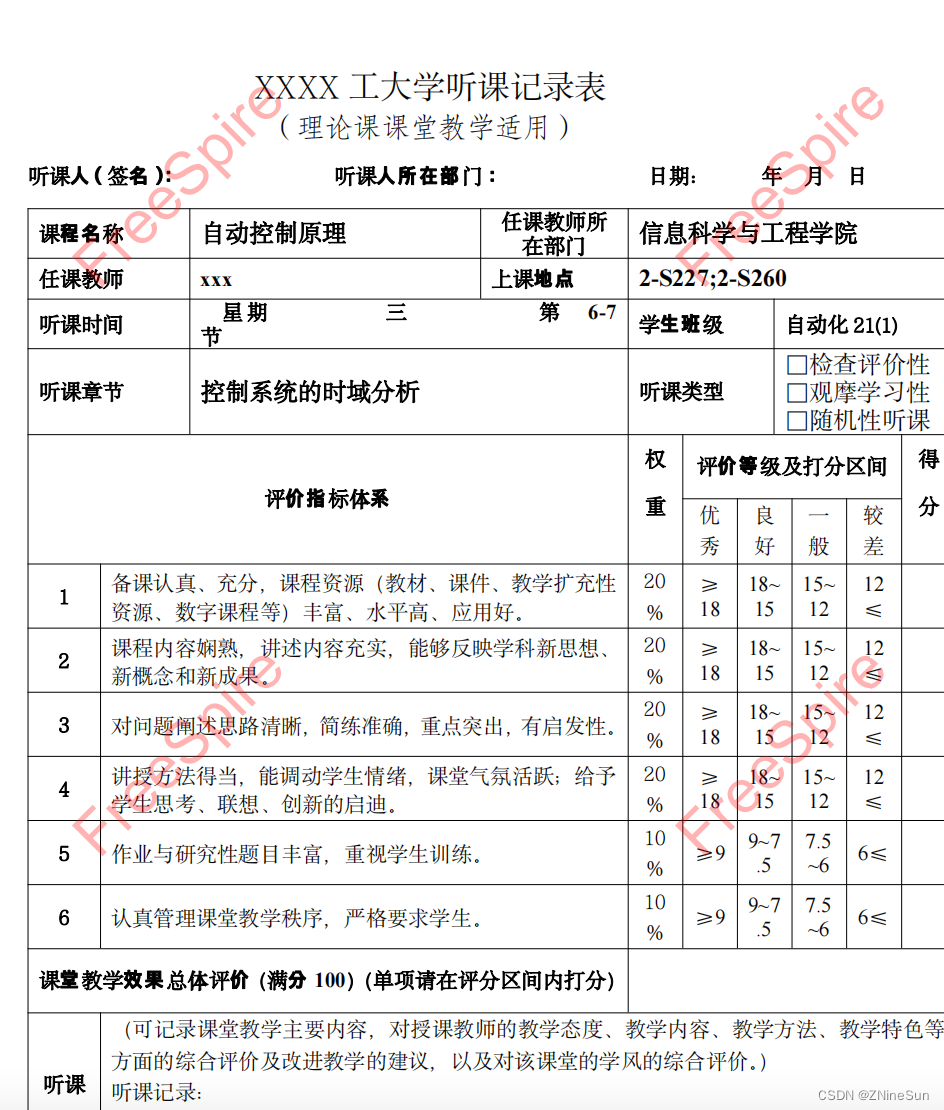

当然,它的功能远不止这么多,自己可以通过官方文档去研究一下,因为本文主要研究水印的操作,故不在此处进行细化改工具的使用。
4.Aspose.PDF for Java
Aspose.PDF for Java 是一个强大的 PDF 处理库,提供了添加水印的功能。
添加maven依赖
<dependency><groupId>com.luhuiguogroupId><artifactId>aspose-pdfartifactId><version>22.4version>dependency>
添加文本水印
@PostMapping("/addTextWatermark")
public ResponseEntity<byte[]> addTextWatermark(@RequestParam("file") MultipartFile file) throws IOException {// 加载 PDF 文件Document pdfDocument = new Document(file.getInputStream());TextStamp textStamp = new TextStamp("Watermark");textStamp.setWordWrap(true);textStamp.setVerticalAlignment(VerticalAlignment.Center);textStamp.setHorizontalAlignment(HorizontalAlignment.Center);pdfDocument.getPages().get_Item(1).addStamp(textStamp);// 保存 PDF 文件ByteArrayOutputStream outputStream = new ByteArrayOutputStream();pdfDocument.save(outputStream);return ResponseEntity.ok().header(HttpHeaders.CONTENT_DISPOSITION, "attachment; filename=\"watermarked.pdf\"").contentType(MediaType.APPLICATION_PDF).body(outputStream.toByteArray());
}
添加图片水印
@PostMapping("/addImageWatermark")
public ResponseEntity<byte[]> addImageWatermark(@RequestParam("file") MultipartFile file) throws IOException {// 加载 PDF 文件Document pdfDocument = new Document(file.getInputStream());ImageStamp imageStamp = new ImageStamp("watermark.png");imageStamp.setWidth(100);imageStamp.setHeight(100);imageStamp.setVerticalAlignment(VerticalAlignment.Center);imageStamp.setHorizontalAlignment(HorizontalAlignment.Center);pdfDocument.getPages().get_Item(1).addStamp(imageStamp);// 保存 PDF 文件ByteArrayOutputStream outputStream = new ByteArrayOutputStream();pdfDocument.save(outputStream);return ResponseEntity.ok().header(HttpHeaders.CONTENT_DISPOSITION, "attachment; filename=\"watermarked.pdf\"").contentType(MediaType.APPLICATION_PDF).body(outputStream.toByteArray());
}
将其抽取为工具类
import com.aspose.pdf.*;import java.io.*;public class AsposeWatermarkUtil {enum METHOD {IMAGE,TEXT}public static void addWaterMark(String filePath, METHOD method, String bandge, String outPath) {String addMethod = method == METHOD.TEXT ? "文本" : "图片";System.out.println("--------------开始添加" + addMethod + "水印--------------------");try {File pdf = new File(filePath);// 加载 PDF 文件Document pdfDocument = new Document(new FileInputStream(pdf));for (int i = 1; i <= pdfDocument.getPages().size(); i++) {Page page = pdfDocument.getPages().get_Item(i);if (method == METHOD.IMAGE) {addImageWatermark(bandge, page);} else {addTextWatermark(bandge, page);}System.out.println("--------------已完成第" + (i) + "页的水印添加--------------------");}// 保存 PDF 文件OutputStream outputStream = new FileOutputStream(outPath);pdfDocument.save(outputStream);System.out.println("--------------已完成文件的水印添加--------------------");} catch (Exception e) {e.printStackTrace();}}public static void addImageWatermark(String imagePath, Page page) {ImageStamp imageStamp = new ImageStamp(imagePath);imageStamp.setWidth(100);imageStamp.setHeight(100);imageStamp.setVerticalAlignment(VerticalAlignment.Center);imageStamp.setHorizontalAlignment(HorizontalAlignment.Center);imageStamp.setOpacity(0.2);page.addStamp(imageStamp);}public static void addTextWatermark(String text, Page page) {TextStamp textStamp = new TextStamp(text);textStamp.setWordWrap(true);textStamp.setVerticalAlignment(VerticalAlignment.Center);textStamp.setHorizontalAlignment(HorizontalAlignment.Center);textStamp.setOpacity(0.5);textStamp.setRotate(25);page.addStamp(textStamp);}public static void main(String[] args) {
//        addWaterMark("/Users/hb24795/Downloads/自动控制原理.pdf", METHOD.TEXT,"Aspose", "/Users/hb24795/Downloads/自动控制原理1.pdf");addWaterMark("/Users/hb24795/Downloads/自动控制原理.pdf", METHOD.IMAGE, "/Users/hb24795/Downloads/水印模板.png", "/Users/hb24795/Downloads/自动控制原理1.pdf");}
}
上面说的四种工具,每一种均可以操作其他类型文件,如word,ppt等,且可以去水印等,自己可以去查询相关资料然后去尝试一下
后面会给出以上工具对Pdf的更多操作,如pdf转图片、合并Pdf、去除水印等。
本文来自互联网用户投稿,文章观点仅代表作者本人,不代表本站立场,不承担相关法律责任。如若转载,请注明出处。 如若内容造成侵权/违法违规/事实不符,请点击【内容举报】进行投诉反馈!