java对excel导入和导出处理的几种方法(二)使用自己封装的工具类
方法二:使用ExcelReader工具类(分别处理excel2003和excel2007)
这里介绍的都是eventusermodel模式的工具类,和usermodel的差别为,前者是逐行读取的,后者为先读取到内存,再一次性解析,容易出现OOM的异常。
先上 Excel2003Reader ,这里就不写controller了,无外部依赖注入的工具类可以直接写main方法进行测试,main方法写在该工具类最后
package zero.excel.util;import org.apache.poi.hssf.eventusermodel.EventWorkbookBuilder.SheetRecordCollectingListener;
import org.apache.poi.hssf.eventusermodel.*;
import org.apache.poi.hssf.eventusermodel.dummyrecord.LastCellOfRowDummyRecord;
import org.apache.poi.hssf.eventusermodel.dummyrecord.MissingCellDummyRecord;
import org.apache.poi.hssf.record.*;
import org.apache.poi.hssf.usermodel.HSSFDataFormat;
import org.apache.poi.hssf.usermodel.HSSFDataFormatter;
import org.apache.poi.poifs.filesystem.POIFSFileSystem;
import org.apache.poi.util.LocaleUtil;
import org.apache.poi.util.POILogFactory;
import org.apache.poi.util.POILogger;
import org.slf4j.Logger;
import org.slf4j.LoggerFactory;import java.io.File;
import java.io.IOException;
import java.text.NumberFormat;
import java.util.*;/*** Excel2003 读取** @author Zero* @date 2018/05/04*/
public class Excel2003Reader implements HSSFListener {private final Logger LOGGER = LoggerFactory.getLogger(Excel2003Reader.class);/*** 我们在处理过程中收集的记录*/private SSTRecord sstRecord;private FormatHSSFListener formatListener;private List<String> cellList = new ArrayList<>();private int curRow = 0;private int lastColumn;private int maxColumn;private File file;private List<String[]> data;public Excel2003Reader(File file) {this.file = file;this.data = new ArrayList<>();}/*** 遍历 excel 文件*/public List<String[]> process() throws IOException {POIFSFileSystem fs = new POIFSFileSystem(file);MissingRecordAwareHSSFListener listener = new MissingRecordAwareHSSFListener(this);formatListener = new FormatHSSFListener(listener);HSSFEventFactory factory = new HSSFEventFactory();HSSFRequest request = new HSSFRequest();SheetRecordCollectingListener workbookBuildingListener = new SheetRecordCollectingListener(formatListener);request.addListenerForAllRecords(workbookBuildingListener);factory.processWorkbookEvents(request, fs);fs.close();return data;}/*** HSSFListener 监听方法,处理 Record*/@Overridepublic void processRecord(Record record) {int thisColumn;String value;switch (record.getSid()) {case SSTRecord.sid:sstRecord = (SSTRecord) record;break;case LabelRecord.sid:LabelRecord lrec = (LabelRecord) record;thisColumn = lrec.getColumn();value = lrec.getValue().trim();value = "".equals(value) ? " " : value;addValue(thisColumn, value);break;case LabelSSTRecord.sid:LabelSSTRecord lsrec = (LabelSSTRecord) record;thisColumn = lsrec.getColumn();if (sstRecord == null) {value = " ";addValue(thisColumn, value);} else {value = sstRecord.getString(lsrec.getSSTIndex()).toString().trim();value = "".equals(value) ? " " : value;addValue(thisColumn, value);}break;case NumberRecord.sid:NumberRecord numrec = (NumberRecord) record;thisColumn = numrec.getColumn();value = formatListener.formatNumberDateCell(numrec).trim();value = "".equals(value) ? " " : value;// FormataddValue(thisColumn, value);break;default:break;}// 空值的操作if (record instanceof MissingCellDummyRecord) {MissingCellDummyRecord mc = (MissingCellDummyRecord) record;thisColumn = mc.getColumn();value = " ";addValue(thisColumn, value);}// 行结束时的操作if (record instanceof LastCellOfRowDummyRecord) {// 行结束时, add到rowList中if (!cellList.isEmpty()) {if (curRow == 0) {LOGGER.info("表头数据:" + cellList);this.maxColumn = cellList.size() - 1;data.add(cellList.toArray(new String[0]));} else {checkMaxColumn();data.add(cellList.toArray(new String[0]));}}cellList.clear();curRow++;lastColumn = 0;}}private void addValue(int curColumn, String value) {checkColumn(curColumn);cellList.add(curColumn, value);this.lastColumn = curColumn;}private void checkColumn(int curColumn) {int diffNum = (curColumn - 1) - lastColumn;for (int i = 0; i < diffNum; i++) {cellList.add("");}}private void checkMaxColumn() {while (lastColumn < maxColumn) {cellList.add("");lastColumn++;}}static class FormatHSSFListener implements HSSFListener {private final static POILogger LOGGER = POILogFactory.getLogger(FormatTrackingHSSFListener.class);private final HSSFListener childListener;private final HSSFDataFormatter formatter;private final NumberFormat defaultFormat;private final Map<Integer, FormatRecord> customFormatRecords = new HashMap<>();private final List<ExtendedFormatRecord> xfRecords = new ArrayList<>();/*** Creates a format tracking wrapper around the given listener, using* the {@link Locale#getDefault() default locale} for the formats.** @param childListener the listener to be wrapped*/FormatHSSFListener(HSSFListener childListener) {this(childListener, LocaleUtil.getUserLocale());}/*** Creates a format tracking wrapper around the given listener, using* the given locale for the formats.** @param childListener the listener to be wrapped* @param locale the locale for the formats*/FormatHSSFListener(HSSFListener childListener, Locale locale) {this.childListener = childListener;formatter = new HSSFDataFormatter(locale);defaultFormat = NumberFormat.getInstance(locale);}/*** Process this record ourselves, and then pass it on to our child listener*/@Overridepublic void processRecord(Record record) {// Handle it ourselvesprocessRecordInternally(record);// Now pass on to our childchildListener.processRecord(record);}/*** Process the record ourselves, but do not pass it on to the child* Listener.** @param record the record to be processed*/void processRecordInternally(Record record) {if (record instanceof FormatRecord) {FormatRecord fr = (FormatRecord) record;customFormatRecords.put(fr.getIndexCode(), fr);}if (record instanceof ExtendedFormatRecord) {ExtendedFormatRecord xr = (ExtendedFormatRecord) record;xfRecords.add(xr);}}/*** Formats the given numeric of date cells contents as a String, in as* close as we can to the way that Excel would do so. Uses the various* format records to manage this.* * TODO - move this to a central class in such a way that hssf.usermodel can* make use of it too** @param cell the cell* @return the given numeric of date cells contents as a String*/
String formatNumberDateCell(CellValueRecordInterface cell) {double value;if (cell instanceof NumberRecord) {value = ((NumberRecord) cell).getValue();} else if (cell instanceof FormulaRecord) {value = ((FormulaRecord) cell).getValue();} else {throw new IllegalArgumentException("Unsupported CellValue Record passed in " + cell);}// Get the built in format, if there is oneint formatIndex = getFormatIndex(cell);String formatString;if (formatIndex == 14) {formatString = "yyyy-MM-dd HH:mm:ss";} else {formatString = getFormatString(cell);}if (formatString == null) {return defaultFormat.format(value);}// Format, using the nice new// HSSFDataFormatter to do the work for usreturn formatter.formatRawCellContents(value, formatIndex, formatString);}/*** Returns the format string, eg $##.##, for the given number format index.** @param formatIndex the format index* @return the format string*/String getFormatString(int formatIndex) {String format = null;if (formatIndex >= HSSFDataFormat.getNumberOfBuiltinBuiltinFormats()) {FormatRecord tfr = customFormatRecords.get(formatIndex);if (tfr == null) {LOGGER.log(POILogger.ERROR, "Requested format at index " + formatIndex+ ", but it wasn't found");} else {format = tfr.getFormatString();}} else {format = HSSFDataFormat.getBuiltinFormat((short) formatIndex);}return format;}/*** Returns the format string, eg $##.##, used by your cell** @param cell the cell* @return the format string*/String getFormatString(CellValueRecordInterface cell) {int formatIndex = getFormatIndex(cell);if (formatIndex == -1) {// Not foundreturn null;}return getFormatString(formatIndex);}/*** Returns the index of the format string, used by your cell, or -1 if none found** @param cell the cell* @return the index of the format string*/int getFormatIndex(CellValueRecordInterface cell) {ExtendedFormatRecord xfr = xfRecords.get(cell.getXFIndex());if (xfr == null) {LOGGER.log(POILogger.ERROR, "Cell " + cell.getRow() + "," + cell.getColumn()+ " uses XF with index " + cell.getXFIndex() + ", but we don't have that");return -1;}return xfr.getFormatIndex();}}public static void main(String[] args) throws Exception {long a = System.currentTimeMillis();String path = "C:\\Users\\Zero\\Desktop\\excel2003.xls";File file = new File(path);Excel2003Reader reader = new Excel2003Reader(file);List<String[]> result = reader.process();for (String[] s : result) {for (String l : s) {System.out.print(l.trim() + "|");}System.out.println();}long b = System.currentTimeMillis();System.out.println("\n用时" + (b - a) + "ms");}
}
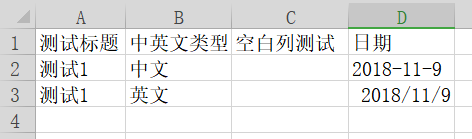
读取的excel内容如下:
main方法执行结果
[main] INFO zero.excel.util.Excel2003Reader - 表头数据:[测试标题, 中英文类型, 空白列测试, 日期]测试标题|中英文类型|空白列测试|日期|
测试1|中文||2018-11-9|
测试1|英文||2018-11-09 00:00:00|用时237ms
再上 Excel2007Reader
package zero.excel.util;import com.sun.org.apache.xerces.internal.parsers.SAXParser;
import org.apache.poi.openxml4j.opc.OPCPackage;
import org.apache.poi.xssf.eventusermodel.XSSFReader;
import org.apache.poi.xssf.model.SharedStringsTable;
import org.apache.poi.xssf.usermodel.XSSFRichTextString;
import org.xml.sax.Attributes;
import org.xml.sax.InputSource;
import org.xml.sax.XMLReader;
import org.xml.sax.helpers.DefaultHandler;import java.io.BufferedInputStream;
import java.io.File;
import java.io.InputStream;
import java.util.ArrayList;
import java.util.Iterator;
import java.util.List;/*** Excel2007 读取** @author Zero* @date 2018/05/04*/
public class Excel2007Reader extends DefaultHandler {/*** 此处定义属性较多,是因为用了阿里巴巴代码规范,提取了大量常量属性*/private static final String ROW_EVENT = "row";private static final String CELL_EVENT = "c";private static final String CELL_VALUE = "v";private static final String CELL_STRING = "s";private static final char CHAR_Z = 'Z';private StringBuffer cellString = new StringBuffer();private SharedStringsTable sst;private String lastContents;private boolean nextIsString;private String curColRef;private String lastColRef;private boolean isNullCell;private File file;private List<String[]> data;public Excel2007Reader(File file) {this.file = file;this.data = new ArrayList<>();}/*** 遍历 excel 文件*/public List<String[]> process() throws Exception {OPCPackage pkg = OPCPackage.open(file);XSSFReader r = new XSSFReader(pkg);SharedStringsTable sst = r.getSharedStringsTable();XMLReader parser = fetchSheetParser(sst);Iterator<InputStream> sheets = r.getSheetsData();InputStream sheet = sheets.next();BufferedInputStream bisSheet = new BufferedInputStream(sheet);InputSource sheetSource = new InputSource(bisSheet);parser.parse(sheetSource);sheet.close();pkg.close();return data;}private XMLReader fetchSheetParser(SharedStringsTable sst) {XMLReader parser = new SAXParser();this.sst = sst;parser.setContentHandler(this);return parser;}@Overridepublic void startElement(String uri, String localName, String name, Attributes attributes) {// c => cellif (CELL_EVENT.equals(name)) {lastColRef = curColRef;curColRef = attributes.getValue(CELL_VALUE);String cellType = attributes.getValue("t");isNullCell = cellType == null;nextIsString = !isNullCell && cellType.equals(CELL_STRING);}lastContents = "";}@Overridepublic void endElement(String uri, String localName, String name) {// 根据SST的索引值得到单元格的真正要存储的字符串// 这时characters()方法可能会被调用多次if (nextIsString) {int idx = Integer.parseInt(lastContents);lastContents = new XSSFRichTextString(sst.getEntryAt(idx)).toString();nextIsString = false;}// v => 单元格的值,如果单元格是字符串则v标签的值为该字符串在SST中的索引// 将单元格内容加入cellCache中if (CELL_VALUE.equals(name)) {int distance = getDistance(lastColRef, curColRef);// 补齐空格while (distance > 1) {cellString.append(",");distance--;}cellString.append(lastContents).append(",");} else if (isNullCell && name.equals(CELL_EVENT)) {cellString.append(",");} else {if (ROW_EVENT.equals(name)) {String[] s = cellString.toString().split(",");data.add(s);cellString.setLength(0);lastColRef = null;}}}@Overridepublic void characters(char[] ch, int start, int length) {//得到单元格内容的值lastContents += new String(ch, start, length);}/*** 获取2个单元格之间的距离,主要用来处理空单元格** @param fromColRefString 开始* @param toColRefString   结束* @return 距离*/private int getDistance(String fromColRefString, String toColRefString) {String fromColRef = getExcelCellRef(fromColRefString);String toColRef = getExcelCellRef(toColRefString);int distance = 0;if (fromColRef == null) {return getDistance("A", toColRefString) + 1;}if (toColRef != null) {while (fromColRef.length() < toColRef.length() || fromColRef.compareTo(toColRef) < 0) {distance++;fromColRef = increment(fromColRef);}}return distance;}private String increment(String s) {int length = s.length();char c = s.charAt(length - 1);if (c == CHAR_Z) {return length > 1 ? increment(s.substring(0, length - 1)) + 'A' : "AA";}return s.substring(0, length - 1) + ++c;}private String getExcelCellRef(String fromColRef) {if (fromColRef != null) {int i = 0;for (; i < fromColRef.length(); i++) {if (Character.isDigit(fromColRef.charAt(i))) {break;}}if (i == 0) {return fromColRef;} else {return fromColRef.substring(0, i);}}return null;}public static void main(String[] args) throws Exception {long a = System.currentTimeMillis();String path = "C:\\Users\\Zero\\Desktop\\excel-import.xlsx";File file = new File(path);Excel2007Reader reader = new Excel2007Reader(file);List<String[]> result = reader.process();for (String[] s : result) {for (String l : s) {System.out.print(l.trim() + "|");}System.out.println();}long b = System.currentTimeMillis();System.out.println("\n用时" + (b - a) + "ms");}
}
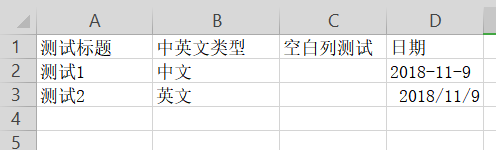
读取的excel内容如下:
main方法执行结果:
测试标题|中英文类型|空白列测试|日期|
测试1|中文||2018-11-9|
测试2|英文||43413|用时567ms
--------------------------------------------------华丽的分割线--------------------------------------------------------------
20190319更新
补充:上述2个excelReader,本人尝试过,逐行读取,并写了一个RowOperation接口,可针对不同类型的excel,写专门处理行级操作的实现类(可以使用Pipeline、多线程等),做到对excel更灵活的操作处理。
而之所以选择使用自己封装的工具类而不是用简单使用easypoi工具包来对excel文件进行导入和导出,其最主要的原因,其实就是easypoi在导入和导出时,都是直接内存读取,而在处理大文件excel的时候,如果直接读到内存,性能将大幅降低,而使用自己封装的工具类,则可以更灵活的选择逐行读取或者给Cell中赋值。
下面分享的是自己写的使用多线程来批量处理较大量的数据,并导出为excel的方法。如果大家有更好的方法,或者思路,欢迎留言讨论。
话不多说,上一些核心代码:
package zero.excel.domain;import lombok.Data;/*** 所有导出对象的抽象父类对象* * @author Zero* @date 2019/3/19*/
@Data
public abstract class BaseExcelExport {
}
package zero.excel.domain;import zero.excel.domain.BaseExcelExport;
import cn.afterturn.easypoi.excel.annotation.Excel;
import lombok.AllArgsConstructor;
import lombok.Data;import java.util.Date;/*** 导出对象* 注意:不使用easypoi导出时,@Excel中的replace、format都是不生效的* * @author Zero* @date 2019/3/19*/
@Data
@AllArgsConstructor
public class ExcelExport extends BaseExcelExport {@Excel(name = "测试标题")private String title;@Excel(name = "中英文类型", replace = {"中文_CN", "英文_EN"})private String type;@Excel(name = "日期", format = "yyyy-MM-dd HH:mm:ss")private Date date;
}
package zero.excel.util;import cn.afterturn.easypoi.excel.ExcelImportUtil;
import cn.afterturn.easypoi.excel.annotation.Excel;
import cn.afterturn.easypoi.excel.entity.ImportParams;
import cn.afterturn.easypoi.util.PoiPublicUtil;
import com.cyipp.skynet.common.domain.vo.BaseExcelExport;
import lombok.extern.slf4j.Slf4j;
import org.apache.poi.ss.usermodel.Cell;
import org.apache.poi.ss.usermodel.Row;
import org.apache.poi.ss.usermodel.Sheet;
import org.apache.poi.xssf.streaming.SXSSFWorkbook;
import org.springframework.web.multipart.MultipartFile;import javax.servlet.http.HttpServletResponse;
import java.io.BufferedOutputStream;
import java.io.IOException;
import java.io.OutputStream;
import java.lang.reflect.Field;
import java.net.URLEncoder;
import java.util.*;
import java.util.concurrent.Future;/*** 工具类* * @author Zero* @date 2018/11/9*/
public class ExcelUtil {/*** 获取表头数组** @param exportClass 导出对象class* @return 表头数组*/public static List<String> getTableHeader(Class exportClass) {ArrayList<String> headerList = new ArrayList<>();Field[] fields = PoiPublicUtil.getClassFields(exportClass);for (Field f : fields) {try {f.setAccessible(true);Excel excel = f.getAnnotation(Excel.class);if (excel != null) {headerList.add(excel.name());}} catch (Exception e) {e.printStackTrace();}}return headerList;}/*** 设置excel主题内容** @param tableHeader 表头* @param sh Sheet* @param listFuture Callable返回的list* @param 对象*/ public static <T extends BaseExcelExport> void setExcelContent(List<String> tableHeader, Sheet sh, List<Future<List<T>>> listFuture) {List<T> list = new ArrayList<>(1000);int size = !listFuture.isEmpty() ? listFuture.size() : 0;Future<List<T>> future;for (int i = 0; i < size; i++) {try {future = listFuture.get(i);if (null != future.get()) {int s = future.get().size();for (int a = 0; a < s; a++) {list.add(future.get().get(a));}}for (int a = 0; a < list.size(); a++) {Row row = sh.createRow(i * 1000 + a + 1);T vo = list.get(a);for (int n = 0; n < tableHeader.size(); n++) {Cell cell = row.createCell(n);Class exportClass = vo.getClass();Field[] fields = PoiPublicUtil.getClassFields(exportClass);for (Field f : fields) {try {f.setAccessible(true);Excel excel = f.getAnnotation(Excel.class);if (excel != null && Objects.equals(excel.name(), tableHeader.get(n))) {String value = f.get(vo) == null ? "" : f.get(vo).toString();cell.setCellValue(value);break;}} catch (Exception e) {e.printStackTrace();}}}}} catch (Exception e) {e.printStackTrace();log.error("导出列表出错");}list.clear();}}/*** 导出excel** @param response response* @param wb Workbook* @param fileName 文件名*/public static void exportExcel(HttpServletResponse response, SXSSFWorkbook wb, String fileName) {BufferedOutputStream out = null;try {response.setHeader("content-disposition", "attachment;filename=" + URLEncoder.encode(fileName + ".xlsx", "UTF-8"));out = new BufferedOutputStream(response.getOutputStream());wb.write(out);wb.dispose();} catch (IOException e) {e.printStackTrace();} finally {try {if (out != null) {out.close();}// 处理在磁盘上备份此工作簿的临时文件wb.dispose();} catch (IOException e) {e.printStackTrace();}}}
}
偷懒没写实现类,只写了一个导出的方法,如有疑问,欢迎留言。
@Resourceprivate XXXMapper mapper;private ThreadFactory namedThreadFactory = new ThreadFactoryBuilder().setNameFormat("excel-pool-%d").build();private ExecutorService executorService = new ThreadPoolExecutor(4, 16, 0L,TimeUnit.MILLISECONDS, new LinkedBlockingDeque<>(10240), namedThreadFactory, new ThreadPoolExecutor.AbortPolicy());/*** 导出excel** @param response response* @param qo 导出时查询的参数*/@Overridepublic void exportAndDownLoad(HttpServletResponse response, ExportExcelQO qo) {//do something。。。对查询条件qo对象的一些其他处理,也可去除qo对象//获取表头List<String> tableHeader = ExcelUtil.getTableHeader(ExcelExport.class);//使用SXSSFWorkbook,表示流的方式进行操作。在内存中保持1000行,超过1000行将被刷新到磁盘SXSSFWorkbook wb = new SXSSFWorkbook(1000);Sheet sh = wb.createSheet();//表头处理Row row = sh.createRow(0);Cell cell;for (int i = 0; i < tableHeader.size(); i++) {cell = row.createCell(i);cell.setCellValue(tableHeader.get(i));}//此处mapper为数据库查询使用的Mapper对象,目的是查询需要导出的数据总条数int count = mapper.getTotalCount(qo);int maxCount = 1000;int cycle = (int) Math.ceil(count / maxCount);//使用callable的回调,获取导出对象的数组List<Future<List<ExcelExport>>> listFuture = new ArrayList<>(1000);for (int i = 0; i <= cycle; i++) {ExportExcelQO cqo = new ExportExcelQO();BeanUtils.copyProperties(qo, cqo);//使用PageHelper进行分页,也可以使用别的方法进行分页查询,目的是让多线程来批量操作,通过callable获取回调结果cqo.setPageSize(maxCount);cqo.setLast(i + 1);//获取导出相关参数Callable<List<ExcelExport>> run = () -> this.getExportList(cqo);listFuture.add(executorService.submit(run));}ExcelUtil.setExcelContent(tableHeader, sh, listFuture);ExcelUtil.exportExcel(response, wb, "file_name");}/*** @param qo 导出参数* @return List*/private List<ExcelExport> getExportList(ExportExcelQO qo) {PageHelper.startPage(qo.getLast() == null ? 1 : qo.getLast(), qo.getPageSize());List<ExcelExport> list = mapper.queryData(qo);if (null != list && list.size() > 0) {for (ExcelExportexcelExport : list) {//经行数据替换等行级操作,如type查询结果为CN和EN,则替换为中文和英文//type处理excelExport.setType(。。。);//Date处理excelExport.setDate(。。。);}}return list;}因为文章篇幅过大,本来是将Easypoi和自己写的工具类放在一起的,后来觉得实在太长了,就又拆分成了2篇文章。我发现早先写的excelReader都还可以优化,不过嘛,目前对excel导入导出处理的文章应该是到此为止了。虽然我电脑上还有一些存货,但都与自己项目有关,并且本人也挺懒的,很多东西可能写的也不够细,希望大家谅解。Whatever,我的文章中都是自己写的干货,虽然可能早就有大佬写过比我更好的,但我也只是希望通过自己的分享,获得大家的认可,与大家一起交流与成长。
PS:如果大家有更好的方法,一定要留言告诉我啊。
--------------------------------------------------华丽的分割线--------------------------------------------------------------
文笔不好,望见谅! ^ _ ^
如有任何问题或者意见,欢迎留言交流。
上一篇:java对excel导入和导出处理的几种方法(一)使用easypoi
本文来自互联网用户投稿,文章观点仅代表作者本人,不代表本站立场,不承担相关法律责任。如若转载,请注明出处。 如若内容造成侵权/违法违规/事实不符,请点击【内容举报】进行投诉反馈!