OpenCV实现图像搜索引擎(Image Search Engine)
一.原理
1. 图像搜索原理
图像搜索算法基本可以分为如下步骤:提取图像特征。如采用SIFT、指纹算法函数、哈希函数、bundling features算法等。当然如知乎中所言,也可以针对特定的图像集群采用特定的模式设计算法,从而提高匹配的精度。如已知所有图像的中间部分在颜色空间或构图上有显著的区别,就可以加强对中间部分的分析,从而更加高效地提取图像特征。图像特征的存储。一般将图像特征量化为数据存放于索引表中,并存储在外部存储介质中,搜索图片时仅搜索索引表中的图像特征,按匹配程度从高到低查找类似图像。对于图像尺寸分辩率不同的情况可以采用降低采样或归一化方法。相似度匹配。如存储的是特征向量,则比较特征向量之间的加权后的平方距离。如存储的是散列码,则比较Hamming距离。初筛后,还可以进一步筛选最佳图像集。2. 图片搜索引擎算法及框架设计
基本步骤
采用颜色空间特征提取器和构图空间特征提取器提取图像特征。
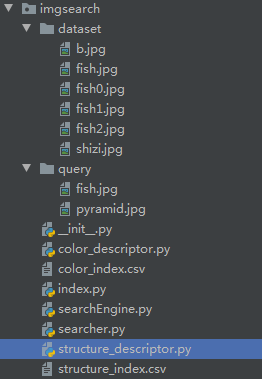
图像索引表构建驱动程序生成待搜索图像库的图像特征索引表。
图像搜索引擎驱动程序执行搜索命令,生成原图图像特征并传入图片搜索匹配器。
图片搜索匹配内核执行搜索匹配任务。返回前limit个最佳匹配图像。
color_descriptor.py
# -*- coding: utf-8 -*-
# @Time    : 2021/10/9 9:44
# @Author  :
import cv2
import numpy
"""
颜色空间特征提取器ColorDescriptor
类成员bins。记录HSV色彩空间生成的色相、饱和度及明度分布直方图的最佳bins分配。bins分配过多则可能导致程序效率低下,匹配难度和匹配要求过分苛严;bins分配过少则会导致匹配精度不足,不能表证图像特征。
成员函数describe(self, image)。将图像从BGR色彩空间转为HSV色彩空间(此处应注意OpenCV读入图像的色彩空间为BGR而非RGB)。生成左上、右上、左下、右下、中心部分的掩模。中心部分掩模的形状为椭圆形。这样能够有效区分中心部分和边缘部分,从而在getHistogram()方法中对不同部位的色彩特征做加权处理。"""class ColorDescriptor:__slot__ = ["bins"]def __init__(self, bins):self.bins = binsdef getHistogram(self, image, mask, isCenter):""":param image::param mask::param isCenter::return:"""# get histogramimageHistogram = cv2.calcHist([image], [0, 1, 2], mask, self.bins, [0, 180, 0, 256, 0, 256])# normalizeimageHistogram = cv2.normalize(imageHistogram, imageHistogram).flatten()if isCenter:weight = 5.0for index in range(len(imageHistogram)):imageHistogram[index] *= weightreturn imageHistogramdef describe(self, image):image = cv2.cvtColor(image, cv2.COLOR_BGR2HSV)features = []# get dimension and centerheight, width = image.shape[0], image.shape[1]centerX, centerY = int(width * 0.5), int(height * 0.5)# initialize mask dimensionsegments = [(0, centerX, 0, centerY), (0, centerX, centerY, height), (centerX, width, 0, centerY),(centerX, width, centerY, height)]# initialize center partaxesX, axesY = int(width * 0.75) / 2, int(height * 0.75) / 2ellipseMask = numpy.zeros([height, width], dtype="uint8")# img, center, axes, angle, startAngle, endAngle, color, thickness=None, lineType=None, shift=Nonecv2.ellipse(ellipseMask, (centerX, centerY), (int(axesX), int(axesY)), 0, 0, 360, 255, -1)# initialize corner partfor startX, endX, startY, endY in segments:cornerMask = numpy.zeros([height, width], dtype="uint8")cv2.rectangle(cornerMask, (startX, startY), (endX, endY), 255, -1)cornerMask = cv2.subtract(cornerMask, ellipseMask)# get histogram of corner partimageHistogram = self.getHistogram(image, cornerMask, False)features.append(imageHistogram)# get histogram of center partimageHistogram = self.getHistogram(image, ellipseMask, True)features.append(imageHistogram)# returnreturn features
index.py
# -*- coding: utf-8 -*-
# @Time    : 2021/10/9 9:45
# @Author  :
import color_descriptor
import structure_descriptor
import glob
import argparse
import cv2"""
图像索引表构建驱动index.py。
引入color_descriptor和structure_descriptor。用于解析图片库图像,获得色彩空间特征向量和构图空间特征向量。用argparse设置命令行参数。参数包括图片库路径、色彩空间特征索引表路径、构图空间特征索引表路径。
用glob获得图片库路径。
生成索引表文本并写入csv文件。可采用如下命令行形式启动驱动程序:
python index.py --dataset dataset --colorindex color_index.csv --structure structure_index.csv
"""
searchArgParser = argparse.ArgumentParser()
searchArgParser.add_argument("-d", "--dataset", required=True,help="Path to the directory that contains the images to be indexed")
searchArgParser.add_argument("-c", "--colorindex", required=True,help="Path to where the computed color index will be stored")
searchArgParser.add_argument("-s", "--structureindex", required=True,help="Path to where the computed structure index will be stored")
arguments = vars(searchArgParser.parse_args())idealBins = (8, 12, 3)
colorDesriptor = color_descriptor.ColorDescriptor(idealBins)output = open(arguments["colorindex"], "w")for imagePath in glob.glob(arguments["dataset"] + "/*.jpg"):imageName = imagePath[imagePath.rfind("/") + 1:]image = cv2.imread(imagePath)features = colorDesriptor.describe(image)# write features to filefeatures = [str(feature).replace("\n", "") for feature in features]output.write("%s,%s\n" % (imageName, ",".join(features)))
# close index file
output.close()idealDimension = (16, 16)
structureDescriptor = structure_descriptor.StructureDescriptor(idealDimension)output = open(arguments["structureindex"], "w")for imagePath in glob.glob("dataset" + "/*.jpg"):imageName = imagePath[imagePath.rfind("/") + 1:]image = cv2.imread(imagePath)structures = structureDescriptor.describe(image)# write structures to filestructures = [str(structure).replace("\n", "") for structure in structures]output.write("%s,%s\n" % (imageName, ",".join(structures)))
# close index file
output.close()
searchEngine.py
# -*- coding: utf-8 -*-
# @Time    : 2021/10/9 9:45
# @Author  :
import color_descriptor
import structure_descriptor
import searcher
import argparse
import cv2
"""
图像搜索引擎驱动searchEngine.py。引入color_descriptor和structure_descriptor。用于解析待匹配(搜索)的图像,获得色彩空间特征向量和构图空间特征向量。用argparse设置命令行参数。参数包括图片库路径、色彩空间特征索引表路径、构图空间特征索引表路径、待搜索图片路径。
生成索引表文本并写入csv文件。可采用如下命令行形式启动驱动程序:
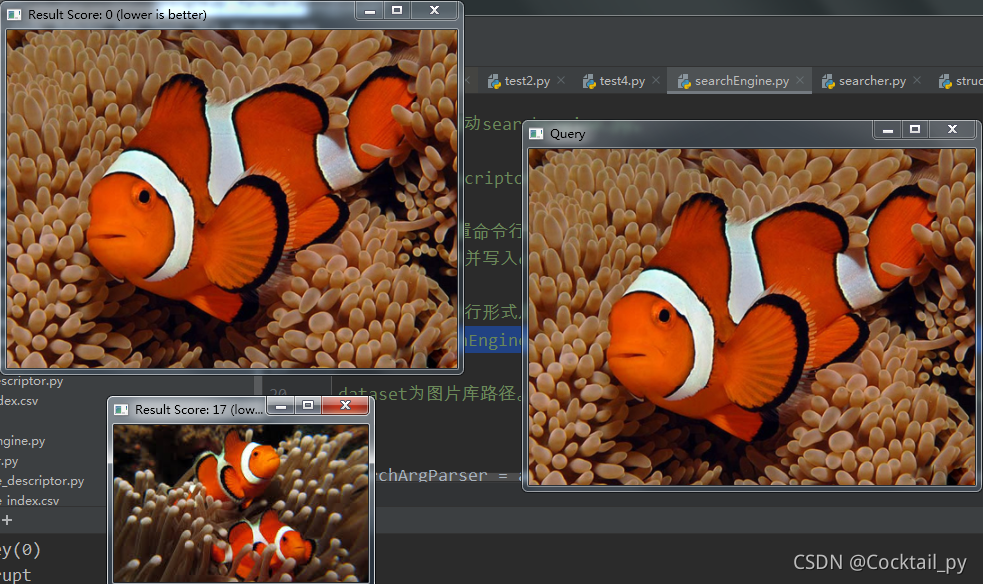
python searchEngine.py -c color_index.csv -s structure_index.csv -r dataset -q query/pyramid.jpg dataset为图片库路径。color_index.csv为色彩空间特征索引表路径。structure_index.csv为构图空间特征索引表路径,query/pyramid.jpg为待搜索图片路径。
"""searchArgParser = argparse.ArgumentParser()
searchArgParser.add_argument("-c", "--colorindex", required = True, help = "Path to where the computed color index will be stored")
searchArgParser.add_argument("-s", "--structureindex", required = True, help = "Path to where the computed structure index will be stored")
searchArgParser.add_argument("-q", "--query", required = True, help = "Path to the query image")
searchArgParser.add_argument("-r", "--resultpath", required = True, help = "Path to the result path")
searchArguments = vars(searchArgParser.parse_args())idealBins = (8, 12, 3)
idealDimension = (16, 16)colorDescriptor = color_descriptor.ColorDescriptor(idealBins)
structureDescriptor = structure_descriptor.StructureDescriptor(idealDimension)
queryImage = cv2.imread(searchArguments["query"])
colorIndexPath = searchArguments["colorindex"]
structureIndexPath = searchArguments["structureindex"]
resultPath = searchArguments["resultpath"]queryFeatures = colorDescriptor.describe(queryImage)
queryStructures = structureDescriptor.describe(queryImage)imageSearcher = searcher.Searcher(colorIndexPath, structureIndexPath)
searchResults = imageSearcher.search(queryFeatures, queryStructures)
print(searchResults)
for imageName, score in searchResults:queryResult = cv2.imread( imageName)cv2.imshow("Result Score: " + str(int(score)) + " (lower is better)", queryResult)
cv2.imshow("Query", queryImage)
cv2.waitKey(0)
searcher.py
# -*- coding: utf-8 -*-
# @Time    : 2021/10/9 9:45
# @Author  :
import numpy
import csv
import re"""
图片搜索匹配内核Searcher。类成员colorIndexPath和structureIndexPath。记录色彩空间特征索引表路径和结构特征索引表路径。
成员函数solveColorDistance(self, features, queryFeatures, eps = 1e-5)。求features和queryFeatures特征向量的二范数。eps是为了避免除零错误。
成员函数solveStructureDistance(self, structures, queryStructures, eps = 1e-5)。同样是求特征向量的二范数。eps是为了避免除零错误。需作统一化处理,color和structure特征向量距离相对比例适中,不可过分偏颇。
成员函数searchByColor(self, queryFeatures)。使用csv模块的reader方法读入索引表数据。采用re的split方法解析数据格式。用字典searchResults存储query图像与库中图像的距离,键为图库内图像名imageName,值为距离distance。
成员函数transformRawQuery(self, rawQueryStructures)。将未处理的query图像矩阵转为用于匹配的特征向量形式。
成员函数searchByStructure(self, rawQueryStructures)。类似4。
成员函数search(self, queryFeatures, rawQueryStructures, limit = 3)。将searchByColor方法和searchByStructure的结果汇总,获得总匹配分值,分值越低代表综合距离越小,匹配程度越高。返回前limit个最佳匹配图像。"""class Searcher:__slot__ = ["colorIndexPath", "structureIndexPath"]def __init__(self, colorIndexPath, structureIndexPath):self.colorIndexPath, self.structureIndexPath = colorIndexPath, structureIndexPathdef solveColorDistance(self, features, queryFeatures, eps=1e-5):distance = 0.5 * numpy.sum([((a - b) ** 2) / (a + b + eps) for a, b in zip(features, queryFeatures)])return distancedef solveStructureDistance(self, structures, queryStructures, eps=1e-5):distance = 0normalizeRatio = 5e3for index in range(len(queryStructures)):for subIndex in range(len(queryStructures[index])):a = structures[index][subIndex]b = queryStructures[index][subIndex]distance += (a - b) ** 2 / (a + b + eps)return distance / normalizeRatiodef searchByColor(self, queryFeatures):searchResults = {}with open(self.colorIndexPath) as indexFile:reader = csv.reader(indexFile)for line in reader:features = []for feature in line[1:]:feature = feature.replace("[", "").replace("]", "")findStartPosition = 0feature = re.split("\s+", feature)rmlist = []for index, strValue in enumerate(feature):if strValue == "":rmlist.append(index)for _ in range(len(rmlist)):currentIndex = rmlist[-1]rmlist.pop()del feature[currentIndex]feature = [float(eachValue) for eachValue in feature]features.append(feature)distance = self.solveColorDistance(features, queryFeatures)searchResults[line[0]] = distanceindexFile.close()# print "feature", sorted(searchResults.iteritems(), key = lambda item: item[1], reverse = False)return searchResultsdef transformRawQuery(self, rawQueryStructures):queryStructures = []for substructure in rawQueryStructures:structure = []for line in substructure:for tripleColor in line:structure.append(float(tripleColor))queryStructures.append(structure)return queryStructuresdef searchByStructure(self, rawQueryStructures):searchResults = {}queryStructures = self.transformRawQuery(rawQueryStructures)with open(self.structureIndexPath) as indexFile:reader = csv.reader(indexFile)for line in reader:structures = []for structure in line[1:]:structure = structure.replace("[", "").replace("]", "")structure = re.split("\s+", structure)if structure[0] == "":structure = structure[1:]structure = [float(eachValue) for eachValue in structure]structures.append(structure)distance = self.solveStructureDistance(structures, queryStructures)searchResults[line[0]] = distanceindexFile.close()# print "structure", sorted(searchResults.iteritems(), key = lambda item: item[1], reverse = False)return searchResultsdef search(self, queryFeatures, rawQueryStructures, limit=3):featureResults = self.searchByColor(queryFeatures)structureResults = self.searchByStructure(rawQueryStructures)results = {}for key, value in featureResults.items():results[key] = value + structureResults[key]results = sorted(results.items(), key=lambda item: item[1], reverse=False)return results[: limit]
structure_descriptor.py
# -*- coding: utf-8 -*-
# @Time    : 2021/10/9 9:45
# @Author  :
import cv2
"""
构图空间特征提取器StructureDescriptor。类成员dimension。将所有图片归一化(降低采样)为dimension所规定的尺寸。由此才能够用于统一的匹配和构图空间特征的生成。
成员函数describe(self, image)。将图像从BGR色彩空间转为HSV色彩空间(此处应注意OpenCV读入图像的色彩空间为BGR而非RGB)。返回HSV色彩空间的矩阵,等待在搜索引擎核心中的下一步处理。"""class StructureDescriptor:__slot__ = ["dimension"]def __init__(self, dimension):self.dimension = dimensiondef describe(self, image):image = cv2.resize(image, self.dimension, interpolation=cv2.INTER_CUBIC)# image = cv2.cvtColor(image, cv2.COLOR_BGR2HSV)return image
二.执行
# 构建索引
python index.py --dataset dataset --colorindex color_index.csv --structure structure_index.csv# 搜图
python searchEngine.py -c color_index.csv -s structure_index.csv -r dataset -q query/pyramid.jpg
参考:https://blog.csdn.net/coderhuhy/article/details/46575667
本文来自互联网用户投稿,文章观点仅代表作者本人,不代表本站立场,不承担相关法律责任。如若转载,请注明出处。 如若内容造成侵权/违法违规/事实不符,请点击【内容举报】进行投诉反馈!