在vscode中打开latex3版本毕业论文提示Recipe terminated with error等问题
最近在写毕业论文编译时一直有问题,记录下错误及解决方法吧:
编译时出现“Recipe terminated with error.”问题
解决方法,修改settings.json文件如下:
settings.json文件打开方法:

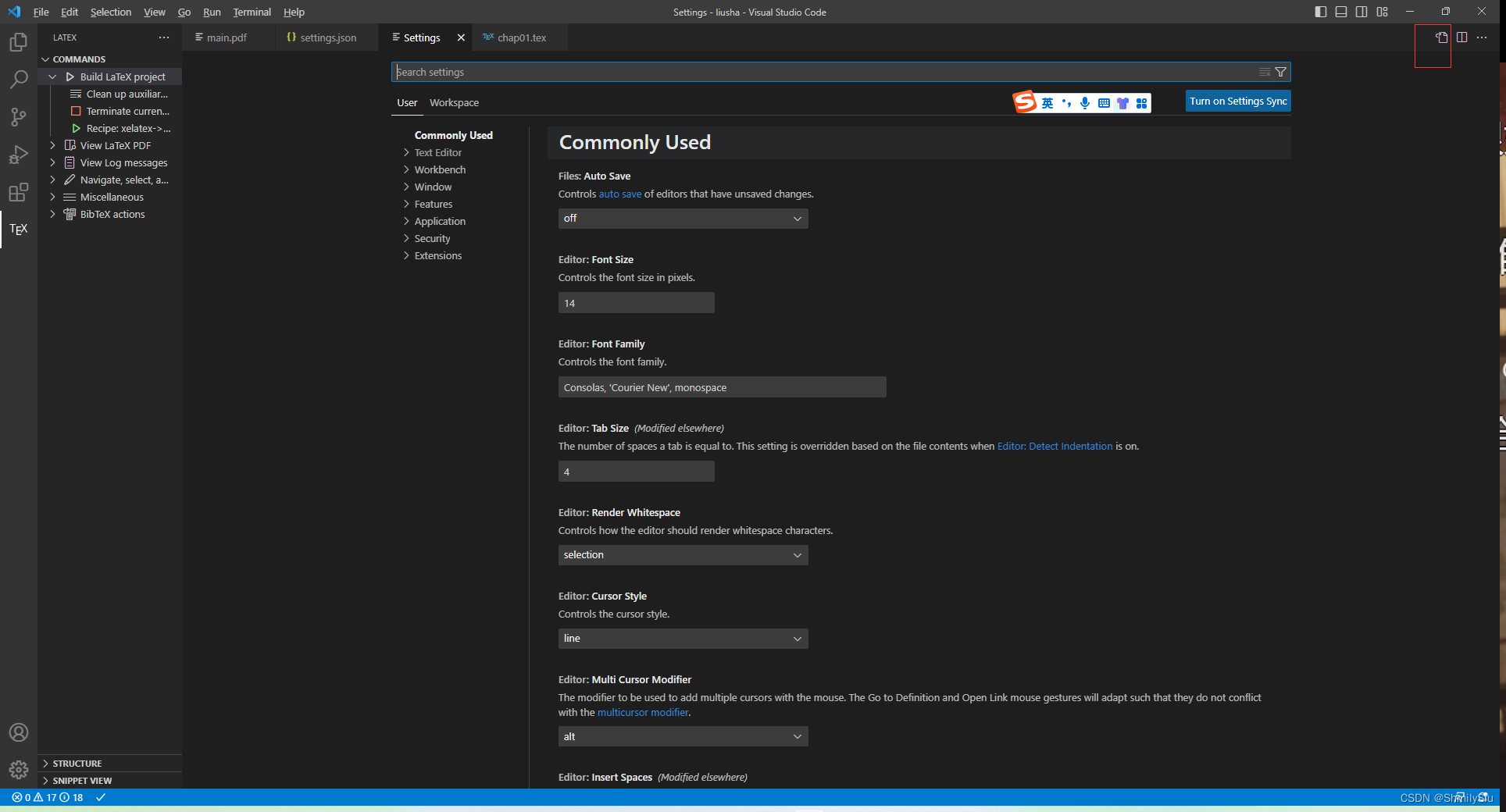
点击右上角就可以打开settings.json文件,并修改其内容如下:
{"latex-workshop.latex.tools": [    {"name": "xelatex","command": "xelatex","args": ["-synctex=1","-interaction=nonstopmode","-file-line-error","%DOCFILE%"]},{"name": "pdflatex","command": "pdflatex","args": ["-synctex=1","-interaction=nonstopmode","-file-line-error","%DOCFILE%"]},{"name": "bibtex","command": "bibtex","args": ["%DOCFILE%"]},{"name": "biber","command": "biber","args": ["%DOCFILE%"]}
],
"latex-workshop.latex.recipes": [{"name": "xelatex->biber->xelatex->xelatex","tools": ["xelatex","biber","xelatex","xelatex"]},// {//     "name": "xelatex",//     "tools": [//         "xelatex"//     ],// },// {//     "name": "pdflatex",//     "tools": [//         "pdflatex"//     ]// },// {//     "name": "pdf->bib->pdf->pdf",//     "tools": [//         "pdflatex",//         "bibtex",//         "pdflatex",//         "pdflatex"//     ]// }
],
"latex-workshop.latex.clean.fileTypes": ["*.aux","*.bbl","*.blg","*.idx","*.ind","*.lof","*.lot","*.out","*.toc","*.acn","*.acr","*.alg","*.glg","*.glo","*.gls","*.ist","*.fls","*.log","*.fdb_latexmk","*.gz","*.bcf","*.thm","*.xdv","contents/*.aux"
],
//tex文件浏览器,可选项为"none" "browser" "tab" "external"
"latex-workshop.view.pdf.viewer": "tab",
//自动编译tex文件onFileChange onSave never
"latex-workshop.latex.autoBuild.run": "never",
//显示内容菜单:(1)编译文件;(2)定位游标
"latex-workshop.showContextMenu": true,
//显示错误
"latex-workshop.message.error.show": true,
//显示警告
"latex-workshop.message.warning.show": false,
//从使用的包中自动补全命令和环境
"latex-workshop.intellisense.package.enabled": true,
//设置为never,为不清除辅助文件
"latex-workshop.latex.autoClean.run": "onBuilt",
//设置vscode编译tex文档时的默认编译链
"latex-workshop.latex.recipe.default": "lastUsed",
// 用于反向同步的内部查看器的键绑定。ctrl/cmd +点击(默认)或双击
"latex-workshop.view.pdf.internal.synctex.keybinding": "double-click",
"editor.wordWrap": "on",
}
修改完毕后,点击运行键,等运行结束后就编译成功了。

“Unable to load picture or PDF file ”
一、无论是pdf文件还是jpg文件都不能太大,我10M左右的图片编译就会出现问题
二、文件最好不要用中文,要用英文命名
本文来自互联网用户投稿,文章观点仅代表作者本人,不代表本站立场,不承担相关法律责任。如若转载,请注明出处。 如若内容造成侵权/违法违规/事实不符,请点击【内容举报】进行投诉反馈!