使用maven整合SSH框架详细步骤
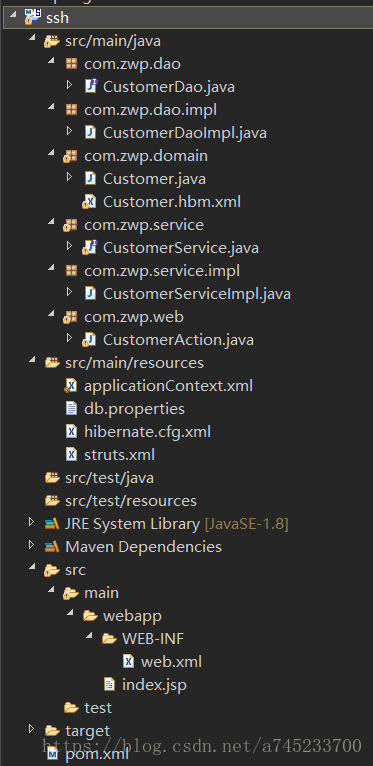
(文章所使用的的框架为Struts2+Spring+Hibernate,项目的结构图参照文章尾部)
1、第一步:创建maven工程,在pom.xml文件中导入需要的jar包依赖:
4.0.0 com.zwp ssh 0.0.1-SNAPSHOT war 4.2.4.RELEASE 5.0.7.Final 2.3.24 org.springframework spring-context ${spring.version} org.springframework spring-aspects ${spring.version} org.springframework spring-orm ${spring.version} org.springframework spring-test ${spring.version} org.springframework spring-web ${spring.version} org.hibernate hibernate-core ${hibernate.version} org.apache.struts struts2-core ${struts.version} org.apache.struts struts2-spring-plugin ${struts.version} org.springframework spring-context org.springframework spring-aspects org.springframework spring-orm org.springframework spring-test org.springframework spring-web org.apache.struts struts2-core org.apache.struts struts2-spring-plugin org.hibernate hibernate-core mysql mysql-connector-java 5.1.6 runtime c3p0 c3p0 0.9.1.2 javax.servlet servlet-api 2.5 provided javax.servlet jsp-api 2.0 provided org.slf4j slf4j-log4j12 1.7.2 junit junit 4.12 test javax.servlet jstl 1.2 org.apache.maven.plugins maven-compiler-plugin 1.8 1.8 UTF-8 org.apache.tomcat.maven tomcat7-maven-plugin 2.2 http://127.0.0.1:8080/manager/text tomcat8 /ssh
2、第二步:搭建struts2环境:
(1)创建action,创建struts.xml配置文件,配置action:
//Customer的web层:
public class CustomerAction extends ActionSupport {//根据主键查询:public String findOne() throws Exception{return SUCCESS;}
}
/index.jsp (2)配置struts2的过滤器(web.xml文件):
struts2 org.apache.struts2.dispatcher.ng.filter.StrutsPrepareAndExecuteFilter struts2 /*
3、第三步:搭建hibernate环境:
(1)创建实体类:
//Customer实体类:
public class Customer {private String custId;private String custName;private String address;public String getCustName() {return custName;}public void setCustName(String custName) {this.custName = custName;}public String getAddress() {return address;}public void setAddress(String address) {this.address = address;}public String getCustId() {return custId;}public void setCustId(String custId) {this.custId = custId;}
}
(2)配置实体类和数据库表映射关系:Customer.hbm.xml
(3)创建hibernate核心配置文件:hibernate.cfg.xml
- 引入映射配置文件
org.hibernate.dialect.MySQL5Dialect true true update
4、第四步:搭建spring环境:
(1)创建spring核心配置文件:applicationContext.xml
(2)让spring配置文件在服务器启动时候加载(web.xml文件)
- 配置监听器
- 指定spring配置文件位置
org.springframework.web.context.ContextLoaderListener
contextConfigLocation classpath:applicationContext.xml
5、第五步:struts2和spring整合:
(1)把action在spring配置(action多实例的):applicationContext.xml文件
(2)在struts.xml中action标签class属性里面的值该写成 bean的id值:
/index.jsp
6、第六步:spring和hibernate整合:
(1)把hibernate核心配置文件中数据库配置,在spring里面配置:
(2)把hibernate的sessionFactory在spring配置
db.properties文件:
//Customer的Dao层接口
public interface CustomerDao {Customer findOne(String custId);
}
//Customer的Dao层接口实现类,继承HibernateDaoSupport,该类已经注入了hibernateTemplate对象。
public class CustomerDaoImpl extends HibernateDaoSupport implements CustomerDao {@Overridepublic Customer findOne(String custId) {return this.getHibernateTemplate().get(Customer.class, custId);}
}//Customer的Service层接口:
public interface CustomerService {Customer findOne(String custId);
}//Customer的Service接口实现类:
public class CustomerServiceImpl implements CustomerService{//注入CustomerDaoprivate CustomerDao customerDao;public void setCustomerDao(CustomerDao customerDao) {this.customerDao = customerDao;}public Customer findOne(String custId) {return customerDao.findOne(custId);}
}//Customer的web层:
public class CustomerAction extends ActionSupport {//注入CustomerService对象;private CustomerService customerService;public void setCustomerService(CustomerService customerService) {this.customerService = customerService;}//属性注入:private String custId;public void setCustId(String custId) {this.custId = custId;}//根据主键查询:public String findOne() throws Exception{Customer customer = customerService.findOne(custId);ActionContext.getContext().getValueStack().push(customer);return SUCCESS;}
}applicationContext.xml:
(5)之前在hibernate配置与本地线程绑定的session:
thread 在hibernate与spring整合后,不需要在spring里面配置与本地线程绑定的session。
8、第八步:配置事务:(applicationContext.xml)
9、第九步:编写成功页面index.jsp:
<%@ page language="java" contentType="text/html; charset=utf-8" pageEncoding="utf-8"%>
<%@ taglib prefix="s" uri="/struts-tags"%>
主页
10、第十步 启动并测试:
(1)启动maven项目输入命令:tomcat7:run。
(2)在浏览器地址栏输入:http://localhost:8080/ssh/customerAction_findOne.action?custId=1
(3)出现以下界面和数据则代表成功:

附:项目的工程结构:
本文来自互联网用户投稿,文章观点仅代表作者本人,不代表本站立场,不承担相关法律责任。如若转载,请注明出处。 如若内容造成侵权/违法违规/事实不符,请点击【内容举报】进行投诉反馈!