一、自定义插件
jQuery.extend(object) 扩展jQuery函数的APIjQuery.fn.extend(object) 扩展jQuery实例对象的API注意:1) object指的是js实例对象。2) 继承相关API,传入js实例对象,js实例对象中的函数中this指的是jQuery实例对象。jQuery其他API,传入的函数,函数中的thsi指的是DOM对象。
3.1 扩展jQuery的工具方法($的工具类)
>>>>>> my-jq-plugin.js
$.extend({'max':function(a,b){return a>b?a:b;},'min':function(a,b){return a>b?b:a;},"leftTrim":function(str){return str.replace(/^\s+/,"");},"rightTrim":function(str){return str.replace(/\s+$/,"");}})
>>>>>> index.html
<body>xxx
body>
<script type="text/javascript" src="js/jquery-1.12.4.js">script>
<script type="text/javascript" src="my-jq-plugin.js">script>
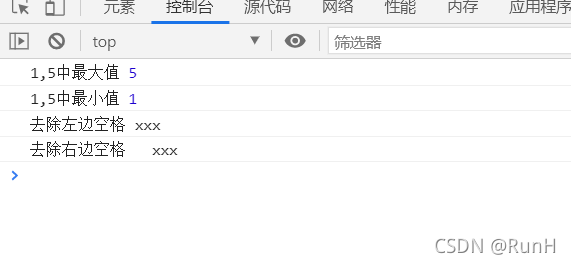
<script>console.log("1,5中最大值",$.max(1,5))console.log("1,5中最小值",$.min(1,5))console.log("去除左边空格",$.leftTrim("  xxx  "))console.log("去除右边空格",$.rightTrim("  xxx  "))script>
3.2 扩展jQuery实例对象的方法
>>>>>> my-jq-plugin.js
$.fn.extend({'checkAll':function(){this.prop("checked",true)},'noCheckAll':function(){this.prop("checked",false)},'reverse':function(){this.each(function(index,elem){this.checked=!this.checked;})}})
>>>>>> index.html
DOCTYPE html>
<html lang="en">
<head><meta charset="UTF-8"><meta http-equiv="X-UA-Compatible" content="IE=edge"><meta name="viewport" content="width=device-width, initial-scale=1.0"><title>Documenttitle>
head>
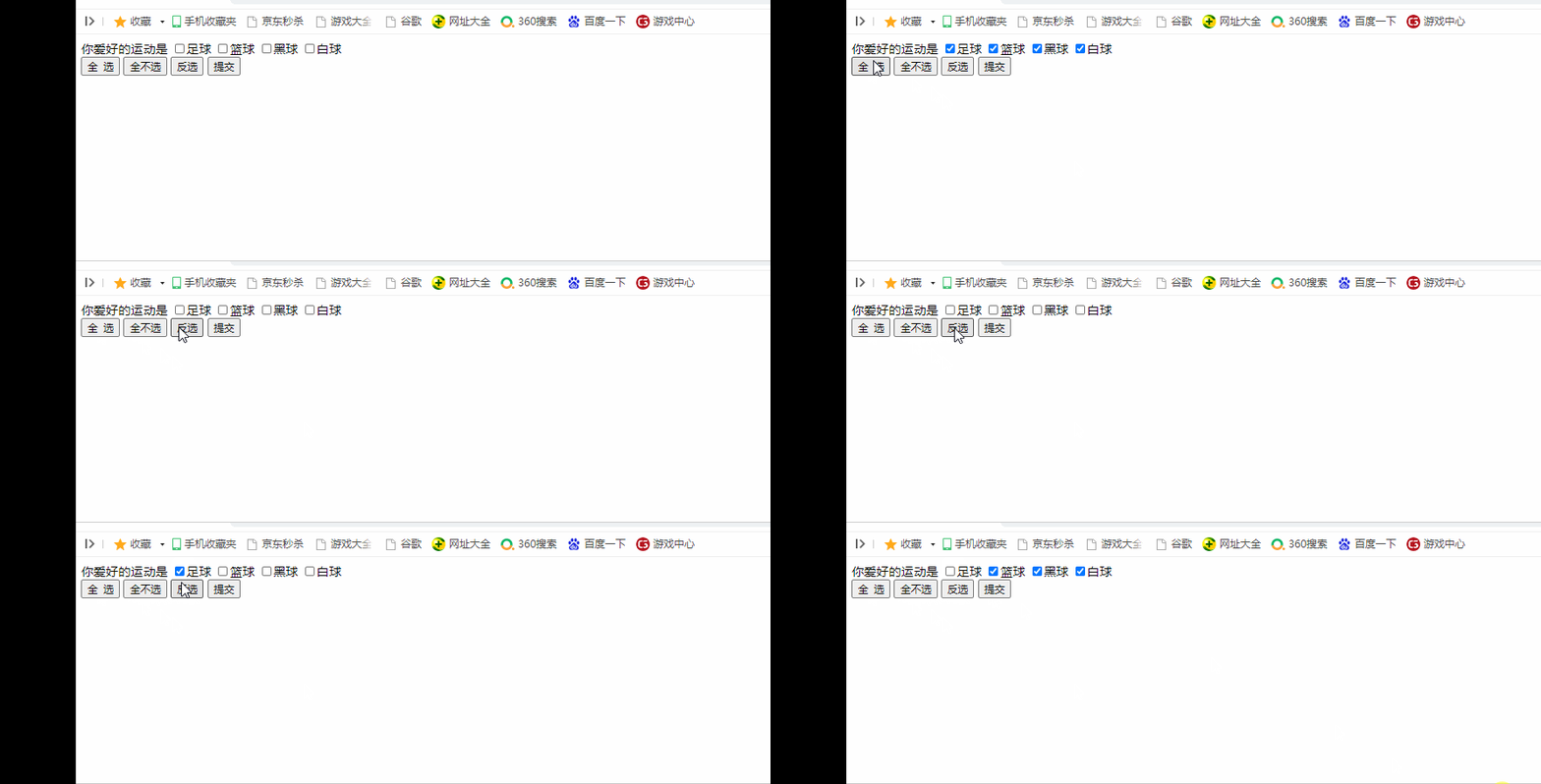
<body><form>你爱好的运动是<input type="checkbox" name="items" value="足球">足球input><input type="checkbox" name="items" value="篮球">篮球input><input type="checkbox" name="items" value="黑球">黑球input><input type="checkbox" name="items" value="白球">白球input> <br><input type="button" id="checkAllBtn" value="全 选"><input type="button" id="checkNoBtn" value="全不选"><input type="button" id="checkReoBtn" value="反选"><input type="button" id="sendBtn" value="提交">form>body>
<script type="text/javascript" src="js/jquery-1.12.4.js">script>
<script type="text/javascript" src="my-jq-plugin.js">script>
<script>$("#checkAllBtn").click(function(){console.log("1")$("[name=items]").checkAll();})$("#checkNoBtn").click(function(){$("[name=items]").noCheckAll();})$("#checkReoBtn").click(function(){$("[name=items]").reverse();})script>
html>
3.3 案例
1)【原生jQuery】实现全选/反选功能
DOCTYPE html>
<html lang="en">
<head><meta charset="UTF-8"><meta http-equiv="X-UA-Compatible" content="IE=edge"><meta name="viewport" content="width=device-width, initial-scale=1.0"><title>Documenttitle>
head>
<body><form>你爱好的运动是?<input type="checkbox" id="checkAllBox"> 全选/全不选 <br><input type="checkbox" name="items" value="足球">足球input><input type="checkbox" name="items" value="篮球">篮球input><input type="checkbox" name="items" value="黑球">黑球input><input type="checkbox" name="items" value="白球">白球input> <br><input type="button" id="checkAllBtn" value="全 选"><input type="button" id="checkNoBtn" value="全不选"><input type="button" id="checkReoBtn" value="反选"><input type="button" id="sendBtn" value="提交">form>
body><script type="text/javascript" src="js/jquery-1.12.4.js">script>
<script>var $lo=$(":checkbox").filter("[name=items]");$("#checkAllBox").click(function(){if($("#checkAllBox").prop("checked")){$lo.prop("checked",true);}else{$lo.prop("checked",false);} })$("#checkAllBtn").click(function(){$lo.prop("checked",true);})$("#checkNoBtn").click(function(){$lo.prop("checked",false);})$("#checkReoBtn").click(function(){$lo.each(function(){console.log(!$(this).prop("checked"))$(this).prop("checked",!$(this).prop("checked"))})})$("#sendBtn").click(function(){var arr=new Array();$lo.each(function(){if($(this).prop("checked")){arr.push(this)}})console.log(arr)})script>
html>
2)【jQuery封装】实现全选/反选功能
>>>>>> my-jq-plugin.js
$.extend({'max':function(a,b){return a>b?a:b;},'min':function(a,b){return a>b?b:a;},"leftTrim":function(str){return str.replace(/^\s+/,"");},"rightTrim":function(str){return str.replace(/\s+$/,"");}})
$.fn.extend({'checkAll':function(){console.log("12")this.prop("checked",true)},'noCheckAll':function(){this.prop("checked",false)},'reverse':function(){this.each(function(index,elem){this.checked=!this.checked;})}})
>>>>>> index.html
DOCTYPE html>
<html lang="en">
<head><meta charset="UTF-8"><meta http-equiv="X-UA-Compatible" content="IE=edge"><meta name="viewport" content="width=device-width, initial-scale=1.0"><title>Documenttitle>
head>
<body><form>你爱好的运动是<input type="checkbox" name="items" value="足球">足球input><input type="checkbox" name="items" value="篮球">篮球input><input type="checkbox" name="items" value="黑球">黑球input><input type="checkbox" name="items" value="白球">白球input> <br><input type="button" id="checkAllBtn" value="全 选"><input type="button" id="checkNoBtn" value="全不选"><input type="button" id="checkReoBtn" value="反选"><input type="button" id="sendBtn" value="提交">form>body>
<script type="text/javascript" src="js/jquery-1.12.4.js">script>
<script type="text/javascript" src="my-jq-plugin.js">script>
<script>$("#checkAllBtn").click(function(){console.log("1")$("[name=items]").checkAll();})$("#checkNoBtn").click(function(){$("[name=items]").noCheckAll();})$("#checkReoBtn").click(function(){$("[name=items]").reverse();})script>
html>
本文来自互联网用户投稿,文章观点仅代表作者本人,不代表本站立场,不承担相关法律责任。如若转载,请注明出处。 如若内容造成侵权/违法违规/事实不符,请点击【内容举报】进行投诉反馈!
