iOS13 tabBar 设置背景色失效
一、首先看一下 tabBar 的UI 显示的层级结构
- 如果 UITabBarController 有 N 个子控制器,那么 UITabBar 的内部就会有 N 个 UITabBarButton 作为子控件。
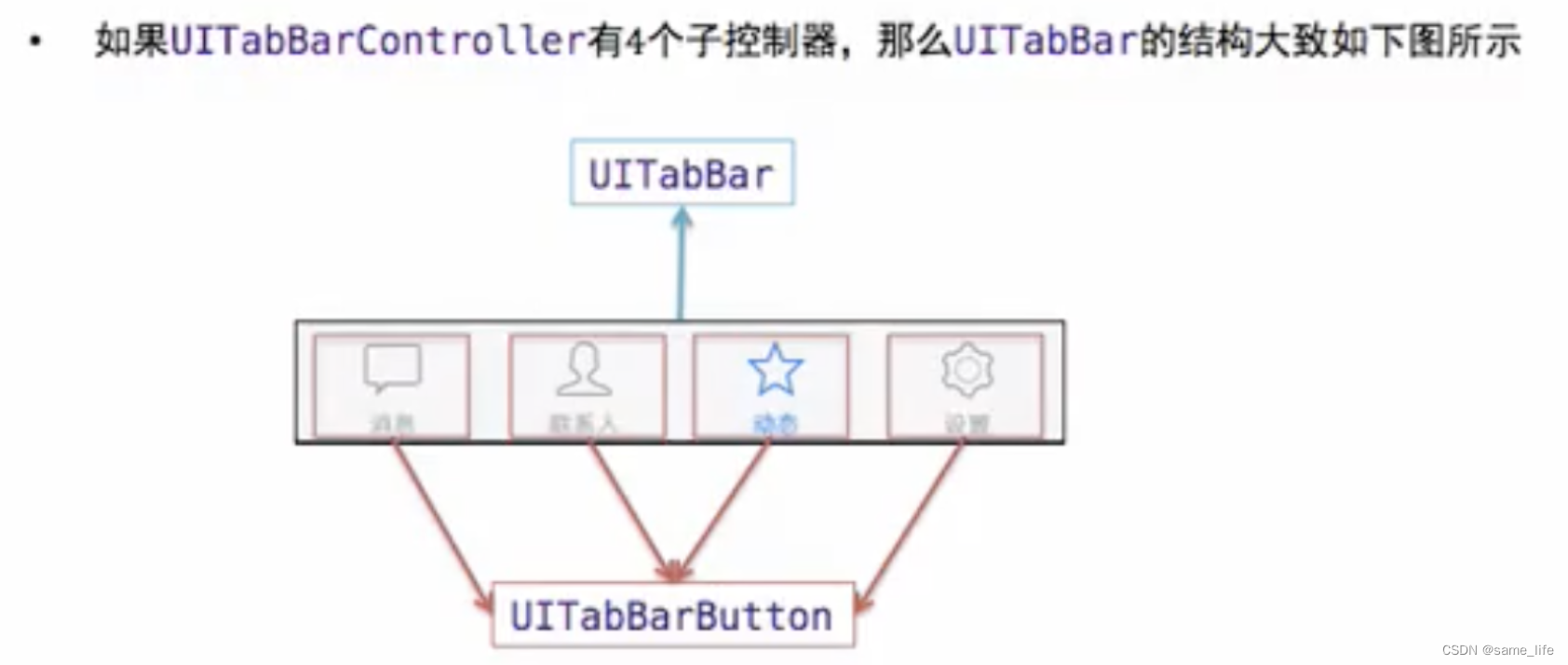
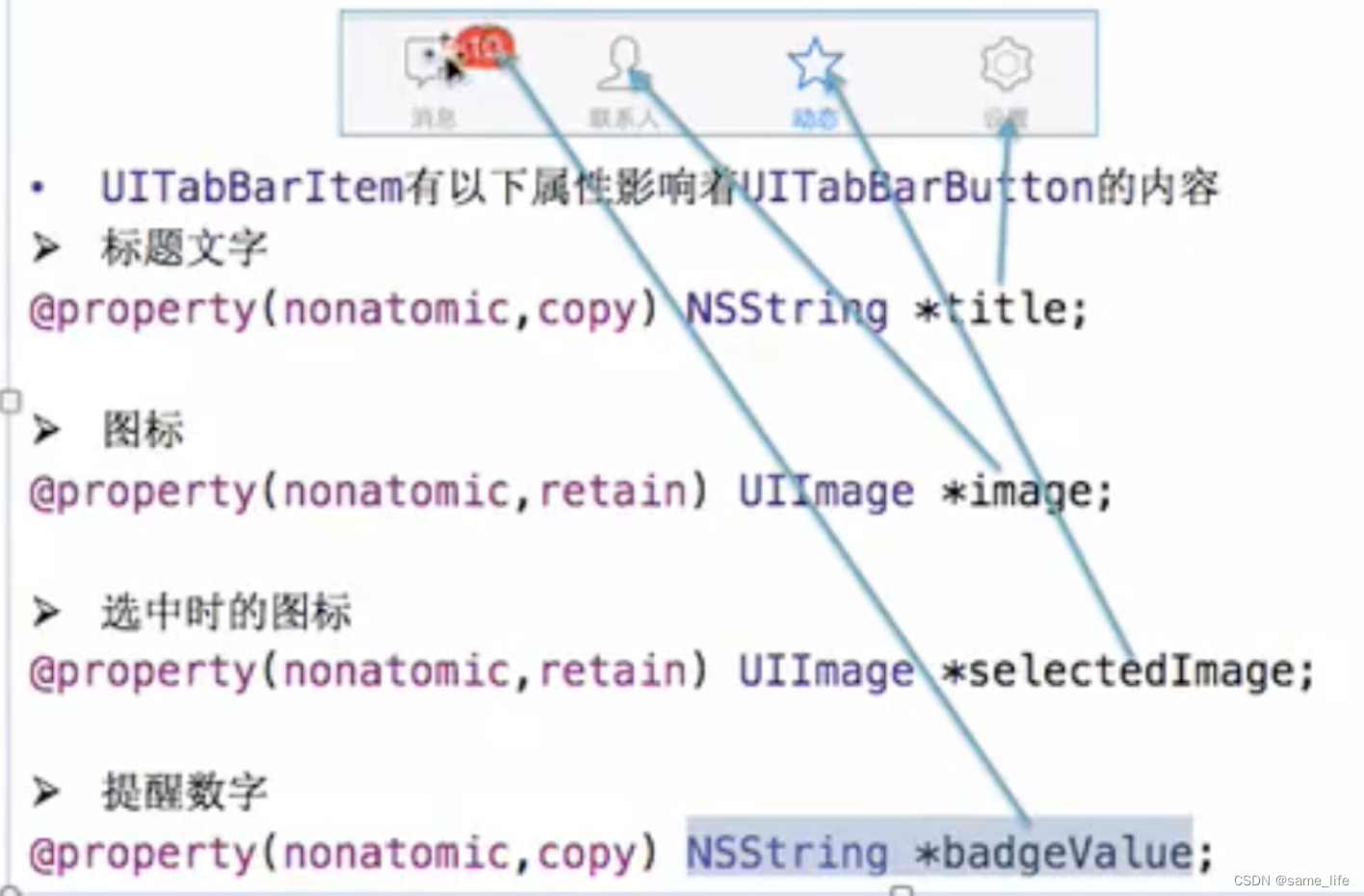
- UITabBarButton 里面显示什么内容,由对应子控制器的 tabBarItem 属性决定。
二、升级到 iOS 13后,之前正常显示的 tabBar 的背景色设置失效了
解决方法如下,代码展示:
- oc 版本
+(void)initialize {NSDictionary *attrNormal = @{NSFontAttributeName:[UIFont boldSystemFontOfSize:15],NSForegroundColorAttributeName:kLightGrayColor};NSDictionary *attrSelect = [NSDictionary dictionary];UITabBar *tabBar = [UITabBar appearance];//ios 13 之后需要这样设置才有效if (@available(iOS 13.0, *)) {attrSelect = @{NSFontAttributeName:[UIFont boldSystemFontOfSize:15],NSForegroundColorAttributeName:[UIColor labelColor]};UITabBarAppearance *tabBarAppearance = [[UITabBarAppearance alloc]init];//设置tabar背景色tabBarAppearance.backgroundColor = [UIColor secondarySystemGroupedBackgroundColor];tabBarAppearance.stackedLayoutAppearance.normal.titleTextAttributes = attrNormal;tabBarAppearance.stackedLayoutAppearance.selected.titleTextAttributes = attrSelect;//必须要加上这两句tabBar.standardAppearance = tabBarAppearance;if (@available(iOS 15.0, *)) {tabBar.scrollEdgeAppearance = tabBarAppearance;} else {// Fallback on earlier versions}} else {attrSelect = @{NSFontAttributeName:[UIFont boldSystemFontOfSize:15],NSForegroundColorAttributeName:kBlackColor};UITabBarItem *tbItem = [UITabBarItem appearance];[tbItem setTitleTextAttributes:attrNormal forState:UIControlStateNormal];[tbItem setTitleTextAttributes:attrSelect forState:UIControlStateSelected];[tabBar setBarTintColor:kWhiteColor];  //tabBar的背景色}tabBar.translucent = YES;     //translucent: 半透明的
}
- Swift 版本
//设置全局界面的颜色func setupAppearance() {//设置加粗字体: Helvetica-Boldlet attrNomal = [NSAttributedString.Key.font: UIFont(name: "Helvetica-Bold", size: 18), NSAttributedString.Key.foregroundColor: UIColor.lightGray]let attrSelect = [NSAttributedString.Key.font: UIFont(name: "Helvetica-Bold", size: 18), NSAttributedString.Key.foregroundColor: UIColor.black]let customTabBar = UITabBar.appearance()if #available(iOS 13.0, *) {let tabBarAppearance = UITabBarAppearance()//设置tabar背景色tabBarAppearance.backgroundColor = .secondarySystemGroupedBackgroundtabBarAppearance.stackedLayoutAppearance.normal.titleTextAttributes = attrNomal as [NSAttributedString.Key : Any]tabBarAppearance.stackedLayoutAppearance.selected.titleTextAttributes = attrSelect as [NSAttributedString.Key: Any]customTabBar.standardAppearance = tabBarAppearanceif #available(iOS 15.0, *) {customTabBar.scrollEdgeAppearance = tabBarAppearance} else {}} else {let tabBarItem = UITabBarItem.appearance()tabBarItem.setTitleTextAttributes(attrNomal as [NSAttributedString.Key: Any], for: .normal)tabBarItem.setTitleTextAttributes(attrSelect as [NSAttributedString.Key : Any], for: .selected)//tabBar的背景色customTabBar.barTintColor = .white}//translucent: 半透明的customTabBar.isTranslucent = true}
本文来自互联网用户投稿,文章观点仅代表作者本人,不代表本站立场,不承担相关法律责任。如若转载,请注明出处。 如若内容造成侵权/违法违规/事实不符,请点击【内容举报】进行投诉反馈!