openlayers - 03 点位标注功能
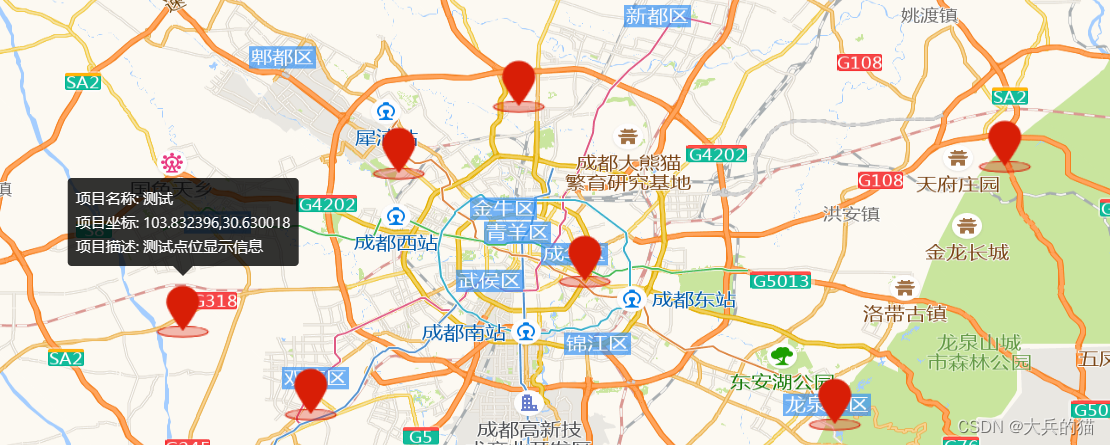
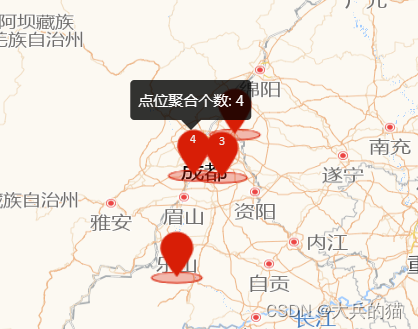
本例实现对地图中的部分点位进行标注,点击标注可以显示基本信息,缩放后会适当对点位进行聚合
1.实现
1.将获取到的所有点位的坐标数组传入以下函数,根据数据创建点位要素(feature);
2.设置聚合参数(Cluster);
3.创建新的图层,将要素加入图层并配置相关样式;
4.提前定义好详情显示的popover弹窗,创建覆盖物(Overlay),将popover弹窗设置到覆盖物内;
5.监听点击事件获取点击要素的坐标,设置popover覆盖物显示的位置到该座标的位置;
6.将覆盖物添加到地图;
// 实现标注聚合polymerization(dataSource: any[]) {var features = new Array(dataSource.length);for (var i = 0; i < dataSource.length; i++) {var coordinate = [dataSource[i][0], dataSource[i][1]].map(parseFloat);var attr = {userName: "测试",info: "测试点位显示信息",coordinate: fromLonLat(coordinate, "EPSG:4326"),type: "marker",};features[i] = new Feature({geometry: new Point(coordinate),attribute: attr,});}var source = new VectorSource({features: features,});var clusterSource = new Cluster({distance: 30, // 超过多少开始聚合source: source,});//加载聚合标注的矢量图层var styleCache = {} as any;var layerVetor = new VectorLayer({source: clusterSource,style: function (feature) {var size = feature.get("features").length;var style = styleCache[size];if (!style) {style = [new Style({image: new Icon(/** @type {olx.style.IconOptions} */ {anchor: [0.5, 10],anchorOrigin: "top-right",anchorXUnits: "fraction",anchorYUnits: "pixels",offsetOrigin: "top-right",offset: [0, 1], //偏移量设置scale: 1.2, //图标缩放比例opacity: 1, //透明度src: new URL("../../assets/position-icon.png",import.meta.url).href, //图标的url}),text: new Text({font: "12px Calibri,sans-serif",text: size > 1 ? size.toString() : "",fill: new Fill({color: "#eee",}),}),}),];styleCache[size] = style;}return style;},});this.map.addLayer(layerVetor);const _this = this;var content = document.getElementById("popup-content");var title = document.getElementById("popup-title");var container: any = document.getElementById("pup-container");var position: any = document.getElementById("popup-position");var overlay = new Overlay({element: container,autoPan: true,positioning: "bottom-center",});this.map.on("click", function (evt) {title!.innerHTML = ``;content!.innerHTML = ``;position!.innerHTML = ``;// 捕捉feature,用于判断是否点击的是标注点let feature = _this.map.forEachFeatureAtPixel(evt.pixel,function (feature, layerVetor) {return feature;});if (feature) {if (!feature.getProperties().features) return;var attribute = feature.getProperties().features[0].values_.attribute;if (attribute.type !== "marker") return;let pLen = feature.getProperties().features.length;if (pLen === 1) {container.style.display = "block";var pixel = _this.map.getEventPixel(evt.originalEvent);_this.map.forEachFeatureAtPixel(pixel, function (feature) {title!.innerHTML = `项目名称: ${attribute.userName}
`;content!.innerHTML = `项目描述: ${attribute.info}
`;position!.innerHTML = `项目坐标: ${attribute.coordinate}
`;overlay.setPosition(attribute.coordinate);_this.map.addOverlay(overlay);});} else {container.style.display = "block";var pixel = _this.map.getEventPixel(evt.originalEvent);_this.map.forEachFeatureAtPixel(pixel, function (feature) {content!.innerHTML = `点位聚合个数: ${pLen}
`;overlay.setPosition(attribute.coordinate);_this.map.addOverlay(overlay);});}} else {container.style.display = "none";}});
注:地图实例化代码见本专题前两章
2.实现效果
本文来自互联网用户投稿,文章观点仅代表作者本人,不代表本站立场,不承担相关法律责任。如若转载,请注明出处。 如若内容造成侵权/违法违规/事实不符,请点击【内容举报】进行投诉反馈!