java excel 颜色_Java POI 实现Excel相同数据同一颜色,不同数据颜色交替显示
1、效果图
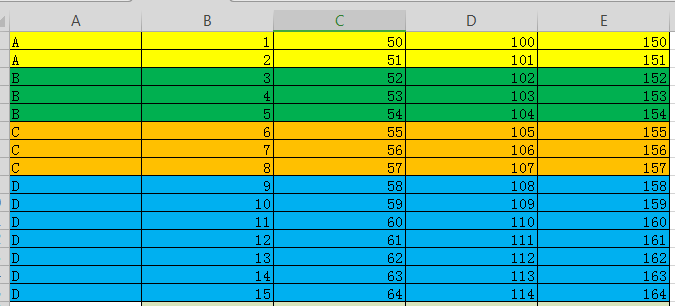
2、具体代码实现
excel 读取工具类
package utils;
import java.io.File;
import java.io.FileInputStream;
import java.io.FileNotFoundException;
import java.io.IOException;
import java.io.InputStream;
import java.util.ArrayList;
import java.util.List;
import org.apache.log4j.Logger;
import org.apache.poi.hssf.usermodel.HSSFWorkbook;
import org.apache.poi.ss.usermodel.Cell;
import org.apache.poi.ss.usermodel.Row;
import org.apache.poi.ss.usermodel.Sheet;
import org.apache.poi.ss.usermodel.Workbook;
import org.apache.poi.xssf.usermodel.XSSFWorkbook;
/**
* excel读写工具类 */
public class POIUtil2 {
private static Logger logger = Logger.getLogger(POIUtil2.class);
private final static String xls = "xls";
private final static String xlsx = "xlsx";
/**
* 读入excel文件,解析后返回
* @param file
* @throws IOException
*/
public static List readExcel(File file) throws IOException{
//检查文件
checkFile(file);
//获得Workbook工作薄对象
Workbook workbook = getWorkBook(file);
//创建返回对象,把每行中的值作为一个数组,所有行作为一个集合返回
List list = new ArrayList();
if(workbook != null){
for(int sheetNum = 0;sheetNum < workbook.getNumberOfSheets();sheetNum++){
//获得当前sheet工作表
Sheet sheet = workbook.getSheetAt(sheetNum);
if(sheet == null){
continue;
}
//获得当前sheet的开始行
int firstRowNum = sheet.getFirstRowNum();
//获得当前sheet的结束行
int lastRowNum = sheet.getLastRowNum();
//循环除了第一行的所有行
// for(int rowNum = firstRowNum+1;rowNum <= lastRowNum;rowNum++){
for(int rowNum = firstRowNum;rowNum <= lastRowNum;rowNum++){
//获得当前行
Row row = sheet.getRow(rowNum);
if(row == null){
continue;
}
//获得当前行的开始列
int firstCellNum = row.getFirstCellNum();
//获得当前行的列数
int lastCellNum = row.getPhysicalNumberOfCells();
String[] cells = new String[row.getPhysicalNumberOfCells()];
//循环当前行
for(int cellNum = firstCellNum; cellNum < lastCellNum;cellNum++){
Cell cell = row.getCell(cellNum);
cells[cellNum] = getCellValue(cell);
}
list.add(cells);
}
}
workbook.close();
}
return list;
}
public static void checkFile(File file) throws IOException{
//判断文件是否存在
if(null == file){
logger.error("文件不存在!");
throw new FileNotFoundException("文件不存在!");
}
//获得文件名
String fileName = file.getName();
//判断文件是否是excel文件
if(!fileName.endsWith(xls) && !fileName.endsWith(xlsx)){
logger.error(fileName + "不是excel文件");
throw new IOException(fileName + "不是excel文件");
}
}
public static Workbook getWorkBook(File file) {
//获得文件名
String fileName = file.getName();
//创建Workbook工作薄对象,表示整个excel
Workbook workbook = null;
try {
//获取excel文件的io流
InputStream is = new FileInputStream(file);
//根据文件后缀名不同(xls和xlsx)获得不同的Workbook实现类对象
if(fileName.endsWith(xls)){
//2003
workbook = new HSSFWorkbook(is);
}else if(fileName.endsWith(xlsx)){
//2007
workbook = new XSSFWorkbook(is);
}
} catch (IOException e) {
logger.info(e.getMessage());
}
return workbook;
}
public static String getCellValue(Cell cell){
String cellValue = "";
if(cell == null){
return cellValue;
}
//把数字当成String来读,避免出现1读成1.0的情况
if(cell.getCellType() == Cell.CELL_TYPE_NUMERIC){
cell.setCellType(Cell.CELL_TYPE_STRING);
}
//判断数据的类型
switch (cell.getCellType()){
case Cell.CELL_TYPE_NUMERIC: //数字
cellValue = String.valueOf(cell.getNumericCellValue());
break;
case Cell.CELL_TYPE_STRING: //字符串
cellValue = String.valueOf(cell.getStringCellValue());
break;
case Cell.CELL_TYPE_BOOLEAN: //Boolean
cellValue = String.valueOf(cell.getBooleanCellValue());
break;
case Cell.CELL_TYPE_FORMULA: //公式
cellValue = String.valueOf(cell.getCellFormula());
break;
case Cell.CELL_TYPE_BLANK: //空值
cellValue = "";
break;
case Cell.CELL_TYPE_ERROR: //故障
cellValue = "非法字符";
break;
default:
cellValue = "未知类型";
break;
}
return cellValue;
}
}
excel写入和测试类
package test;
import java.io.File;
import java.io.FileOutputStream;
import java.io.IOException;
import java.util.ArrayList;
import java.util.HashSet;
import java.util.LinkedHashMap;
import java.util.List;
import java.util.Map;
import java.util.Map.Entry;
import java.util.Set;
import org.apache.poi.hssf.usermodel.HSSFCellStyle;
import org.apache.poi.hssf.util.HSSFColor;
import org.apache.poi.xssf.usermodel.XSSFCell;
import org.apache.poi.xssf.usermodel.XSSFCellStyle;
import org.apache.poi.xssf.usermodel.XSSFFont;
import org.apache.poi.xssf.usermodel.XSSFRow;
import org.apache.poi.xssf.usermodel.XSSFSheet;
import org.apache.poi.xssf.usermodel.XSSFWorkbook;
import org.junit.Test;
import pojo.ReadEntity;
import utils.POIUtil2;
public class readTest {
@Test
public void test() {
try {
// 创建一个Excel对象
XSSFWorkbook wb = new XSSFWorkbook();
// 创建表单Sheet对象
XSSFSheet sheet = wb.createSheet();
XSSFCellStyle style = null;
XSSFCellStyle style1 = getCellStyle(wb, HSSFColor.GREEN.index);
XSSFCellStyle style2 = getCellStyle(wb, HSSFColor.LIGHT_YELLOW.index);
XSSFCellStyle style3 = getCellStyle(wb, HSSFColor.SKY_BLUE.index);
XSSFCellStyle style4 = getCellStyle(wb, HSSFColor.LIGHT_ORANGE.index);
sheet.setColumnWidth(0, 10000); //设置第一列列宽:
sheet.setColumnWidth(1, 10000); //设置第二列列宽:
sheet.setColumnWidth(2, 10000); //设置列宽:
sheet.setColumnWidth(3, 10000); //设置列宽:
sheet.setColumnWidth(4, 10000); //设置列宽:
int count = 0;
int rowNum = 0; //行
Map> map = getData();
for (Entry> entry : map.entrySet()) {
//判断相同数据用同一种背景颜色,四种背景颜色交替显示
if (count % 4 == 0) {
style = style1;
} else if (count % 4 == 1) {
style = style2;
} else if (count % 3 == 2) {
style = style3;
} else {
style = style4;
}
List value = entry.getValue();
for (ReadEntity temp : value) {
//创建行
XSSFRow row = sheet.createRow(rowNum);
//创建单元格,此处设置了5列
XSSFCell cell1 = row.createCell(0);
cell1.setCellValue(temp.getTableName());
cell1.setCellStyle(style);
XSSFCell cell2 = row.createCell(1);
cell2.setCellValue(temp.getTableRemark());
cell2.setCellStyle(style);
XSSFCell cell3 = row.createCell(2);
cell3.setCellValue(temp.getField());
cell3.setCellStyle(style);
XSSFCell cell4 = row.createCell(3);
cell4.setCellValue(temp.getFieldRemark());
cell4.setCellStyle(style);
XSSFCell cell5 = row.createCell(4);
cell5.setCellValue(temp.getFieldType());
cell5.setCellStyle(style);
rowNum++;
}
count++;
}
//写出数据文件
File file = new File("D:/table2.xlsx");
if (!file.exists()) {
file.createNewFile();
}
// 输出文件
FileOutputStream output = new FileOutputStream(file);
wb.write(output);
output.flush();
} catch (Exception e) {
e.printStackTrace();
}
}
/**
* 获取本地导入数据
* @return
* @throws IOException
*/
private Map> getData() throws IOException {
File file = new File("D:/table.xlsx");
List list = POIUtil2.readExcel(file);
Map> map = new LinkedHashMap<>();
Set set = new HashSet<>();
List entites = null;
for (String[] strArr : list) {
if (set.add(strArr[0])) {
entites = new ArrayList<>();
map.put(strArr[0], entites);
}
ReadEntity entity = new ReadEntity();
entity.setTableName(strArr[0]);
entity.setTableRemark(strArr[1]);
entity.setField(strArr[2]);
entity.setFieldRemark(strArr[3]);
entity.setFieldType(strArr[4]);
entites.add(entity);
}
return map;
}
/**
* 得到不同颜色的style样式
* @param wb
* @param color
* @return
*/
public XSSFCellStyle getCellStyle(XSSFWorkbook wb, Short color) {
XSSFCellStyle style = wb.createCellStyle();
//注意这两个属性同时设置才能起作用
//style.setFillForegroundColor(color);// 设置背景色
//style.setFillPattern(HSSFCellStyle.SOLID_FOREGROUND);
style.setFillForegroundColor(color);// 设置背景色
style.setFillPattern(HSSFCellStyle.SOLID_FOREGROUND);
style.setBorderBottom(HSSFCellStyle.BORDER_THIN); // 下边框
style.setBorderLeft(HSSFCellStyle.BORDER_THIN);// 左边框
style.setBorderTop(HSSFCellStyle.BORDER_THIN);// 上边框
style.setBorderRight(HSSFCellStyle.BORDER_THIN);// 右边框
//style.setAlignment(HSSFCellStyle.ALIGN_CENTER); // 居中
XSSFFont font = wb.createFont();
font.setFontName("仿宋_GB2312");
//font.setBoldweight(HSSFFont.BOLDWEIGHT_BOLD);// 粗体显示
font.setFontHeightInPoints((short) 12); // 字体大小
style.setFont(font);// 选择需要用到的字体格式
return style;
}
}
本文来自互联网用户投稿,文章观点仅代表作者本人,不代表本站立场,不承担相关法律责任。如若转载,请注明出处。 如若内容造成侵权/违法违规/事实不符,请点击【内容举报】进行投诉反馈!