Spring Security 在登录时如何添加图形验证码
前言
在前面的几篇文章中,登录时都是使用用户名 + 密码进行登录的,但是在实际项目当中,登录时,还需要输入图形验证码。那如何在 Spring Security 现有的认证体系中,加入自己的认证逻辑呢?这就是本文的内容,本文会介绍两种实现方案,一是基于过滤器实现;二是基于认证器实现。
验证码生成
既然需要输入图形验证码,那先来生成验证码吧。
加入验证码依赖
com.github.penggle kaptcha 2.3.2
org.springframework.boot spring-boot-starter-web
Kaptcha 依赖是谷歌的验证码工具。
验证码配置
@Configuration
public class KaptchaConfig {@Beanpublic DefaultKaptcha captchaProducer() {Properties properties = new Properties();// 是否显示边框properties.setProperty("kaptcha.border","yes");// 边框颜色properties.setProperty("kaptcha.border.color","105,179,90");// 字体颜色properties.setProperty("kaptcha.textproducer.font.color","blue");// 字体大小properties.setProperty("kaptcha.textproducer.font.size","35");// 图片宽度properties.setProperty("kaptcha.image.width","300");// 图片高度properties.setProperty("kaptcha.image.height","100");// 文字个数properties.setProperty("kaptcha.textproducer.char.length","4");//文字大小properties.setProperty("kaptcha.textproducer.font.size","100");//文字随机字体properties.setProperty("kaptcha.textproducer.font.names", "宋体");//文字距离properties.setProperty("kaptcha.textproducer.char.space","16");//干扰线颜色properties.setProperty("kaptcha.noise.color","blue");// 文本内容 从设置字符中随机抽取properties.setProperty("kaptcha.textproducer.char.string","0123456789");DefaultKaptcha kaptcha = new DefaultKaptcha();kaptcha.setConfig(new Config(properties));return kaptcha;}
}
复制代码
验证码接口
/*** 生成验证码*/
@GetMapping("/verify-code")
public void getVerifyCode(HttpServletResponse resp, HttpSession session) throws IOException {resp.setContentType("image/jpeg");// 生成图形校验码内容String text = producer.createText();// 将验证码内容存入HttpSessionsession.setAttribute("verify_code", text);// 生成图形校验码图片BufferedImage image = producer.createImage(text);// 使用try-with-resources 方式,可以自动关闭流try(ServletOutputStream out = resp.getOutputStream()) {// 将校验码图片信息输出到浏览器ImageIO.write(image, "jpeg", out);}
}
复制代码
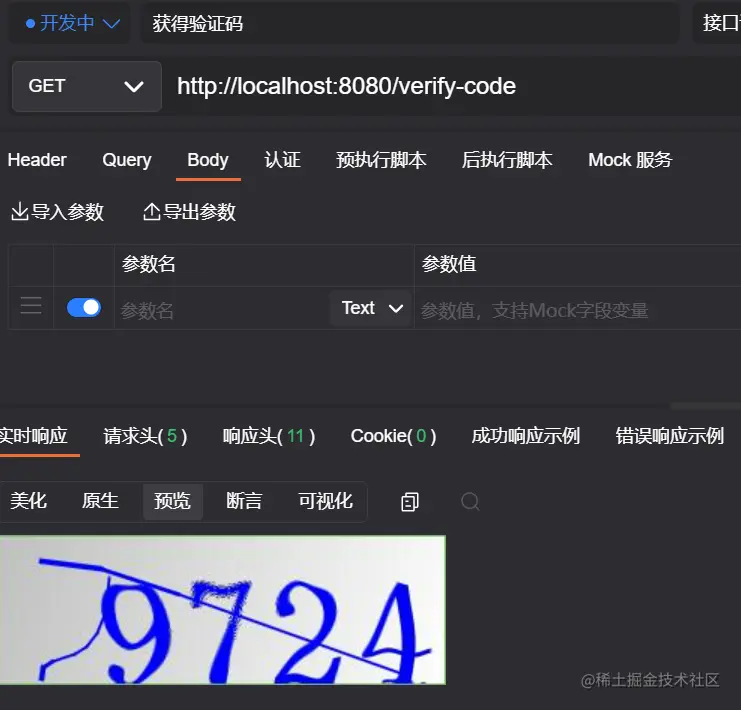
代码注释写的很清楚,就不过多的介绍。属于固定的配置,既然配置完了,那就看看生成的效果吧!
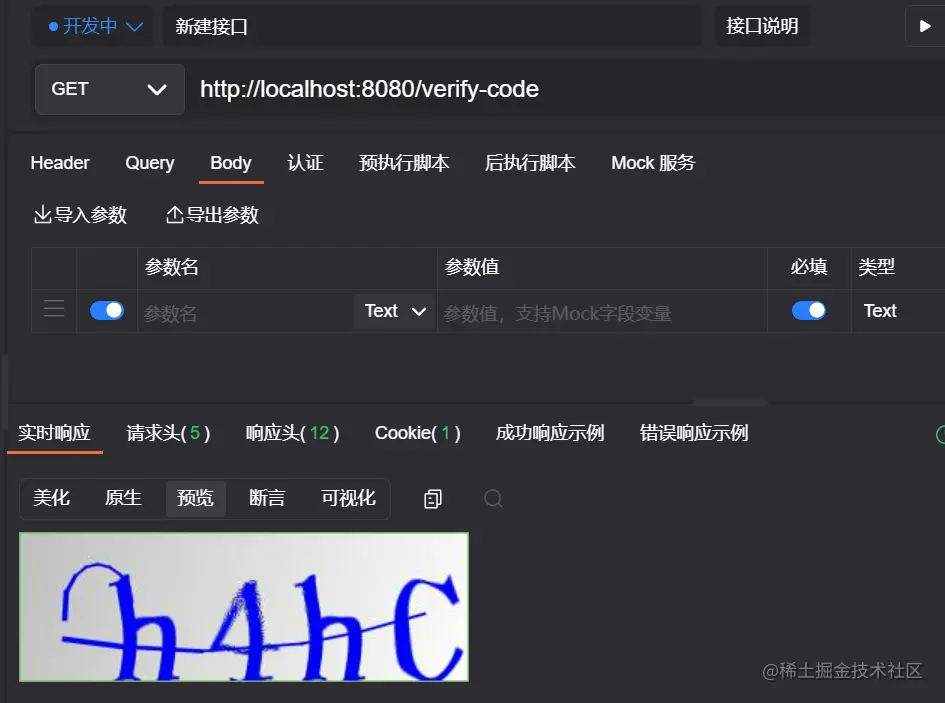
接下来就看看如何集成到 Spring Security 中的认证逻辑吧!
加入依赖
org.springframework.boot spring-boot-starter-security
基于过滤器
编写自定义认证逻辑
这里继承的过滤器为 UsernamePasswordAuthenticationFilter,并重写attemptAuthentication方法。用户登录的用户名/密码是在 UsernamePasswordAuthenticationFilter 类中处理,那我们就继承这个类,增加对验证码的处理。当然也可以实现其他类型的过滤器,比如:GenericFilterBean、OncePerRequestFilter,不过处理起来会比继承UsernamePasswordAuthenticationFilter麻烦一点。
import org.springframework.security.authentication.AuthenticationServiceException;
import org.springframework.security.core.Authentication;
import org.springframework.security.core.AuthenticationException;
import org.springframework.security.web.authentication.UsernamePasswordAuthenticationFilter;
import org.springframework.util.StringUtils;import javax.servlet.http.HttpServletRequest;
import javax.servlet.http.HttpServletResponse;
import javax.servlet.http.HttpSession;public class VerifyCodeFilter extends UsernamePasswordAuthenticationFilter {@Overridepublic Authentication attemptAuthentication(HttpServletRequest request, HttpServletResponse response) throws AuthenticationException {// 需要是 POST 请求if (!request.getMethod().equals("POST")) {throw new AuthenticationServiceException("Authentication method not supported: " + request.getMethod());}// 获得请求验证码值String code = request.getParameter("code");HttpSession session = request.getSession();// 获得 session 中的 验证码值String sessionVerifyCode = (String) session.getAttribute("verify_code");if (StringUtils.isEmpty(code)){throw new AuthenticationServiceException("验证码不能为空!");}if(StringUtils.isEmpty(sessionVerifyCode)){throw new AuthenticationServiceException("请重新申请验证码!");}if (!sessionVerifyCode.equalsIgnoreCase(code)) {throw new AuthenticationServiceException("验证码错误!");}// 验证码验证成功,清除 session 中的验证码session.removeAttribute("verify_code");// 验证码验证成功,走原本父类认证逻辑return super.attemptAuthentication(request, response);}}
复制代码
代码逻辑很简单,验证验证码是否正确,正确则走父类原本逻辑,去验证用户名密码是否正确。 过滤器定义完成后,接下来就是用我们自定义的过滤器代替默认的 UsernamePasswordAuthenticationFilter。
- SecurityConfig
import cn.cxyxj.study04.Authentication.config.MyAuthenticationFailureHandler;
import cn.cxyxj.study04.Authentication.config.MyAuthenticationSuccessHandler;
import org.springframework.context.annotation.Bean;
import org.springframework.context.annotation.Configuration;
import org.springframework.security.authentication.AuthenticationManager;
import org.springframework.security.config.annotation.web.builders.HttpSecurity;
import org.springframework.security.config.annotation.web.configuration.WebSecurityConfigurerAdapter;
import org.springframework.security.core.userdetails.User;
import org.springframework.security.core.userdetails.UserDetailsService;
import org.springframework.security.crypto.password.NoOpPasswordEncoder;
import org.springframework.security.crypto.password.PasswordEncoder;
import org.springframework.security.provisioning.InMemoryUserDetailsManager;
import org.springframework.security.web.authentication.UsernamePasswordAuthenticationFilter;@Configuration
public class SecurityConfig extends WebSecurityConfigurerAdapter {@BeanPasswordEncoder passwordEncoder() {return NoOpPasswordEncoder.getInstance();}@Bean@Overrideprotected UserDetailsService userDetailsService() {InMemoryUserDetailsManager manager = new InMemoryUserDetailsManager();manager.createUser(User.withUsername("cxyxj").password("123").roles("admin").build());manager.createUser(User.withUsername("security").password("security").roles("user").build());return manager;}@Override@Beanpublic AuthenticationManager authenticationManagerBean()throws Exception {return super.authenticationManagerBean();}@Overrideprotected void configure(HttpSecurity http) throws Exception {// 用自定义的 VerifyCodeFilter 实例代替 UsernamePasswordAuthenticationFilterhttp.addFilterBefore(new VerifyCodeFilter(), UsernamePasswordAuthenticationFilter.class);http.authorizeRequests()  //开启配置// 验证码、登录接口放行.antMatchers("/verify-code","/auth/login").permitAll().anyRequest() //其他请求.authenticated().and()//验证   表示其他请求需要登录才能访问.csrf().disable();  // 禁用 csrf 保护}@BeanVerifyCodeFilter loginFilter() throws Exception {VerifyCodeFilter verifyCodeFilter = new VerifyCodeFilter();verifyCodeFilter.setFilterProcessesUrl("/auth/login");verifyCodeFilter.setUsernameParameter("account");verifyCodeFilter.setPasswordParameter("pwd");verifyCodeFilter.setAuthenticationManager(authenticationManagerBean());verifyCodeFilter.setAuthenticationSuccessHandler(new MyAuthenticationSuccessHandler());verifyCodeFilter.setAuthenticationFailureHandler(new MyAuthenticationFailureHandler());return verifyCodeFilter;}}
复制代码
当我们替换了 UsernamePasswordAuthenticationFilter 之后,原本在 SecurityConfig#configure 方法中关于 form 表单的配置就会失效,那些失效的属性,都可以在配置 VerifyCodeFilter 实例的时候配置;还需要记得配置AuthenticationManager,否则启动时会报错。
- MyAuthenticationFailureHandler
import org.springframework.security.authentication.BadCredentialsException;
import org.springframework.security.authentication.LockedException;
import org.springframework.security.core.AuthenticationException;
import org.springframework.security.web.authentication.AuthenticationFailureHandler;import javax.servlet.ServletException;
import javax.servlet.http.HttpServletRequest;
import javax.servlet.http.HttpServletResponse;
import java.io.IOException;
import java.io.PrintWriter;
/*** 登录失败回调*/
public class MyAuthenticationFailureHandler implements AuthenticationFailureHandler {@Overridepublic void onAuthenticationFailure(HttpServletRequest request, HttpServletResponse response, AuthenticationException e) throws IOException, ServletException {response.setContentType("application/json;charset=utf-8");PrintWriter out = response.getWriter();String msg = "";if (e instanceof LockedException) {msg = "账户被锁定,请联系管理员!";}else if (e instanceof BadCredentialsException) {msg = "用户名或者密码输入错误,请重新输入!";}out.write(e.getMessage());out.flush();out.close();}
}
复制代码- MyAuthenticationSuccessHandler
import com.fasterxml.jackson.databind.ObjectMapper;
import org.springframework.security.core.Authentication;
import org.springframework.security.web.authentication.AuthenticationSuccessHandler;import javax.servlet.ServletException;
import javax.servlet.http.HttpServletRequest;
import javax.servlet.http.HttpServletResponse;
import java.io.IOException;
import java.io.PrintWriter;/*** 登录成功回调*/
public class MyAuthenticationSuccessHandler implements AuthenticationSuccessHandler {@Overridepublic void onAuthenticationSuccess(HttpServletRequest request, HttpServletResponse response, Authentication authentication) throws IOException, ServletException {Object principal = authentication.getPrincipal();response.setContentType("application/json;charset=utf-8");PrintWriter out = response.getWriter();out.write(new ObjectMapper().writeValueAsString(principal));out.flush();out.close();}}
复制代码
测试
- 不传入验证码发起请求。
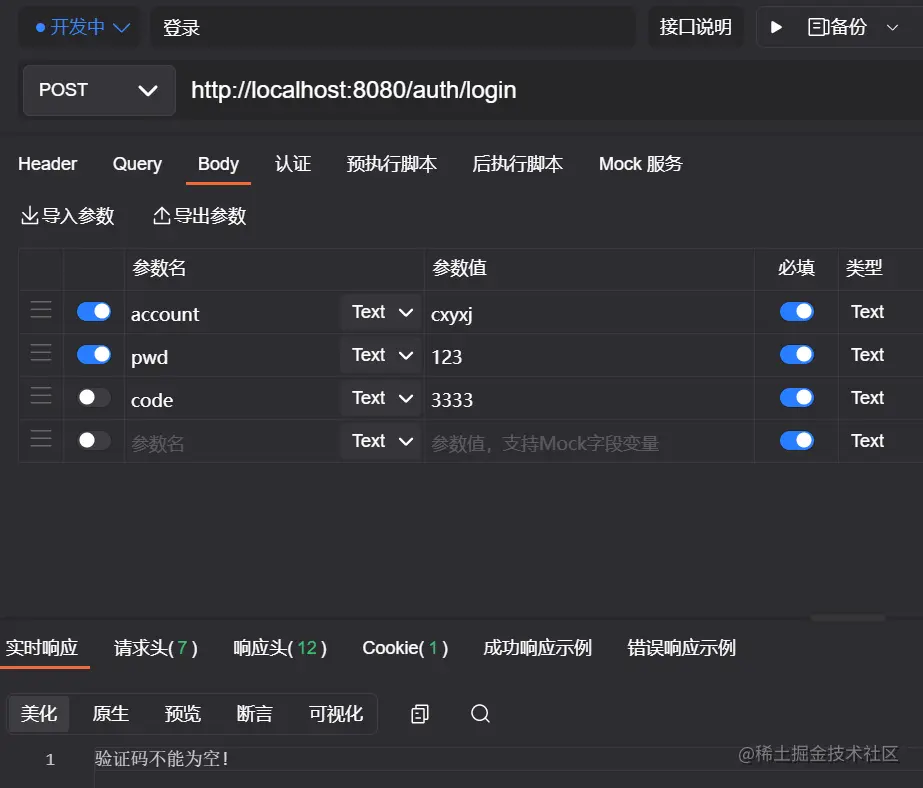
- 请求获取验证码接口
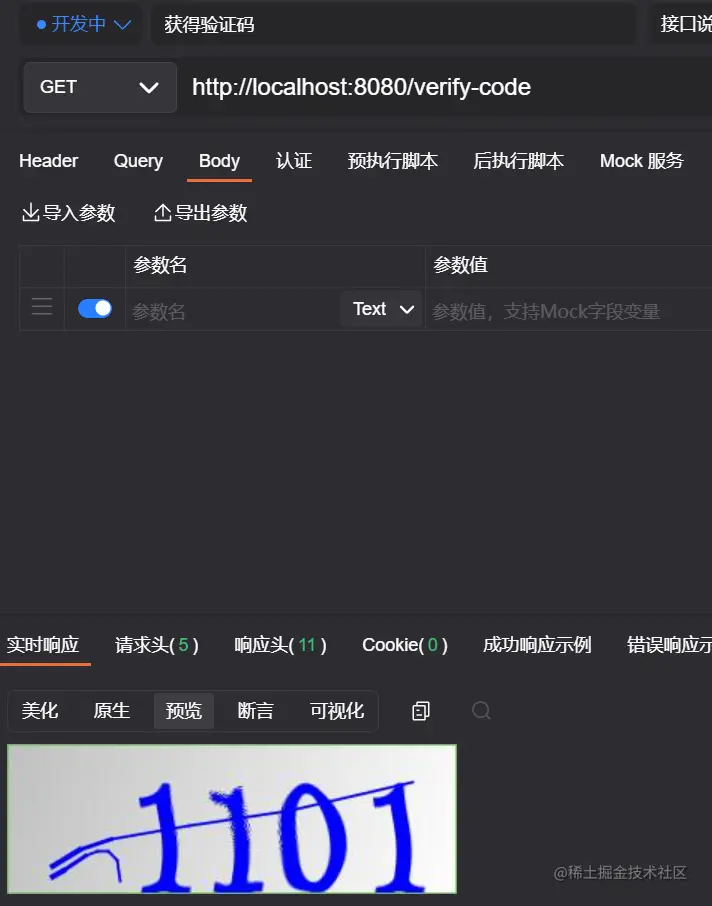
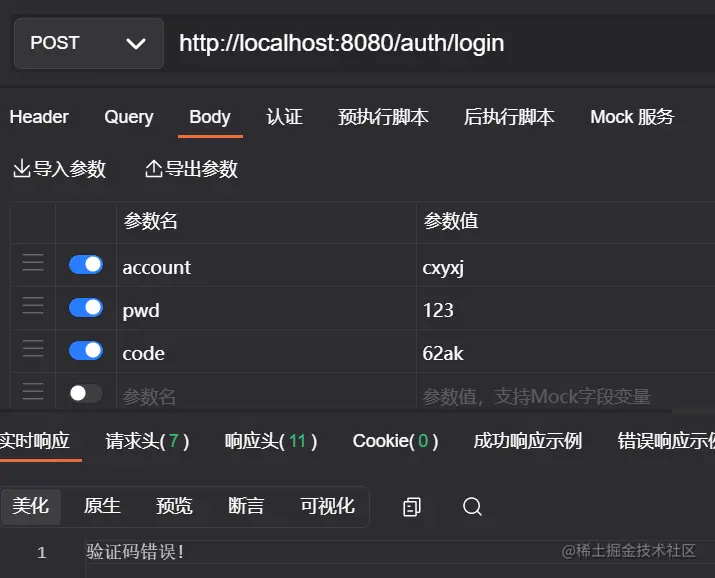
- 输入错误的验证码
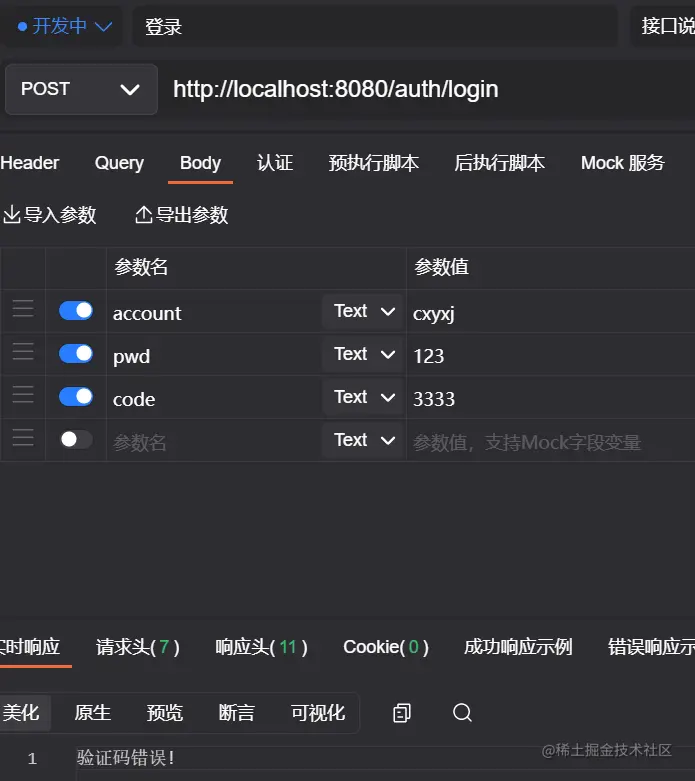
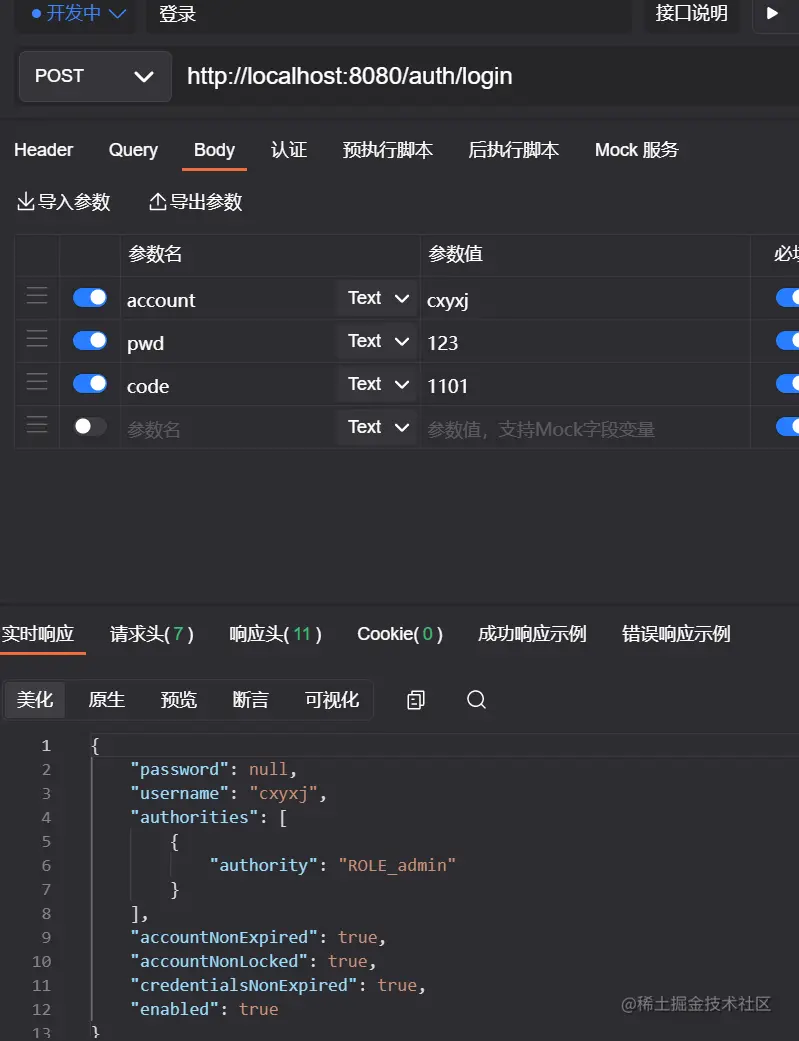
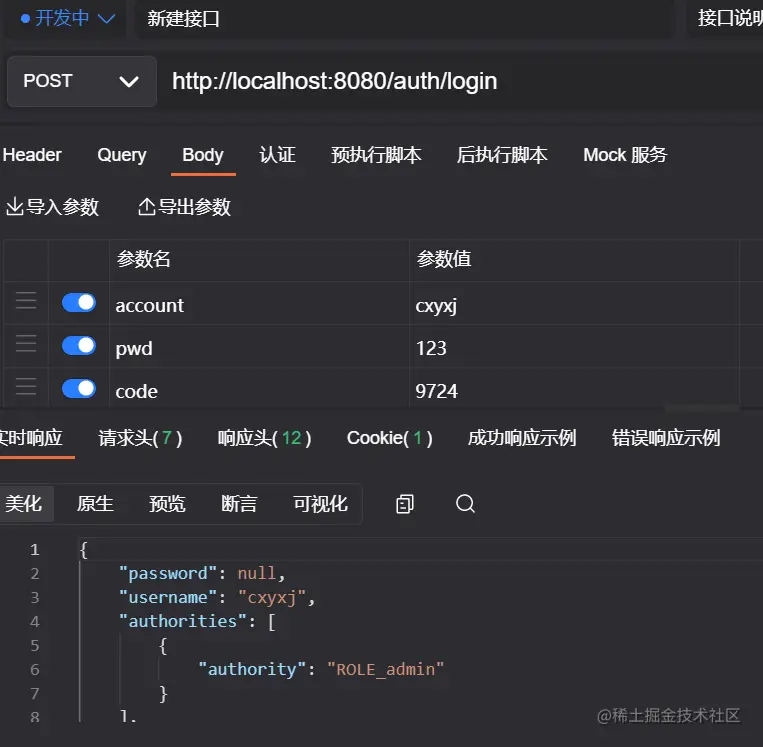
- 输入正确的验证码
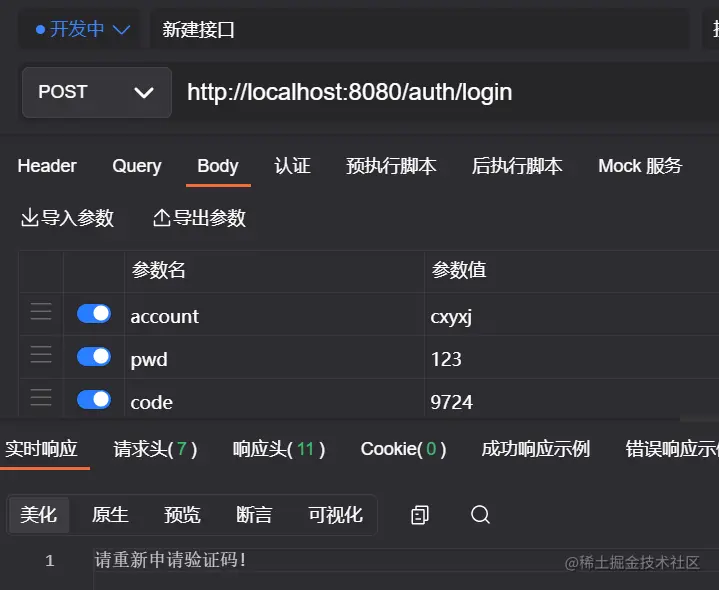
- 输入已经使用过的验证码
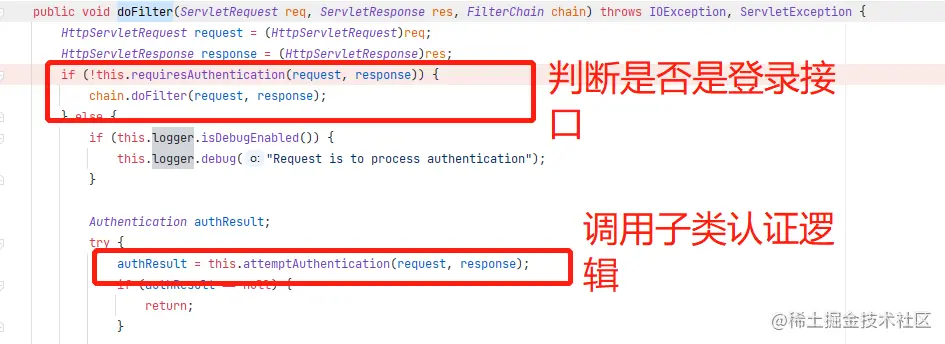
各位读者是不是会觉得既然继承了 Filter,那是不是每个接口都会进入到我们的自定义方法中呀!如果是继承了 GenericFilterBean、OncePerRequestFilter 那是肯定会的,需要手动处理。 但我们继承的是 UsernamePasswordAuthenticationFilter,security 已经帮忙处理了。处理逻辑在其父类 AbstractAuthenticationProcessingFilter#doFilter 中。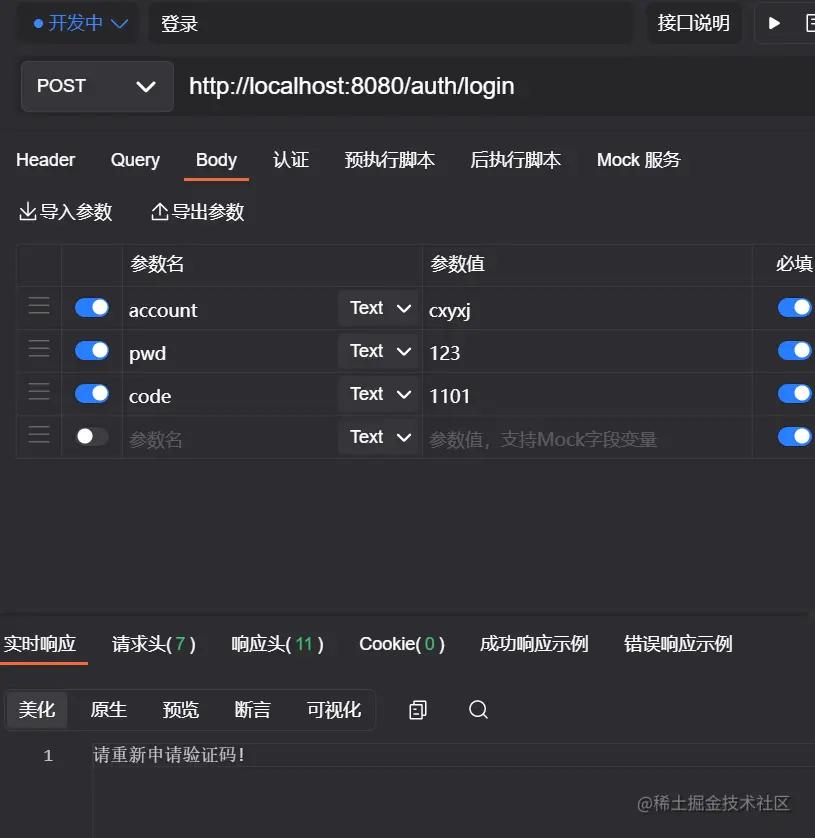
基于认证器
编写自定义认证逻辑
验证码逻辑编写完成,那接下来就自定义一个 VerifyCodeAuthenticationProvider 继承自 DaoAuthenticationProvider,并重写 authenticate 方法。
import org.springframework.security.authentication.AuthenticationServiceException;
import org.springframework.security.authentication.dao.DaoAuthenticationProvider;
import org.springframework.security.core.Authentication;
import org.springframework.security.core.AuthenticationException;
import org.springframework.util.StringUtils;
import org.springframework.web.context.request.RequestContextHolder;
import org.springframework.web.context.request.ServletRequestAttributes;import javax.servlet.http.HttpServletRequest;
import javax.servlet.http.HttpSession;/*** 验证码验证器*/
public class VerifyCodeAuthenticationProvider extends DaoAuthenticationProvider {@Overridepublic Authentication authenticate(Authentication authentication) throws AuthenticationException {HttpServletRequest req = ((ServletRequestAttributes) RequestContextHolder.getRequestAttributes()).getRequest();// 获得请求验证码值String code = req.getParameter("code");// 获得 session 中的 验证码值HttpSession session = req.getSession();String sessionVerifyCode = (String) session.getAttribute("verify_code");if (StringUtils.isEmpty(code)){throw new AuthenticationServiceException("验证码不能为空!");}if(StringUtils.isEmpty(sessionVerifyCode)){throw new AuthenticationServiceException("请重新申请验证码!");}if (!code.toLowerCase().equals(sessionVerifyCode.toLowerCase())) {throw new AuthenticationServiceException("验证码错误!");}// 验证码验证成功,清除 session 中的验证码session.removeAttribute("verify_code");// 验证码验证成功,走原本父类认证逻辑return super.authenticate(authentication);}
}
复制代码
自定义的认证逻辑完成了,剩下的问题就是如何让 security 走我们的认证逻辑了。
在 security 中,所有的 AuthenticationProvider 都是放在 ProviderManager 中统一管理的,所以接下来我们就要自己提供 ProviderManager,然后注入自定义的 VerifyCodeAuthenticationProvider。
- SecurityConfig
import cn.cxyxj.study02.config.MyAuthenticationFailureHandler;
import cn.cxyxj.study02.config.MyAuthenticationSuccessHandler;
import org.springframework.context.annotation.Bean;
import org.springframework.context.annotation.Configuration;
import org.springframework.security.authentication.AuthenticationManager;
import org.springframework.security.authentication.ProviderManager;
import org.springframework.security.config.annotation.web.builders.HttpSecurity;
import org.springframework.security.config.annotation.web.configuration.WebSecurityConfigurerAdapter;
import org.springframework.security.core.userdetails.User;
import org.springframework.security.core.userdetails.UserDetailsService;
import org.springframework.security.crypto.password.NoOpPasswordEncoder;
import org.springframework.security.crypto.password.PasswordEncoder;
import org.springframework.security.provisioning.InMemoryUserDetailsManager;@Configuration
public class SecurityConfig extends WebSecurityConfigurerAdapter {@BeanPasswordEncoder passwordEncoder() {return NoOpPasswordEncoder.getInstance();}@Bean@Overrideprotected UserDetailsService userDetailsService() {InMemoryUserDetailsManager manager = new InMemoryUserDetailsManager();manager.createUser(User.withUsername("cxyxj").password("123").roles("admin").build());manager.createUser(User.withUsername("security").password("security").roles("user").build());return manager;}@BeanVerifyCodeAuthenticationProvider verifyCodeAuthenticationProvider() {VerifyCodeAuthenticationProvider provider = new VerifyCodeAuthenticationProvider();provider.setPasswordEncoder(passwordEncoder());provider.setUserDetailsService(userDetailsService());return provider;}@Override@Beanpublic AuthenticationManager authenticationManagerBean() throws Exception {ProviderManager manager = new ProviderManager(verifyCodeAuthenticationProvider());return manager;}@Overrideprotected void configure(HttpSecurity http) throws Exception {http.authorizeRequests()  //开启配置// 验证码接口放行.antMatchers("/verify-code").permitAll().anyRequest() //其他请求.authenticated()//验证   表示其他请求需要登录才能访问.and().formLogin().loginPage("/login.html") //登录页面.loginProcessingUrl("/auth/login") //登录接口,此地址可以不真实存在.usernameParameter("account") //用户名字段.passwordParameter("pwd") //密码字段.successHandler(new MyAuthenticationSuccessHandler()).failureHandler(new MyAuthenticationFailureHandler()).permitAll() // 上述 login.html 页面、/auth/login接口放行.and().csrf().disable();  // 禁用 csrf 保护;}
}
复制代码
测试
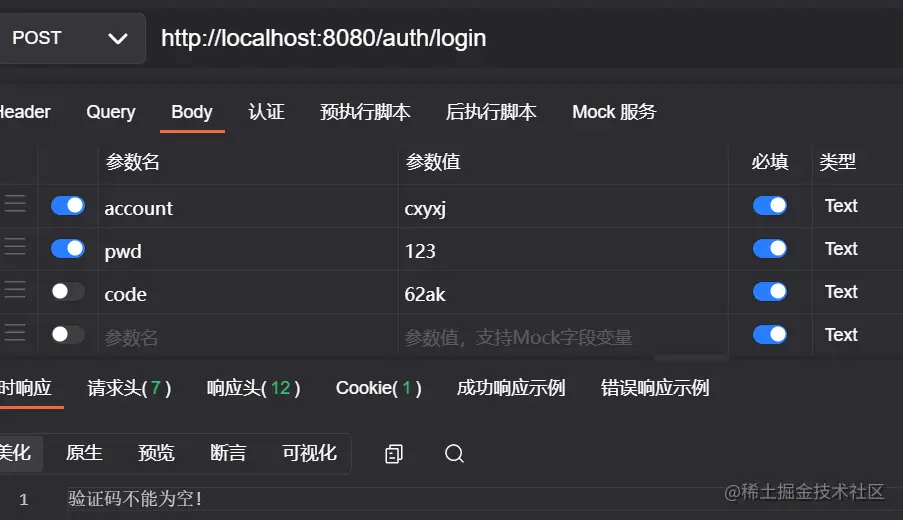
- 不传入验证码发起请求。
- 请求获取验证码接口
- 输入错误的验证码
- 输入正确的验证码
- 输入已经使用过的验证码
- 如你对本文有疑问或本文有错误之处,欢迎评论留言指出。如觉得本文对你有所帮助,欢迎点赞和关注。
本文来自互联网用户投稿,文章观点仅代表作者本人,不代表本站立场,不承担相关法律责任。如若转载,请注明出处。 如若内容造成侵权/违法违规/事实不符,请点击【内容举报】进行投诉反馈!