jcrop 图片压缩剪切
jcrop实现图片剪裁
现在一些图片上传都需要处理一下大小,特别是头像的上传,具体怎么裁剪呢?这里介绍一款好用的插件 jcrop
下载地址 里面有简单的 页面demo jcrop下载
官网API :http://code.ciaoca.com/jquery/jcrop/ 官网的demo是php 的
下面我介绍一下java的裁剪
图片剪裁需要的步骤
1、先上传需要裁剪的图片
html代码如下:
图片上传  上传图片
上传图片 说明: 每个图片允许大小2M,支持格式jpg/jpeg/png文件
${msg?if_exists} <#if returnPath?exists> <#if '${returnPath?if_exists}'!=""> 
<#else> <#else> 

2、展示上传的图片,然后进行需要裁剪的区域选择(提交图片后,跳转的页面,显示上一步上传的图片)
首先页面需要引用jcrop的js和css 以及初始化的一些function
引用:
比较常用的几个参数这里介绍一下:
| aspectRatio | 1 | 选框宽高比。说明:width/height; |
| boxWidth | 508 | 画布宽度 |
| boxHeight | 284 | 画布高度 |
下面是我自己的一段js,和html,适用于自己的场景,需要的可以参考:
下面这段js 是我初始化页面从后台获取的原始图片,个人根据自己的需要进行设置
页面html
![]()
效果预览 请注意预览效果是否清晰 ![]()
效果图如下图:
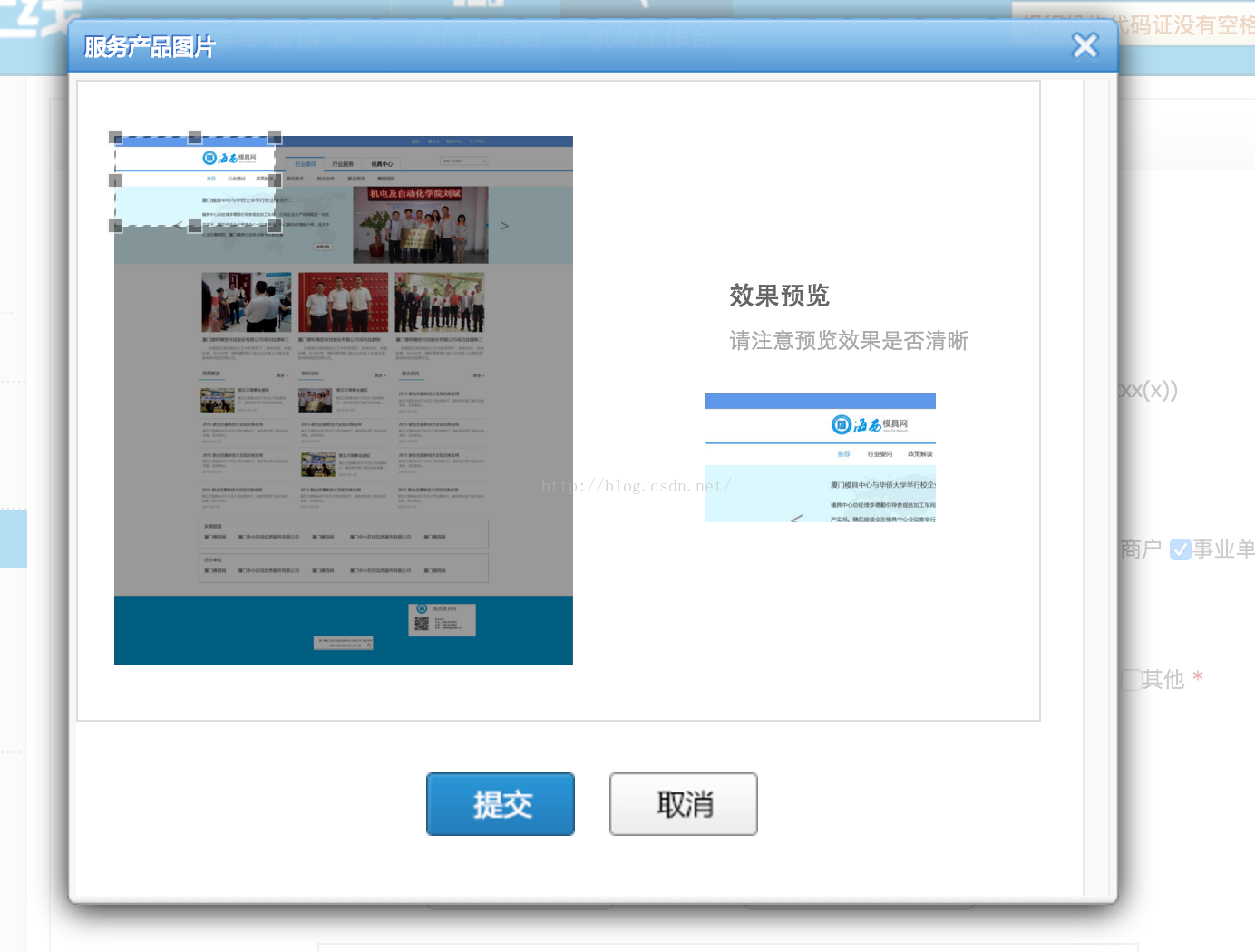
左边的是 id为target 的图片 右边的是id为preview 的 图片地址都是一样的 ,左上角的是剪裁框;
需要预览不同大小的话继续添加preview1 等;就会出来两个预览框,当然还需要添加相应的js,这时候效果如下(下面是我做头像 高宽1:1时候的样子)
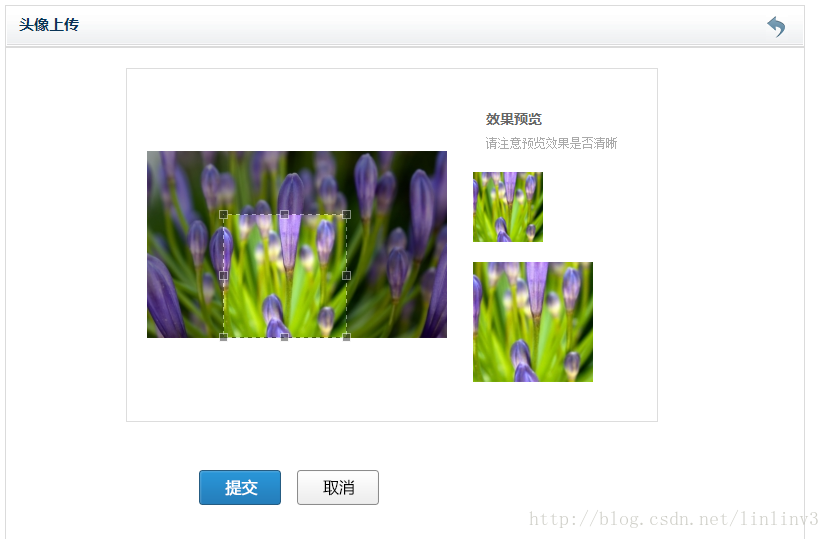
3、根据选择区域剪切成自己想要的图片,以java为例,php的看官网,官网有现成的demo;
在上面的js里面你会发现 你可以获取到你裁剪的图片的四个坐标;把这些坐标提交到后台:
我用的post提交,把这些从js 赋值给input隐藏域:也就是最上面html代码中的隐藏域 image.x image.y这些值
提交到后台获取到坐标:
下面贴上整个action类
package cn.fulong.omp.web.action.person;import java.awt.Color;import java.awt.Graphics;import java.awt.Image;import java.awt.image.BufferedImage;import java.awt.image.ConvolveOp;import java.awt.image.Kernel;import java.io.File;import java.io.FileOutputStream;import java.io.IOException;import java.sql.Timestamp;import javax.swing.ImageIcon;import org.apache.commons.io.FileUtils;import org.apache.commons.lang.StringUtils;import org.apache.struts2.ServletActionContext;import cn.fulong.frame.config.Platform;import cn.fulong.frame.transaction.BaseTransaction;import cn.fulong.frame.web.action.BaseAction;import cn.fulong.omp.dm.CommonOrganization;import com.sun.image.codec.jpeg.JPEGCodec;import com.sun.image.codec.jpeg.JPEGEncodeParam;import com.sun.image.codec.jpeg.JPEGImageEncoder;public class ImageCutAction extends BaseAction{ /** * 上传的文件 */ private File file; private String entId; private String pathPic; private String fileFileName; private String msg; private String url; private OperateImage image; /** * 剪裁后的图片地址 */ private String returnPath; public String getReturnPath() { return returnPath; } public void setReturnPath(String returnPath) { this.returnPath = returnPath; } public OperateImage getImage() { return image; } public void setImage(OperateImage image) { this.image = image; } public String getUrl() { return url; } public void setUrl(String url) { this.url = url; } Timestamp currentTime = new Timestamp(System.currentTimeMillis()); public String getEntId() { return entId; } public void setEntId(String entId) { this.entId = entId; } public String getPathPic() { return pathPic; } public void setPathPic(String pathPic) { this.pathPic = pathPic; } public String getFileFileName() { return fileFileName; } public void setFileFileName(String fileFileName) { this.fileFileName = fileFileName; } public String getMsg() { return msg; } public void setMsg(String msg) { this.msg = msg; } public File getFile() { return file; } public void setFile(File file) { this.file = file; } /** * 这里是一个图片的压缩方法,可以用可以不用,需要压缩的可以使用 * @param originalFile 原始图片 * @param resizedFile 压缩图片 * @param newWidth 新的高度 * @param quality 像素 * @throws IOException */ private void resize(File originalFile, File resizedFile,int newWidth, float quality) throws IOException { if (quality > 1) { throw new IllegalArgumentException("Quality has to be between 0 and 1"); } ImageIcon ii = new ImageIcon(originalFile.getCanonicalPath()); Image i = ii.getImage(); Image resizedImage = null; int iWidth = i.getWidth(null); int iHeight = i.getHeight(null); if (iWidth > iHeight) { resizedImage = i.getScaledInstance(newWidth, (newWidth * iHeight)/ iWidth, Image.SCALE_SMOOTH); } else { resizedImage = i.getScaledInstance((newWidth * iWidth) / iHeight,newWidth, Image.SCALE_SMOOTH); } // This code ensures that all the pixels in the image are loaded. Image temp = new ImageIcon(resizedImage).getImage(); // Create the buffered image. BufferedImage bufferedImage = new BufferedImage(temp.getWidth(null), temp.getHeight(null), BufferedImage.TYPE_INT_RGB); // Copy image to buffered image. Graphics g = bufferedImage.createGraphics(); // Clear background and paint the image. g.setColor(Color.white); g.fillRect(0, 0, temp.getWidth(null), temp.getHeight(null)); g.drawImage(temp, 0, 0, null); g.dispose(); // Soften. float softenFactor = 0.05f; float[] softenArray = { 0, softenFactor, 0, softenFactor,1 - (softenFactor * 4), softenFactor, 0, softenFactor, 0 }; Kernel kernel = new Kernel(3, 3, softenArray); ConvolveOp cOp = new ConvolveOp(kernel, ConvolveOp.EDGE_NO_OP, null); bufferedImage = cOp.filter(bufferedImage, null); // Write the jpeg to a file. FileOutputStream out = new FileOutputStream(resizedFile); // Encodes image as a JPEG data stream JPEGImageEncoder encoder = JPEGCodec.createJPEGEncoder(out); JPEGEncodeParam param = encoder.getDefaultJPEGEncodeParam(bufferedImage); param.setQuality(quality, true); encoder.setJPEGEncodeParam(param); encoder.encode(bufferedImage); } // Example usage /** * 上传服务图片 这个类是上传原是图片的方法 * @return */ public String uploadSerevice() { url="/ueditor/executeSerevice.action?newsId="+entId; String extFileName = ""; if ((file != null) && (file.length() > 0L)) { int index = StringUtils.lastIndexOf(fileFileName, '.'); if (index == -1){ msg = "附件名称错误!"; return "success"; } extFileName = StringUtils.substring(fileFileName, index + 1); if ((!"jpg".equalsIgnoreCase(extFileName)) && (!"jpeg".equalsIgnoreCase(extFileName))&& (!"png".equalsIgnoreCase(extFileName))&&(!"gif".equalsIgnoreCase(extFileName))){ msg = "文件类型不正确,必须为jpg/jpeg/png/gif文件!"; return "success"; } if (this.file.length() > 1048576L*2){ msg = "文件太大,不能超过2M!"; return "success"; } String separator = File.separator; String rootpath = Platform.getInstance().getRealPath() ;//项目所在位置 String mypath = "file" + separator+"logo" + separator;//定义文件夹 //original // 存入磁盘 String filename = "original_"+entId+"_"+currentTime.getTime()+ "." + extFileName.toLowerCase();//定义文件名称 //原图 String path= rootpath +separator+ mypath+filename; String cutfilename = "original_cut_"+entId+"_"+currentTime.getTime()+ "." + extFileName.toLowerCase();//定义文件名称 //经过压缩的图片 String cutPath = rootpath +separator+ mypath+cutfilename; System.out.println("---文件上传位置---"+path); File destFile = new File(path); File cutFile = new File(cutPath); pathPic = mypath+filename; //pathPic=mypath+cutfilename; try { FileUtils.copyFile(file, destFile); // ImageHepler help = new ImageHepler(); //help.saveImageAsJpg(path, cutPath, 500, 500, true); //resize(destFile, cutFile, 254, 1f); //需要压缩的 ,调用压缩方 }catch (Exception e) { e.printStackTrace(); msg = "上传图片失败"; return "success"; } } return "uploadSerevice"; } /** * 剪切服务产品图片 * @return */ public String cutservicePic() { String name = ServletActionContext.getServletContext().getRealPath(pathPic); image.setSrcpath(name);//原始文件 int index = StringUtils.lastIndexOf(pathPic, '.'); String extFileName = StringUtils.substring(pathPic, index + 1); String separator = File.separator; String rootpath = Platform.getInstance().getRealPath() ;//项目所在位置 String mypath = "file" + separator+"logo" + separator;//定义文件夹 String filename = entId+"_"+currentTime.getTime()+"_1." + extFileName.toLowerCase();//定义文件名称 裁剪后的 String newPic = rootpath+separator+mypath+filename; String resizeFilename = entId+"_"+currentTime.getTime()+"." + extFileName.toLowerCase();//定义文件名称 裁剪后的 再次进行压缩的 String newResizePic = rootpath+separator+mypath+resizeFilename; // returnPath = mypath+resizeFilename; 返回压缩过的图片 returnPath = mypath+filename; System.out.println("-----剪裁图片地址-----"+newPic); image.setSubpath(newPic);//裁剪后的文件地址 try { image.cut(); //执行裁剪操作 执行完后即可生成目标图在对应文件夹内。 File newFile = new File(newPic); File newResizeFile = new File(newResizePic); //resize(newFile, newResizeFile, 254, 1f); //生成第二个压缩图片,需要压缩的使用 } catch (IOException e) { e.printStackTrace(); } url="/ueditor/executeSerevice.action?newsId="+entId; return "success"; } }
OperateImage类
package cn.fulong.omp.web.action.person;import java.awt.Rectangle;import java.awt.image.BufferedImage;import java.io.File;import java.io.FileInputStream;import java.io.IOException;import java.util.Iterator;import javax.imageio.ImageIO;import javax.imageio.ImageReadParam;import javax.imageio.ImageReader;import javax.imageio.stream.ImageInputStream;public class OperateImage { // ===源图片路径名称如:c:\1.jpg private String srcpath; // ===剪切图片存放路径名称.如:c:\2.jpg private String subpath; // ===剪切点x坐标 private int x; private int y; // ===剪切点宽度 private int width; private int height; public String getSrcpath() { return srcpath; } public void setSrcpath(String srcpath) { this.srcpath = srcpath; } public String getSubpath() { return subpath; } public void setSubpath(String subpath) { this.subpath = subpath; } public int getX() { return x; } public void setX(int x) { this.x = x; } public int getY() { return y; } public void setY(int y) { this.y = y; } public int getWidth() { return width; } public void setWidth(int width) { this.width = width; } public int getHeight() { return height; } public void setHeight(int height) { this.height = height; } public OperateImage() { } /** 对图片裁剪,并把裁剪完的新图片保存 */ public void cut() throws IOException { FileInputStream is = null; ImageInputStream iis = null; try { // 读取图片文件 is = new FileInputStream(srcpath); /* * 返回包含所有当前已注册 ImageReader 的 Iterator,这些 ImageReader 声称能够解码指定格式。 * 参数:formatName - 包含非正式格式名称 . (例如 "jpeg" 或 "tiff")等 。 */ Iterator it = ImageIO.getImageReadersByFormatName("jpg"); ImageReader reader = it.next(); // 获取图片流 iis = ImageIO.createImageInputStream(is); /* * iis:读取源.true:只向前搜索
.将它标记为 ‘只向前搜索’。 * 此设置意味着包含在输入源中的图像将只按顺序读取,可能允许 reader 避免缓存包含与以前已经读取的图像关联的数据的那些输入部分。 */ reader.setInput(iis, true); /* * 描述如何对流进行解码的类
.用于指定如何在输入时从 Java Image I/O
* 框架的上下文中的流转换一幅图像或一组图像。用于特定图像格式的插件 将从其 ImageReader 实现的 * getDefaultReadParam 方法中返回 ImageReadParam 的实例。 */ ImageReadParam param = reader.getDefaultReadParam(); /* * 图片裁剪区域。Rectangle 指定了坐标空间中的一个区域,通过 Rectangle 对象 * 的左上顶点的坐标(x,y)、宽度和高度可以定义这个区域。 */ Rectangle rect = new Rectangle(x, y, width, height); // 提供一个 BufferedImage,将其用作解码像素数据的目标。 param.setSourceRegion(rect); /* * 使用所提供的 ImageReadParam 读取通过索引 imageIndex 指定的对象,并将 它作为一个完整的 * BufferedImage 返回。 */ BufferedImage bi = reader.read(0, param); // 保存新图片 ImageIO.write(bi, "jpg", new File(subpath)); } finally { if (is != null) is.close(); if (iis != null) iis.close(); } }}
到这里就全部完成了。
可以自己到剪裁后文件夹内看到剪裁的图片;
本文来自互联网用户投稿,文章观点仅代表作者本人,不代表本站立场,不承担相关法律责任。如若转载,请注明出处。 如若内容造成侵权/违法违规/事实不符,请点击【内容举报】进行投诉反馈!