项目实训(十)FPS游戏之移动,跑步,跳跃,下蹲等
文章目录
- 前言
- 一、如何让角色移动
- 二、如何让角色按 shift 键奔跑
- 三、如何让角色按“C”键下蹲
- 1.需要使用携程函数
- 2.判断是否下蹲
- 四、如何让角色按空格键下蹲
前言
FPS游戏之移动,跑步,跳跃,下蹲等
FPCharacterControllerMovement 该脚本用于获取玩家的输入行为,根据相应的按键输入等对角色的移动进行控制。
一、如何让角色移动
首先判断是否在地面
if (characterController.isGrounded){var tmp_Horizontal = Input.GetAxis("Horizontal");var tmp_Vertical = Input.GetAxis("Vertical");movementDirection =characterTransform.TransformDirection(new Vector3(tmp_Horizontal, 0, tmp_Vertical)).normalized;
用move函数设置物体的重力
movementDirection.y -= Gravity * Time.deltaTime;var tmp_Movement = CurrentSpeed * Time.deltaTime * movementDirection;characterController.Move(tmp_Movement);
二、如何让角色按 shift 键奔跑
在unity中修改速度,判断是否按左边的shift键,如果按了则执行经改造后的增快的速度
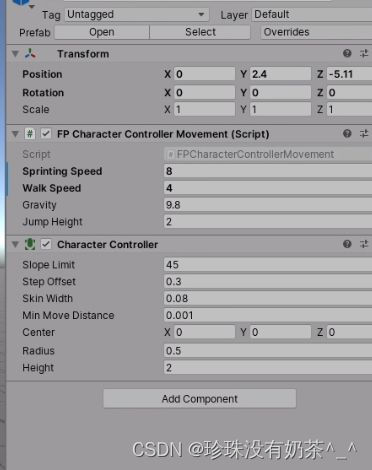
if (isCrouched){CurrentSpeed = Input.GetKey(KeyCode.LeftShift) ? SprintingSpeedWhenCrouched : WalkSpeedWhenCrouched;}else{CurrentSpeed = Input.GetKey(KeyCode.LeftShift) ? SprintingSpeed : WalkSpeed;}
三、如何让角色按“C”键下蹲
1.需要使用携程函数
协程:协程是一个分部执行,遇到条件(yield return 语句)
时才会挂起,直到条件满足才会被唤醒继续执行后面的代码。
private IEnumerator DoCrouch(float _target){float tmp_CurrentHeight = 0;while (Mathf.Abs(characterController.height - _target) > 0.1f){yield return null;characterController.height =Mathf.SmoothDamp(characterController.height, _target,ref tmp_CurrentHeight, Time.deltaTime * 5);}}
2.判断是否下蹲
判断是否蹲下,将 isCrouched 重置为对立状态,按下C键后,如若为下蹲状态,则可获取到下蹲状态的高度,并将其制为下蹲状态
if (Input.GetKeyDown(KeyCode.C)){var tmp_CurrentHeight = isCrouched ? originHeight : CrouchHeight;StartCoroutine(DoCrouch(tmp_CurrentHeight));isCrouched = !isCrouched;}四、如何让角色按空格键下蹲
if (Input.GetButtonDown("Jump")){movementDirection.y = JumpHeight;}
本文来自互联网用户投稿,文章观点仅代表作者本人,不代表本站立场,不承担相关法律责任。如若转载,请注明出处。 如若内容造成侵权/违法违规/事实不符,请点击【内容举报】进行投诉反馈!