UITabeViews---设置字体格式,大小,颜色
效果图:
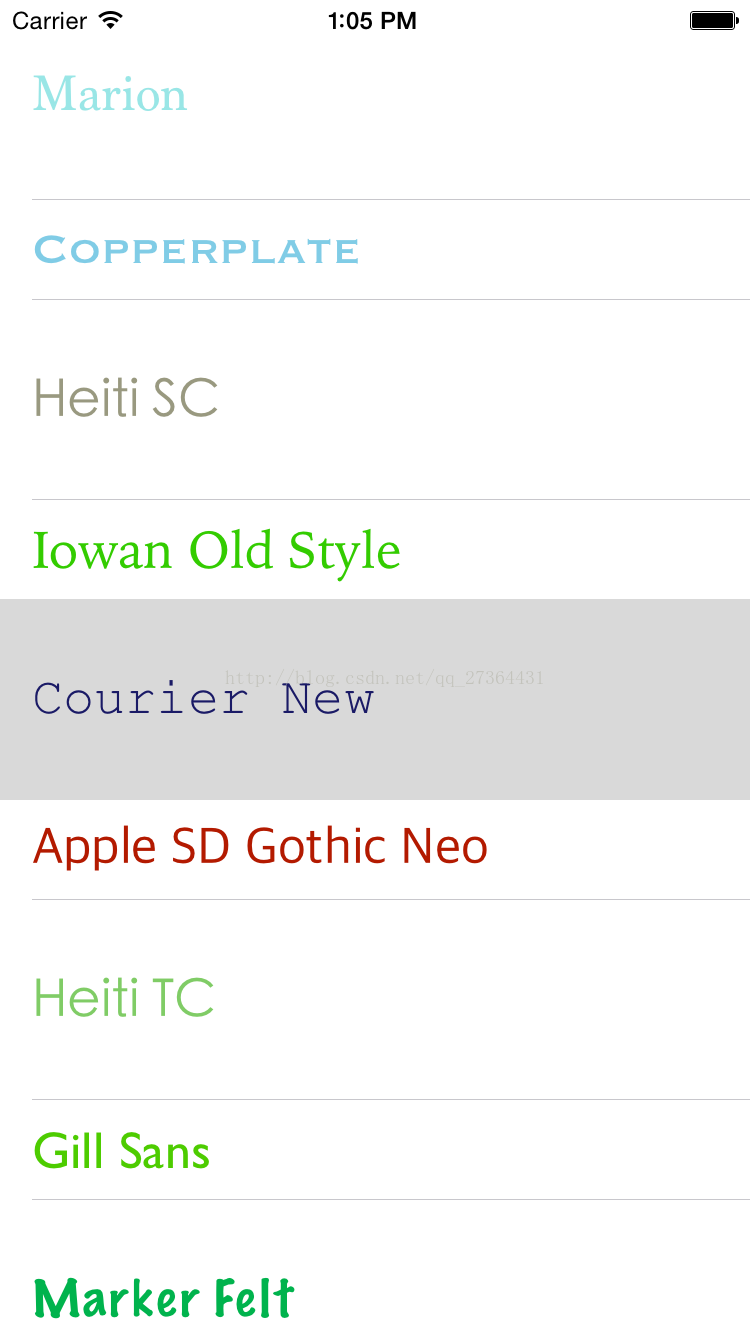
UITableView设置每行显示的内容,字体格式,大小,颜色
首先设置根视图控制器:
AppDelegate.m文件
#import "AppDelegate.h"
#import "JRTableViewController.h"
@interface AppDelegate ()
@end
@implementation AppDelegate
- (BOOL)application:(UIApplication *)application didFinishLaunchingWithOptions:(NSDictionary *)launchOptions
{
JRTableViewController * tableVC=[[JRTableViewController alloc]init];
self.window.rootViewController=tableVC;
return YES;
}
自定义的JRTableViewController.m文件
#import "JRTableViewController.h"
//定义宏
#define jrRandomColor [UIColor colorWithRed:arc4random_uniform(10)*0.1 green:arc4random_uniform(10)*0.1 blue:arc4random_uniform(10)*0.1 alpha:1]
@interface JRTableViewController ()
//数据存储
@property (nonatomic,strong) NSArray * dataArray;
@end
@implementation JRTableViewController
- (void)viewDidLoad {
[super viewDidLoad];
self.tableView.rowHeight=100;
//加载数据
[self _loadData];
}
#pragma mark - 加载 tableView 数据
- (void) _loadData
{
self.dataArray=[UIFont familyNames]; //每行cell内显示的内容
}
//创建JRTableViewController时,自动生成代理方法
#pragma mark - Table view data source
- (NSInteger)tableView:(UITableView *)tableView numberOfRowsInSection:(NSInteger)section
{
return self.dataArray.count; //返回数组的行数
}
#pragma mark - 返回cell
- (UITableViewCell *)tableView:(UITableView *)tableView cellForRowAtIndexPath:(NSIndexPath *)indexPath
{
static NSString * identy=@"JRTable";
UITableViewCell *cell = [tableView dequeueReusableCellWithIdentifier:identy];
if (!cell)
{
cell=[[UITableViewCell alloc]initWithStyle:UITableViewCellStyleDefault reuseIdentifier:identy];
}
cell.textLabel.text=self.dataArray[indexPath.row];
cell.textLabel.font=[UIFont fontWithName:cell.textLabel.text size:16];
//设置字体颜色
if(indexPath.row%2==0)
{
cell.textLabel.textColor=jrRandomColor; //宏
}
return cell;
}
//设置每一行的高度
/*
第 0行 高度 100
第 1行 高度 50
第 2行 高度 100
第 3行 高度 50
第 4行 高度 100
第 5行 高度 50
*/
- (CGFloat) tableView:(UITableView *)tableView heightForRowAtIndexPath:(NSIndexPath *)indexPath
{
if (indexPath.row%2==0)
{
return 100;
}
else
{
return 50;
}
}
- (void)didReceiveMemoryWarning {
[super didReceiveMemoryWarning];
}
@end
本文来自互联网用户投稿,文章观点仅代表作者本人,不代表本站立场,不承担相关法律责任。如若转载,请注明出处。 如若内容造成侵权/违法违规/事实不符,请点击【内容举报】进行投诉反馈!