效果图展示
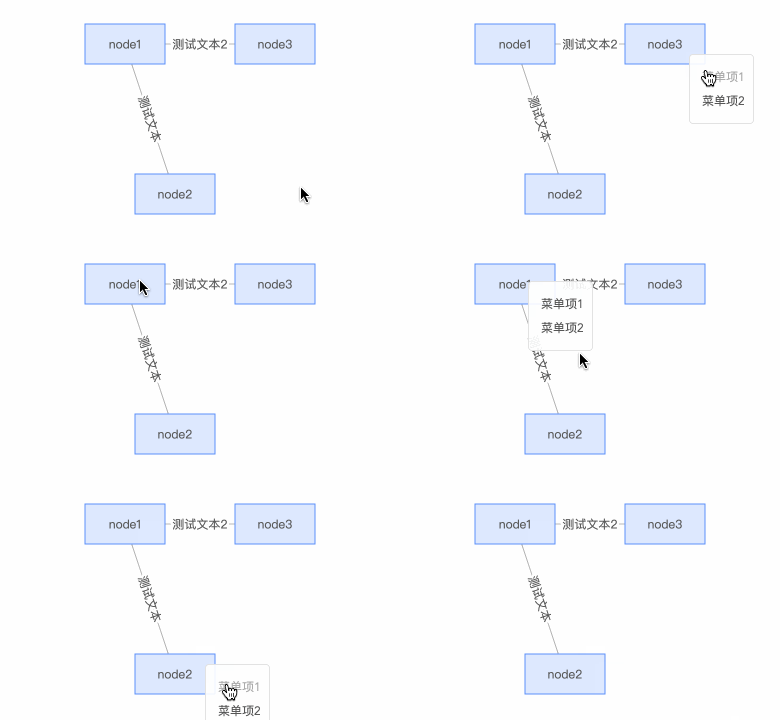
方案一
<template><div ref="graphContent" class="graph-page" @contextmenu.prevent=""></div>
</template><script>
import G6 from '@antv/g6'
export default {mounted() {const data = {nodes: [{id: 'node1',label: 'node1',x: 200,y: 100,type: 'rect',},{id: 'node2',label: 'node2',x: 250,y: 250,type: 'rect',},{id: 'node3',label: 'node3',x: 350,y: 100,type: 'rect',},],edges: [{source: 'node1',target: 'node2',label: 'Test Label',},{source: 'node1',target: 'node3',label: 'Test Label 2',},],}this.init(data)},methods: {init(nodeData) {const container = this.$refs.graphContentconst width = container.scrollWidthconst height = container.scrollHeight || 500const graph = new G6.Graph({container: container,width,height,defaultNode: {size: [80, 40],type: 'rect',style: {fill: '#DEE9FF',stroke: '#5B8FF9',},},defaultEdge: {style: {stroke: '#b5b5b5',lineAppendWidth: 3, },labelCfg: {autoRotate: true,style: {stroke: 'white',lineWidth: 5,},},},modes: {default: ['drag-canvas', 'zoom-canvas', 'click-select', 'drag-node'],},fitView: false,fitCenter: true,})graph.data(nodeData)graph.render()graph.on('node:click', (item) => {console.log(item)})let conextMenuContainer = document.createElement('ul')conextMenuContainer.id = 'contextMenu'let firstLi = document.createElement('li')firstLi.innerText = '指标详情'conextMenuContainer.appendChild(firstLi)this.$refs.graphContent.appendChild(conextMenuContainer)let menu = document.getElementById('contextMenu')graph.on('node:contextmenu', function (event) {self.currentNodeInfo = event.item._cfg.modelmenu.style.display = 'block'menu.style.left = event.canvasX + 20 + 'px'menu.style.top = event.canvasY + 'px'document.body.addEventListener('click', function () {menu.style.display = 'none'})event.stopPropagation() })firstLi.addEventListener('click', function (event) {event.stopPropagation() })},},
}
</script><style lang="less" scoped>
.graph-page {position: relative;height: 100%;
}
/deep/ #contextMenu {position: absolute;box-shadow: 1px 2px 5px #aaaaaa;border: 1px solid #c6c6c6;li {padding: 4px 14px;background: white;cursor: pointer;color: #444444;}
}
</style>
方案二
<template><div ref="graphContent" class="graph-page" @contextmenu.prevent=""></div>
</template><script>
import G6 from '@antv/g6'
import insertCss from 'insert-css'
insertCss(`.g6-component-contextmenu {padding: 0}.g6-component-contextmenu ul {margin: 0;text-align: center;}.g6-component-contextmenu ul li {padding: 6px 20px;cursor: pointer;}.g6-component-contextmenu ul li:hover {background: #b4b4b4;}
`)
export default {mounted() {const data = {nodes: [{id: 'node1',label: 'node1',x: 200,y: 100,type: 'rect',},{id: 'node2',label: 'node2',x: 250,y: 250,type: 'rect',},{id: 'node3',label: 'node3',x: 350,y: 100,type: 'rect',},],edges: [{source: 'node1',target: 'node2',label: 'Test Label',},{source: 'node1',target: 'node3',label: 'Test Label 2',},],}this.init(data)},methods: {init(nodeData) {const contextMenu = new G6.Menu({getContent() {return ``},handleMenuClick: (target, item) => {console.log(target, item, target.innerHTML)},offsetX: 10,offsetY: -25,itemTypes: ['node'],})const container = this.$refs.graphContentconst width = container.scrollWidthconst height = container.scrollHeight || 500const graph = new G6.Graph({container: container,width,height,plugins: [contextMenu],defaultNode: {size: [80, 40],type: 'rect',style: {fill: '#DEE9FF',stroke: '#5B8FF9',},},defaultEdge: {style: {stroke: '#b5b5b5',lineAppendWidth: 3, },labelCfg: {autoRotate: true,style: {stroke: 'white',lineWidth: 5,},},},modes: {default: ['drag-canvas', 'zoom-canvas', 'click-select', 'drag-node'],},fitView: false,fitCenter: true,})graph.data(nodeData)graph.render()graph.on('node:click', (item) => {console.log(item)})},},
}
</script><style lang="less" scoped>
.graph-page {position: relative;height: 100%;
}
</style>
本文来自互联网用户投稿,文章观点仅代表作者本人,不代表本站立场,不承担相关法律责任。如若转载,请注明出处。 如若内容造成侵权/违法违规/事实不符,请点击【内容举报】进行投诉反馈!
