javaExcel的导出(简单方法,不用代码写表头)
目录
一.java代码
1.controller层(/exportTradeCreditData)
2.service代码
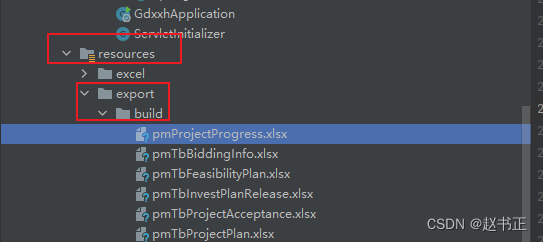
3.将设计好的excel模板放到指定位置
4.ExcelWriter.write()方法
二.前端Vue代码
1.接口
2.代码
三.Excel模板
1.将对应的字段也就是list中的key放到你想放在的位置(${contract.CITY_NAME})
2.加入批注
表头批注(jx:area(lastCell = "BB5"))
字段批注(jx:each(items="contracts" var="contract" lastCell="BB5"))
模板需要遍历的最后一行最后一列
一.java代码
1.controller层(/exportTradeCreditData)
package com.rhxt.irrmanage.build.control;import java.io.IOException;
import java.util.List;
import java.util.Map;import javax.servlet.http.HttpServletRequest;
import javax.servlet.http.HttpServletResponse;import org.apache.tomcat.util.http.fileupload.servlet.ServletFileUpload;
import org.slf4j.Logger;
import org.slf4j.LoggerFactory;
import org.springframework.beans.factory.annotation.Autowired;
import org.springframework.beans.factory.annotation.Value;
import org.springframework.web.bind.annotation.PostMapping;
import org.springframework.web.bind.annotation.RequestBody;
import org.springframework.web.bind.annotation.RequestMapping;
import org.springframework.web.bind.annotation.RequestParam;
import org.springframework.web.bind.annotation.RestController;
import org.springframework.web.multipart.MultipartFile;
import org.springframework.web.multipart.MultipartHttpServletRequest;
import org.springframework.web.util.WebUtils;import com.rhxt.common.swagger.ApiJsonObject;
import com.rhxt.common.swagger.ApiJsonProperty;
import com.rhxt.irrmanage.build.pojo.PmTbFiles;
import com.rhxt.irrmanage.build.service.ExportFileService;
import com.rhxt.util.G4Utils;
import com.rhxt.util.ResponseEnum;
import com.rhxt.util.Result;
import com.rhxt.util.file.FileUploadUtils;import io.swagger.annotations.Api;
import io.swagger.annotations.ApiOperation;@RestController
@Api(value = "附件上传及导出",tags = {"附件上传及导出"})
@RequestMapping("/exportFile")
public class ExportFileController {private static final Logger log = LoggerFactory.getLogger(ExportFileController.class);@AutowiredExportFileService exportFileService;@Value("${file.upload.filePath}")private String path;//文件服务器地址@Value("${file.url}")private String localIp;@ApiOperation(value = "导出", notes = "导出")@PostMapping("/exportTradeCreditData")public Result apiExport(@ApiJsonObject(name = "exportTradeCreditData", value = {@ApiJsonProperty(key = "regionId", example = "", description = "灌区编码", type = "string", required = true),@ApiJsonProperty(key = "year", example = "", description = "年份", type = "string", required = true),@ApiJsonProperty(key = "state", example = "", description = "灌区类型", type = "string", required = true),@ApiJsonProperty(key = "irrName", example = "", description = "灌区名称", type = "string", required = true),@ApiJsonProperty(key = "planName", example = "", description = "规划名称", type = "string", required = true),@ApiJsonProperty(key = "tableName", example = "", description = "对应文件名", type = "string", required = true),@ApiJsonProperty(key = "superRegionId", example = "", description = "上级所属行政区划", type = "string", required = true),@ApiJsonProperty(key = "regionType", example = "", description = "用户级别", type = "string", required = true),@ApiJsonProperty(key = "selRegionId", example = "", description = "灌区编码", type = "string", required = true),})HttpServletResponse response, @RequestBody Map map ) throws IOException{if (G4Utils.checkParams(map, "tableName")) {String regionId = G4Utils.getMapValue2String(map, "regionId");String year = G4Utils.getMapValue2String(map, "year");String state = G4Utils.getMapValue2String(map, "state");String irrName = G4Utils.getMapValue2String(map, "irrName");String planName = G4Utils.getMapValue2String(map, "planName");String tableName = G4Utils.getMapValue2String(map, "tableName");String superRegionId = G4Utils.getMapValue2String(map, "superRegionId");String regionType = G4Utils.getMapValue2String(map, "regionType");String selRegionId = G4Utils.getMapValue2String(map, "selRegionId");exportFileService.exportTradeCreditData(tableName, response, regionId, year, state, irrName, planName,superRegionId,regionType,selRegionId);}return null;		}@ApiOperation(value = "附件上传", notes = "附件上传")@PostMapping("/uploadFile")public Result uploadFile(@ApiJsonObject(name = "queryData", value = {@ApiJsonProperty(key = "file", example = "", description = "文件", type = "", required = true),@ApiJsonProperty(key = "regionId", example = "", description = "行政区划编码", type = "string", required = true),@ApiJsonProperty(key = "objId", example = "", description = "附件关联对象id", type = "string", required = true),@ApiJsonProperty(key = "userId", example = "", description = "用户id", type = "string", required = true),@ApiJsonProperty(key = "remark", example = "", description = "备注", type = "string", required = true),})@RequestParam Map map, HttpServletRequest request) throws IOException{	Result result = new Result();boolean isMultipart = ServletFileUpload.isMultipartContent(request);List file = null;List insertPmFiles = null;if (G4Utils.checkParams(map, "regionId", "objId", "userId")) {if (isMultipart) {String regionId = G4Utils.getMapValue2String(map, "regionId");String objId = G4Utils.getMapValue2String(map, "objId");String userId = G4Utils.getMapValue2String(map, "userId");String remark = G4Utils.getMapValue2String(map, "remark");MultipartHttpServletRequest multipartRequest = WebUtils.getNativeRequest(request, MultipartHttpServletRequest.class);file = multipartRequest.getFiles("file");if (G4Utils.isNotEmpty(file)) {try {insertPmFiles = FileUploadUtils.insertPmFiles(file, regionId, objId, userId, path, remark);} catch (Throwable e) {e.printStackTrace();log.info("附件上传异常,异常位置:ExportFileController.uploadFile:异常原因:", e);}if (G4Utils.isNotEmpty(insertPmFiles)) {result.setObj(insertPmFiles);result.setCode(ResponseEnum.FILE_UPLOAD_SUCCESS.getCode());result.setMsg(ResponseEnum.FILE_UPLOAD_SUCCESS.getMsg());}else {result.setCode(ResponseEnum.FILE_UPLOAD_ERROR.getCode());result.setMsg(ResponseEnum.FILE_UPLOAD_ERROR.getMsg());}}}}else {result.setCode(ResponseEnum.PARAM_LOSE_EXCEPTION.getCode());result.setMsg(ResponseEnum.PARAM_LOSE_EXCEPTION.getMsg());}return result;		}@ApiOperation(value = "附件删除", notes = "附件删除")@PostMapping("/deleteFileById")public Result deleteFileById(@ApiJsonObject(name = "deleteFileById", value = {@ApiJsonProperty(key = "id", example = "", description = "文件id", type = "", required = true)})@RequestBody Map map) throws IOException{	Result result = new Result();if (G4Utils.checkParams(map, "id")) {String id = G4Utils.getMapValue2String(map, "id");result.setObj(exportFileService.deleteFile(id));result.setCode(ResponseEnum.DELETE_SUCCESS.getCode());result.setMsg(ResponseEnum.DELETE_SUCCESS.getMsg());}else {result.setCode(ResponseEnum.PARAM_LOSE_EXCEPTION.getCode());result.setMsg(ResponseEnum.PARAM_LOSE_EXCEPTION.getMsg());}return result;		}@ApiOperation(value = "附件查看", notes = "附件查看")@PostMapping("/selectFileById")public Result selectFileById(@ApiJsonObject(name = "selectFileById", value = {@ApiJsonProperty(key = "id", example = "", description = "附件关联对象id", type = "", required = true)})@RequestBody Map map) throws IOException{	Result result = new Result();if (G4Utils.checkParams(map, "id")) {String id = G4Utils.getMapValue2String(map, "id");result.setObj(exportFileService.selectFileById(id, localIp));}else {result.setCode(ResponseEnum.PARAM_LOSE_EXCEPTION.getCode());result.setMsg(ResponseEnum.PARAM_LOSE_EXCEPTION.getMsg());}return result;		}
}
2.service代码
package com.rhxt.irrmanage.build.service.impl;import java.io.OutputStream;
import java.text.SimpleDateFormat;
import java.util.Date;
import java.util.HashMap;
import java.util.List;
import java.util.Map;import javax.servlet.http.HttpServletResponse;import org.slf4j.Logger;
import org.slf4j.LoggerFactory;
import org.springframework.beans.factory.annotation.Autowired;
import org.springframework.stereotype.Service;import com.rhxt.irrmanage.build.dao.PmTbFilesMapper;
import com.rhxt.irrmanage.build.service.ExportFileService;
import com.rhxt.irrmanage.build.service.IPmTbBiddingInfoService;
import com.rhxt.irrmanage.build.service.IPmTbFeasibilityPlanService;
import com.rhxt.irrmanage.build.service.IPmTbInvestPlanReleaseService;
import com.rhxt.irrmanage.build.service.IPmTbProjectAcceptanceService;
import com.rhxt.irrmanage.build.service.IPmTbProjectPlanService;
import com.rhxt.irrmanage.build.service.IPmTbProjectProgressService;
import com.rhxt.irrmanage.build.service.IPmTbProjectProposalService;
import com.rhxt.irrmanage.build.service.IPmTbReplyBuildService;
import com.rhxt.irrmanage.build.service.IPmTbReplyDesignService;
import com.rhxt.irrmanage.build.service.PmTbProjectStartService;
import com.rhxt.util.ExcelWriter;
import com.rhxt.util.G4Utils;@Service
public class ExportFileServiceImpl implements ExportFileService {private static final Logger log = LoggerFactory.getLogger(ExportFileServiceImpl.class);@AutowiredIPmTbProjectProposalService IPmTbProjectProposalService;@AutowiredIPmTbProjectPlanService iPmTbProjectPlanService;@AutowiredIPmTbBiddingInfoService iPmTbBiddingInfoService;@AutowiredIPmTbFeasibilityPlanService iPmTbFeasibilityPlanService;@AutowiredIPmTbInvestPlanReleaseService iPmTbInvestPlanReleaseService;@AutowiredIPmTbProjectAcceptanceService iPmTbProjectAcceptanceService;@AutowiredIPmTbProjectProgressService iPmTbProjectProgressService;@AutowiredPmTbProjectStartService pmTbProjectStartService;@AutowiredIPmTbReplyBuildService iPmTbReplyBuildService;@AutowiredIPmTbReplyDesignService iPmTbReplyDesignService;@AutowiredPmTbFilesMapper pmTbFilesMapper;@Overridepublic void exportTradeCreditData(String tableName, HttpServletResponse response, String regionId, String year,String state, String irrName, String planName, String superRegionId, String regionType,String selRegionId) {Map data = new HashMap<>();String fn = "";switch (tableName) {case "pmTbProjectProposal": //项目建议书 √fn = "pmTbProjectProposal";List> proposalList = IPmTbProjectProposalService.queryData(regionId, year, state, irrName,superRegionId,regionType, selRegionId);data.put("contracts", proposalList);break;case "pmTbProjectPlan": //规划报告 √fn = "pmTbProjectPlan";List> proPlanList = iPmTbProjectPlanService.queryData(regionId, year, state, irrName, planName,superRegionId,regionType,"", selRegionId);data.put("contracts", proPlanList);break;case "pmTbFeasibilityPlan":  //可行性研究 √fn = "pmTbFeasibilityPlan";List> feaPlanList = iPmTbFeasibilityPlanService.queryData(regionId, year, state, irrName,superRegionId,regionType,"", selRegionId);data.put("contracts", feaPlanList);break;case "pmTbReplyDesign": //初步设计 √fn = "pmTbReplyDesign";List> replyDesList = iPmTbReplyDesignService.queryData(regionId, year, state, irrName,superRegionId,regionType,"", selRegionId);data.put("contracts", replyDesList);break;case "pmTbReplyBuild": //年度实施方案 √fn = "pmTbReplyBuild";List> replyBuildList = iPmTbReplyBuildService.queryData(regionId, year, state, irrName,superRegionId,regionType,"", selRegionId);data.put("contracts", replyBuildList);break;case "pmTbInvestPlanRelease": //年度投资计划下达 √fn = "pmTbInvestPlanRelease";List> invPlanList = iPmTbInvestPlanReleaseService.queryData(regionId, year, state, irrName,superRegionId,regionType, selRegionId);data.put("contracts", invPlanList);break;case "pmTbBiddingInfo": //招投标  √fn = "pmTbBiddingInfo";List> biddingList = iPmTbBiddingInfoService.queryData(regionId, year, state, irrName,superRegionId,regionType, selRegionId);data.put("contracts", biddingList);break;case "pmTbProjectStart": //开工报验 √fn = "pmTbProjectStart";List> proStartList = pmTbProjectStartService.queryData(regionId, year, state, irrName,superRegionId,regionType, selRegionId);data.put("contracts", proStartList);break;case "pmTbProjectProgress": //建设进度 √fn = "pmTbProjectProgress";List> progressList = iPmTbProjectProgressService.queryData(regionId, year, state, irrName,superRegionId,regionType, selRegionId);data.put("contracts", progressList);break;case "pmTbProjectAcceptance": //验收管理 √fn = "pmTbProjectAcceptance";List> proAccList = iPmTbProjectAcceptanceService.queryData(regionId, year, state, irrName,superRegionId,regionType, selRegionId);data.put("contracts", proAccList);break;default:break;}try {		response.setContentType("application/vnd.ms-excel");response.setHeader("Content-disposition", "attachment;filename="+new String(("测试导出信息_"+ new SimpleDateFormat("yyyy-MM-dd").format(new Date()).toString() +".xlsx").getBytes(), "iso-8859-1"));OutputStream out = response.getOutputStream();//重点 工具类ExcelWriter.write(this.getClass().getClassLoader().getResourceAsStream("export/build/"+fn+".xlsx"), out, data);} catch (Exception e) {
//			log.warning(e.getMessage());e.printStackTrace();}}@Overridepublic int deleteFile(String id) {int count = 0;try {count = pmTbFilesMapper.deleteByPrimaryKey(id);} catch (Exception e) {log.info("删除附件异常,异常位置:ExportFileServiceImpl.deleteFile:异常原因:", e);}return count;}@Overridepublic List> selectFileById(String id, String localIp) {List> fileList= pmTbFilesMapper.selectFileById(id);for (Map map : fileList) {map.put("url", localIp + G4Utils.getMapValue2String(map, "filePath"));}return fileList;}}
3.将设计好的excel模板放到指定位置
4.ExcelWriter.write()方法
package com.rhxt.util;import java.io.File;
import java.io.FileInputStream;
import java.io.FileNotFoundException;
import java.io.IOException;
import java.io.InputStream;
import java.io.OutputStream;
import java.util.Map;import org.jxls.common.Context;
import org.jxls.util.JxlsHelper;/*** 通过模板导出Excel的工具* @author Dylan**/
public class ExcelWriter {/*** 根据模板输出Excel文件* @param templateInputStream 模板输入流* @param out 要写入的流,一般为文件流或网络流* @param vars 上下文变量* @throws IOException*/public static void write(InputStream templateInputStream, OutputStream out, Map vars) throws IOException {Context context = new Context(vars);		JxlsHelper.getInstance().processTemplate(templateInputStream, out, context);}/*** 根据模板输出Excel文件* @param templateFile 模板文件* @param out 要写入的流,一般为文件流或网络流* @param vars 上下文变量* @throws FileNotFoundException* @throws IOException*/public static void write(File templateFile, OutputStream out, Map vars) throws FileNotFoundException, IOException {try (InputStream templateInputStream = new FileInputStream(templateFile)) {write(templateInputStream, out, vars);}}/*** 根据模板输出Excel文件* @param templateFileName 模板文件全名,包含路径* @param out 要写入的流,一般为文件流或网络流* @param vars 上下文变量* @throws FileNotFoundException* @throws IOException*/public static void write(String templateFileName, OutputStream out, Map vars) throws FileNotFoundException, IOException {try (InputStream templateInputStream = new FileInputStream(templateFileName)) {write(templateInputStream, out, vars);}}}
二.前端Vue代码
1.接口
//项目管理表格导出 post_XMJYS_exportData:(data) => axios.post(`${proHost}/GDXXH/exportFile/exportTradeCreditData`,data,{responseType:'blob',headers: {'Content-Type': 'application/json'},}),2.代码
//项目管理 表格导出
async handleExportData({commit}, option){let data = {...option,}let res = await api.post_XMJYS_exportData(data);exportDown(res, option.fileName);},
// 文件下载
const exportDown = (data, name) =>{const blob = new Blob([data], { type: "application/xls" });const elink = document.createElement("a");elink.download = name + ".xls";elink.style.display = "none";elink.href = URL.createObjectURL(blob);document.body.appendChild(elink);elink.click();URL.revokeObjectURL(elink.href); // 释放URL对象document.body.removeChild(elink);
}
三.Excel模板
1.将对应的字段也就是list中的key放到你想放在的位置(${contract.CITY_NAME})

2.加入批注
表头批注(jx:area(lastCell = "BB5"))
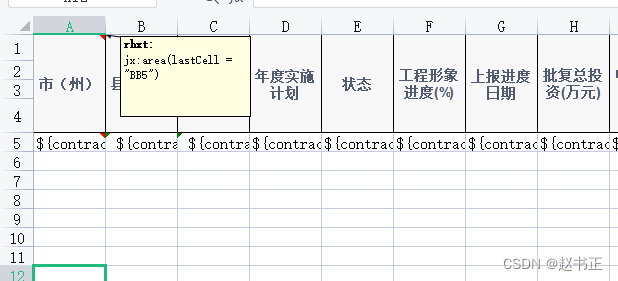
字段批注(jx:each(items="contracts" var="contract" lastCell="BB5"))

模板需要遍历的最后一行最后一列

本文来自互联网用户投稿,文章观点仅代表作者本人,不代表本站立场,不承担相关法律责任。如若转载,请注明出处。 如若内容造成侵权/违法违规/事实不符,请点击【内容举报】进行投诉反馈!