向量的归一: 因为D3D采用浮点数表示矩阵,在进行多次平移旋转缩放后可能会丢失一定的精度,从而造成原来垂直的向量不垂直。为了解决这个问题,D3D采用了归一(Normalize)叉积的方法。具体代码如下: D3DXVec3Normalize( &vLook, &vLook ); // 以Look为标准 D3DXVec3Cross( &vRight, &vUp, &vLook ); // 求Up和Look叉积来设定Right D3DXVec3Normalize( &vRight, &vRight ); D3DXVec3Cross ( &vUp, &vLook, &vRight); // 求Look和Right叉积来设定Up D3DXVec3Normalize( &vUp, &vUp ); 归一就是把向量单位化,计算公式为||A|| = sqrt(x*x + y*y + z*z)。 四元数: 四元数就是一个向量加上一次旋转。四元数将三维空间的旋转概念扩展到四维空间,这对于表示和处理3D中点的旋转很有用。四元数可以用于实现: n 骨骼动画 ( skeletal animation ) n 反向动力学动画 ( inverse cinematics ) n 3D物理学 我们可以在一个游戏中将所有的矩阵替换为四元数,因为这样不仅节省内存空间,同时也降低了计算成本。并且当需要一个矩阵进行操作时,随时可以将四元数转换成矩阵。 四元数包括一个标量w和一个向量v。其中向量应为单位向量w,标量为绕v轴旋转的数量。通常表示为(x, y, z, w)。它的物理意义是这样的:考虑以角度θ绕轴A(x , y, z)旋转的所有旋转矩阵,四元数Q将是Q=( x sin(θ/2), y sin(θ/2), z sin(θ/2), cos(θ/2) )。因此由一个四元数可以很容易求出旋转角θ= 2 arc cos w,那么旋转轴A也就很容易求出了。 关于四元数的数学意义以及和矩阵的具体转换方法参见游戏编程精粹1中的2.7和2.8章。在D3D中四元数的典型应用是在一个偏航,俯仰,横滚系统中( yaw, pitch, roll )。如果由键盘控制一架飞机的偏航,俯仰以及横滚,我们就可以用四元数计算取代矩阵计算。从用户的键盘中得到飞机的偏航角度为yaw,俯仰角度为pitch,横滚角度为roll,那么便可以通过D3DXQuaternionRotationYawPitchRoll( D3DQUATERNION * pOut, FLOAT yaw, FLOAT pitch, FLOAT roll)来获得相应的四元数pOut。然后用四元数的乘法操作取代矩阵的乘法操作。四元数乘法操作Q=q1*q2的意义是绕轴2旋转某角度,然后再绕轴1旋转某角度。将最终得到的四元数结果应用于D3DXMatrixRotationQuaternion( D3DXMatrix *pOut, CONST D3DXQUATERNION *pQ)就能得到最终矩阵pOut了。另外常用的四元数操作函数还有四元数的归一D3DXQUATERNIONNormalize,四元数乘法D3DXQUATERNIONMultiply。 观察变换 观察变换通常用于描述一个观察者在场景中的位置和朝向。可以用照相机看场景的例子来描述这种变换。观察变换可以通过一个观察变换矩阵来表示。世界矩阵以行的次序存储向量的朝向,而观察矩阵则以列的次序存储。D3D中提供了一种比较简单的观察矩阵获取方式,即调用D3DXMatrixLookAtLH。这个函数必须要传进去三个向量,它们分别定义了照相机所在点eye,照相机拍摄物体位置at,和上方向量up。返回的矩阵第一列前三个值存储了up向量,第二列的前3个值存储了Right向量,第三列的前3个值存储了Look向量。D3DXMatrixLookAtLH适合用于跟随式照相机,对于太空射击游戏或者飞行模拟器就不适合了。解决办法有两个,一是将照相机绕向量旋转,二是使用四元数将照相机绕任意轴旋转。
Example 1 A plain’s Simple Transform
将平面做成一个对象,以简化主回调函数的逻辑
#include "dxstdafx.h"// Plain vertex structstructPlainVertex{FLOATx, y, z;FLOATtu, tv;};// replace D3DFVF_XYZRHW with D3DFVF_XYZ#definePLAIN_FVF (D3DFVF_XYZ | D3DFVF_TEX1)// Object PlainVertex wrap classclassPlain{public:Plain(IDirect3DDevice9* device); ~Plain();HRESULTCreatePlain();boolOnFrameMove( IDirect3DDevice9* pd3dDevice, double fTime );boolOnFrameRender( D3DMATERIAL9* mtrl, IDirect3DTexture9* tex);public:IDirect3DDevice9* m_device;IDirect3DVertexBuffer9* m_vb;IDirect3DIndexBuffer9* m_ib;};// ConstructorPlain::Plain(IDirect3DDevice9* device){m_device = device;m_vb = NULL;m_ib = NULL;}// Create the plain first when reset deviceinlineHRESULTPlain::CreatePlain(){HRESULThr;PlainVertexplainVertex[] = { { -1.0f, -1.0f, 0.0f, 1.0f, 1.0f }, // x, y, z, tu, tv : left bottom { 1.0f, -1.0f, 0.0f, 0.0f, 1.0f }, // right bottom { 1.0f, 1.0f, 0.0f, 0.0f, 0.0f }, // right up { -1.0f, 1.0f, 0.0f, 1.0f, 0.0f }, // left up };V_RETURN(m_device->CreateVertexBuffer(sizeof(plainVertex), 0,PLAIN_FVF,D3DPOOL_MANAGED, &m_vb,NULL));PlainVertex* v;V_RETURN(m_vb->Lock(0, 0, (void**)&v, 0));memcpy( v, plainVertex, sizeof(plainVertex) );m_vb->Unlock();WORDwIndeces[] = {3,2,0,2,1,0};V_RETURN( m_device->CreateIndexBuffer( sizeof(wIndeces), 0, D3DFMT_INDEX16,D3DPOOL_MANAGED, &m_ib, NULL) );VOID* pIndeces;V_RETURN( m_ib->Lock( 0, sizeof(wIndeces), &pIndeces, 0) );memcpy( pIndeces, wIndeces, sizeof(wIndeces) );m_ib->Unlock();return S_OK;}// Things to do when frame move for this plaininline bool Plain::OnFrameMove( IDirect3DDevice9* pd3dDevice, double fTime ){D3DXMATRIX matRotY;D3DXMatrixRotationY( &matRotY, (float)fTime * 2.0f );D3DXMATRIX matTrans;D3DXMatrixTranslation( &matTrans, 0.0f, 0.0f, 0.0f );D3DXMATRIX matResult;matResult = matRotY * matTrans;pd3dDevice->SetTransform( D3DTS_WORLD, &matResult );returntrue;}// Things to do when frame render for this plaininline bool Plain::OnFrameRender(D3DMATERIAL9* mtrl, IDirect3DTexture9* tex){if( mtrl )m_device->SetMaterial(mtrl);if( tex )m_device->SetTexture(0, tex);m_device->SetSamplerState(0, D3DSAMP_MAGFILTER, D3DTEXF_LINEAR);m_device->SetSamplerState(0, D3DSAMP_MINFILTER, D3DTEXF_LINEAR);m_device->SetSamplerState(0, D3DSAMP_MIPFILTER, D3DTEXF_LINEAR);m_device->SetStreamSource(0, m_vb, 0, sizeof(PlainVertex));m_device->SetIndices(m_ib);m_device->SetFVF(PLAIN_FVF);m_device->DrawIndexedPrimitive(D3DPT_TRIANGLELIST, 0, 0, 4,0,2);returntrue;}// destructor, must invoked when lost devicePlain::~Plain(){SAFE_RELEASE(m_vb);SAFE_RELEASE(m_ib);}
接下来的事情就是在主回调函数中调用上面函数了
// DeclarationPlain* g_pPlain = NULL;// codes in OnCreateDevice// Turn off cullingpd3dDevice->SetRenderState( D3DRS_CULLMODE, D3DCULL_NONE );// Turn off D3D lightingpd3dDevice->SetRenderState( D3DRS_LIGHTING, FALSE );// Turn on the zbufferpd3dDevice->SetRenderState( D3DRS_ZENABLE, TRUE );// Codes in OnResetDeviceg_pPlain = newPlain(pd3dDevice);V_RETURN ( g_pPlain->CreatePlain() );// Codes in OnFrameMove.// invoke plain’s OnFrameMove fisrt to set the world matricsg_pPlain->OnFrameMove( pd3dDevice, fTime );// Set up our view matrix. A view matrix can be defined given an eye point,// a point to lookat, and a direction for which way is up. Here, we set the// eye five units back along the z-axis and up three units, look at the// origin, and define "up" to be in the y-direction.D3DXVECTOR3vEyePt( 0.0f, 0.0f, 4.0f );D3DXVECTOR3vLookatPt( 0.0f, 0.0f, 0.0f );D3DXVECTOR3vUpVec( 0.0f, 1.0f, 0.0f );D3DXMATRIXA16 matView;D3DXMatrixLookAtLH( &matView, &vEyePt, &vLookatPt, &vUpVec );pd3dDevice->SetTransform( D3DTS_VIEW, &matView );// For the projection matrix, we set up a perspective transform (which// transforms geometry from 3D view space to 2D viewport space, with// a perspective divide making objects smaller in the distance). To build// a perpsective transform, we need the field of view (1/4 pi is common),// the aspect ratio, and the near and far clipping planes (which define at// what distances geometry should be no longer be rendered).D3DXMATRIXA16 matProj;D3DXMatrixPerspectiveFovLH( &matProj, D3DX_PI/4, 1.0f, 1.0f, 100.0f );pd3dDevice->SetTransform( D3DTS_PROJECTION, &matProj );// Codes in OnFrameRenderg_pPlain->OnFrameRender(0,g_pTexture);// Codes in OnLostDeviceg_pPlain->~Plain();
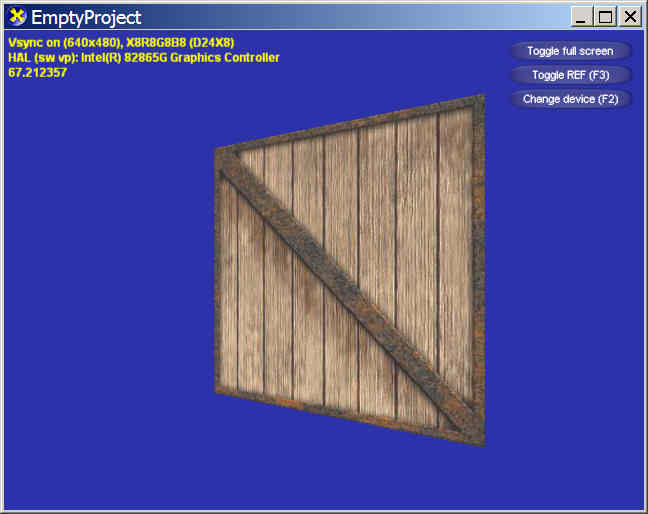
从上面的代码可以看出,这个程序是将一个平面绕Y轴旋转。由于定义的定点是在[-1, 1]区间的,所以动画显示出来的效果就是绕平面中心竖线选转的。这里用到了前几章的顶点缓冲和索引缓冲,然后在平面上做了纹理贴图,利用了mipmap并进行了双线过滤(见Plain::OnFrameRender)。需要注意的一点是D3D中默认打开了背面剔除(culling)和光照效果(lighting),所以我们必须手动调用SetRenderState手动关闭它们(OnCreateDevice),否则动画将只现实是黑乎乎的旋转平面正面。关闭后效果如下: