【项目实战】mybatis +vue.js 前后端交互批量删除
单个删除功能已经实现了,批量删除弄了很久也没弄好,来试一下。弄了很久终于把批量删除实现了!
结果:
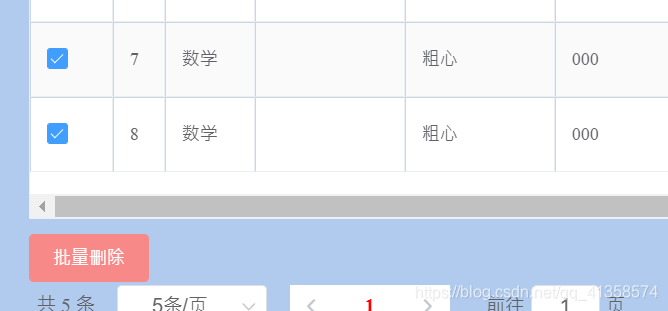
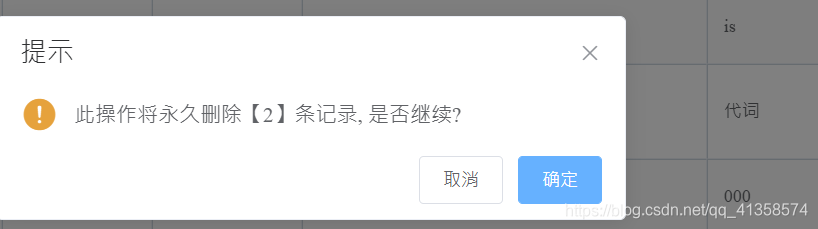
点击确认后,将看见表中已经少了两条数据。
实现的关键是:1.正确传递数据给后端的js语句
2.后端接收的方式,为json类型时需要进行解析
3.接收到的是一个字符串,可以转为list类型,在sql语句中注意collection的参数要与自定义的类型相匹配
4.在dao接口中的参数要与xml中实际传递的参数匹配
5.前端设置一个多选框选项数组,每选中一个就把这个加入到数组中。
关键代码:
js:
multipleSelection: [],deleteHandler(id) {this.$confirm("确定删除题目吗?删除后无法恢复","Warning",{confirmButtonText: '确定删除',cancelButtonText: '算了,留着吧',type: 'danger'}).then(()=> { //确认删除this.$axios({url: `/deleteerror/${id}`,method: 'delete',}).then(res => {this.initJls();})}).catch(() => {})},deleteMany() {this.$confirm('此操作将永久删除【' + this.multipleSelection.length+ '】条记录, 是否继续?', '提示', {confirmButtonText: '确定',cancelButtonText: '取消',type: 'warning'}).then(() => {let ids = '?';var nums = new Array();this.multipleSelection.forEach(item => {// ids += 'ids=' + item.id + '&';nums.push(item.id)})var wNums=nums.toString()console.log(wNums)this.$axios({url: `/deletemany`,method: 'post',data : {id:wNums},}).then(res => {this.initJls();})}).catch(() => {this.$message({type: 'info',message: '已取消删除'});});},handleSelectionChange(val) {this.multipleSelection = val;}, //处理选中多选框
要注意这句:
data : {id:wNums},
发现当id为其他字符(如num)时,无法批量删除自己增加的错题,可能是因为这个id须与后端数据库的id字段相同才能正确删除。
elementui渲染:
(包含单个删除部分)
<el-table-column type="selection" width="55">el-table-column><el-table-column(这样写之后第一列会出现选择框)label="操作" width="150"><template slot-scope="scope"><el-button size="small"@click="showEditView(scope.row.id)">编辑el-button><el-button size="small" type="danger"@click="deleteHandler(scope.row.id)">删除el-button>template>el-table-column><el-button type="danger" size="small" style="margin-top: 10px":disabled="multipleSelection.length==0"@click="deleteMany">批量删除el-button>
java处理:
xml:
<delete id="delete" parameterType="java.lang.Integer">delete from errorbook where id=#{id}delete><delete id="doRemoveeMore" parameterType="java.util.List">delete from errorbookwhere id in<foreach collection="list" item="item" index="index" open="(" close=")" separator=",">#{item}foreach>delete>接口:
public int delete(Integer id);public boolean doRemoveeMore(List<String> arr);
controller:
 @DeleteMapping("/deleteerror/{id}")public String deleteUser( @PathVariable("id")Integer id){System.out.println(id);int i = errorBookDao.delete(id);String str = i >0?"success":"error";return str;}@PostMapping("/deletemany")public boolean deletebatch(@RequestBody String nums) {System.out.println(nums);Map<String, Object> jsonMap = JSON.parseObject(nums);System.out.println(jsonMap.get("id"));//class  m =jsonMap.get("id").getClass();//        System.out.println(object.getJSONObject("id"));//  int wNums = errorBook.getId();String[] ns=jsonMap.get("id").toString().split(",");List<String> wNums=new ArrayList<String>();for(int i=0;i<ns.length;i++){wNums.add(ns[i]);}
//        System.out.println(wNums);boolean doremove=errorBookDao.doRemoveeMore(wNums);return true;}
bean层:
public class ErrorBook {private Integer id;//private String datee;private String content;private String answer;private String reason;private String master;private String subject;}//省略了getter setter
本文来自互联网用户投稿,文章观点仅代表作者本人,不代表本站立场,不承担相关法律责任。如若转载,请注明出处。 如若内容造成侵权/违法违规/事实不符,请点击【内容举报】进行投诉反馈!