贴一个电脑自动出题,然后判断正误,显示分数的python帖子,基于tkinter的gui图形界面
之前实验室考核这个题目,网上没有代码 完全没思路,考核的日子越来越近,但是啥都没做好,根本不会写这玩意,去贴吧求助,都是代写收费的,希望他们提供一点思路,他们只认钱。当时很悲催,楼主看了不少教学视频,然后自己一步一步慢慢摸索,终于在最后一天写出来了,也就是今天写出来的,现在发布一下,有需要的拿去.
import tkinterimport copyimport tkinter.messageboximport pickleimport randomimport pygameroot=tkinter.Tk()root.title("登录系统")root.geometry("1000x800")pygame.init()#全部模块初始化pygame.mixer.music.load(r"D:\\洛克音乐\\特鲁米小径.mp3")pygame.mixer.music.play(-1,0)#循环播放canvas=tkinter.Canvas(root,width=1000,height=800 )image_file=tkinter.PhotoImage(file="D:\\转换后的图片\\洛克王国.gif")image=canvas.create_image(0,0,anchor="nw",image=image_file)canvas.pack(side="top")tkinter.Label(text="用户名",bg="Cornsilk",font=("SimSun",20)).place(x=300,y=300)tkinter.Label(text="密 码",bg="Wheat",font=("SimSun",20)).place(x=300,y=360)var_username=tkinter.StringVar() #设置用户名var_username.set("245137@qq.com")#初始化用户名var_password=tkinter.StringVar() #设置密码entry_username=tkinter.Entry(root,textvariable=var_username,font=("Arial",14)).place(x=450,y=300)entry_password=tkinter.Entry(root,textvariable=var_password,font=("Arial",14)).place(x=450,y=360)def sign():def sing_up():nn=new_name.get()np=new_password.get()npc=new_confirmpassword.get()with open("D:\\python考核登陆系统\\用户的信息.txt","rb") as file_1:dics=pickle.load(file_1)if np!=npc:tkinter.messagebox.showwarning(message="您两次输入的密码一致哦,QWQ~",title="温馨提示")elif nn in dics:tkinter.messagebox.showwarning(message="改用户已经存在哦,请从新输入用户名",title="温馨提示")else:dics[nn]=npwith open("D:\\python考核登陆系统\\用户的信息.txt","wb") as file_2:pickle.dump(dics,file_2)tkinter.messagebox.showinfo(title="温馨提示",message="恭喜您,注册成功")window.destroy()global window,window_canvas,window_image_file #一定要设置全局变量,不然就出了函数,画布无法显示window = tkinter.Toplevel(root)window.geometry("1000x625")window.title("注册窗口")window_canvas = tkinter.Canvas(window, width=1000, height=625)window_image_file = tkinter.PhotoImage(file="D:\\转换后的图片\\夜光1.gif")window_canvas.create_image(0, 0, anchor="nw", image=window_image_file)window_canvas.pack(side="top")new_name = tkinter.StringVar() #新的用户名new_password = tkinter.StringVar() #新的密码new_confirmpassword = tkinter.StringVar()# 确认密码tkinter.Label(window, text="用 户 名", font=("SimSun",20), bg="Gold").place(x=180, y=200)tkinter.Label(window, text="密 码", font=("SimSun",20), bg="Chocolate").place(x=180,y=250)tkinter.Label(window, text="确认密码",font=("SimSun",20), bg="Honeydew").place(x=180, y=300)tkinter.Entry(window, textvariable=new_name).place(x=400, y=200) #用户名文本框tkinter.Entry(window, textvariable=new_password,show="*").place(x=400,y=250) #密码文本框tkinter.Entry(window,textvariable=new_confirmpassword,show="*").place(x=400,y=300) #确认密码文本框tkinter.Button(window, text="注册", command=sing_up,bg="yellow").place(x=400, y=400)def log():us_name=var_username.get() #获取用户名us_password=var_password.get() #获取密码try:with open("D:\\python考核登陆系统\\用户的信息.txt","rb") as file1:us_information=pickle.load(file1)except FileNotFoundError:with open ("D:\\python考核登陆系统\\用户的信息.txt","wb") as file1:us_information={"dengwenzheng":"123123"}pickle.dump(us_information,file1)if us_name in us_information:if us_password == us_information[us_name]:global reet,canvas_copy,image_file_copytkinter.messagebox.showinfo(title="登陆提示",message="你好呀 "+ us_name)root.destroy()reet=tkinter.Tk()reet.title("答题界面")reet.geometry("1000x625")canvas_copy = tkinter.Canvas(reet, width=1000, height=625)image_file_copy = tkinter.PhotoImage(file="D:\\转换后的图片\\修剪植物2.gif")canvas_copy.create_image(0, 0, anchor="nw", image=image_file_copy)canvas_copy.pack(side="top")L1 = tkinter.Label(reet, text="empty", bg="orange", font=("Arial", 25)) # 设置一个显示分数的标签L2 = tkinter.Label(reet, text="empty", bg="red", font=("SimSun", 24)) # 设置一个显示对错的标签L1.place(x=0, y=100)L2.place(x=0, y=150)#显示问候的标签L=tkinter.Label(reet,text="欢迎来到答题界面我们开始答题吧",bg="yellow",font=("Arial",25))L.place(x=200,y=0)question_list1=[]answer_list1=[]var1 = tkinter.StringVar()#答案1var2 = tkinter.StringVar()#答案2var3 = tkinter.StringVar()#答案3var4 = tkinter.StringVar()#答案4var = tkinter.IntVar()#区别参数ques = tkinter.StringVar() # 设置问题变量with open("D:\\python的对话草稿\\问题.txt","r") as file_1:for line in file_1.readlines():#所有的问题存在列表中rs=line.rstrip("\n")question_list1.append(rs)question_list1.pop()with open("D:\\python的对话草稿\\答案.txt","r") as file_2:for line in file_2.readlines():#所有的答案存在列表中rs=line.rstrip("\n")answer_list1.append(rs)dictionary_1=dict(zip(question_list1,answer_list1))#字典和列表一一对应def judge1():global scoresif var1.get() == correct_answer:scores += 1L1.config(text="您的得分是" + str(scores))else:L2.config(text="回答错误哦,正确答案是" + correct_answer)def judge2():global scoresif var2.get() == correct_answer:scores += 1L1.config(text="您的得分是" + str(scores))else:L2.config(text="回答错误哦,正确答案是" + correct_answer)def judge3():global scoresif var3.get() == correct_answer:scores += 1L1.config(text="您的得分是" + str(scores))else:L2.config(text="回答错误哦,正确答案是" + correct_answer)def judge4():global scoresif var4.get() == correct_answer:scores += 1L1.config(text="您的得分是" + str(scores))else:L2.config(text="回答错误哦,正确答案是" + correct_answer)global scores,counts,question_numberscores = 0counts = 0question_number = len(question_list1)def begin():global name, correct_answer,counts,correct_answer,question_number # 必须在函数里面声明是全局变量,才能在函数里面使用counts=counts+1if counts ==question_number:tkinter.messagebox.showinfo(title="温馨提示",message="您已经答题完毕啦,最终得分是"+str(scores))reet.destroy()L2.config(text="")answer_list1_copy=copy.copy(answer_list1)random.shuffle(question_list1)question=random.sample(question_list1,1)del question_list1[question_list1.index(question[0])]random.shuffle(answer_list1_copy)correct_answer=dictionary_1[question[0]]del answer_list1_copy[answer_list1_copy.index(correct_answer)]random.shuffle(answer_list1_copy)answer_options=random.sample(answer_list1_copy,3)+[correct_answer]random.shuffle(answer_options)var1.set(answer_options[0])var2.set(answer_options[1])var3.set(answer_options[2])var4.set(answer_options[3])R1=tkinter.Radiobutton(reet,textvariable=var1,variable=var,value=1,bg="Seashell",font=("SimSun",25),command=judge1)R2 =tkinter.Radiobutton(reet,textvariable=var2, variable=var,value=2,bg="Snow",font=("SimSun",25),command=judge2)R3=tkinter.Radiobutton(reet,textvariable=var3,variable=var,value=3,bg="Pink",font=("SimSun",25),command=judge3)R4=tkinter.Radiobutton(reet,textvariable=var4,variable=var,value=4,bg="SeaGreen",font=("SimSun",25),command=judge4)R1.place(x=300,y=300)R2.place(x=300,y=370)R3.place(x=300,y=440)R4.place(x=300,y=510)ques.set(question[0])#设置为上面定义好的问题lable_question=tkinter.Label(reet,textvariable=ques,bg="SkyBlue",font=("SimSun",30))lable_question.place(x=100,y=200)button_contral = tkinter.Button(reet, text="下一题", bg="white", font=("Arial", 16), command=begin)button_contral.place(x=600, y=500)else:tkinter.messagebox.showerror(title="温馨提示",message="输入错误哦,请再试一次吧")else:a=tkinter.messagebox.askyesno(title="温馨提示",message="你还没有注册哦,赶紧注册吧")if a:sign()but1 = tkinter.Button(root, text="登录", bg="yellow", command=log).place(x=400, y=450)but2 = tkinter.Button(root, text="注册", bg="white", command=sign).place(x=550, y=450)tkinter.mainloop()
在这里插入图片描述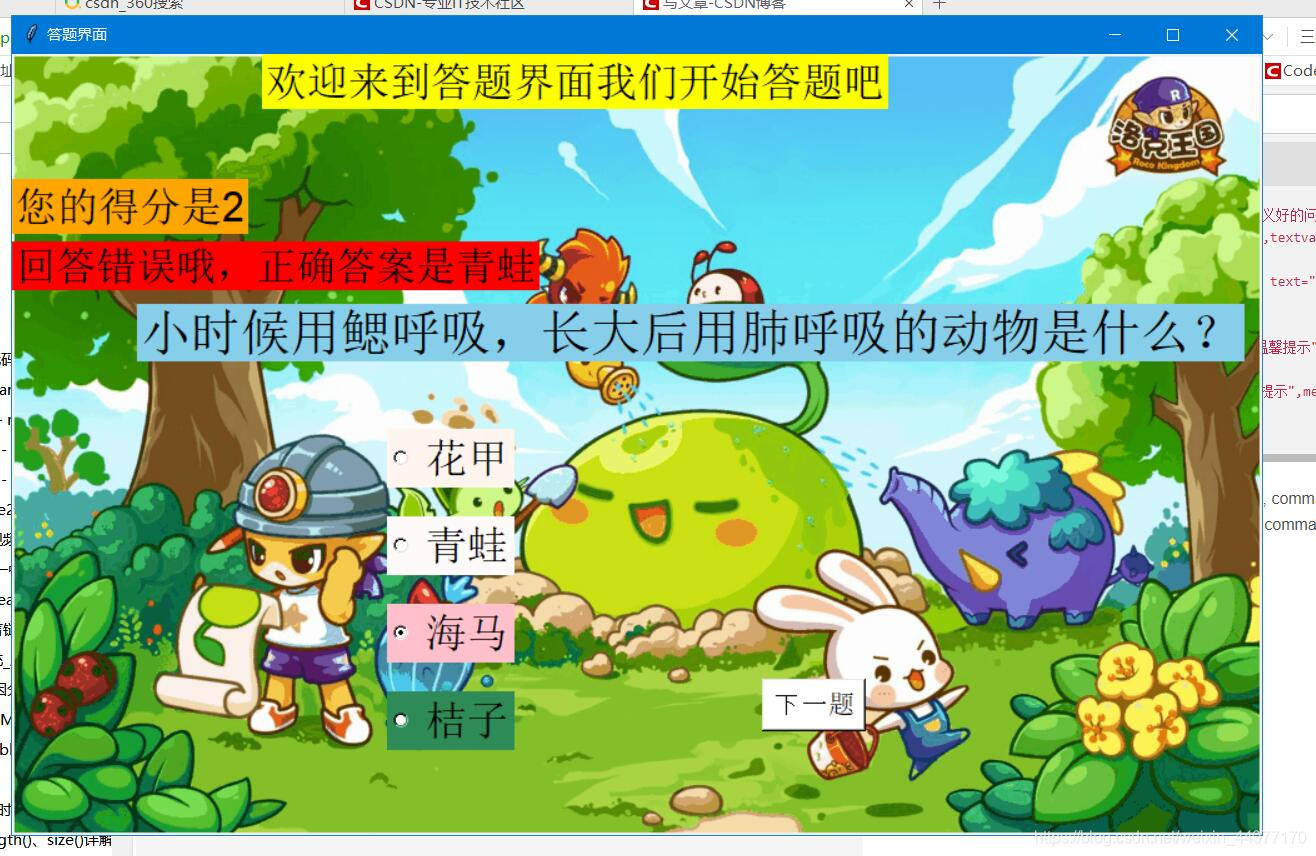
本文来自互联网用户投稿,文章观点仅代表作者本人,不代表本站立场,不承担相关法律责任。如若转载,请注明出处。 如若内容造成侵权/违法违规/事实不符,请点击【内容举报】进行投诉反馈!