模拟登录系列3-java模拟登录网站-验证码破解
需求:每日会在指定文件夹下生成一个excl文件,系统需要定时读取该文件,根据这个生成文件的数据去匹配填充指定excl模板数据,excl模板文件每天也需要从指定网站下载,并完成上传到指定网站;
本文继上次百度开发者接口图文识别,来实现模拟登录网站;为后续自动化下载数据(爬虫),自动上传数据(数据自动报送)功能做准备。本文不在叙述百度开发者中心接口调用过程,如果有不懂可以查看我的前面文章;本文主要实现网站破解,登录过程(如果有疑问或者要源码可以发送邮件给我 552312627@qq.com),源码附在博客中了,在顶部↑↑↑↑。
准备工作:
1、请确认百度开发者中心图文识别接口已经调用成功。
2、准备需要模拟登录网站的相关信息:用户名,密码,登录url,验证码图片地址。
准备完成后进入如下阶段,
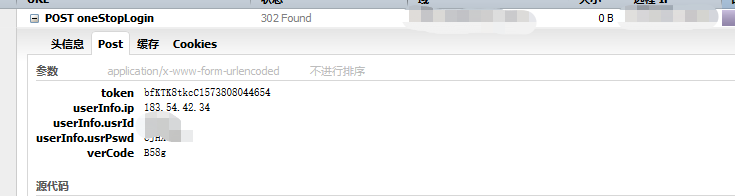
首先在模拟对象网站上登录(调试模式,我使用的谷歌或者火狐,其他的也行,自己平时用啥就用啥);获取到登录请求相关信息,拿到请求信息后需要分析请求参数,是否需要户名,密码,验证码 之外的参数,或者是否对 这些参数有加密,有转码之类的。
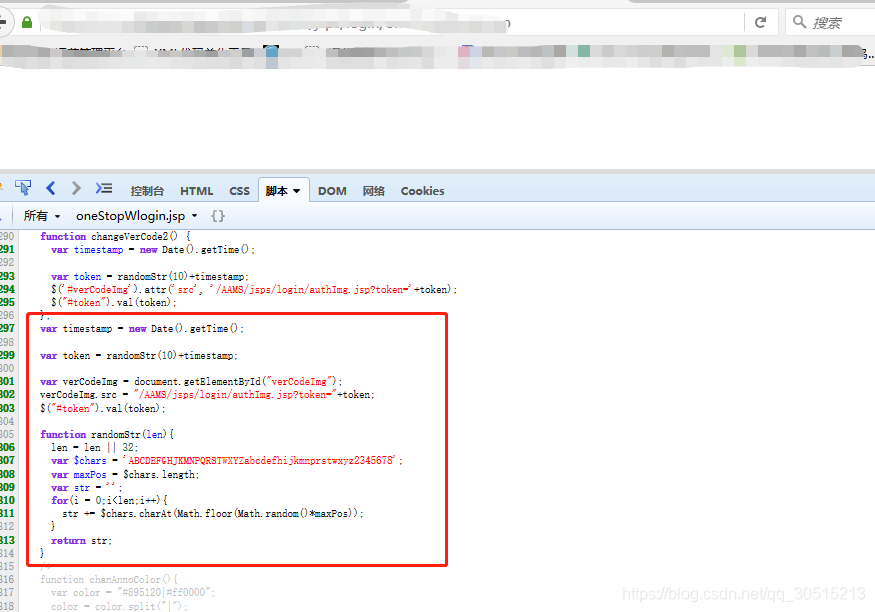
如果有加密、转码 则需要研究 模拟网站上的 js代码,用调试模式打开,一般网站都会在js中有写这些代码,仔细研究一下即可发现。我研究的网站涉及公司信息,我就不过多说明,我这个网站是新增参数 token,ip信息;如下图;token的生成也在js中发现,那么只要我们在对应的java代码中实现即可;因每个网站不同,我这里就不过多的说明了。
现在进入java代码阶段:
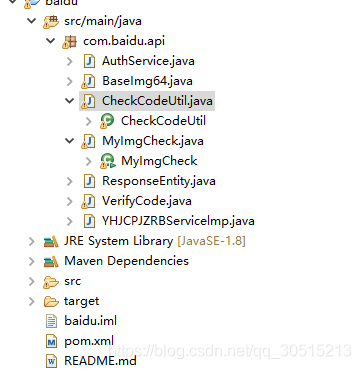
我的项目代码结构,这里是为了做研究测试,全部放到一个包中了;
另外说明一下:百度图文识别对干扰码较多的 无法做到识别,但是基本的图片都能搞定,所有对于复杂的我采用了公司其他验证码解析平台处理。图片识别对比我在后面会有说明。
如下我这里将登录所需要的参数均准备完成。
String chars ="ABCDEFGHJKMNPQRSTWXYZabcdefhijkmnprstwxyz2345678";String time = new Date().getTime()+"";Random random=new Random();StringBuffer sb=new StringBuffer();for(int i=0;i<10;i++){int number=random.nextInt(48);sb.append(chars.charAt(number));}String token = sb.toString()+time;System.out.println("token:"+token);String ip="xxx.xxx.xxx.xxx";//你自己的公网ip,可以根据真实登录的时候获取,生产环境需要自己写代码去获取String usrId="xxxx";String usrPswd="xxxx";String verCodeName="verCode";String verCodeImg = "https://xxx.jsp?token="+token;String loginUrl="https://xxx?";Map param = new HashMap();param.put("token", token);param.put("userInfo.ip", ip);param.put("userInfo.usrId", usrId);param.put("userInfo.usrPswd", usrPswd); 建立登录服务类YHJCPJZRBServicelmp.java
package com.baidu.api;import java.io.IOException;
import java.io.UnsupportedEncodingException;
import java.net.ConnectException;
import java.util.ArrayList;
import java.util.Date;
import java.util.HashMap;
import java.util.List;
import java.util.Map;
import java.util.Random;
import java.util.UUID;import org.apache.http.Header;
import org.apache.http.HttpEntity;
import org.apache.http.HttpResponse;
import org.apache.http.NameValuePair;
import org.apache.http.client.ClientProtocolException;
import org.apache.http.client.entity.UrlEncodedFormEntity;
import org.apache.http.client.methods.HttpGet;
import org.apache.http.client.methods.HttpPost;
import org.apache.http.impl.client.CloseableHttpClient;
import org.apache.http.message.BasicNameValuePair;
import org.apache.http.util.EntityUtils;
import org.apache.log4j.Logger;/*** 银行间产品净值日报* @author yangminit**/
public  class YHJCPJZRBServicelmp {// 封装后的private static final Logger mylog = Logger.getLogger(YHJCPJZRBServicelmp.class);protected String sysName = "";public static void main(String[] args) {}/*** 登录* * @param param*            登录参数* @param url*            登录地址* @param codeUrl*            验证码地址* @param codeName*            验证码名称* @return*/public ResponseEntity login(Map param, String url, String codeUrl, String codeName,String codeType) {//		try {
//			if (!isOpenService(url)) {
//				mylog.info(sysName + "服务器已经关闭:" + url);
//				return new ResponseEntity(sysName + "服务器已经关闭:" + url, -1);
//			}
//		} catch (IOException e1) {
//			mylog.error("对方服务器未知异常");
//			e1.printStackTrace();
//		}System.out.println("进入方法--->");HttpPost post = new HttpPost(url);List qparams = new ArrayList();CloseableHttpClient client = null;HttpResponse response = null;try {// 重新登录策略for (int i = 1; i <= 8; i++) {//这里自行定重试次数client = CheckCodeUtil.getConnection(); // 获取连接qparams.clear();// param.put(codeName, code);mylog.info(sysName + "第" + i + "次登录");param.put(codeName, getCode(codeUrl).getHtml());// 设置验证码// 添加参数for (Map.Entry enetiy : param.entrySet()) {mylog.debug("添加变量" + enetiy.getKey() + "<---->" + enetiy.getValue());qparams.add(new BasicNameValuePair(enetiy.getKey(), enetiy.getValue()));}//post=setCookie(post);//设置cookiepost.setEntity(new UrlEncodedFormEntity(qparams));// 设置实体response = client.execute(post);String loginRsp = EntityUtils.toString(response.getEntity());if (loginCheck(response, loginRsp)) {Header locationHeader = response.getFirstHeader("Location");if (locationHeader != null) {String location = locationHeader.getValue();System.out.println("重定向地址为:"+location);}mylog.info(sysName + "登录成功");System.out.println(sysName +"登录成功");return new ResponseEntity(loginRsp, 1);}else{System.out.println("登录失败");}}return new ResponseEntity("-1", -1);} catch (UnsupportedEncodingException e) {mylog.error("无法解析编码格式" + e.getMessage());e.printStackTrace();} catch (ClientProtocolException e) {mylog.error("连接池错误" + e.getMessage());e.printStackTrace();} catch (IOException e) {mylog.info("读写错误" + e.getMessage());e.printStackTrace();} catch (Exception e) {mylog.info("读写错误" + e.getMessage());e.printStackTrace();} finally {try {client.close();} catch (IOException e) {e.printStackTrace();} // 关闭连接}return new ResponseEntity();}/*** 获取验证码* * @param codeUrl* @return*/public ResponseEntity getCode(String codeUrl) {CloseableHttpClient client = CheckCodeUtil.getConnection(); // 获取连接HttpGet get = new HttpGet(codeUrl); // 获取地址try {mylog.info(sysName + "开始获取验证码");HttpResponse resp = client.execute(get); // 访问HttpEntity entity = resp.getEntity(); // 获取相应实体String filename = UUID.randomUUID().toString();// 下载分析验证码String path = "";if (System.getProperty("os.name").indexOf("Windows") != -1) {path = "E:\\home\\img\\";} else {path = "/home/file/yjbs/yhjjzrb/";}String imgUrl = path + filename + ".jpg";if (CheckCodeUtil.download(entity.getContent(), imgUrl)) {String code = "";System.out.println("下载到验证码图片:"+imgUrl);//code = CheckCodeUtil.getComplexCode(imgUrl,codeUrl);code = CheckCodeUtil.analysisCode(imgUrl, "3", codeUrl);mylog.info("可能正确的验证码:" + code.trim());return new ResponseEntity(code.trim(), resp.getStatusLine().getStatusCode());}else{System.out.println("未能下载到"+sysName+"验证码");};} catch (ConnectException e) {e.printStackTrace();mylog.error(sysName + "连接超时" + e.getMessage());} catch (IOException e) {e.printStackTrace();mylog.error(sysName + "IOException 读写错误" + e.getMessage());} finally {get.abort();try {client.close();} catch (IOException e) {mylog.error("IOException 关闭错误" + e.getMessage());e.printStackTrace();}}return null;}/*** 测试服务器是否开启* * @param url* @return* @throws IOException* @throws ClientProtocolException*/public boolean isOpenService(String url) throws ClientProtocolException, IOException {CloseableHttpClient client = CheckCodeUtil.getConnection();HttpPost post = new HttpPost(url);HttpResponse response = client.execute(post);String loginRsp = EntityUtils.toString(response.getEntity());post.abort();client.close();// 访问到Nginx界面,或者连接超时if (loginRsp == null || (loginRsp.contains("nginx"))|| (response.getStatusLine().getStatusCode() + "").startsWith("4")) {return false;}return true;}/*** 校验登录是否成功* @param entity* @param rspon* @return*/public boolean loginCheck(HttpResponse entity, String rspon) {// System.out.println(rspon);if (entity.getStatusLine().getStatusCode() == 302) {return true;}return false;}}
验证码校验类:CheckCodeUtil.java;这里你们调用 getComplexCode 百度的即可;
package com.baidu.api;import java.io.File;
import java.io.FileOutputStream;
import java.io.IOException;
import java.io.InputStream;
import java.net.MalformedURLException;
import java.net.URISyntaxException;
import java.text.SimpleDateFormat;
import java.util.Calendar;
import java.util.Date;
import java.util.List;
import java.util.Map;
import java.util.Set;import org.apache.http.HttpHost;
import org.apache.http.client.CookieStore;
import org.apache.http.client.config.RequestConfig;
import org.apache.http.client.methods.HttpPost;
import org.apache.http.impl.client.BasicCookieStore;
import org.apache.http.impl.client.CloseableHttpClient;
import org.apache.http.impl.client.HttpClientBuilder;
import org.apache.http.impl.client.HttpClients;
import org.apache.log4j.Logger;import com.alibaba.fastjson.JSON;
import com.alibaba.fastjson.JSONObject;public class CheckCodeUtil {public static final ThreadLocal thread = new ThreadLocal();public static Set codeSet;private static final Logger mylog = Logger.getLogger(CheckCodeUtil.class);;//检查是否public static boolean checkCode(String code) {return codeSet.contains(code);}/*** 干扰码较多或者识别度不高时,调用转换验证码识别接口(这里是公司的识别平台)* @param image_save_path* @param codeType* @param imgurl* @return*/public static  String analysisCode(String image_save_path,String codeType,String imgurl) {//优先调用讯策提供的验证码 解析。20190426if("3".equals(codeType)){codeType="30400";//4位数字和字母组合}else if("4".equals(codeType)){codeType="10400";//4位数字}else if("5".equals(codeType)){codeType="30500";//5位数字和字母组合}else if("6".equals(codeType)){codeType="30600";//6位数字和字母组合}else if("7".equals(codeType)){codeType="30700";//7位数字和字母组合}else if("8".equals(codeType)){codeType="30800";//8位数字和字母组合}else if("10".equals(codeType)){codeType="50100";//简单计算图}else if("20".equals(codeType)){codeType="50200";//复杂计算图}String code =VerifyCode.getVerifyCode(image_save_path,codeType,imgurl);if(!"".equals(code)){return code;}return code;}public static  String getComplexCode(String image_save_path,String imgurl) {String codeStr="";try {codeStr = MyImgCheck.checkFile(image_save_path);} catch (URISyntaxException e) {mylog.error("调用百度中心接口失败~");e.printStackTrace();} catch (IOException e) {mylog.error("调用百度中心接口失败~");e.printStackTrace();}String code="";try {Map m = JSON.parseObject(codeStr,Map.class);  List lst = JSONObject.parseArray(m.get("words_result")+"", String.class);if(lst.size()>0){Map m1= JSON.parseObject(lst.get(0),Map.class);  code = m1.get("words")+"";mylog.info("用百度开发者中心接口验证码为:"+code);}}catch (Exception e) {mylog.error("调用百度开发者中心接口返回值 格式解析失败~");mylog.error("错误返回值【"+codeStr+"】");e.printStackTrace();}return code;}/*** * @param in*            输入流* @param path*            地址* @return 是否成功*/public static synchronized boolean download(InputStream in, String path) {FileOutputStream out = null;try {out = new FileOutputStream(path);// out = new FileOutputStream("D:\\abb.jpg");byte b[] = new byte[1024];int j = 0;while ((j = in.read(b)) != -1) {out.write(b, 0, j);}out.flush();File file = new File(path);if (file.exists() && file.length() == 0)return false;return true;} catch (MalformedURLException e) {e.printStackTrace();} catch (IOException e) {if ("FileNotFoundException".equals(e.getClass().getSimpleName()))System.err.println("download FileNotFoundException");if ("SocketTimeoutException".equals(e.getClass().getSimpleName()))System.err.println("download SocketTimeoutException");elsee.printStackTrace();} finally {if (out != null)try {out.close();} catch (IOException e) {e.printStackTrace();}if (in != null)try {in.close();} catch (IOException e) {e.printStackTrace();}}return false;}public static CloseableHttpClient getConnection() {if (CheckCodeUtil.thread.get() == null) {CookieStore cookieStore = new BasicCookieStore();//httpClient4.x 使用cookie保持会话CheckCodeUtil.thread.set(cookieStore);}CloseableHttpClient httpClient = HttpClients.custom().setDefaultCookieStore(CheckCodeUtil.thread.get()).build();return httpClient;}/*** 关闭连接~* */public static void removeConn() {if (CheckCodeUtil.thread.get() != null) {CheckCodeUtil.thread.remove();}}public static String getFileName() {SimpleDateFormat sdf = new SimpleDateFormat("yyyyMMdd");return sdf.format(new Date());}/*** 获取session* * @return*/public static CookieStore getCok() {return CheckCodeUtil.thread.get();}/*** 获取本月最后一天* * @return*/public static String getLastMonth() {Calendar cal_1 = Calendar.getInstance();// 获取当前日期// cal_1.add(Calendar.MONTH, -1);cal_1.set(Calendar.DAY_OF_MONTH, 1);cal_1.add(Calendar.DATE, -1);SimpleDateFormat sdf = new SimpleDateFormat("yyyy-MM-dd");return sdf.format(cal_1.getTime());}}
状态实体类:ResponseEntity.java
package com.baidu.api;/*** 状态对象* @author xionglingfeng*/
public class ResponseEntity {public ResponseEntity(){}public ResponseEntity(String html,Integer status){this.status = status;this.html = html;}private  Integer status;/*** 获取状态码* @param status*/public Integer getStatus() {return status;}/*** 设置状态码* @param status*/public void setStatus(Integer status) {this.status = status;}/*** 获取返回的内容* @param status*/public String getHtml() {return html;}/*** 设置返回的内容* @param status*/public void setHtml(String html) {this.html = html;}private  String html ;}
MyImgCheck.java,BaseImg64.java,AuthService.java在前一篇已经有了,这里就不重复了。
pom.xml
4.0.0 com.wsk baidu 1.0-SNAPSHOT jar com.alibaba fastjson 1.2.46 org.apache.httpcomponents httpclient 4.5.5 commons-codec commons-codec 1.12 log4j log4j 1.2.17 ROOT org.apache.maven.plugins maven-compiler-plugin 2.3.2 1.8 1.8
执行效果:
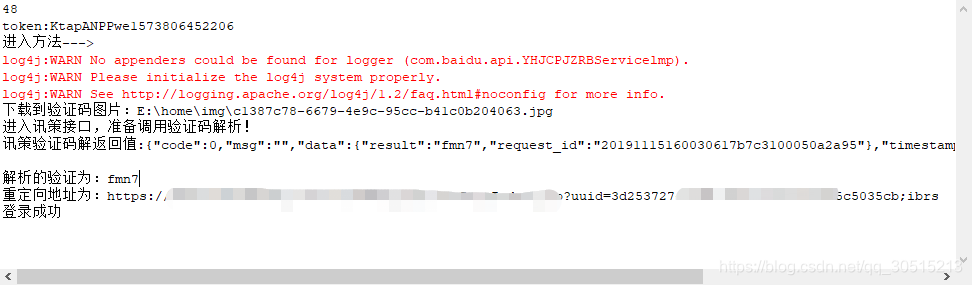
这里已经登录成功,且获取到了重定向url,我模拟的这个网站,做了uuid,后面所有的请求,必须带这个;其他的爬取数据,或者上传文件或者数据,后面继续研究。
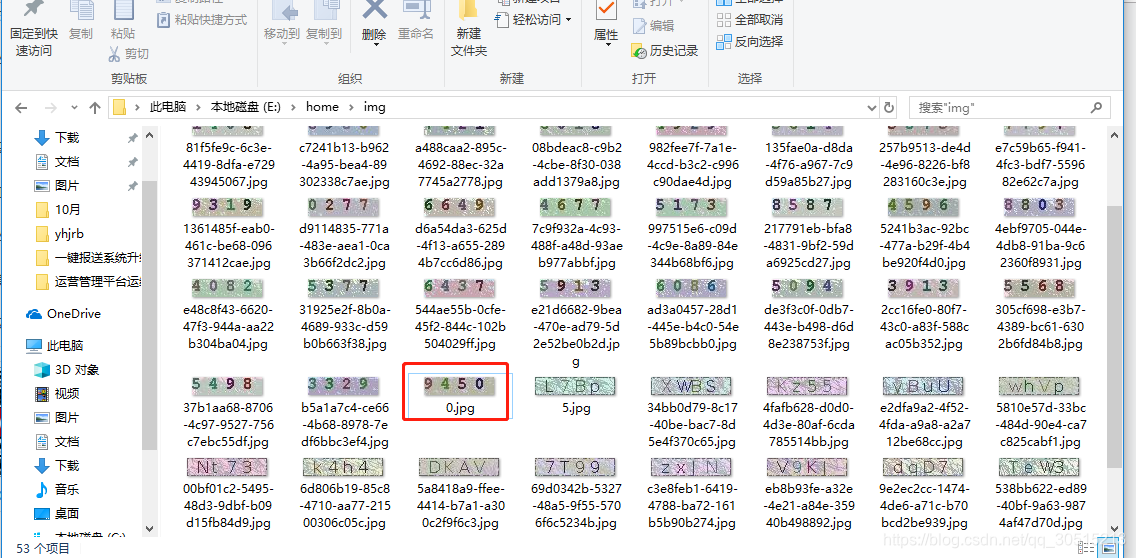
百度开发中心图文识别情况说明:无法识别干扰码较多的,对于简单识别率99%;毕竟不是专门做验证码识别的,主要是图文识别;
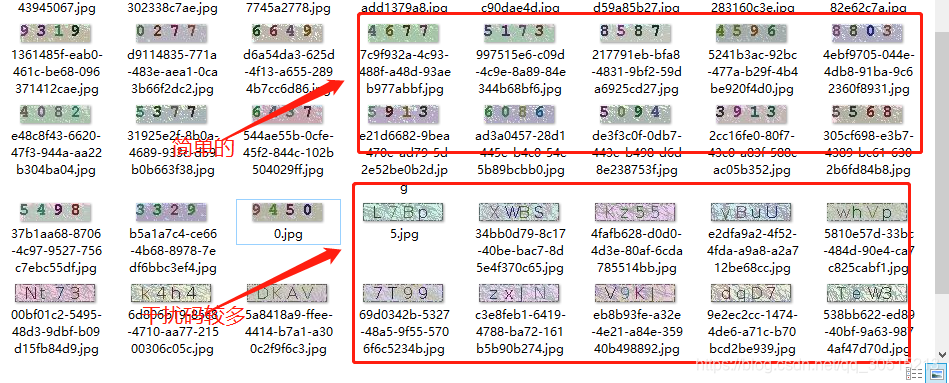
百度验证码识别效果截图:

本文来自互联网用户投稿,文章观点仅代表作者本人,不代表本站立场,不承担相关法律责任。如若转载,请注明出处。 如若内容造成侵权/违法违规/事实不符,请点击【内容举报】进行投诉反馈!