动态渲染拓扑图方案探究
前言
![[外链图片转存失败,源站可能有防盗链机制,建议将图片保存下来直接上传(img-ihqHFdbR-1611338566959)(https://vleedesigntheory.github.io/tech/front/topology20210122/topology01.jpg)]](https://img-blog.csdnimg.cn/img_convert/477d68eea83374fde220815b160a7225.png#pic_center)
拓扑图是数据可视化领域一种比较常见的展示类型,目前业界常见的可视化展现的方案有ECharts、HighCharts、D3、AntV等。当前的项目使用的是基于ECharts的静态关系图渲染,为了后续可能扩展成动态的拓扑图渲染,本文探索了ECharts的原理以及G6的原理,也算是对自研一个可视化库的基本实现方法做了一个梳理。
方案选择
- ECharts
- 关系图
- AntV
- G6
- Graphin
- G6
源码解析
ECharts源码
[外链图片转存失败,源站可能有防盗链机制,建议将图片保存下来直接上传(img-9FBdbUCE-1611338566962)(https://vleedesigntheory.github.io/tech/front/topology20210122/topology02.jpg)]
整个ECharts核心对外输出是一个大的ECharts类,所有的类型都是基于其进行new出来的实例,而其核心是基于对ZRender这样一个Canvas的封装
ECharts
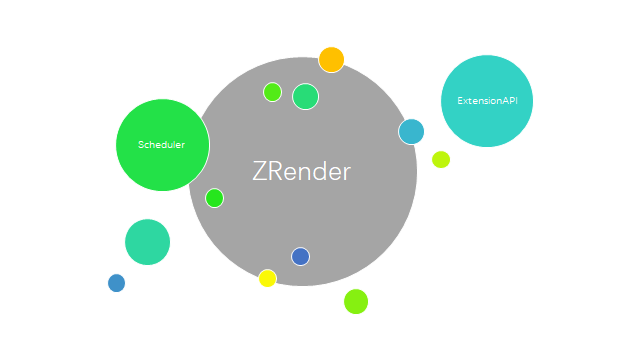
class ECharts extends Eventful {// 公共属性group: string;// 私有属性private _zr: zrender.ZRenderType;private _dom: HTMLElement;private _model: GlobalModel;private _throttledZrFlush: zrender.ZRenderType extends {flush: infer R} ? R : never;private _theme: ThemeOption;private _locale: LocaleOption;private _chartsViews: ChartView[] = [];private _chartsMap: {[viewId: string]: ChartView} = {};private _componentsViews: ComponentView[] = [];private _componentsMap: {[viewId: string]: ComponentView} = {};private _coordSysMgr: CoordinateSystemManager;private _api: ExtensionAPI;private _scheduler: Scheduler;private _messageCenter: MessageCenter;private _pendingActions: Payload[] = [];private _disposed: boolean;private _loadingFX: LoadingEffect;private _labelManager: LabelManager;private [OPTION_UPDATED_KEY]: boolean | {silent: boolean};private [IN_MAIN_PROCESS_KEY]: boolean;private [CONNECT_STATUS_KEY]: ConnectStatus;private [STATUS_NEEDS_UPDATE_KEY]: boolean;// 保护属性protected _$eventProcessor: never;constructor(dom: HTMLElement,theme?: string | ThemeOption,opts?: {locale?: string | LocaleOption,renderer?: RendererType,devicePixelRatio?: number,useDirtyRect?: boolean,width?: number,height?: number}) {super(new ECEventProcessor());opts = opts || {};if (typeof theme === 'string') {theme = themeStorage[theme] as object;}this._dom = dom;let defaultRenderer = 'canvas';const zr = this._zr = zrender.init(dom, {renderer: opts.renderer || defaultRenderer,devicePixelRatio: opts.devicePixelRatio,width: opts.width,height: opts.height,useDirtyRect: opts.useDirtyRect == null ? defaultUseDirtyRect : opts.useDirtyRect});this._locale = createLocaleObject(opts.locale || SYSTEM_LANG);this._coordSysMgr = new CoordinateSystemManager();const api = this._api = createExtensionAPI(this);this._scheduler = new Scheduler(this, api, dataProcessorFuncs, visualFuncs);this._initEvents();zr.animation.on('frame', this._onframe, this);bindRenderedEvent(zr, this);bindMouseEvent(zr, this);}private _onframe(): void {}getDom(): HTMLElement {return this._dom;}getId(): string {return this.id;}getZr(): zrender.ZRenderType {return this._zr;}setOption(option: Opt, notMerge?: boolean | SetOptionOpts, lazyUpdate?: boolean): void {if (lazyUpdate) {this[OPTION_UPDATED_KEY] = {silent: silent};this[IN_MAIN_PROCESS_KEY] = false;this.getZr().wakeUp();}else {prepare(this);updateMethods.update.call(this);this._zr.flush();this[OPTION_UPDATED_KEY] = false;this[IN_MAIN_PROCESS_KEY] = false;flushPendingActions.call(this, silent);triggerUpdatedEvent.call(this, silent);}}private getModel(): GlobalModel {return this._model;}getRenderedCanvas(opts?: {backgroundColor?: ZRColorpixelRatio?: number}): HTMLCanvasElement {if (!env.canvasSupported) {return;}opts = zrUtil.extend({}, opts || {});opts.pixelRatio = opts.pixelRatio || this.getDevicePixelRatio();opts.backgroundColor = opts.backgroundColor|| this._model.get('backgroundColor');const zr = this._zr;return (zr.painter as CanvasPainter).getRenderedCanvas(opts);}private _initEvents(): void {each(MOUSE_EVENT_NAMES, (eveName) => {const handler = (e: ElementEvent) => {const ecModel = this.getModel();const el = e.target;let params: ECEvent;const isGlobalOut = eveName === 'globalout';if (isGlobalOut) {params = {} as ECEvent;}else {el && findEventDispatcher(el, (parent) => {const ecData = getECData(parent);if (ecData && ecData.dataIndex != null) {const dataModel = ecData.dataModel || ecModel.getSeriesByIndex(ecData.seriesIndex);params = (dataModel && dataModel.getDataParams(ecData.dataIndex, ecData.dataType) || {}) as ECEvent;return true;}// If element has custom eventData of componentselse if (ecData.eventData) {params = zrUtil.extend({}, ecData.eventData) as ECEvent;return true;}}, true);}if (params) {let componentType = params.componentType;let componentIndex = params.componentIndex;if (componentType === 'markLine'|| componentType === 'markPoint'|| componentType === 'markArea') {componentType = 'series';componentIndex = params.seriesIndex;}const model = componentType && componentIndex != null&& ecModel.getComponent(componentType, componentIndex);const view = model && this[model.mainType === 'series' ? '_chartsMap' : '_componentsMap'][model.__viewId];params.event = e;params.type = eveName;(this._$eventProcessor as ECEventProcessor).eventInfo = {targetEl: el,packedEvent: params,model: model,view: view};this.trigger(eveName, params);}};(handler as any).zrEventfulCallAtLast = true;this._zr.on(eveName, handler, this);});each(eventActionMap, (actionType, eventType) => {this._messageCenter.on(eventType, function (event) {this.trigger(eventType, event);}, this);});// Extra events// TODO register?each(['selectchanged'],(eventType) => {this._messageCenter.on(eventType, function (event) {this.trigger(eventType, event);}, this);});handleLegacySelectEvents(this._messageCenter, this, this._api);}dispatchAction(payload: Payload,opt?: boolean | {silent?: boolean,flush?: boolean | undefined}): void {const silent = opt.silent;doDispatchAction.call(this, payload, silent);const flush = opt.flush;if (flush) {this._zr.flush();}else if (flush !== false && env.browser.weChat) {this._throttledZrFlush();}flushPendingActions.call(this, silent);triggerUpdatedEvent.call(this, silent);}
}
ZRender


ZRender是典型的MVC架构,其中M为Storage,主要对数据进行CRUD管理;V为Painter,对Canvas或SVG的生命周期及视图进行管理;C为Handler,负责事件的交互处理,实现dom事件的模拟封装
class ZRender {// 公共属性dom: HTMLElementid: numberstorage: Storagepainter: PainterBasehandler: Handleranimation: Animation// 私有属性private _sleepAfterStill = 10;private _stillFrameAccum = 0;private _needsRefresh = trueprivate _needsRefreshHover = trueprivate _darkMode = false;private _backgroundColor: string | GradientObject | PatternObject;constructor(id: number, dom: HTMLElement, opts?: ZRenderInitOpt) {opts = opts || {};/*** @type {HTMLDomElement}*/this.dom = dom;this.id = id;const storage = new Storage();let rendererType = opts.renderer || 'canvas';// TODO WebGLif (useVML) {throw new Error('IE8 support has been dropped since 5.0');}if (!painterCtors[rendererType]) {// Use the first registered renderer.rendererType = zrUtil.keys(painterCtors)[0];}if (!painterCtors[rendererType]) {throw new Error(`Renderer '${rendererType}' is not imported. Please import it first.`);}opts.useDirtyRect = opts.useDirtyRect == null? false: opts.useDirtyRect;const painter = new painterCtors[rendererType](dom, storage, opts, id);this.storage = storage;this.painter = painter;const handerProxy = (!env.node && !env.worker)? new HandlerProxy(painter.getViewportRoot(), painter.root): null;this.handler = new Handler(storage, painter, handerProxy, painter.root);this.animation = new Animation({stage: {update: () => this._flush(true)}});this.animation.start();}/*** 添加元素*/add(el: Element) {}/*** 删除元素*/remove(el: Element) {}refresh() {this._needsRefresh = true;// Active the animation again.this.animation.start();}private _flush(fromInside?: boolean) {let triggerRendered;const start = new Date().getTime();if (this._needsRefresh) {triggerRendered = true;this.refreshImmediately(fromInside);}if (this._needsRefreshHover) {triggerRendered = true;this.refreshHoverImmediately();}const end = new Date().getTime();if (triggerRendered) {this._stillFrameAccum = 0;this.trigger('rendered', {elapsedTime: end - start});}else if (this._sleepAfterStill > 0) {this._stillFrameAccum++;// Stop the animiation after still for 10 frames.if (this._stillFrameAccum > this._sleepAfterStill) {this.animation.stop();}}}on(eventName: string, eventHandler: EventCallback | EventCallback, context?: Ctx): this {this.handler.on(eventName, eventHandler, context);return this;}off(eventName?: string, eventHandler?: EventCallback | EventCallback) {this.handler.off(eventName, eventHandler);}trigger(eventName: string, event?: unknown) {this.handler.trigger(eventName, event);}clear() {}dispose() {}
}
G6源码
[外链图片转存失败,源站可能有防盗链机制,建议将图片保存下来直接上传(img-Gvkotb57-1611338566969)(https://vleedesigntheory.github.io/tech/front/topology20210122/topology06.png)]
G6是AntV专门针对图开源的一个库,其底层通过对边和点的定义,以及对位置的确定,来进行图的绘制,其主要包括五大内容:1、图的元素:点、边、分组等;2、图的算法:DFS、BFS、图检测、最短路径、中心度等;3、图布局:force、circle、grid等;4、图渲染:Canvas及SVG等;5、图交互:框选、点选、拖拽等;而Graphin是基于G6的使用React封装的落地方案
G6
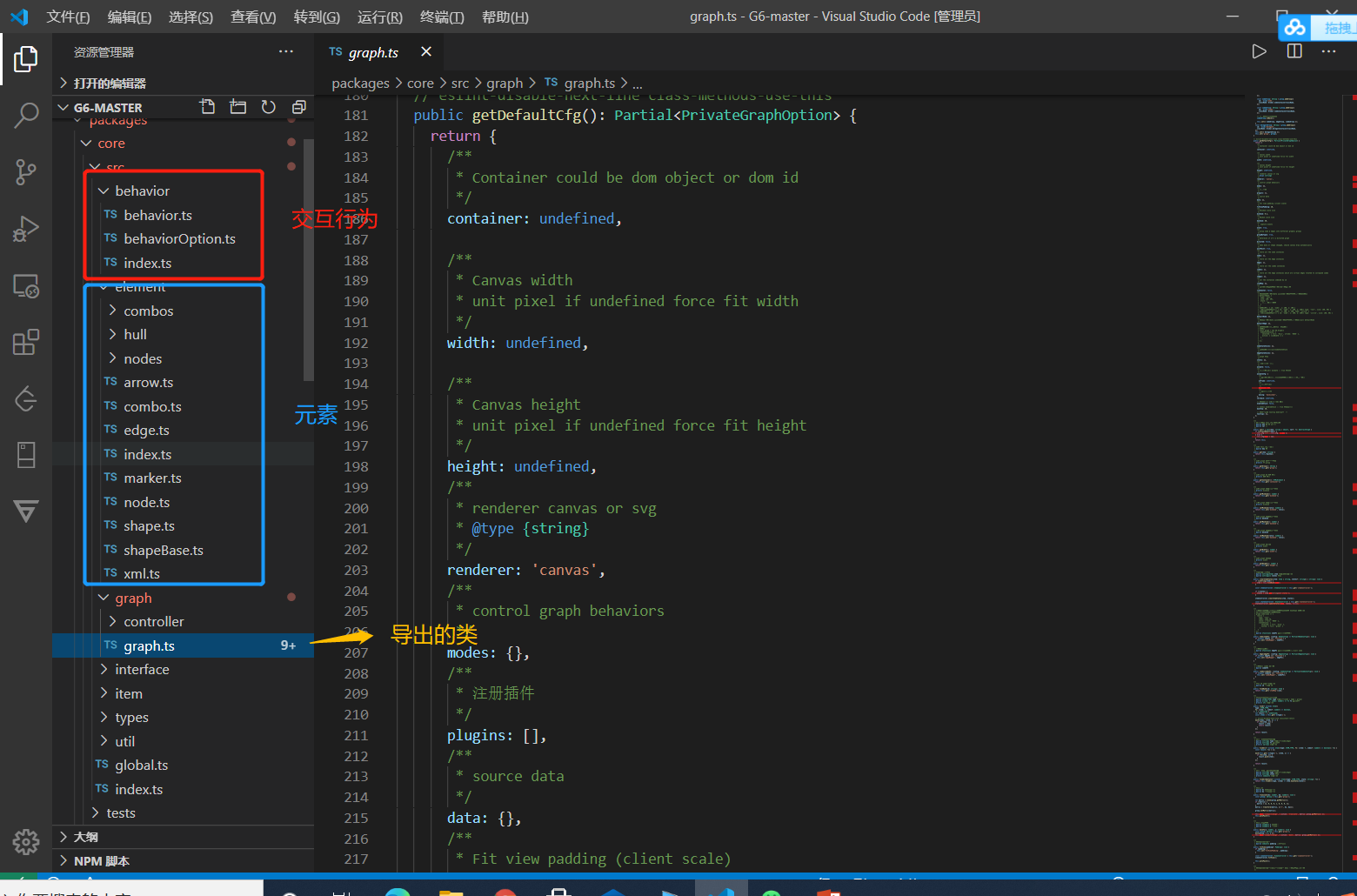
和ECharts的核心思路是一致的,都是基于MVC的模型,但是G6针对图的特点对元素进行了细化,用御术的话说就是“G6是面粉,ECharts是面条”,果然同一个作者开发的思路都是极其的相似
export default abstract class AbstractGraph extends EventEmitter implements IAbstractGraph {protected animating: boolean;protected cfg: GraphOptions & { [key: string]: any };protected undoStack: Stack;protected redoStack: Stack;public destroyed: boolean;constructor(cfg: GraphOptions) {super();this.cfg = deepMix(this.getDefaultCfg(), cfg);this.init();this.animating = false;this.destroyed = false;if (this.cfg.enabledStack) {this.undoStack = new Stack(this.cfg.maxStep);this.redoStack = new Stack(this.cfg.maxStep);}}protected init() {this.initCanvas();const viewController = new ViewController(this);const modeController = new ModeController(this);const itemController = new ItemController(this);const stateController = new StateController(this);this.set({viewController,modeController,itemController,stateController,});this.initLayoutController();this.initEventController();this.initGroups();this.initPlugins();}protected abstract initLayoutController(): void;protected abstract initEventController(): void;protected abstract initCanvas(): void;protected abstract initPlugins(): void;protected initGroups(): void {const canvas: ICanvas = this.get('canvas');const el: HTMLElement = this.get('canvas').get('el');const { id } = el;const group: IGroup = canvas.addGroup({id: `${id}-root`,className: Global.rootContainerClassName,});if (this.get('groupByTypes')) {const edgeGroup: IGroup = group.addGroup({id: `${id}-edge`,className: Global.edgeContainerClassName,});const nodeGroup: IGroup = group.addGroup({id: `${id}-node`,className: Global.nodeContainerClassName,});const comboGroup: IGroup = group.addGroup({id: `${id}-combo`,className: Global.comboContainerClassName,});// 用于存储自定义的群组comboGroup.toBack();this.set({ nodeGroup, edgeGroup, comboGroup });}const delegateGroup: IGroup = group.addGroup({id: `${id}-delegate`,className: Global.delegateContainerClassName,});this.set({ delegateGroup });this.set('group', group);}public node(nodeFn: (config: NodeConfig) => Partial): void {if (typeof nodeFn === 'function') {this.set('nodeMapper', nodeFn);}}public edge(edgeFn: (config: EdgeConfig) => Partial): void {if (typeof edgeFn === 'function') {this.set('edgeMapper', edgeFn);}}public combo(comboFn: (config: ComboConfig) => Partial): void {if (typeof comboFn === 'function') {this.set('comboMapper', comboFn);}}public addBehaviors(behaviors: string | ModeOption | ModeType[],modes: string | string[],): AbstractGraph {const modeController: ModeController = this.get('modeController');modeController.manipulateBehaviors(behaviors, modes, true);return this;}public removeBehaviors(behaviors: string | ModeOption | ModeType[],modes: string | string[],): AbstractGraph {const modeController: ModeController = this.get('modeController');modeController.manipulateBehaviors(behaviors, modes, false);return this;}public paint(): void {this.emit('beforepaint');this.get('canvas').draw();this.emit('afterpaint');}public render(): void {const self = this;this.set('comboSorted', false);const data: GraphData = this.get('data');if (this.get('enabledStack')) {// render 之前清空 redo 和 undo 栈this.clearStack();}if (!data) {throw new Error('data must be defined first');}const { nodes = [], edges = [], combos = [] } = data;this.clear();this.emit('beforerender');each(nodes, (node: NodeConfig) => {self.add('node', node, false, false);});// process the data to tree structureif (combos && combos.length !== 0) {const comboTrees = plainCombosToTrees(combos, nodes);this.set('comboTrees', comboTrees);// add combosself.addCombos(combos);}each(edges, (edge: EdgeConfig) => {self.add('edge', edge, false, false);});const animate = self.get('animate');if (self.get('fitView') || self.get('fitCenter')) {self.set('animate', false);}// layoutconst layoutController = self.get('layoutController');if (layoutController) {layoutController.layout(success);if (this.destroyed) return;} else {if (self.get('fitView')) {self.fitView();}if (self.get('fitCenter')) {self.fitCenter();}self.emit('afterrender');self.set('animate', animate);}// 将在 onLayoutEnd 中被调用function success() {// fitView 与 fitCenter 共存时,fitView 优先,fitCenter 不再执行if (self.get('fitView')) {self.fitView();} else if (self.get('fitCenter')) {self.fitCenter();}self.autoPaint();self.emit('afterrender');if (self.get('fitView') || self.get('fitCenter')) {self.set('animate', animate);}}if (!this.get('groupByTypes')) {if (combos && combos.length !== 0) {this.sortCombos();} else {// 为提升性能,选择数量少的进行操作if (data.nodes && data.edges && data.nodes.length < data.edges.length) {const nodesArr = this.getNodes();// 遍历节点实例,将所有节点提前。nodesArr.forEach((node) => {node.toFront();});} else {const edgesArr = this.getEdges();// 遍历节点实例,将所有节点提前。edgesArr.forEach((edge) => {edge.toBack();});}}}if (this.get('enabledStack')) {this.pushStack('render');}}
}
Graphin
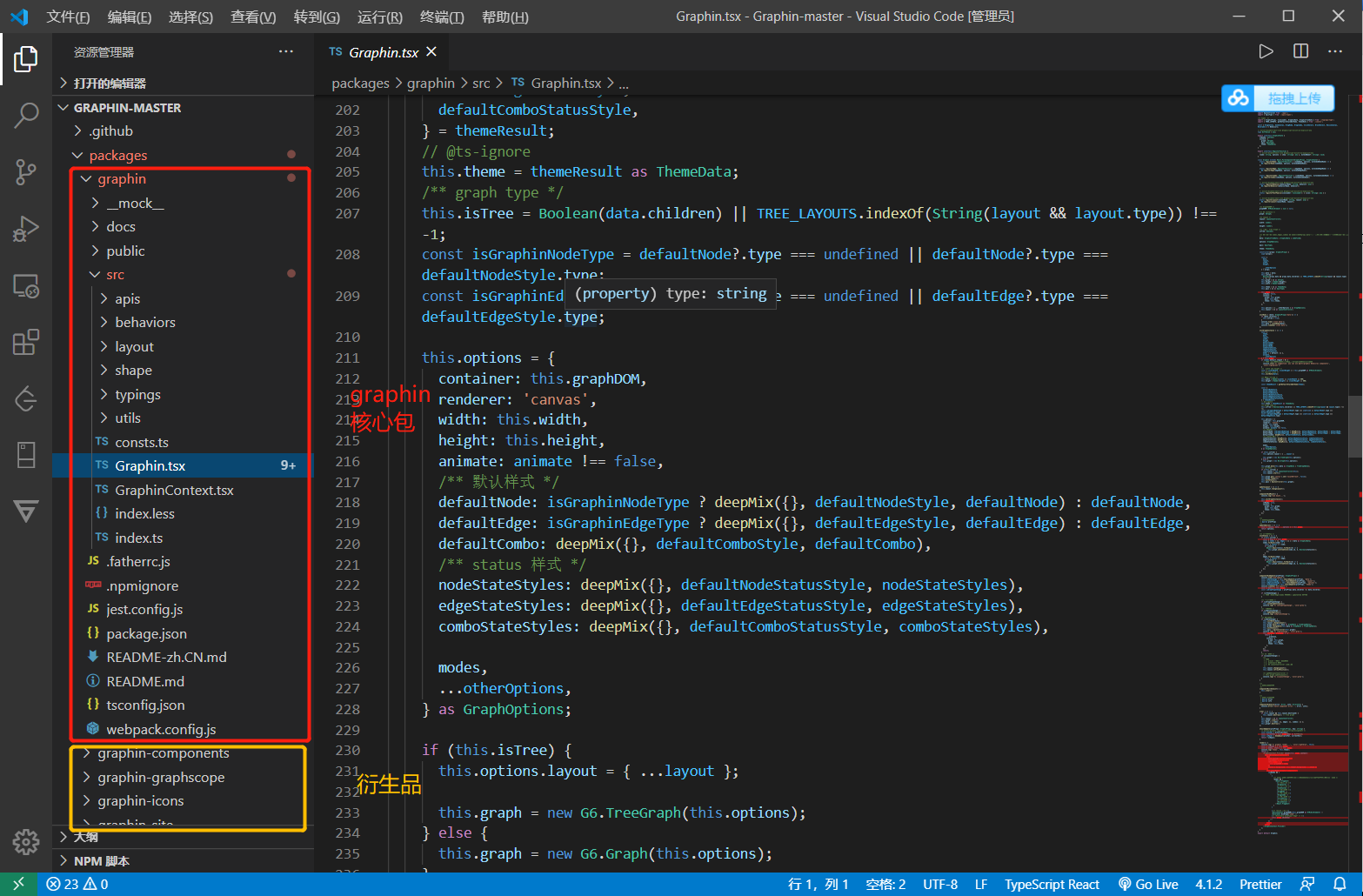
Graphin是基于G6封装的React组件,可以直接进行使用
import React, { ErrorInfo } from 'react';
import G6, { Graph as IGraph, GraphOptions, GraphData, TreeGraphData } from '@antv/g6';class Graphin extends React.PureComponent {static registerNode: RegisterFunction = (nodeName, options, extendedNodeName) => {G6.registerNode(nodeName, options, extendedNodeName);};static registerEdge: RegisterFunction = (edgeName, options, extendedEdgeName) => {G6.registerEdge(edgeName, options, extendedEdgeName);};static registerCombo: RegisterFunction = (comboName, options, extendedComboName) => {G6.registerCombo(comboName, options, extendedComboName);};static registerBehavior(behaviorName: string, behavior: any) {G6.registerBehavior(behaviorName, behavior);}static registerFontFamily(iconLoader: IconLoader): { [icon: string]: any } {/** 注册 font icon */const iconFont = iconLoader();const { glyphs, fontFamily } = iconFont;const icons = glyphs.map((item) => {return {name: item.name,unicode: String.fromCodePoint(item.unicode_decimal),};});return new Proxy(icons, {get: (target, propKey: string) => {const matchIcon = target.find((icon) => {return icon.name === propKey;});if (!matchIcon) {console.error(`%c fontFamily:${fontFamily},does not found ${propKey} icon`);return '';}return matchIcon?.unicode;},});}// eslint-disable-next-line @typescript-eslint/no-explicit-anystatic registerLayout(layoutName: string, layout: any) {G6.registerLayout(layoutName, layout);}graphDOM: HTMLDivElement | null = null;graph: IGraph;layout: LayoutController;width: number;height: number;isTree: boolean;data: GraphinTreeData | GraphinData | undefined;options: GraphOptions;apis: ApisType;theme: ThemeData;constructor(props: GraphinProps) {super(props);const {data,layout,width,height,...otherOptions} = props;this.data = data;this.isTree =Boolean(props.data && props.data.children) || TREE_LAYOUTS.indexOf(String(layout && layout.type)) !== -1;this.graph = {} as IGraph;this.height = Number(height);this.width = Number(width);this.theme = {} as ThemeData;this.apis = {} as ApisType;this.state = {isReady: false,context: {graph: this.graph,apis: this.apis,theme: this.theme,},};this.options = { ...otherOptions } as GraphOptions;this.layout = {} as LayoutController;}initData = (data: GraphinProps['data']) => {if (data.children) {this.isTree = true;}console.time('clone data');this.data = cloneDeep(data);console.timeEnd('clone data');};initGraphInstance = () => {const {theme,data,layout,width,height,defaultCombo,defaultEdge,defaultNode,nodeStateStyles,edgeStateStyles,comboStateStyles,modes = { default: [] },animate,...otherOptions} = this.props;const { clientWidth, clientHeight } = this.graphDOM as HTMLDivElement;this.initData(data);this.width = Number(width) || clientWidth || 500;this.height = Number(height) || clientHeight || 500;const themeResult = getDefaultStyleByTheme(theme);const {defaultNodeStyle,defaultEdgeStyle,defaultComboStyle,defaultNodeStatusStyle,defaultEdgeStatusStyle,defaultComboStatusStyle,} = themeResult;this.theme = themeResult as ThemeData;this.isTree = Boolean(data.children) || TREE_LAYOUTS.indexOf(String(layout && layout.type)) !== -1;const isGraphinNodeType = defaultNode?.type === undefined || defaultNode?.type === defaultNodeStyle.type;const isGraphinEdgeType = defaultEdge?.type === undefined || defaultEdge?.type === defaultEdgeStyle.type;this.options = {container: this.graphDOM,renderer: 'canvas',width: this.width,height: this.height,animate: animate !== false,/** 默认样式 */defaultNode: isGraphinNodeType ? deepMix({}, defaultNodeStyle, defaultNode) : defaultNode,defaultEdge: isGraphinEdgeType ? deepMix({}, defaultEdgeStyle, defaultEdge) : defaultEdge,defaultCombo: deepMix({}, defaultComboStyle, defaultCombo),/** status 样式 */nodeStateStyles: deepMix({}, defaultNodeStatusStyle, nodeStateStyles),edgeStateStyles: deepMix({}, defaultEdgeStatusStyle, edgeStateStyles),comboStateStyles: deepMix({}, defaultComboStatusStyle, comboStateStyles),modes,...otherOptions,} as GraphOptions;if (this.isTree) {this.options.layout = { ...layout };this.graph = new G6.TreeGraph(this.options);} else {this.graph = new G6.Graph(this.options);}this.graph.data(this.data as GraphData | TreeGraphData);/** 初始化布局 */if (!this.isTree) {this.layout = new LayoutController(this);this.layout.start();}this.graph.get('canvas').set('localRefresh', false);this.graph.render();this.initStatus();this.apis = ApiController(this.graph);};updateLayout = () => {this.layout.changeLayout();};componentDidMount() {console.log('did mount...');this.initGraphInstance();this.setState({isReady: true,context: {graph: this.graph,apis: this.apis,theme: this.theme,},});}updateOptions = () => {const { layout, data, ...options } = this.props;return options;};initStatus = () => {if (!this.isTree) {const { data } = this.props;const { nodes = [], edges = [] } = data as GraphinData;nodes.forEach((node) => {const { status } = node;if (status) {Object.keys(status).forEach((k) => {this.graph.setItemState(node.id, k, Boolean(status[k]));});}});edges.forEach((edge) => {const { status } = edge;if (status) {Object.keys(status).forEach((k) => {this.graph.setItemState(edge.id, k, Boolean(status[k]));});}});}};componentDidUpdate(prevProps: GraphinProps) {console.time('did-update');const isDataChange = this.shouldUpdate(prevProps, 'data');const isLayoutChange = this.shouldUpdate(prevProps, 'layout');const isOptionsChange = this.shouldUpdate(prevProps, 'options');const isThemeChange = this.shouldUpdate(prevProps, 'theme');console.timeEnd('did-update');const { data } = this.props;const isGraphTypeChange = prevProps.data.children !== data.children;/** 图类型变化 */if (isGraphTypeChange) {this.initGraphInstance();console.log('%c isGraphTypeChange', 'color:grey');}/** 配置变化 */if (isOptionsChange) {this.updateOptions();console.log('isOptionsChange');}/** 数据变化 */if (isDataChange) {this.initData(data);this.layout.changeLayout();this.graph.data(this.data as GraphData | TreeGraphData);this.graph.changeData(this.data as GraphData | TreeGraphData);this.initStatus();this.apis = ApiController(this.graph);console.log('%c isDataChange', 'color:grey');this.setState((preState) => {return {...preState,context: {graph: this.graph,apis: this.apis,theme: this.theme,},};});return;}/** 布局变化 */if (isLayoutChange) {/*** TODO* 1. preset 前置布局判断问题* 2. enablework 问题* 3. G6 LayoutController 里的逻辑*/this.layout.changeLayout();this.layout.refreshPosition();/** 走G6的layoutController */// this.graph.updateLayout();console.log('%c isLayoutChange', 'color:grey');}}/*** 组件移除的时候*/componentWillUnmount() {this.clear();}/*** 组件崩溃的时候* @param error* @param info*/componentDidCatch(error: Error, info: ErrorInfo) {console.error('Catch component error: ', error, info);}clear = () => {if (this.layout && this.layout.destroyed) {this.layout.destroy(); // tree graph}this.layout = {} as LayoutController;this.graph!.clear();this.data = { nodes: [], edges: [], combos: [] };this.graph!.destroy();};shouldUpdate(prevProps: GraphinProps, key: string) {/* eslint-disable react/destructuring-assignment */const prevVal = prevProps[key];const currentVal = this.props[key] as DiffValue;const isEqual = deepEqual(prevVal, currentVal);return !isEqual;}render() {const { isReady } = this.state;const { modes, style } = this.props;return ( {this.graphDOM = node;}}style={{ background: this.theme?.background, ...style }}/>{isReady && (<>{/** modes 不存在的时候,才启动默认的behaviros,否则会覆盖用户自己传入的 */!modes && ({/* 拖拽画布 */} )}{/** resize 画布 */} );}
}
总结
数据可视化通常是基于Canvas进行渲染的,对于简单的图形渲染,我们常常一个实例一个实例去写,缺少系统性的统筹规划的概念,对于需要解决一类问题的可视化方案,可以借鉴ECharts及G6引擎的做法,基于MVC模型,将展示、行为及数据进行分离,对于特定方案细粒度的把控可以参考G6的方案。本质上,大数据可视化展示是一个兼具大数据、视觉传达、前端等多方交叉的领域,对于怎么进行数据粒度的优美展示,可以借鉴data-ink ratio以及利用力导布局的算法(ps:引入库伦斥力及胡克弹力阻尼衰减进行动效展示,同时配合边线权重进行节点聚合),对于这方面感兴趣的同学,可以参考今年SEE Conf的《图解万物——AntV图可视化分析解决方案》,数据可视化领域既专业又交叉,对于深挖此道的同学还是需要下一番功夫的。
参考
- ECharts关系图官网
- ECharts官方源码
- ECharts 3.0源码简要分析1-总体架构
- ZRender官方源码
- ZRender源码分析1:总体结构
- ZRender源码分析2:Storage(Model层)
- ZRender源码分析3:Painter(View层)-上
- ZRender源码分析4:Painter(View层)-中
- ZRender源码分析5:Shape绘图详解
- ZRender源码分析6:Shape对象详解之路径
- G6官网
- G6官方源码
- G6源码阅读-part1-运行主流程
- G6源码阅读-Part2-Item与Shape
- G6源码阅读-Part3-绘制Paint
- Graphin官方源码
- Graphin官网
本文来自互联网用户投稿,文章观点仅代表作者本人,不代表本站立场,不承担相关法律责任。如若转载,请注明出处。 如若内容造成侵权/违法违规/事实不符,请点击【内容举报】进行投诉反馈!