【Android学习】Android studio 使用AIDL
版权声明:本文为博主原创文章,转载请注明出处http://blog.csdn.net/u013132758。 https://blog.csdn.net/u013132758/article/details/51225755
刚开始接触AIDL,想学着使用它,但是网上搜了一圈发现全都是Eclipise教程,很少有Android studio 的教程,这篇博客将为大家介绍如何使用Android studio来使用aidl,.
一、AIDL创建的步骤
1、创建.aidl文件,可以在里面写自己的方法;
2、编译生成java interface 文件;
3、创建aidl service的服务类,重写前面提到的方法;
4、在Activity中启动Service 调用AIDL;
二、详细步骤
1、创建.adil文件
如图所示,android studio提供了简便的创建方法:
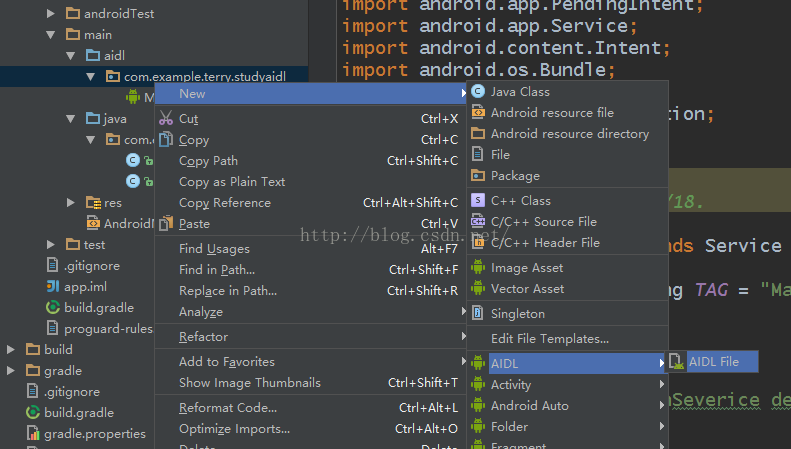
我们创建一个名为MyService的aidl文件:源代码如下:
interface MyService {/*** Demonstrates some basic types that you can use as parameters* and return values in AIDL.*/void basicTypes(int anInt, long aLong, boolean aBoolean, float aFloat,double aDouble, String aString);void Download();}
2、编译生成java interface
但是此时并没有AIDL的java文件产生,其实android studio也是带有自动生成的,只不过需要确认一些信息后才能生成。此时,我们可以在目录 build-->generated-->source-->aidl-->test-->debug下面发现还没有任何文件
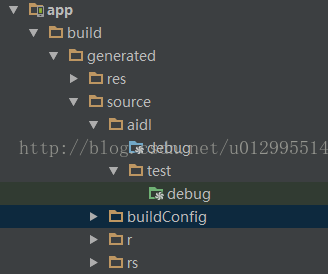

如果一致,则编译
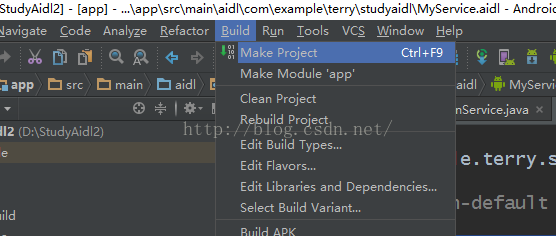
编译后我们再看,debug,就会发现多了一个java文件。
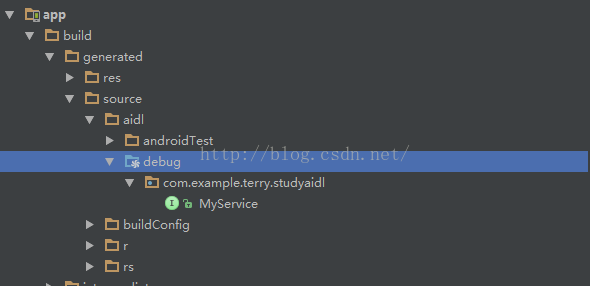
3、创建MyService的服务类
package com.example.terry.studyaidl;import android.app.Notification;
import android.app.Notification.Builder;
import android.app.NotificationManager;
import android.app.PendingIntent;
import android.app.Service;
import android.content.Intent;
import android.os.Bundle;
import android.os.IBinder;
import android.os.RemoteException;
import android.util.Log;/*** Created by Terry on 2016/4/18.*/
public class MainService extends Service {boolean flag;private final static String TAG = "MainService";
int i=1;@Overridepublic void onDestroy() {super.onDestroy();Log.e(TAG, "+++++=MainSeverice destory++++");flag = false;}@Overridepublic IBinder onBind(Intent intent) {Bundle bundle = intent.getExtras();flag = bundle.getBoolean("flag");System.out.println(flag);return ms;}@Overridepublic int onStartCommand(Intent intent,int flags, int startId) {return super.onStartCommand(intent,flags,startId);}@Overridepublic void onCreate() {flag = true;NotificationManager notificationManager = (NotificationManager) getSystemService(NOTIFICATION_SERVICE);Builder builder = new Notification.Builder(MainService.this);Intent intent = new Intent(this, MainActivity.class);PendingIntent pi = PendingIntent.getActivity(this, 0, intent, 0);Log.e(TAG, "++++++MainService Create++++++");builder.setContentIntent(pi).setContentText("您有一条新消息!").setContentTitle("有通知到来").setSmallIcon(R.mipmap.ic_launcher).setWhen(System.currentTimeMillis()).setAutoCancel(true);Notification notification = builder.getNotification();notificationManager.notify(i++,notification);}MyService.Stub ms = new MyService.Stub() {@Overridepublic void basicTypes(int anInt, long aLong, boolean aBoolean, float aFloat, double aDouble, String aString) throws RemoteException {}@Overridepublic void Download() throws RemoteException {Log.d(TAG,"***++++start download+++***");new Thread(new Runnable() {int i = 0;@Overridepublic void run() {//未达到线程条件,会一直在后台运行,就算服务已经关闭while (flag) {try {i++;Log.e("i的值是:", String.valueOf(i));System.out.println("i的值是" + i);Thread.sleep(1000);} catch (InterruptedException e) {e.printStackTrace();}}Log.e("推出服务i的值是:", String.valueOf(i));}}).start();}};
}
4、在Activity中调用Service
package com.example.terry.studyaidl;import android.content.ComponentName;
import android.content.Intent;
import android.content.ServiceConnection;
import android.os.IBinder;
import android.os.RemoteException;
import android.support.v7.app.AppCompatActivity;
import android.os.Bundle;
import android.util.Log;
import android.view.View;
import android.widget.Button;public class MainActivity extends AppCompatActivity {private MyService myService;private Intent binderIntent;private final static boolean create_flag =true;private final static boolean destory_flag = false;private String TAG = "MainActivity";
private Button button;private ServiceConnection sc = new ServiceConnection() {@Overridepublic void onServiceConnected(ComponentName name, IBinder service) {myService =MyService.Stub.asInterface(service);try{//通过AIDL调用ServiceLog.d(TAG,"++++start download+++");myService.Download();Log.d(TAG, "++++start%%% download+++");}catch (RemoteException e){e.printStackTrace();}}@Overridepublic void onServiceDisconnected(ComponentName name) {}};@Overrideprotected void onCreate(Bundle savedInstanceState) {Log.d(TAG, "+++++++MainActivity start++++");super.onCreate(savedInstanceState);setContentView(R.layout.activity_main);//开启服务Log.e(TAG, "%%%%%%%%%%%");button = (Button) findViewById(R.id.start);button.setOnClickListener(new View.OnClickListener() {@Overridepublic void onClick(View v) {//Intent i = new Intent(MainActivity.this, MainService.class);//startService(i);Log.e(TAG, "%%%%#####%%%%%%%");//链接远程Service和ActivitybinderIntent = new Intent(MainActivity.this, MainService.class);Bundle bundle = new Bundle();bundle.putBoolean("flag", create_flag);binderIntent.putExtras(bundle);bindService(binderIntent, sc, BIND_AUTO_CREATE);Log.e(TAG, "%%%%#####%%%%%@@@@@%%");}});}@Overrideprotected void onDestroy(){super.onDestroy();Log.d(TAG,"+++Activity   onDestory()+++++");boolean flag = false;//暂停服务//Intent intent = new Intent(this,MainService.class);///stopService(intent);//断开连接unbindService(sc);}}
对了不要忘记在AndroidMainifest.xml文件中注册Service
本文来自互联网用户投稿,文章观点仅代表作者本人,不代表本站立场,不承担相关法律责任。如若转载,请注明出处。 如若内容造成侵权/违法违规/事实不符,请点击【内容举报】进行投诉反馈!