bibtex报错:! File ended while scanning use of \BR@@lbibitem.
bibtex报错: File ended while scanning use of \BR@@lbibitem.
这是笔者遇到最离谱的报错了,能解决也全凭运气
特别感谢:https://blog.csdn.net/qw11er/article/details/126689699
笔者的环境:ubuntu20.04+ texlive + vscode + latex-workshop
出现的问题时使用\bibliography时根本显示不出来参考文献
警告也是说\cite找不到citation,
找了半天没有发现任何问题
问题解决:
首先需要排除是找不到文件的问题。
源文件名为myBib.bib
原命令为\bibliography{myBib}
将命令改为\bibliography{whereismyBib}
立即出现找不到bibdata的错误,说明不是找不到文件的问题
到底是什么问题,不使用vscode latex-workshop的插件,逐步编译看看:
在命令行分别输入
pdflatex script
biblatex script
pdflatex script
pdflatex script
在第三步:pdflatex script报出了题目所示的错误
而解决方法是,打开同目录下的bbl,\bibitem之间空行即可
空行能通过build的原理目前还不清楚,应该是bbl文件的LaTeX语法的问题
也就是说bibtex工具本身生成的bbl文件有问题,这里给出bibtex版本信息如下:
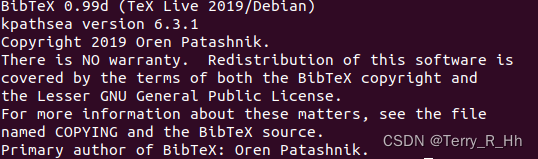
如果要使用vscode 的插件latex-workshop重现这个问题,需要更改settings.json,这个部分:
"latex-workshop.latex.clean.fileTypes": ["*.aux","*.blg","*.idx","*.ind","*.lof","*.lot","*.out","*.toc","*.acn","*.acr","*.alg","*.glg","*.glo","*.gls","*.fls","*.log","*.fdb_latexmk","*.snm","*.synctex(busy)","*.synctex.gz(busy)","*.nav","*.vrb"]//去掉了"*.bbl"
去掉了"*.bbl",即设置latex-workshop不再删除这个中间文件
再点击build,可以看出vscode终于输出这个错误了,原先连报错都没有是真的折磨:

永久解决这个问题:
根据上面的debug原理编写一个简单的python脚本如下:
import os
import subprocess
import argparse#---------------------传入参数设定----------------------------
parser = argparse.ArgumentParser(description='传入仿真参数')
parser.add_argument('--texDir', type=str, required=True)args = parser.parse_args()# --------------------检查传入参数-----------------------------
texDir = args.texDir
if type(texDir) != str:raise ValueError('texDir应是字符串')# -------------------开始修改bbl文件-------------------------
print('begin check and fix bbl process! ')file_names = os.listdir(texDir)
tex_name = ''
for name in file_names:if name[-4:] == '.tex':tex_name = name[:-4]breakelse:continueaux_file_name = tex_name + '.aux'
bbl_file_name = tex_name + '.bbl'file_content = ''
generate_aux_command = 'pdflatex '+tex_name
generate_bbl_command = 'bibtex ' + tex_nameif aux_file_name not in file_names:subprocess.call(generate_aux_command, shell=True)
if bbl_file_name not in file_names:subprocess.call(generate_bbl_command, shell=True)with open(texDir + '/{}'.format(bbl_file_name),'r+') as file_handle:file_content = file_handle.read()# check file content
if file_content == '':subprocess.call(generate_bbl_command, shell=True)# read file content again
with open(texDir + '/{}'.format(bbl_file_name),'r+') as file_handle:file_content = file_handle.read()# fix file content:
with open(texDir + '/{}'.format(bbl_file_name),'w+') as file_handle:if file_content.count('\n\n%Type = Article') == 0 and file_content.count('\n%Type = Article') != 0:file_content = file_content.replace('\n%Type = Article','\n\n%Type = Article')file_handle.write(file_content)
以及对vscode setttings.json进行更改
在tex文件目录下打开终端:
mkdir .vscode
cd vscode/
touch settings.json
修改settings.json如下:
(记得自行更改python脚本的绝对路径 “/absolute_directory/to/python_scirpt/fix_bbl.py”):
{"editor.codeActionsOnSave": {},"latex-workshop.latex.tools": [{"name": "latexmk","command": "latexmk","args": ["-synctex=1","-interaction=nonstopmode","-file-line-error","-pdf","%DOCFILE%"]},{"name": "python","command": "python","args": ["/absolute_directory/to/python_scirpt/fix_bbl.py",//这个要根据自己的脚本路径自行更改!"--texDir=%DIR%"]},{"name": "xelatex","command": "xelatex","args": ["-synctex=1","-interaction=nonstopmode","-file-line-error","%DOCFILE%"]}, {"name": "pdflatex","command": "pdflatex","args": ["-synctex=1","-interaction=nonstopmode","-file-line-error","%DOCFILE%"]},{"name": "bibtex","command": "bibtex","args": ["%DOCFILE%",]},],"latex-workshop.latex.clean.fileTypes": ["*.aux","*.blg","*.idx","*.ind","*.lof","*.lot","*.out","*.toc","*.acn","*.acr","*.alg","*.glg","*.glo","*.gls","*.fls","*.log","*.fdb_latexmk","*.snm","*.synctex(busy)","*.synctex.gz(busy)","*.nav","*.vrb"],"latex-workshop.latex.recipes": [{"name": "XeLaTeX","tools": ["xelatex"]},{"name": "PDFLaTeX","tools": ["pdflatex"]},{"name": "BibTeX","tools": ["bibtex"]},{"name": "LaTeXmk","tools": ["latexmk"]},{"name": "fixBBL","tools":["python"]},{"name": "xelatex -> bibtex -> xelatex*2","tools": ["xelatex","bibtex","python","xelatex","xelatex"]},{"name": "pdflatex -> bibtex -> pdflatex*2","tools": ["pdflatex","bibtex","python","pdflatex","pdflatex"]}],"files.associations": {"*.tex": "latex"},"[latex]": {"editor.formatOnPaste": false,"editor.suggestSelection": "recentlyUsedByPrefix"},"files.autoGuessEncoding": true,"[python]": {"editor.formatOnType": true}}
完成以后效果应该是这样子的:
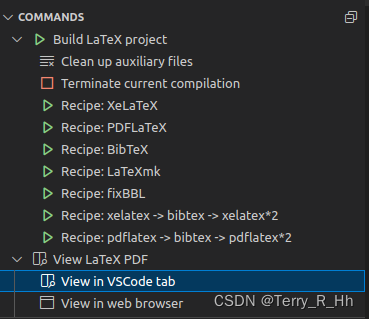
其中可以直接点击pdflatex->bibtex->pdflatex*2
问题解决~
本文来自互联网用户投稿,文章观点仅代表作者本人,不代表本站立场,不承担相关法律责任。如若转载,请注明出处。 如若内容造成侵权/违法违规/事实不符,请点击【内容举报】进行投诉反馈!