鸿蒙系统应用开发之——二维码生成
概述:能够根据给定的字符串信息和二维码图片尺寸,返回相应的二维码图片字节流。也可以通过二维码字节流生成二维码。
本文将以一个点击按钮,将输入的字符串生成一个二维码为例。文章末尾附上源代码
限制:
1.当前仅支持生成QR二维码(Quick Response Code)。由于QR二维码算法限制,字符串信息的长度不能超过2953个字符。
2.生成的二维码图片的宽度不能超过1920像素,高度不能超过1680像素。由于QR二维码是通过正方形阵列承载信息的,建议二维码采用正方形,当这个二维码采用长方形时,会在QR二维码信息的周边区域留白。
接口说明
码生成能力提供了IBarcodeDetector接口,常用的方法功能如下:
/**barcodeInput:要转换的字符串
*bitmapOutput:二维码输出流
*width:图片宽度
*	height:图片高度
*/int detect(String barcodeInput, byte[] bitmapOutput, int width, int height)//释放IBarcodeDeteteor接口,释放相关资源
int relese()
实现步骤
1.定义ConnectionCallback回调,实现连接能力引擎成功与否。
private ConnectionCallback connectionCallback = new ConnectionCallback() {@Overridepublic void onServiceConnect() {}@Overridepublic void onServiceDisconnect() {}};
2.调用VisionManager.init()方法,将此工程的context和ConnectionCallback作为入参,建立与能力引擎的连接。
private void initEngine(){VisionManager.init(this,connectionCallback);}
3.在点击按钮监听事件里对IBarcodeDetector实例化,生成图片等操作
 private void getImage(Component component){iBarcodeDetector = VisionManager.getBarcodeDetector(this);final  int IMAGE_LENGTH = 512;byte[] byteArray = new byte[IMAGE_LENGTH * IMAGE_LENGTH * 4];int result1 = iBarcodeDetector.detect(textField.getText(),byteArray,IMAGE_LENGTH,IMAGE_LENGTH);if(result1 == 0){InputStream inputStream = new ByteArrayInputStream(byteArray);ImageSource imageSource = ImageSource.create(inputStream,null);PixelMap pixelMap =imageSource.createPixelmap(null);imageSource.createPixelmap(null);outImage.setPixelMap(pixelMap);}}/**
实例化IBarcodeDetector对象之后,调用detect方法,将文本输入框textFied的值作为要转换的字符串。
IMAGE_LENGTH作为图片宽高,byteArray作为图片输出流。如果成功会返回状态码0
*/
4.最高调用VisionManager.destory()方法断开连接
VisionManager.destroy();
5.运行结果
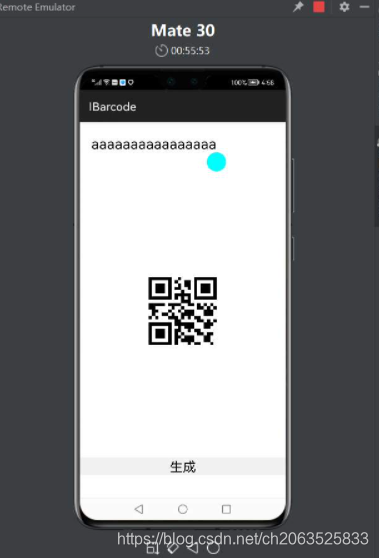
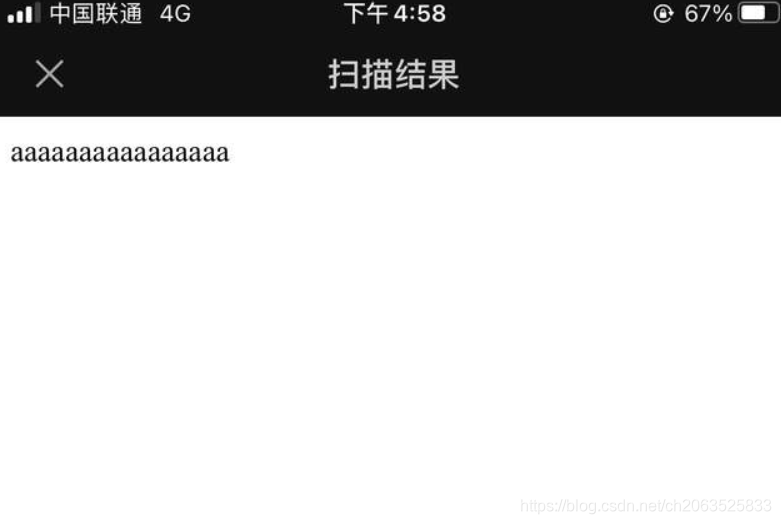
用手机扫描二维码功能扫描就会看到你输入的结果了。(中文会因为编码问题而出现乱码)
代码
<DirectionalLayoutxmlns:ohos="http://schemas.huawei.com/res/ohos"ohos:height="match_content"ohos:width="match_content"ohos:alignment="center"ohos:orientation="vertical"><TextFieldohos:id="$+id:inputText"ohos:height="match_content"ohos:width="match_parent"ohos:text_size="25fp"ohos:text=""ohos:multiple_lines="true"ohos:top_margin="30vp"ohos:margin="20vp"/><Imageohos:id="$+id:image"ohos:height="512vp"ohos:width="512vp"/><Buttonohos:id="$+id:button"ohos:height="match_content"ohos:width="match_parent"ohos:text="生成"ohos:text_size="23fp"ohos:background_element="#0d000000"/>DirectionalLayout>
MainAbilitySliice.java
public class MainAbilitySlice extends AbilitySlice {private Image outImage;private IBarcodeDetector iBarcodeDetector;private TextField textField;@Overridepublic void onStart(Intent intent) {super.onStart(intent);super.setUIContent(ResourceTable.Layout_ability_main);initComponent();initEngine();}private void initComponent(){outImage = (Image)findComponentById(ResourceTable.Id_image);textField = (TextField)findComponentById(ResourceTable.Id_inputText);Component startButton = findComponentById(ResourceTable.Id_button);startButton.setClickedListener(this::getImage);}private void initEngine(){VisionManager.init(this,connectionCallback);}private void getImage(Component component){iBarcodeDetector = VisionManager.getBarcodeDetector(this);final  int IMAGE_LENGTH = 512;byte[] byteArray = new byte[IMAGE_LENGTH * IMAGE_LENGTH * 4];int result1 = iBarcodeDetector.detect(textField.getText(),byteArray,IMAGE_LENGTH,IMAGE_LENGTH);if(result1 == 0){InputStream inputStream = new ByteArrayInputStream(byteArray);ImageSource imageSource = ImageSource.create(inputStream,null);PixelMap pixelMap =imageSource.createPixelmap(null);imageSource.createPixelmap(null);outImage.setPixelMap(pixelMap);}}@Overridepublic void onActive() {super.onActive();}@Overridepublic void onForeground(Intent intent) {super.onForeground(intent);}@Overrideprotected void onStop() {super.onStop();if(iBarcodeDetector != null){iBarcodeDetector.release();}VisionManager.destroy();}private ConnectionCallback connectionCallback = new ConnectionCallback() {@Overridepublic void onServiceConnect() {}@Overridepublic void onServiceDisconnect() {}};
}
本文来自互联网用户投稿,文章观点仅代表作者本人,不代表本站立场,不承担相关法律责任。如若转载,请注明出处。 如若内容造成侵权/违法违规/事实不符,请点击【内容举报】进行投诉反馈!