解决 tensorflow 出现的 ImportError: Could not find the DLL(s) ‘msvcp140_1.dll‘. 问题
在安装完tensorflow库后出现
问题详述:
ImportError: Could not find the DLL(s) 'msvcp140_1.dll'. TensorFlow requires that these DLLs be installed in a directory that is named in your %PATH% environment variable. You may install these DLLs by downloading "Microsoft C++ Redistributable for Visual Studio 2015, 2017 and 2019" for your platform from this URL: https://support.microsoft.com/help/2977003/the-latest-supported-visual-c-downloads
问题解决:
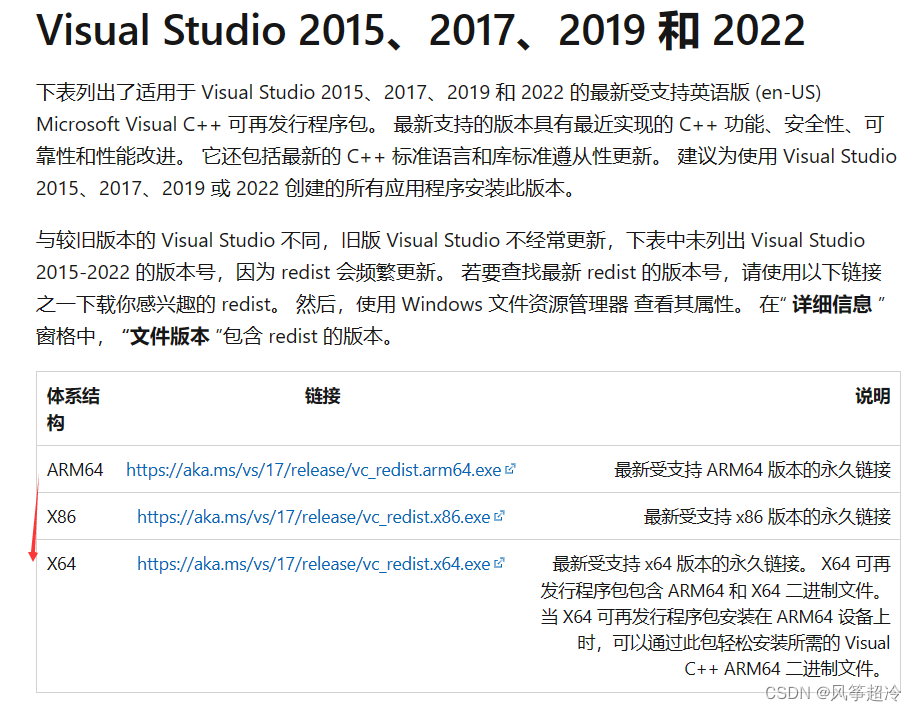
1、打开这个网站
最新受支持的 Visual C++ 可再发行程序包下载 | Microsoft Learn
2.查看系统版本
计算机-> 右键 -> 属性

3.根据计算机版本选择,下载后双击安装,重启后再次运行import tensorflow as tf。
本文来自互联网用户投稿,文章观点仅代表作者本人,不代表本站立场,不承担相关法律责任。如若转载,请注明出处。 如若内容造成侵权/违法违规/事实不符,请点击【内容举报】进行投诉反馈!