通义千问项目制作
这一次我们来做一个集成了通义千问的程序,里面还有计算器、翻译等,通义千问支持播报,输入支持图像和文字。
1.申请和开通
1.1.文字识别开通
首先,打开文字识别_OCR 文字识别_图片识别文字_数据智能-阿里云 (aliyun.com)页面并登陆阿里云账号,点击 ,文字识别服务。接下来在RAM 访问控制 (aliyun.com)页面申请一个AccessKey并牢记。
1.2.通义千问申请
打开API详情_灵积模型服务-阿里云帮助中心 (aliyun.com),选择申请体验,点击同意,即可申请体验。通过以后,打开API-KEY管理 (aliyun.com),创建一个apikey并牢记
2.计算器的制作
这个程序保存在python安装路径\Lib目录下,重命名为jsq.py
首先打开阿里云盘分享,下载所需要的文件,之后运行bat文件,安装所需模块。
import PySimpleGUI as sg
#引入模块PySimpleGUI
a=""
#创建变量来保存计算公式
layout=[[sg.In(key="-I-",disabled=True,size=(18, None))],[sg.T(key="-T-")],[sg.B("c",key="c",size=(2,2)),sg.B("(",key="(",size=(2,2)),sg.B(")",key=")",size=(2,2)),sg.B("**",key="**",size=(2,2))],[sg.B("7",key="7",size=(2,2)),sg.B("8",key="8",size=(2,2)),sg.B("9",key="9",size=(2,2)),sg.B("+",key="+",size=(2,2))],[sg.B("4",key="4",size=(2,2)),sg.B("5",key="5",size=(2,2)),sg.B("6",key="6",size=(2,2)),sg.B("-",key="-",size=(2,2))],[sg.B("1",key="1",size=(2,2)),sg.B("2",key="2",size=(2,2)),sg.B("3",key="3",size=(2,2)),sg.B("*",key="*",size=(2,2))],[sg.B(".",key=".",size=(2,2)),sg.B("0",key="0",size=(2,2)),sg.B("=",key="=",size=(2,2)),sg.B("/",key="/",size=(2,2))]]
#界面布局创建
if 1==1:window=sg.Window('计算器',layout,grab_anywhere=True,disable_minimize=True,keep_on_top=True)#创建界面while True:event,values=window.read()#刷新if event==None:break#窗口关闭if event=="1" or "2" or "3" or "4" or "5" or "6" or "7" or "8" or "9" or "0":window["-I-"].update(value=a+event)a=a+eventif event=="c":window["-I-"].update(value="")a=""#清空数据if event=="=":qqqq=str(a)qqq=a.replace("=","")# window["-TT-"].update(qqqq)# b=f'window["-T-"].update('+qqqq+qqq+')'try:qls="qls="+qqqexec(qls)print(qls)window["-T-"].update(qqqq+str(qls))except Exception as e:print(e)window["-T-"].update("你输入的计算方式有问题")window["-I-"].update(value="")a=""#计算和更新
3.制作翻译程序
此方法已经失效,为保证程序的正常运行,请在python安装路径\Lib文件夹下新建一个py文件,重命名为fy.py,内容为,
import PySimpleGUI as sg
sg.popup("翻译功能维护中……")
可以弹出一个维护提示框。
4.制作图片转文字
这个程序保存在python安装路径\Lib目录下,重命名为imgtostr.py
图片转文字(阿里云示例代码)
# -*- coding: utf-8 -*-
# This file is auto-generated, don't edit it. Thanks.
import os
import sys
import json
from typing import List
import re
from alibabacloud_ocr_api20210707.client import Client as ocr_api20210707Client
from alibabacloud_tea_openapi import models as open_api_models
from alibabacloud_darabonba_stream.client import Client as StreamClient
from alibabacloud_ocr_api20210707 import models as ocr_api_20210707_models
from alibabacloud_tea_util import models as util_models
from alibabacloud_tea_util.client import Client as UtilClientclass Sample:def __init__(self):pass@staticmethoddef create_client(access_key_id: str,access_key_secret: str,) -> ocr_api20210707Client:"""使用AK&SK初始化账号Client@param access_key_id:@param access_key_secret:@return: Client@throws Exception"""config = open_api_models.Config(# 必填,您的 AccessKey ID,access_key_id="你的AccessKey ID",# 必填,您的 AccessKey Secret,access_key_secret="你的AccessKey Secre")# Endpoint 请参考 https://api.aliyun.com/product/ocr-apiconfig.endpoint = f'ocr-api.cn-hangzhou.aliyuncs.com'return ocr_api20210707Client(config)@staticmethoddef main(img,args: List[str],) -> None:# 请确保代码运行环境设置了环境变量 ALIBABA_CLOUD_ACCESS_KEY_ID 和 ALIBABA_CLOUD_ACCESS_KEY_SECRET。# 工程代码泄露可能会导致 AccessKey 泄露,并威胁账号下所有资源的安全性。以下代码示例使用环境变量获取 AccessKey 的方式进行调用,仅供参考,建议使用更安全的 STS 方式,更多鉴权访问方式请参见:https://help.aliyun.com/document_detail/378659.htmlclient = Sample.create_client('你的AccessKey ID', '你的AccessKey Secre')# 需要安装额外的依赖库,直接点击下载完整工程即可看到所有依赖。body_stream = StreamClient.read_from_file_path(img)recognize_general_request = ocr_api_20210707_models.RecognizeGeneralRequest(url='',body=body_stream)runtime = util_models.RuntimeOptions()try:# 复制代码运行请自行打印 API 的返回值aa=str(client.recognize_general_with_options(recognize_general_request, runtime))r=re.compile(r'"content":"(.|\n)*","height"')bbbb=r.search(aa).group()bbbb=bbbb.strip('"content":"')bbbb=bbbb.strip('","height"')return bbbbexcept Exception as error:# 如有需要,请打印 errorUtilClient.assert_as_string(error)@staticmethodasync def main_async(args: List[str],) -> None:# 请确保代码运行环境设置了环境变量 ALIBABA_CLOUD_ACCESS_KEY_ID 和 ALIBABA_CLOUD_ACCESS_KEY_SECRET。# 工程代码泄露可能会导致 AccessKey 泄露,并威胁账号下所有资源的安全性。以下代码示例使用环境变量获取 AccessKey 的方式进行调用,仅供参考,建议使用更安全的 STS 方式,更多鉴权访问方式请参见:https://help.aliyun.com/document_detail/378659.htmlclient = Sample.create_client(os.environ['ALIBABA_CLOUD_ACCESS_KEY_ID'], os.environ['ALIBABA_CLOUD_ACCESS_KEY_SECRET'])# 需要安装额外的依赖库,直接点击下载完整工程即可看到所有依赖。body_stream = StreamClient.read_from_file_path(r"")recognize_general_request = ocr_api_20210707_models.RecognizeGeneralRequest(url='',body=body_stream)runtime = util_models.RuntimeOptions()try:# 复制代码运行请自行打印 API 的返回值await client.recognize_general_with_options_async(recognize_general_request, runtime)except Exception as error:# 如有需要,请打印 errorUtilClient.assert_as_string(error.message)if __name__ == '__main__':# Sample.main(r"C:\Users\wq546\Desktop\0.png",sys.argv[1:])pass
5.制作核心程序(通义千问)
引入模块
import imgtostr
import webbrowser as web
import sys
import PySimpleGUI as sg
import dashscope
from dashscope import Generation
from http import HTTPStatus
import json
调用计算器
def jisuanqi():if 1==1:import importlibif 'jsq' in sys.modules:del sys.modules["jsq"]import jsq调用翻译
def fanyi():if 1==1:import importlibif 'fy' in sys.modules:del sys.modules["fy"]import fy重点!调用通义千问(阿里云官方文档的示例有差不多的)
def qianwen(a):if 1==1:response = Generation.call(model='qwen-v1',prompt=a,api_key='你的阿里云灵积大模型apikey')# The response status_code is HTTPStatus.OK indicate success,# otherwise indicate request is failed, you can get error code# and message from code and message.if response.status_code == HTTPStatus.OK:print(response.output["text"])return response.output["text"] # The output text# print(response.usage) # The usage informationelse:print(response.code) # The error code.print(response.message) # The error message.主程序和播放回答
def main():#页面设计c=0import PySimpleGUI as sglayout=[[sg.T(" "),sg.Text("欢迎来到便携工具",relief='ridge',border_width=5,font=('华文彩云',15))],[sg.T("通义千问")],[sg.T("问题"),sg.InputText(key="-W-",size=(100, None)),sg.B("提问",key="-TT-"),sg.InputText(key="-IMG-",disabled=False,size=(30, None)),sg.T("图片内容"),sg.FileBrowse("读取",target='-IMG-',file_types=(("ALL Files","*.png"),("ALL Files","*.jpg"),)),sg.B("加入",key="-WIMG-")],[sg.B("播放",key="-BF-"),sg.In("",disabled=True,key="-HD-",size=(160, None))],[sg.Button('计算器',key="-JSQ-"),sg.Button('翻译',key="-FY-"),sg.B("退出",key='-EXIT-')]]if 1==1:window=sg.Window('便携工具',layout)while True:event,values=window.read()if event=="-BF-":# coding=utf-8## Installation instructions for pyaudio:# APPLE Mac OS X# brew install portaudio # pip install pyaudio# Debian/Ubuntu# sudo apt-get install python-pyaudio python3-pyaudio# or# pip install pyaudio# CentOS# sudo yum install -y portaudio portaudio-devel && pip install pyaudio# Microsoft Windows# python -m pip install pyaudioimport dashscopeimport sysimport pyaudiofrom dashscope.api_entities.dashscope_response import SpeechSynthesisResponsefrom dashscope.audio.tts import ResultCallback, SpeechSynthesizer, SpeechSynthesisResultdashscope.api_key='你的阿里云灵积大模型apikey'class Callback(ResultCallback):_player = None_stream = Nonedef on_open(self):print('Speech synthesizer is opened.')self._player = pyaudio.PyAudio()self._stream = self._player.open(format=pyaudio.paInt16,channels=1, rate=48000,output=True)def on_complete(self):print('Speech synthesizer is completed.')def on_error(self, response: SpeechSynthesisResponse):print('Speech synthesizer failed, response is %s' % (str(response)))def on_close(self):print('Speech synthesizer is closed.')self._stream.stop_stream()self._stream.close()self._player.terminate()def on_event(self, result: SpeechSynthesisResult):if result.get_audio_frame() is not None:print('audio result length:', sys.getsizeof(result.get_audio_frame()))self._stream.write(result.get_audio_frame())if result.get_timestamp() is not None:print('timestamp result:', str(result.get_timestamp()))callback = Callback()SpeechSynthesizer.call(model='sambert-zhichu-v1',text=values["-HD-"],sample_rate=48000,format='pcm',callback=callback)if event==None:breakif event=="-EXIT-":breakif event=="-TT-":# if values["-IMG-"]!="":# img=values["-IMG-"]# text=imgtostr.Sample.main(img,sys.argv[1:])# huida=qianwen(text)# window["-HD-"].update(value=huida)# window["-IMG-"].update("")# else:huida=qianwen(values["-W-"])window["-HD-"].update(value=huida)if event=="-JSQ-":jisuanqi()if event=="-FY-":fanyi()if event=="-WK-":wangke()if event=="-WIMG-":img=values["-IMG-"]text=imgtostr.Sample.main(img,sys.argv[1:])window["-W-"].update(value=text)window.close()运行程序
main()现在运行一下看看吧!
如果看介绍麻烦,可以直接复制核心程序的代码
import imgtostr
import webbrowser as web
import sys
import PySimpleGUI as sg
import dashscope
from dashscope import Generation
from http import HTTPStatus
import jsondef jisuanqi():if 1==1:import importlibif 'jsq' in sys.modules:del sys.modules["jsq"]import jsqdef fanyi():if 1==1:import importlibif 'fy' in sys.modules:del sys.modules["fy"]import fydef qianwen(a):if 1==1:response = Generation.call(model='qwen-v1',prompt=a,api_key='你的阿里云灵积大模型apikey')# The response status_code is HTTPStatus.OK indicate success,# otherwise indicate request is failed, you can get error code# and message from code and message.if response.status_code == HTTPStatus.OK:print(response.output["text"])return response.output["text"]  # The output text# print(response.usage)  # The usage informationelse:print(response.code)  # The error code.print(response.message)  # The error message.
def main():c=0import PySimpleGUI as sglayout=[[sg.T("                                                                                                                               "),sg.Text("欢迎来到便携工具",relief='ridge',border_width=5,font=('华文彩云',15))],[sg.T("通义千问")],[sg.T("问题"),sg.InputText(key="-W-",size=(100, None)),sg.B("提问",key="-TT-"),sg.InputText(key="-IMG-",disabled=False,size=(30, None)),sg.T("图片内容"),sg.FileBrowse("读取",target='-IMG-',file_types=(("ALL Files","*.png"),("ALL Files","*.jpg"),)),sg.B("加入",key="-WIMG-")],[sg.B("播放",key="-BF-"),sg.In("",disabled=True,key="-HD-",size=(160, None))],[sg.Button('计算器',key="-JSQ-"),sg.Button('翻译',key="-FY-"),sg.B("退出",key='-EXIT-')]]if 1==1:window=sg.Window('便携工具',layout)while True:event,values=window.read()if event=="-BF-":# coding=utf-8## Installation instructions for pyaudio:# APPLE Mac OS X#   brew install portaudio #   pip install pyaudio# Debian/Ubuntu#   sudo apt-get install python-pyaudio python3-pyaudio#   or#   pip install pyaudio# CentOS#   sudo yum install -y portaudio portaudio-devel && pip install pyaudio# Microsoft Windows#   python -m pip install pyaudioimport dashscopeimport sysimport pyaudiofrom dashscope.api_entities.dashscope_response import SpeechSynthesisResponsefrom dashscope.audio.tts import ResultCallback, SpeechSynthesizer, SpeechSynthesisResultdashscope.api_key='你的阿里云灵积大模型apikey'class Callback(ResultCallback):_player = None_stream = Nonedef on_open(self):print('Speech synthesizer is opened.')self._player = pyaudio.PyAudio()self._stream = self._player.open(format=pyaudio.paInt16,channels=1, rate=48000,output=True)def on_complete(self):print('Speech synthesizer is completed.')def on_error(self, response: SpeechSynthesisResponse):print('Speech synthesizer failed, response is %s' % (str(response)))def on_close(self):print('Speech synthesizer is closed.')self._stream.stop_stream()self._stream.close()self._player.terminate()def on_event(self, result: SpeechSynthesisResult):if result.get_audio_frame() is not None:print('audio result length:', sys.getsizeof(result.get_audio_frame()))self._stream.write(result.get_audio_frame())if result.get_timestamp() is not None:print('timestamp result:', str(result.get_timestamp()))callback = Callback()SpeechSynthesizer.call(model='sambert-zhichu-v1',text=values["-HD-"],sample_rate=48000,format='pcm',callback=callback)if event==None:breakif event=="-EXIT-":breakif event=="-TT-":# if values["-IMG-"]!="":#     img=values["-IMG-"]#     text=imgtostr.Sample.main(img,sys.argv[1:])#     huida=qianwen(text)#     window["-HD-"].update(value=huida)#     window["-IMG-"].update("")# else:huida=qianwen(values["-W-"])window["-HD-"].update(value=huida)if event=="-JSQ-":jisuanqi()if event=="-FY-":fanyi()if event=="-WK-":wangke()if event=="-WIMG-":img=values["-IMG-"]text=imgtostr.Sample.main(img,sys.argv[1:])window["-W-"].update(value=text)window.close()main()
'''
img=values["-IMG-"]text=imgtostr.Sample.main(img,sys.argv[1:])huida=qianwen(text)window["-HD-"].update(value=huida)
'''
6.计费标准
效果不错吧?这里温馨提示一下:如果你用多了是要收费的哦!通义千问计费标准(1个token=一个汉字或者3-4个英文字母)

文字识别200次,否则需要购买资源包
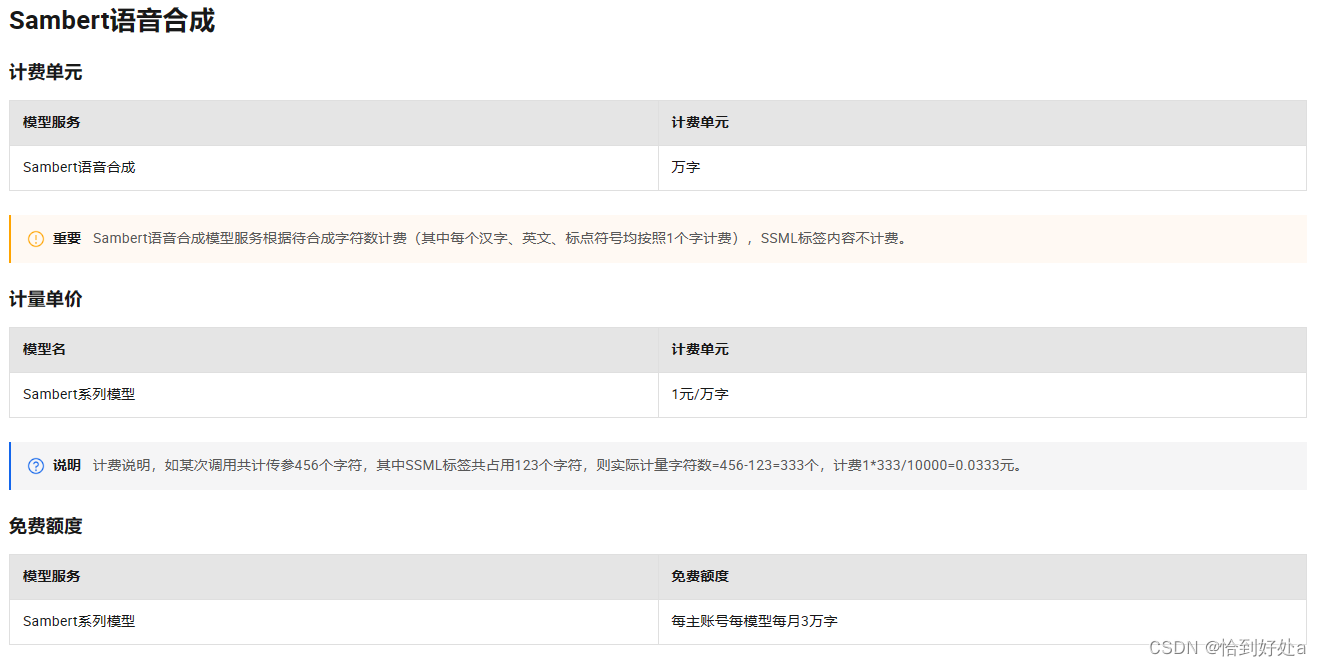
 语音合成每月三万字,否则1元一万字
注意不要用多啦!
这个内容就到这里,再见啦!
本文来自互联网用户投稿,文章观点仅代表作者本人,不代表本站立场,不承担相关法律责任。如若转载,请注明出处。 如若内容造成侵权/违法违规/事实不符,请点击【内容举报】进行投诉反馈!