Android-PopupWindow自定义的弹出框
PopupWindow自定义的弹出框的使用记录
使用介绍
- 可实现弹出框的效果
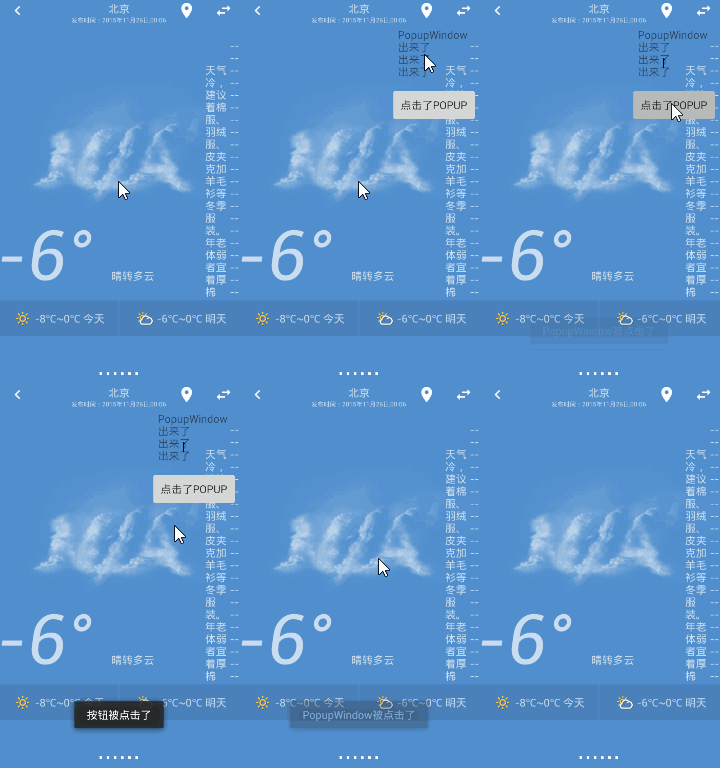
- 这里是将PopupWindow添加到ActionBar下,通过点击标题上的图标显示
使用步骤
新建一个PopupWindow的xml布局(popup_window.xml)
<LinearLayout xmlns:android="http://schemas.android.com/apk/res/android"
android:layout_width="match_parent"
android:layout_height="wrap_content"
android:orientation="vertical"><TextView
    android:layout_width="match_parent"android:layout_height="wrap_content"android:padding="10dp"android:text="PopupWindow\n出来了\n出来了\n出来了" /><Button
    android:id="@+id/button1"android:layout_width="match_parent"android:layout_height="wrap_content"android:padding="10dp"android:text="点击了Popup" />
LinearLayout>
在Activity代码中
- 响应actionbar上子控件的点击事件
@Override public boolean onOptionsItemSelected(MenuItem item) {switch (item.getItemId()) {case R.id.city_choose://当点击这个item时显示PopupWindow//处理显示PopupWindowshowPopupWindow();return true;case R.id.get_location:getpostion();break;}return super.onOptionsItemSelected(item); }- showPopupWindow()设置显示PopupWindow的方法
    private void showPopupWindow() {// 获取状态栏高度Rect frame = new Rect();getWindow().getDecorView().getWindowVisibleDisplayFrame(frame);//状态栏高度:frame.top; toolbar是我自定义的标题栏,如果是默认的可以直接用getActionBar.getHeight()int xOffset = frame.top + toolbar.getHeight() - 25;//减去阴影宽度,适配UI.int yOffset = Dp2Px(this, 5f); //设置x方向offset为5dp//加载的Activity的布局R.layout.activity_weatherView parentView = getLayoutInflater().inflate(R.layout.activity_weather, null);//获取PopupWindow的布局View contentView = LayoutInflater.from(this).inflate(R.layout.popup_window, null);//获取和设置PopupWindow布局里button的监听Button button = (Button) contentView.findViewById(R.id.button1);button.setOnClickListener(new View.OnClickListener() {@Overridepublic void onClick(View v) {Toast.makeText(WeatherActivity.this, "button is pressed",Toast.LENGTH_SHORT).show();}});//创建一个PopupWindow对象//参数一:PopupWindow的布局;//参数二:宽度(注意导入的包是:android.view.ViewGroup.LayoutParams;)//参数三:高度//参数四:设置focusablePopupWindow popupWindow = new PopupWindow(contentView, LayoutParams.WRAP_CONTENT, LayoutParams.WRAP_CONTENT, true);
//        popupWindow.setTouchable(true);
//        popupWindow.setFocusable(true);
//        popupWindow.setOutsideTouchable(true);
//能监听到PopupWindow被点击popupWindow.setTouchInterceptor(new View.OnTouchListener() {@Overridepublic boolean onTouch(View v, MotionEvent event) {Log.i("myout", "ontouch");return false;}});//必须设置BackgroundDrawable 后 ,点击外部可以消失的方法setOutsideTouchable(true)才会有效。这里在XML中定义背景,所以这里设置为null;
//        popupWindow.showAsDropDown(view);显示在哪个布局的下方(一般当不在标题栏的时候 使用)popupWindow.setBackgroundDrawable(new BitmapDrawable(getResources(),
(Bitmap) null));popupWindow.setOutsideTouchable(true); //点击外部关闭。popupWindow.setAnimationStyle(android.R.style.Animation_Dialog);    //设置一个动画。//设置Gravity,让它显示在右上角。popupWindow.showAtLocation(parentView, Gravity.RIGHT | Gravity.TOP,yOffset, xOffset);}/*** 处理Java代码中多是接受px单位的尺寸,Android用了dp单位* Dp转换Px的方法*/public int Dp2Px(Context context, float dp) {final float scale = context.getResources().getDisplayMetrics().density;return (int) (dp * scale + 0.5f);}
学习的地址:
- Android PopupWindow的使用和分析:http://www.cnblogs.com/mengdd/p/3569127.html
- 用PopupWindow实现自定义overflow:http://www.cnblogs.com/JinyaoLi/p/3850734.html
我的运行效果图
我的感受
- 使用PopupWindow是因为不想跳到第二个页面搜索城市获取天气(@ ̄ー ̄@)
- 这个弹出的效果挺好的,当PopupWindow弹出时,点击屏幕任何部位都会调用PopupWindow的setTouchInterceptor()方法
想说的话
- 博客坚持写,今后学习了新的东西就在这里记录一下,以便今后回顾,也希望小小笔记能帮助你们
- 若内容有什么地方不对、不清楚,还望吐槽,希望大家能一起成长
- 来一句:有意识的改变自己的不良的生活方式
- 再来一句:对于程序员来说,一千多万不在代码里,不在技术里,而在生活中,在眼光里,在勇气里。
本文来自互联网用户投稿,文章观点仅代表作者本人,不代表本站立场,不承担相关法律责任。如若转载,请注明出处。 如若内容造成侵权/违法违规/事实不符,请点击【内容举报】进行投诉反馈!