mui微信支付宝支付插件配置
HBuilder 基座已实现H5 plus的支付API,现已集成支付宝快捷支付平台。使用支付功能前必须在支付宝网站开通”快捷支付“服务,并配置服务器生成订单信息。
开发指导
支付流程如下: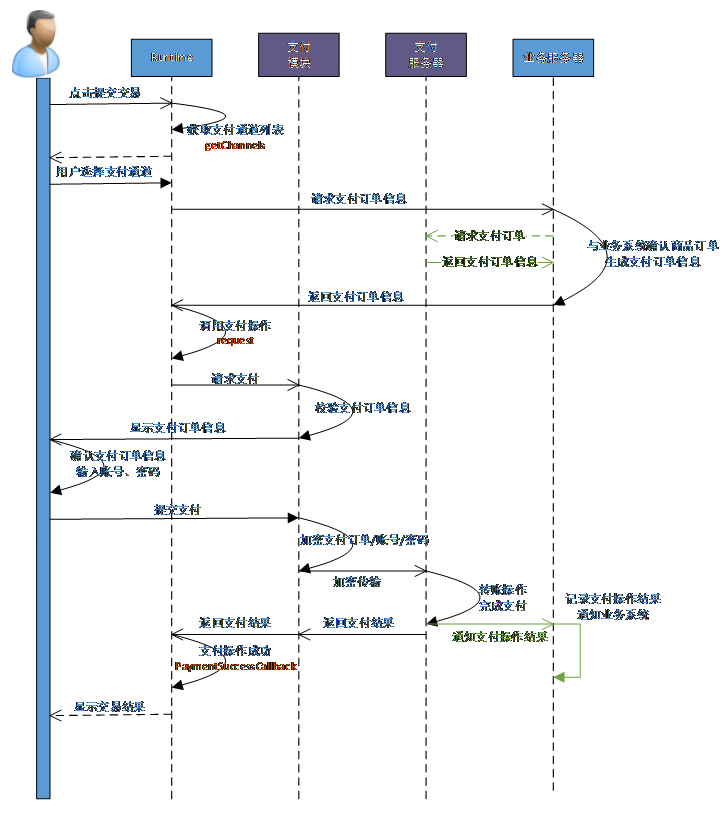
plus API使用步骤:
1. 调用plus.payment.getChannels()获取系统支持的支付通道;
2. 调用plus.payment.request()发起支付请求。
示例代码
| 1 2 3 4 5 6 7 8 9 10 11 12 13 14 15 16 17 18 19 20 21 22 23 24 25 26 27 28 29 30 31 32 33 34 35 36 37 38 39 40 41 42 43 44 45 46 47 48 49 | var channel= null ; // 1. 获取支付通道 function plusReady(){ // 获取支付通道 plus.payment.getChannels(function(channels){ channel=channels[0]; },function(e){ alert( "获取支付通道失败:" +e.message); }); } document.addEventListener( 'plusready' ,plusReady, false ); var ALIPAYSERVER= 'http://demo.dcloud.net.cn/helloh5/payment/alipay.php?total=' ; var WXPAYSERVER= 'http://demo.dcloud.net.cn/helloh5/payment/wxpay.php?total=' ; // 2. 发起支付请求 function pay(id){ // 从服务器请求支付订单 var PAYSERVER= '' ; if (id== 'alipay' ){ PAYSERVER=ALIPAYSERVER; } else if (id== 'wxpay' ){ PAYSERVER=WXPAYSERVER; } else { plus.nativeUI.alert( "不支持此支付通道!" , null , "捐赠" ); return ; } var xhr= new XMLHttpRequest(); xhr.onreadystatechange=function(){ switch (xhr.readyState){ case 4: if (xhr.status==200){ plus.payment.request(channel,xhr.responseText,function(result){ plus.nativeUI.alert( "支付成功!" ,function(){ back(); }); },function(error){ plus.nativeUI.alert( "支付失败:" + error.code); }); } else { alert( "获取订单信息失败!" ); } break ; default : break ; } } xhr.open( 'GET' ,PAYSERVER); xhr.send(); } |
注:第二步中获取到的订单数据需要在服务器通过支付宝平台获取PID和密钥生成。
HBuilder应用配置
分享插件添加方法具体步骤如下:
1. 点击manifest.json文件的“代码视图”,在permissions节点下添加Payment节点: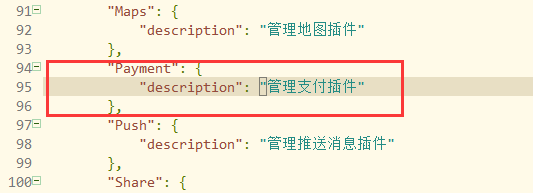
- 在plus -> distribute -> plugins 节点下添加payment节点:

alipay节点下配置支付宝相关信息
scheme值为iOS平台调用支付宝的“快捷支付”应用返回时用到的标识,推荐使用小写字符串。
weixin节点下配置微信支付相关信息
appid值为在微信开放平台申请应用的AppID值。
appleiap节点下配置苹果应用内支付相关信息
在HBuilder基座中无法使用此支付通道,需要提交云端打包才可使用。
支付宝功能申请
- 登录支付宝账号,签约申请“移动快捷支付”功能,操作流程参考:
- 支付宝帮助中心 https://cshall.alipay.com/enterprise/index.htm
- 获取PID,参考教程:
获取合作者身份ID https://help.alipay.com/support/help_detail.htm?help_id=396880&keyword=%B2%E9%D1%AF - 生成密钥(公钥和私钥),并提交到支付宝,参考教程:
生成RSA密钥 https://help.alipay.com/support/help_detail.htm?help_id=397433&keyword=%C3%DC%D4%BF
上传公钥 https://help.alipay.com/support/help_detail.htm?help_id=477353&keyword=%C9%CC%BB%A7%B9%AB%D4%BF
服务器生成订单示例(PHP)
参考开源示例代码github-支付宝 https://github.com/dcloudio/H5P.Server/tree/master/payment/alipay
C#生成支付宝订单示例 http://ask.dcloud.net.cn/article/197
微信支付功能申请
使用微信支付功能需到微信开放平台申请移动应用并开通支付功能
微信APP支付接入商户服务中心 https://open.weixin.qq.com/cgi-bin/showdocument?action=dir_list&t=resource/res_list&verify=1&lang=zh_CN
申请应用后可以获取AppID和AppSecret值。开通支付功能后可获取支付业务服务器配置数据
PARTNER:财付通商户号
PARTNER_KEY:财付通密钥
PAYSIGNKEY:支付签名密钥
参考开源示例代码github-微信支付 https://github.com/dcloudio/H5P.Server/tree/master/payment/wxpayv3
应用内支付(IAP)使用说明
IOS 应用内支付接口使用说明 http://ask.dcloud.net.cn/article/497

1.先上图片,由于mui自己集成了支付宝,所以不需要配置sdk和获取appid,微信配置有些小细节,不注意就会出错,在这里微信支付只能调用一次,详情看下去在特别注意里
> > charset="UTF-8"> >支付 name="viewport" content="width=device-width,initial-scale=1,minimum-scale=1,maximum-scale=1,user-scalable=no" /> rel="stylesheet" href="css/mui.min.css" /> type="text/javascript" src="js/mui.min.js"> type="text/css"> .top { margin-top: 40px; } .weixin { width: 200px; height: 50px; margin-left: 50px; background: url(../images/icon-weixin.png); } .zhifubao { width: 200px; height: 50px; margin-left: 50px; background: url(../images/alipay.jpg); } #jine{ -webkit-user-select:text; text-align:right; padding:0 1em; border: 0px; border-bottom:1px solid #ECB100; border-radius: 0; font-size:16px; width:30%; outline:none; text-align:center; } > class="mui-bar mui-bar-nav"> class="mui-action-back mui-icon mui-icon-left-nav mui-pull-left"> class="mui-title">第三方支付 class="mui-content"> 捐赠金额: id="jine" type="number" value="1" /> 元 class="top" id="testLogin" > type="button" class="weixin" id="weixin1" value="微信支付" /> type="button" class="zhifubao" id="zhifubao" value="支付宝支付" /> > var wxChannel = null; // 微信支付 var aliChannel = null; // 支付宝支付 var channel = null; //支付通道 mui.init({ swipeBack:true //启用右滑关闭功能 }); mui.plusReady(function() { // 获取支付通道 plus.payment.getChannels(function(channels){ for (var i in channels) { if (channels[i].id == "wxpay") { wxChannel=channels[i]; }else{ aliChannel=channels[i]; } } },function(e){ alert("获取支付通道失败:"+e.message); }); }) document.getElementById('weixin1').addEventListener('tap',function() { console.log("微信"); pay('wxpay'); }) document.getElementById('zhifubao').addEventListener('tap',function() { console.log("zhifubao"); pay('alipay'); }) var ALIPAYSERVER='http://demo.dcloud.net.cn/helloh5/payment/alipay.php?total='; var WXPAYSERVER='http://demo.dcloud.net.cn/helloh5/payment/wxpay.php?total='; // 2. 发起支付请求 function pay(id){ // 从服务器请求支付订单 var PAYSERVER=''; if(id=='alipay'){ PAYSERVER=ALIPAYSERVER; channel = aliChannel; }else if(id=='wxpay'){ PAYSERVER=WXPAYSERVER; channel = wxChannel; }else{ plus.nativeUI.alert("不支持此支付通道!",null,"捐赠"); return; } var xhr=new XMLHttpRequest(); var amount = document.getElementById('jine').value; xhr.onreadystatechange=function(){ switch(xhr.readyState){ case 4: if(xhr.status==200){ plus.payment.request(channel,xhr.responseText,function(result){ plus.nativeUI.alert("支付成功!",function(){ back(); }); },function(error){ plus.nativeUI.alert("支付失败:" + error.code); }); }else{ alert("获取订单信息失败!"); } break; default: break; } } xhr.open('GET',PAYSERVER+amount); xhr.send(); } type="text/javascript" src="js/immersed.js" >