Android_自定义遥控器按钮
源码地址https://github.com/GuoFeilong/RemoteControllerDemo来一波star谢谢
HI,一辆开往幼儿园的小车,即将到站.
昨天偶然看见群里哥们,抛出一张效果图,蛮有意思的,就自己实现下.

遥控器的面板主控键
看下我们临摹的效果
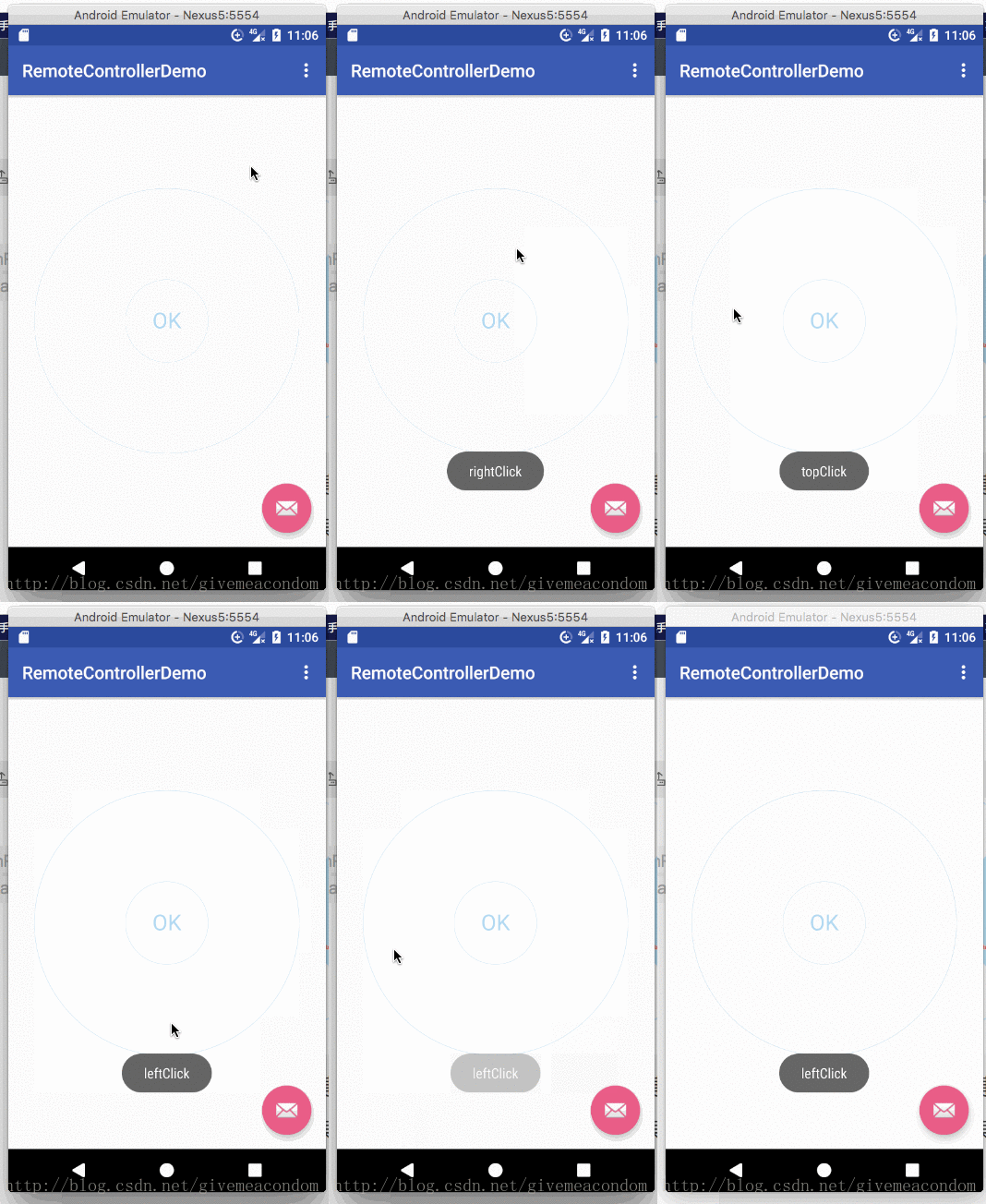
模拟器配色有点淡,这些都是自定义属性可以设置的.
这个View用传说中的不规则点击据说很简单,但是我没去搜,我就是用两三个简单的API实现了,没啥技术含量,但是蛮有意思的.里面有一个小坑.下面用代码说下.
实现思路
- 分析效果图view的组成部分,view拆分
- 抽取可扩展的自定义属性
- 测试 绘制
- 暴露监听给调用者
第一步(没什么可说的)
<declare-styleable name="RemoteControllerView"><attr name="rcv_text_color" format="color" /><attr name="rcv_shadow_color" format="color" /><attr name="rcv_stroke_color" format="color" /><attr name="rcv_stroke_width" format="dimension" /><attr name="rcv_text_size" format="dimension" /><attr name="rcv_oval_degree" format="integer" />declare-styleable>第二步获取自定义属性,确定测量大小
@Overrideprotected void onSizeChanged(int w, int h, int oldw, int oldh) {super.onSizeChanged(w, h, oldw, oldh);centerPoint = new Point(w / 2, h / 2);ovalPaths = new ArrayList<>();ovalRegions = new ArrayList<>();ovalPaints = new ArrayList<>();rcvViewWidth = w;rcvViewHeight = h;rcvPadding = (int) (Math.min(w, h) * SCALE_OF_PADDING);viewContentWidht = rcvViewWidth - rcvPadding;viewContentHeight = rcvViewHeight - rcvPadding;第三步骤(绘制几个API.一顿draw)
// 画布平移到中心点改变坐标系canvas.translate(centerPoint.x, centerPoint.y);// 绘制最外层的圆环canvas.drawCircle(0, 0, Math.min(rcvViewWidth, rcvViewHeight) / 2, rcvStrokePaint);// 核心,扇形的组成的遥控器面板圆圈for (int i = 0; i < ovalRegions.size(); i++) {canvas.drawPath(ovalPaths.get(i), ovalPaints.get(i));}// 内部的小圆圈canvas.drawCircle(0, 0, Math.min(rcvViewWidth, rcvViewHeight) * SCALE_OF_SMALL_CIRCLE / 2, rcvWhitePaint);canvas.drawCircle(0, 0, Math.min(rcvViewWidth, rcvViewHeight) * SCALE_OF_SMALL_CIRCLE / 2, rcvStrokePaint);// 文案canvas.drawText("OK", textPointInView.x, textPointInView.y, rcvTextPaint);刚开始我说的坑就是这里,绘制的时候,不要让画布去旋转你设定的初始角度,因为我们这里对扇形区域分别暴露了点击事件,以及背景的选择状态色,如果旋转画布会给你视觉效果有点击A区域,B区域变色的效果,其实是假象,变色的全是是A区域,因为你旋转了画布,所以他不在原本的区域位置上了..
一个简单的草图,不会用画图工具,凑乎看吧

左图是不旋转的时候,ABCD四个区域,右图是选择过后的,那么ABCD必然不在原来的位置上了,
是不是豁然开朗了,如果还是不豁然……好吧,忽略.我也不知道咋说了.
所以我们绘制扇形区域拼接成圆圈的时候就要从他的startAngele开始下手了.
于是出现了下面一段垃圾代码,希望老铁能帮我写一个公式…
// 注意外环的线宽占用的尺寸,这个是绘制扇形的时候限制它绘制区域的ovalRectF = new RectF(-rcvViewWidth / 2 + rcvStrokeWidth, -rcvViewWidth / 2 + rcvStrokeWidth, rcvViewHeight / 2 - rcvStrokeWidth, rcvViewHeight / 2 - rcvStrokeWidth);for (int i = 0; i < 4; i++) {Region tempRegin = new Region();Path tempPath = new Path();float tempStarAngle = 0;float tempSweepAngle;if (i % 2 == 0) {tempSweepAngle = rcvDegree;} else {tempSweepAngle = rcvOtherDegree;}// 计算扇形的开始角度,这里不能用canvas旋转的方法// 因为设计到扇形点击,如果画布旋转,会因为角度问题,导致感官上看上去点击错乱的问题,// 其实点击的区域是正确的,就是因为旋转角度导致的,注意,// 这块需要一个n的公式,本人没学历不会总结通用公式.....switch (i) {case 0:tempStarAngle = -rcvDegree / 2;break;case 1:tempStarAngle = rcvDegree / 2;break;case 2:tempStarAngle = rcvDegree / 2 + rcvOtherDegree;break;case 3:tempStarAngle = rcvDegree / 2 + rcvOtherDegree + rcvDegree;break;}tempPath.moveTo(0, 0);tempPath.lineTo(viewContentWidht / 2, 0);tempPath.addArc(ovalRectF, tempStarAngle, tempSweepAngle);tempPath.lineTo(0, 0);tempPath.close();RectF tempRectF = new RectF();tempPath.computeBounds(tempRectF, true);tempRegin.setPath(tempPath, new Region((int) tempRectF.left, (int) tempRectF.top, (int) tempRectF.right, (int) tempRectF.bottom));ovalPaths.add(tempPath);ovalRegions.add(tempRegin);ovalPaints.add(creatPaint(Color.WHITE, 0, Paint.Style.FILL, 0));}第四步确认点击事件区域
@Overridepublic boolean onTouchEvent(MotionEvent event) {float x;float y;switch (event.getAction()) {case MotionEvent.ACTION_DOWN:x = event.getX() - centerPoint.x;y = event.getY() - centerPoint.y;// 这块就没啥好说了,按下去的时候用regin判断该点在哪个区域for (int i = 0; i < ovalRegions.size(); i++) {Region tempRegin = ovalRegions.get(i);boolean contains = tempRegin.contains((int) x, (int) y);if (contains) {seleced = i;}}resetPaints();// 给对应的区域设置背景色ovalPaints.get(seleced).setColor(rcvShadowColor);invalidate();break;case MotionEvent.ACTION_UP:resetPaints();invalidate();// 抬起的时候,透漏点击事件remoteClickAction();break;}return true;}
我们这样用即可
RemoteControllerView remoteControllerView = (RemoteControllerView) findViewById(R.id.rcv_view);remoteControllerView.setRemoteControllerClickListener(new RemoteControllerView.OnRemoteControllerClickListener() {@Overridepublic void topClick() {Toast.makeText(MainActivity.this, "topClick", Toast.LENGTH_SHORT).show();}@Overridepublic void leftClick() {Toast.makeText(MainActivity.this, "leftClick", Toast.LENGTH_SHORT).show();}@Overridepublic void rightClick() {Toast.makeText(MainActivity.this, "rightClick", Toast.LENGTH_SHORT).show();}@Overridepublic void bottomClick() {Toast.makeText(MainActivity.this, "bottomClick", Toast.LENGTH_SHORT).show();}});好了由于本来代码就不多,完整项目不上传了,直接给一个完整的自定义view类,想用的或者想完善的修改下就行了,里面的箭头我偷懒没画,有两个方式,一是确定坐标绘制bitmap,而是画path,都是api没啥好写的.
/*** @author by 有人@我 on 2017/9/6.*/public class RemoteControllerView extends View {private static final String TAG = "RemoteControllerView";private static final float SCALE_OF_PADDING = 40.F / 320;private static final float SCALE_OF_BIG_CIRCLE = 288.F / 320;private static final float SCALE_OF_SMALL_CIRCLE = 100.F / 320;private static final float DEF_VIEW_SIZE = 300;private OnRemoteControllerClickListener remoteControllerClickListener;private int rcvViewHeight;private int rcvViewWidth;private int rcvPadding;private int viewContentHeight;private int viewContentWidht;private Point centerPoint;private int rcvTextColor;private int rcvShadowColor;private int rcvStrokeColor;private int rcvStrokeWidth;private int rcvTextSize;private int rcvDegree;private int rcvOtherDegree;private Paint rcvTextPaint;private Paint rcvShadowPaint;private Paint rcvStrokePaint;private Paint rcvWhitePaint;private RectF ovalRectF;private List ovalPaths;private List ovalRegions;private List ovalPaints;private int seleced;private Point textPointInView;public RemoteControllerView(Context context) {this(context, null);}public RemoteControllerView(Context context, @Nullable AttributeSet attrs) {this(context, attrs, 0);}public RemoteControllerView(Context context, @Nullable AttributeSet attrs, int defStyleAttr) {super(context, attrs, defStyleAttr);initAttribute(context, attrs, defStyleAttr);initPaints();}@Overrideprotected void onSizeChanged(int w, int h, int oldw, int oldh) {super.onSizeChanged(w, h, oldw, oldh);centerPoint = new Point(w / 2, h / 2);ovalPaths = new ArrayList<>();ovalRegions = new ArrayList<>();ovalPaints = new ArrayList<>();rcvViewWidth = w;rcvViewHeight = h;rcvPadding = (int) (Math.min(w, h) * SCALE_OF_PADDING);viewContentWidht = rcvViewWidth - rcvPadding;viewContentHeight = rcvViewHeight - rcvPadding;textPointInView = getTextPointInView(rcvTextPaint, "OK", 0, 0);// 注意外环的线宽占用的尺寸ovalRectF = new RectF(-rcvViewWidth / 2 + rcvStrokeWidth, -rcvViewWidth / 2 + rcvStrokeWidth, rcvViewHeight / 2 - rcvStrokeWidth, rcvViewHeight / 2 - rcvStrokeWidth);for (int i = 0; i < 4; i++) {Region tempRegin = new Region();Path tempPath = new Path();float tempStarAngle = 0;float tempSweepAngle;if (i % 2 == 0) {tempSweepAngle = rcvDegree;} else {tempSweepAngle = rcvOtherDegree;}// 计算扇形的开始角度,这里不能用canvas旋转的方法// 因为设计到扇形点击,如果画布旋转,会因为角度问题,导致感官上看上去点击错乱的问题,// 其实点击的区域是正确的,就是因为旋转角度导致的,注意,// 这块需要一个n的公式,本人没学历不会总结通用公式.....switch (i) {case 0:tempStarAngle = -rcvDegree / 2;break;case 1:tempStarAngle = rcvDegree / 2;break;case 2:tempStarAngle = rcvDegree / 2 + rcvOtherDegree;break;case 3:tempStarAngle = rcvDegree / 2 + rcvOtherDegree + rcvDegree;break;}tempPath.moveTo(0, 0);tempPath.lineTo(viewContentWidht / 2, 0);tempPath.addArc(ovalRectF, tempStarAngle, tempSweepAngle);tempPath.lineTo(0, 0);tempPath.close();RectF tempRectF = new RectF();tempPath.computeBounds(tempRectF, true);tempRegin.setPath(tempPath, new Region((int) tempRectF.left, (int) tempRectF.top, (int) tempRectF.right, (int) tempRectF.bottom));ovalPaths.add(tempPath);ovalRegions.add(tempRegin);ovalPaints.add(creatPaint(Color.WHITE, 0, Paint.Style.FILL, 0));}}@Overrideprotected void onMeasure(int widthMeasureSpec, int heightMeasureSpec) {int widthMode = MeasureSpec.getMode(widthMeasureSpec);int heightMode = MeasureSpec.getMode(heightMeasureSpec);int widthSize;int heightSize;if (widthMode == MeasureSpec.AT_MOST || widthMode == MeasureSpec.UNSPECIFIED) {widthSize = (int) TypedValue.applyDimension(TypedValue.COMPLEX_UNIT_DIP, DEF_VIEW_SIZE, getResources().getDisplayMetrics());widthMeasureSpec = MeasureSpec.makeMeasureSpec(widthSize, MeasureSpec.EXACTLY);}if (heightMode == MeasureSpec.AT_MOST || heightMode == MeasureSpec.UNSPECIFIED) {heightSize = (int) TypedValue.applyDimension(TypedValue.COMPLEX_UNIT_DIP, DEF_VIEW_SIZE, getResources().getDisplayMetrics());heightMeasureSpec = MeasureSpec.makeMeasureSpec(heightSize, MeasureSpec.EXACTLY);}super.onMeasure(widthMeasureSpec, heightMeasureSpec);}@Overrideprotected void onDraw(Canvas canvas) {super.onDraw(canvas);canvas.translate(centerPoint.x, centerPoint.y);canvas.drawCircle(0, 0, Math.min(rcvViewWidth, rcvViewHeight) / 2, rcvStrokePaint);for (int i = 0; i < ovalRegions.size(); i++) {canvas.drawPath(ovalPaths.get(i), ovalPaints.get(i));}canvas.drawCircle(0, 0, Math.min(rcvViewWidth, rcvViewHeight) * SCALE_OF_SMALL_CIRCLE / 2, rcvWhitePaint);canvas.drawCircle(0, 0, Math.min(rcvViewWidth, rcvViewHeight) * SCALE_OF_SMALL_CIRCLE / 2, rcvStrokePaint);canvas.drawText("OK", textPointInView.x, textPointInView.y, rcvTextPaint);}@Overridepublic boolean onTouchEvent(MotionEvent event) {float x;float y;switch (event.getAction()) {case MotionEvent.ACTION_DOWN:x = event.getX() - centerPoint.x;y = event.getY() - centerPoint.y;for (int i = 0; i < ovalRegions.size(); i++) {Region tempRegin = ovalRegions.get(i);boolean contains = tempRegin.contains((int) x, (int) y);if (contains) {seleced = i;}}resetPaints();ovalPaints.get(seleced).setColor(rcvShadowColor);invalidate();break;case MotionEvent.ACTION_UP:resetPaints();invalidate();remoteClickAction();break;}return true;}private void remoteClickAction() {if (remoteControllerClickListener != null) {switch (seleced) {case 0:remoteControllerClickListener.rightClick();break;case 1:remoteControllerClickListener.bottomClick();break;case 2:remoteControllerClickListener.leftClick();break;case 3:remoteControllerClickListener.topClick();break;}}}private void initAttribute(Context context, @Nullable AttributeSet attrs, int defStyleAttr) {TypedArray typedArray = context.getTheme().obtainStyledAttributes(attrs, R.styleable.RemoteControllerView, defStyleAttr, R.style.def_remote_controller);int indexCount = typedArray.getIndexCount();for (int i = 0; i < indexCount; i++) {int attr = typedArray.getIndex(i);switch (attr) {case R.styleable.RemoteControllerView_rcv_text_color:rcvTextColor = typedArray.getColor(attr, Color.BLACK);break;case R.styleable.RemoteControllerView_rcv_text_size:rcvTextSize = typedArray.getDimensionPixelSize(attr, 0);break;case R.styleable.RemoteControllerView_rcv_shadow_color:rcvShadowColor = typedArray.getColor(attr, Color.BLACK);break;case R.styleable.RemoteControllerView_rcv_stroke_color:rcvStrokeColor = typedArray.getColor(attr, Color.BLACK);break;case R.styleable.RemoteControllerView_rcv_stroke_width:rcvStrokeWidth = typedArray.getDimensionPixelOffset(attr, 0);break;case R.styleable.RemoteControllerView_rcv_oval_degree:rcvDegree = typedArray.getInt(attr, 0);rcvOtherDegree = (int) ((360 - rcvDegree * 2) / 2.F);break;}}typedArray.recycle();}private void initPaints() {rcvTextPaint = creatPaint(rcvTextColor, rcvTextSize, Paint.Style.FILL, 0);rcvShadowPaint = creatPaint(rcvShadowColor, 0, Paint.Style.FILL, 0);rcvStrokePaint = creatPaint(rcvStrokeColor, 0, Paint.Style.STROKE, 0);rcvWhitePaint = creatPaint(Color.WHITE, 0, Paint.Style.FILL, 0);}private Paint creatPaint(int paintColor, int textSize, Paint.Style style, int lineWidth) {Paint paint = new Paint();paint.setColor(paintColor);paint.setAntiAlias(true);paint.setStrokeWidth(lineWidth);paint.setDither(true);paint.setTextSize(textSize);paint.setStyle(style);paint.setStrokeCap(Paint.Cap.ROUND);paint.setStrokeJoin(Paint.Join.ROUND);return paint;}private void resetPaints() {for (Paint p : ovalPaints) {p.setColor(Color.WHITE);}}private Point getTextPointInView(Paint textPaint, String textDesc, int w, int h) {if (null == textDesc) return null;Point point = new Point();int textW = (w - (int) textPaint.measureText(textDesc)) / 2;Paint.FontMetrics fm = textPaint.getFontMetrics();int textH = (int) Math.ceil(fm.descent - fm.top);point.set(textW, h / 2 + textH / 2 - textH / 4);return point;}public interface OnRemoteControllerClickListener {void topClick();void leftClick();void rightClick();void bottomClick();}public void setRemoteControllerClickListener(OnRemoteControllerClickListener remoteControllerClickListener) {this.remoteControllerClickListener = remoteControllerClickListener;}
} 
本文来自互联网用户投稿,文章观点仅代表作者本人,不代表本站立场,不承担相关法律责任。如若转载,请注明出处。 如若内容造成侵权/违法违规/事实不符,请点击【内容举报】进行投诉反馈!