Springboot项目简单案例-登陆
项目代码已上传至github,下载地址:https://github.com/snowlavenderlove/springbootLogin.git
1.通过springboot官网新建项目springbootLogin
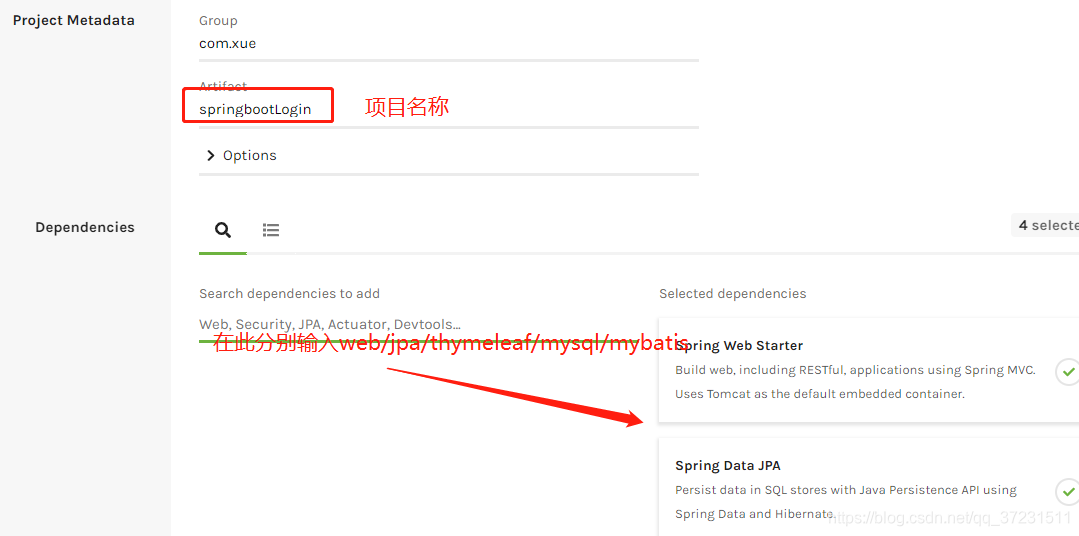
2.点击 generate the project

3.将压缩包解压并导入到eclipse中,Eclipse->file->import->maven->maven project->existing maven project,结构如图

4.在数据库建立spring_login数据库,并新建user表,表结构如图

5.通过generator-mybatis自动生成java代码,generator-mybatis使用教程可见博文:https://blog.csdn.net/qq_37231511/article/details/90692784
6.将自动生成的代码放到src/main/java下,如图:

7.编辑pom.xml,在其中添加logging和druid依赖
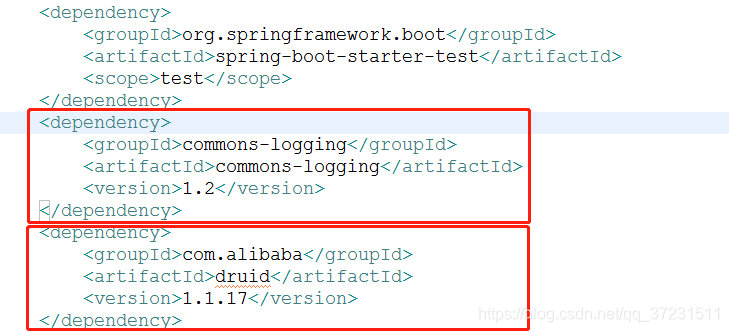
8.编辑application.propertis文件
#mysql
spring.datasource.driver-class-name=com.mysql.jdbc.Driver
spring.datasource.url=jdbc:mysql://127.0.0.1:3306/spring_login
spring.datasource.username=root
spring.datasource.password=123456#druid
spring.datasource.type=com.alibaba.druid.pool.DruidDataSource
#dao
mybatis.type-aliases-package==com.xue.repository.dao
mybatis.mapper-locations=classpath*:com/xue/repository/mapper/*.xml
9.在src/main/resources/templates下创建登陆页面和注册页面,分别为loginHtml和registerHtml,代码如下
Insert title here
Insert title here
10. 在项目中新建controller包,创建LoginController类,编辑代码
package com.xue.controller;import java.util.List;import javax.servlet.http.HttpServletRequest;import org.slf4j.Logger;
import org.slf4j.LoggerFactory;
import org.springframework.beans.factory.annotation.Autowired;
import org.springframework.stereotype.Controller;
import org.springframework.web.bind.annotation.RequestMapping;
import org.springframework.web.bind.annotation.ResponseBody;import com.xue.entity.model.User;
import com.xue.service.LoginService;@Controller
public class LoginController {private Logger logger = LoggerFactory.getLogger(this.getClass());@Autowiredprivate LoginService loginService;//	登陆页面@RequestMapping("/loginHtml")public String loginHtml(){return "loginHtml";}
//	注册页面@RequestMapping("/registerHtml")public String registerHtml(){return "registerHtml";}//	登陆验证@RequestMapping("/login")@ResponseBody //不返回页面,返回json对象需加@ResponseBodypublic String login(User user,HttpServletRequest request){User result = null;result = loginService.login(user);if(null != result){return "登陆成功    "+"name:"+user.getName()+"   password:"+user.getPassword();}else{return "登陆失败";}}//注册验证@RequestMapping("/register")@ResponseBody //不返回页面,返回json对象需加@ResponseBodypublic String register(User user){int result =0;result = loginService.register(user);if(0 != result){return "注册成功";}else{return "注册失败";}}	}
11. 在项目中创建service包,并在报下创建LoginService接口,同时创建子包Impl,在报下创建LoginServiceImpl实现LoginServcie接口,代码分别为
package com.xue.service;import java.util.List;import com.xue.entity.model.User;public interface LoginService {//注册public int register(User user);//登陆public User login(User user);}
package com.xue.service.Impl;import java.util.List;import org.slf4j.Logger;
import org.slf4j.LoggerFactory;
import org.springframework.beans.factory.annotation.Autowired;
import org.springframework.stereotype.Service;import com.xue.entity.model.User;
import com.xue.repository.dao.UserMapper;
import com.xue.service.LoginService;
@Service
public class LoginServiceImpl implements LoginService {@Autowiredprivate UserMapper dao;@Overridepublic int register(User user) {// TODO Auto-generated method stubSystem.out.println("Impl");int result = 0;System.out.println(user);try {result = dao.insertUser(user);} catch (Exception e) {// TODO Auto-generated catch blocke.printStackTrace();}return result;}@Overridepublic User login(User user) {// TODO Auto-generated method stubtry {user = dao.selectUser(user);} catch (Exception e) {// TODO Auto-generated catch blocke.printStackTrace();}return user;}}
12. 编写UserMapper.java,在文件最后添加
User selectUser(User user);int insertUser(User user);13.在UserMapper.xml中添加
insert user(name,password) values(#{name},#{password}) 14.编辑SpringBootLoginApplication启动类
package com.xue;import org.mybatis.spring.annotation.MapperScan;
import org.springframework.boot.SpringApplication;
import org.springframework.boot.autoconfigure.SpringBootApplication;
import org.springframework.context.annotation.ComponentScan;@SpringBootApplication
@MapperScan("com.xue.repository.dao")
public class SpringbootLoginApplication {public static void main(String[] args) {SpringApplication.run(SpringbootLoginApplication.class, args);}}
15.为项目添加日志配置,在pom.xml中添加
org.springframework.boot spring-boot-starter-log4j2 1.5.2.RELEASE
16.将springboot默认日志排除,将spring-boot-starter-web依赖修改为
org.springframework.boot spring-boot-starter-web org.springframework.boot spring-boot-starter-logging 17.在src/main/resources中创建log4j2-spring.xml文件,并编辑
%d{yyyy-MM-dd HH:mm:ss.SSS} |-%-5level [%thread] %c [%L] -| %msg%n
18.在application.properties中添加
#log4j2
logging.config=classpath:log4j2-spring.xml
19. 在相关代码中添加,至此,项目代码完成
private Logger logger = LoggerFactory.getLogger(this.getClass());20.在浏览器输入localhost:8080/registerHtml

21.输入用户名a密码123456,点击提交

22.在浏览器输入localhost:8080/loginHtml

23.输入登陆信息

本文来自互联网用户投稿,文章观点仅代表作者本人,不代表本站立场,不承担相关法律责任。如若转载,请注明出处。 如若内容造成侵权/违法违规/事实不符,请点击【内容举报】进行投诉反馈!