手写java数据库连接池,自定义实现数据库连接池,兼容springboot
一、目标
用精简的代码实现一个类似于Hikari,Druid一样的高性能数据库连接池。
二、实现思路
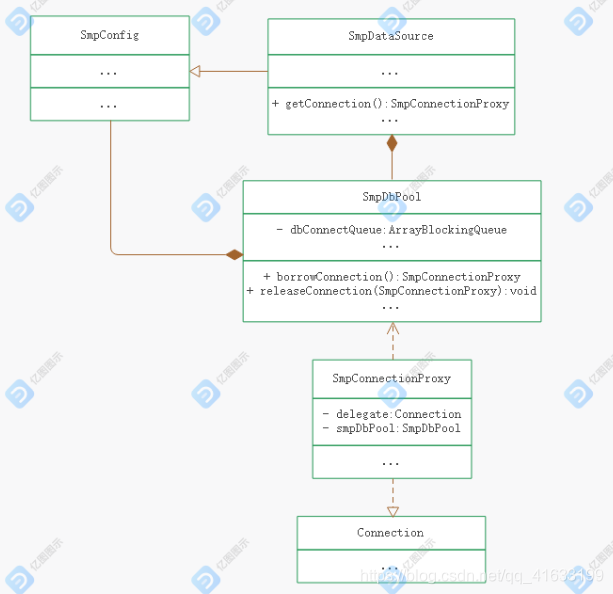
1:新建连接池配置类保存连接池配置。
2:实现DataSource接口。
3:新增SmpDbPool类,内部维护一个阻塞队列保存数据库连接,并提供数据库连接的获取回收等方法。
4:大致类图:
三、核心代码
1:数据库连接代理类SmpConnectionProxy
SmpConnectionProxy实现jdbc的Connection接口
重写close方法,确保外部调用close的时候将连接归还到连接池。
public void close() throws SQLException {if (this.closed) return;this.closed = true;//回滚掉未提交的脏statementif (this.isCommitStateDirty && !this.isAutoCommit){this.delegate.rollback();//}this.clearWarnings();this.smpDbPool.releaseConnection(this);}新增判断连接是否有效方法供连接池类使用。
public boolean isValid() throws SQLException {if (System.currentTimeMillis() - this.lastActiveTime < this.smpDbPool.getConfig().getKeepaliveTimeInMill()) return true;long validationTimeout = this.smpDbPool.getConfig().getValidationTimeoutInMill();this.delegate.setNetworkTimeout(this.smpDbPool.getNetTimeoutExecutor(), (int) validationTimeout);int validationSeconds = (int) Math.max(1000L, validationTimeout) / 1000;return this.delegate.isValid(validationSeconds);}2:数据源类SmpDataSource
SmpDataSource实现DataSource接口
实现getConnection方法,以便外界从连接池获取连接。
@Overridepublic Connection getConnection() throws SQLException {try {return this.dbPool.borrowConnection();} catch (Exception e) {LOG.error("getConnection error", e);throw new SQLException(e);}}3:连接池类SmpDbPool
获取数据库连接方法:
public Connection borrowConnection() throws Exception {boolean isDebugEnable = LOG.isDebugEnabled();long sTime = 0;if (isDebugEnable){//尽量少访问临界资源sTime = System.currentTimeMillis();}try {SmpConnectionProxy connection = this.getConnectionFromQueue();if (connection != null) return connection;//未获取到有效连接,校验是否创建连接int maxActive = this.smpConfig.getMaxActive(), dbAmount = createdDbConnectionAmount.get();if (dbAmount >= maxActive){//尝试等待其他线程释放连接connection = this.dbConnectQueue.poll(this.smpConfig.getMaxWaitInMill(), TimeUnit.MILLISECONDS);if (connection != null) return connection.borrowConnection();LOG.error("get connection error, no connection available,maxActive:{}, activated connection:{}", maxActive, dbAmount);throw new IllegalStateException("database connection pool too busy");}connection = this.createConnectionForPool();if (connection != null) return connection;throw new IllegalStateException("database connection pool too busy");} finally {if (isDebugEnable){LOG.debug("get database connection cost {} ms", System.currentTimeMillis() - sTime);}}}从阻塞队列获取数据库连接方法:
private SmpConnectionProxy getConnectionFromQueue() throws SQLException {int times = 0;while (times++ < 1000){SmpConnectionProxy connection = this.dbConnectQueue.poll();if (connection == null) return null;if (connection.isValid()) return connection.borrowConnection();//destroy invalid connectionconnection.destroy();createdDbConnectionAmount.decrementAndGet();LOG.info("destroyed invalid jdbc connection");}return null;}新建数据库连接:
private SmpConnectionProxy createConnectionForPool() throws Exception{boolean locked = false;try {locked = GET_CONNECTION_LOCK.tryLock(this.smpConfig.getMaxWaitInMill() >> 1, TimeUnit.MILLISECONDS);if (!locked){LOG.error("get lock to create connection error");return null;}SmpConnectionProxy connection = this.getConnectionFromQueue();if (connection != null) return connection;int dbAmount = createdDbConnectionAmount.get(), maxActive = this.smpConfig.getMaxActive();if (dbAmount >= maxActive){LOG.error("get connection error, no connection available,maxActive:{}, activated connection:{}", maxActive, dbAmount);return null;}connection = this.createConnection();createdDbConnectionAmount.addAndGet(1);return connection.borrowConnection();} catch (ClassNotFoundException ex){LOG.error("class {} not found", this.smpConfig.getDriverClassName(), ex);throw new SQLException(ex);}finally {if (locked){GET_CONNECTION_LOCK.unlock();}}}private SmpConnectionProxy createConnection() throws ClassNotFoundException, SQLException {Class.forName( this.smpConfig.getDriverClassName() );Connection connection = DriverManager.getConnection( this.smpConfig.getUrl(), this.smpConfig.getUsername(), this.smpConfig.getPassword());LOG.debug("create new database connection with url:{}", this.smpConfig.getUrl());return new SmpConnectionProxy(connection, this, connection.getAutoCommit());}4:构建spring-boot-starter
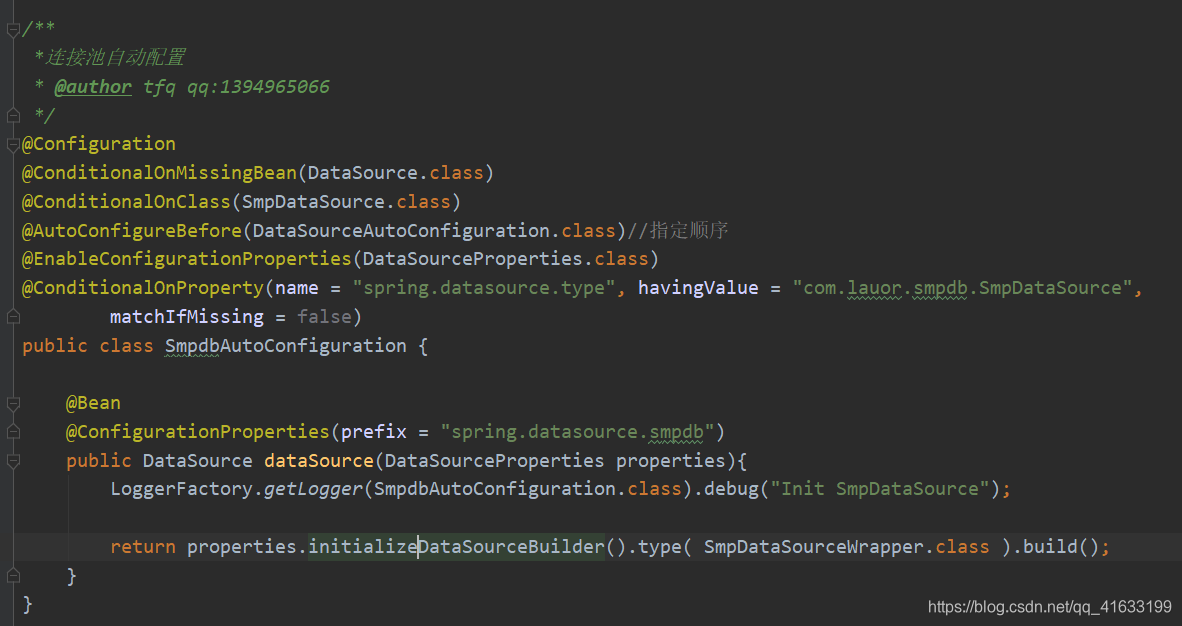
这里需要说明的是springboot默认会尝试使用com.zaxxer.hikari.HikariDataSource,org.apache.tomcat.jdbc.pool.DataSource,org.apache.commons.dbcp2.BasicDataSource作为连接池,相关代码逻辑在org.springframework.boot.autoconfigure.jdbc.DataSourceConfiguration,因此配置spring-boot-starter的时候先要确保应用没有配置连接池。
核心代码:
5:springboot使用
添加依赖后再添加如下配置:
spring.datasource.type=com.lauor.smpdb.SmpDataSource
#最小连接数,默认4
spring.datasource.smpdb.minIdle=4
#最大连接数,默认40
spring.datasource.smpdb.maxActive=20
#数据库连接有效期检查间隔时间ms,默认30分钟,最小1s
spring.datasource.smpdb.keepaliveTimeInMill=1800000
#获取数据库连接最大等待时间ms,默认30s,最小1s
spring.datasource.smpdb.maxWaitInMill=30000
#数据连接合法性校验超时时间,默认5s,最小1s
spring.datasource.smpdb.validationTimeoutInMill=5000
连接池完整代码:https://gitee.com/tandatda/smpdb
连接池使用完整demo:https://gitee.com/tandatda/demo-edr-smpdb
本文来自互联网用户投稿,文章观点仅代表作者本人,不代表本站立场,不承担相关法律责任。如若转载,请注明出处。 如若内容造成侵权/违法违规/事实不符,请点击【内容举报】进行投诉反馈!